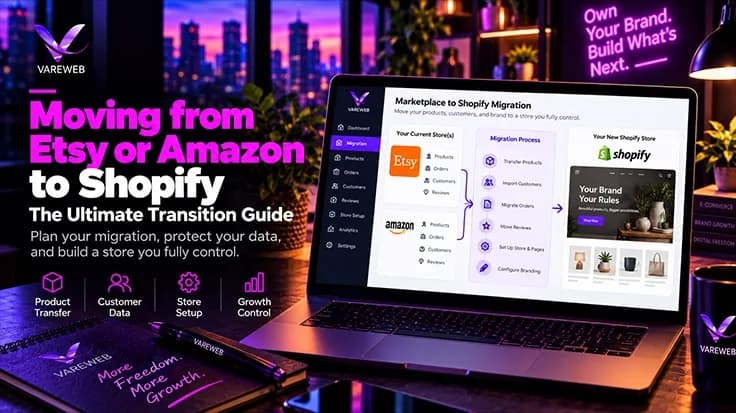
Quick Answer: Marketplaces are excellent launchpads, but listing fees, transaction fees, ads, fulfillment charges and thin customer data add up and squeeze margin over time. A Shopify store gives you brand control, first-party data and long-term equity that you actually keep. The hardest part is not setting up Shopify. It is transferring momentum: reviews, brand recognition, repeat demand, search intent, catalog data and daily workflows. For most sellers, a phased or hybrid move is safer than switching the marketplace off overnight.
I've sat in a lot of planning calls where a seller says, "Amazon takes too much, let's just switch it off." I understand the instinct. The sellers who do this well treat it as a transfer of demand, not a platform swap.
The cost pressure is real, but it's rarely a single flat cut. Etsy's own Q2 2026 shareholder letter reports a take rate of 25.9%. That's a blended figure covering fees, ads and services across the whole marketplace, not what any one seller pays. On the Amazon side, the company's Q2 2026 earnings report highlighted advertising growth of 26% year over year, which shows where a lot of seller spend is heading.
This guide walks you through the move the way I would plan it with a client: audit first, then structure, catalog, brand, reviews, search, customers, data, operations and launch. No invented success stories, only the mechanics and the traps.

Ready to Own Your Customers, Not Rent Them?
Marketplace fees and thin customer data squeeze your margins. Vareweb designs and builds ecommerce stores that give you brand control, first-party data, and a storefront that is built to rank and convert.
Why Move to Your Own Brand?
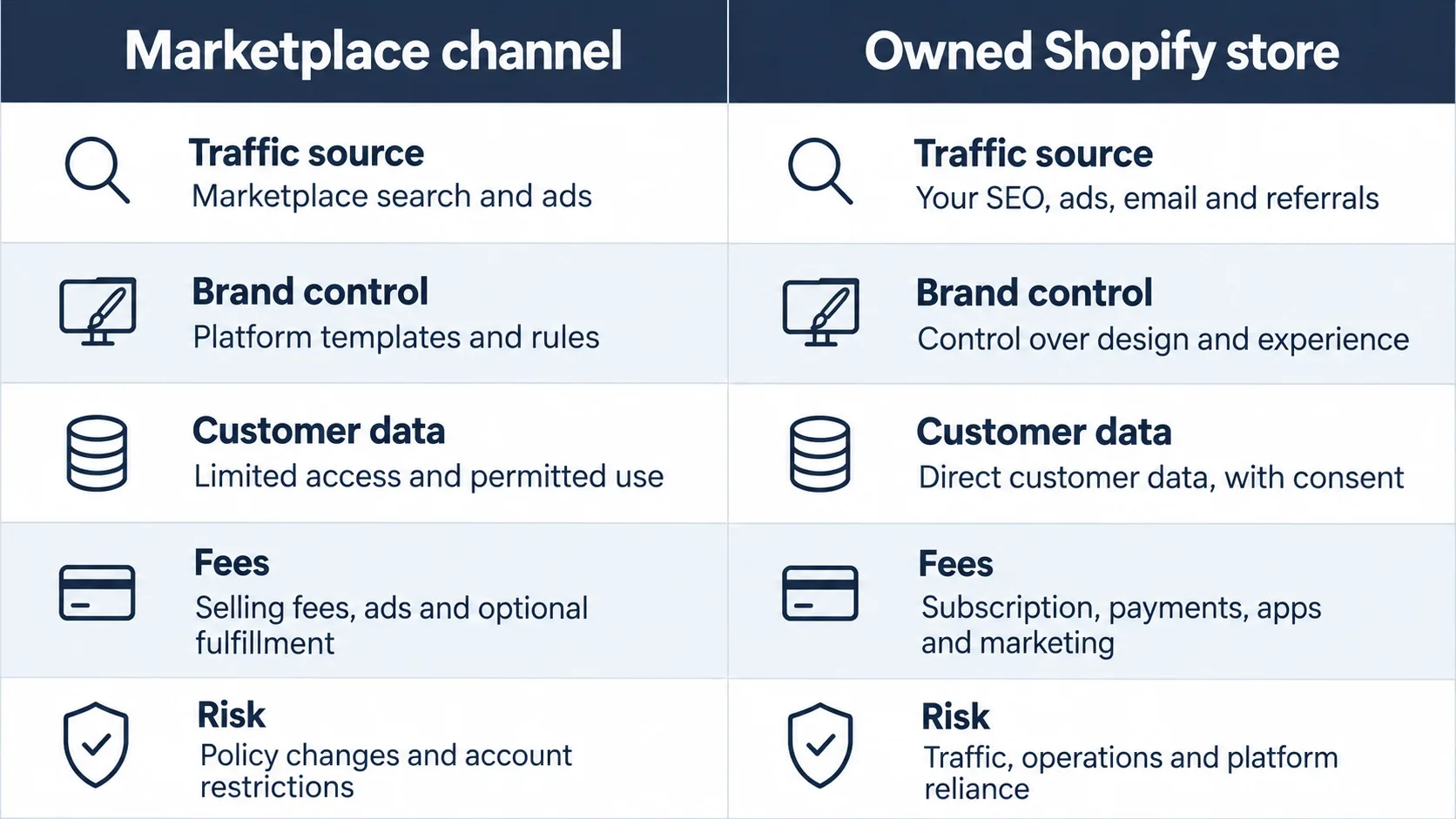
Before the detail, here is the whole picture in one table. Every row is a place where I see marketplace sellers either gain or lose when they move, and each row is covered in the steps below.
|
Business Area |
Amazon or Etsy | Owned Shopify Store | Transition Risk |
|---|---|---|---|
| Traffic | Built-in shopper demand, but you compete on the same results page | You earn or buy every visit (SEO, email, social, paid) | High: the built-in audience does not follow you |
| Brand control | Marketplace-defined layout, your brand is secondary | Full control of storefront, story and packaging inserts | Low: mostly design work |
| Customer data | Limited; use of buyer data is restricted by marketplace rules | You own consented emails, order history and behavior | Medium: you must earn opt-ins fairly |
| Reviews | Tied to the marketplace listing | Collected on your own site by a review app | High: social proof resets |
| SEO | Rankings belong to the marketplace listing | Rankings build on your own domain over time | High: rankings do not transfer |
| Merchandising | Fixed templates and rules | Bundles, collections, custom pages, upsells | Low |
| Retention | Marketplace controls the relationship | Email, SMS, loyalty and subscriptions you run yourself | Medium |
| Account dependency | Suspension can freeze sales overnight | Platform terms still apply, but the brand and list are yours | Low once live |
| Operational responsibility | Marketplace handles much of checkout and support flow | You handle payments, tax, returns, fulfillment sync | Medium to high |
Let's look at the math. Etsy's current fee policy (last updated October 5, 2026) lists a $0.20 listing fee and a 6.5% transaction fee, plus payment processing that varies by country. Its Offsite Ads fee is 15% of an attributed order, dropping to 12% once a shop passes $10,000 in sales over the prior 365 days, with a $100 cap per order. Amazon charges referral fees by category and adds fees for fulfillment, storage, returns and advertising. Read your own settlement reports, because that is where your real number lives.
Here is a hypothetical to make it concrete, not a claim about any seller. If all marketplace costs together land at an effective 15% on $10,000 a month, that is $1,500 a month. Shopify isn't free either. Plans start at $29 per month on annual billing ($39 monthly) with a 2.9% + 30¢ card rate on Basic, and you will pay for a theme, apps and your own traffic.
The Offsite Ads rule is worth a second look because it catches people off guard. As a hypothetical, a $50 order attributed to those ads at the 15% rate costs $7.50 in ad fees before listing, transaction and shipping costs. On a high-ticket item the $100 cap softens the hit, but on low-priced products the percentage bites hardest. When I review a seller's numbers, I always calculate margin per product, never per shop.
So the real question isn't "which is cheaper?" It's whether a Shopify store can bring in repeat customers at a lower acquisition cost than you pay today. Two terms matter here. CAC (customer acquisition cost) is what you spend to win one new customer. LTV (lifetime value) is the net profit you can expect from a customer over the whole relationship. A marketplace often keeps the relationship; your own store lets you earn the second, third and fourth order.
One analogy, and only one: a marketplace is like renting a busy storefront. Foot traffic is great, but the landlord sets the rules and the rent. Shopify is closer to owning your shop, with the catch that nobody walks past it unless you bring them there.
Should You Leave Completely or Run Both?
Most sellers ask this too late. I usually frame it as three stages, and you can sit in any of them for a long time.
- Marketplace-first. The marketplace stays your main revenue source. Shopify is a brand home that captures email and repeat buyers. Best when marketplace sales still carry most of your cash flow.
- Hybrid. Both channels sell the same core catalog. The marketplace brings discovery, Shopify brings margin and retention. Best when you have steady demand and want to test how much traffic you can drive yourself.
- Shopify-led. Shopify is the main channel, and the marketplace is a smaller discovery layer or is wound down. Best when your own traffic and repeat purchases are already proven.
Not Sure Whether to Go Hybrid or Fully Shopify?
The right path depends on your margins, your search dependence, and how fast you can build your own traffic. Talk it through with a Vareweb strategist before you commit to a move you can't easily undo.
Here is the reality. If marketplace sales pay your rent, an immediate shutdown is a bet, not a strategy. Start hybrid, move your best repeat products and customers first, and let the numbers tell you when to shift weight. I broke down the platform differences in my earlier comparison, Shopify vs Etsy: What Are The Differences, which is worth reading if you are still unsure whether Shopify fits your product type.
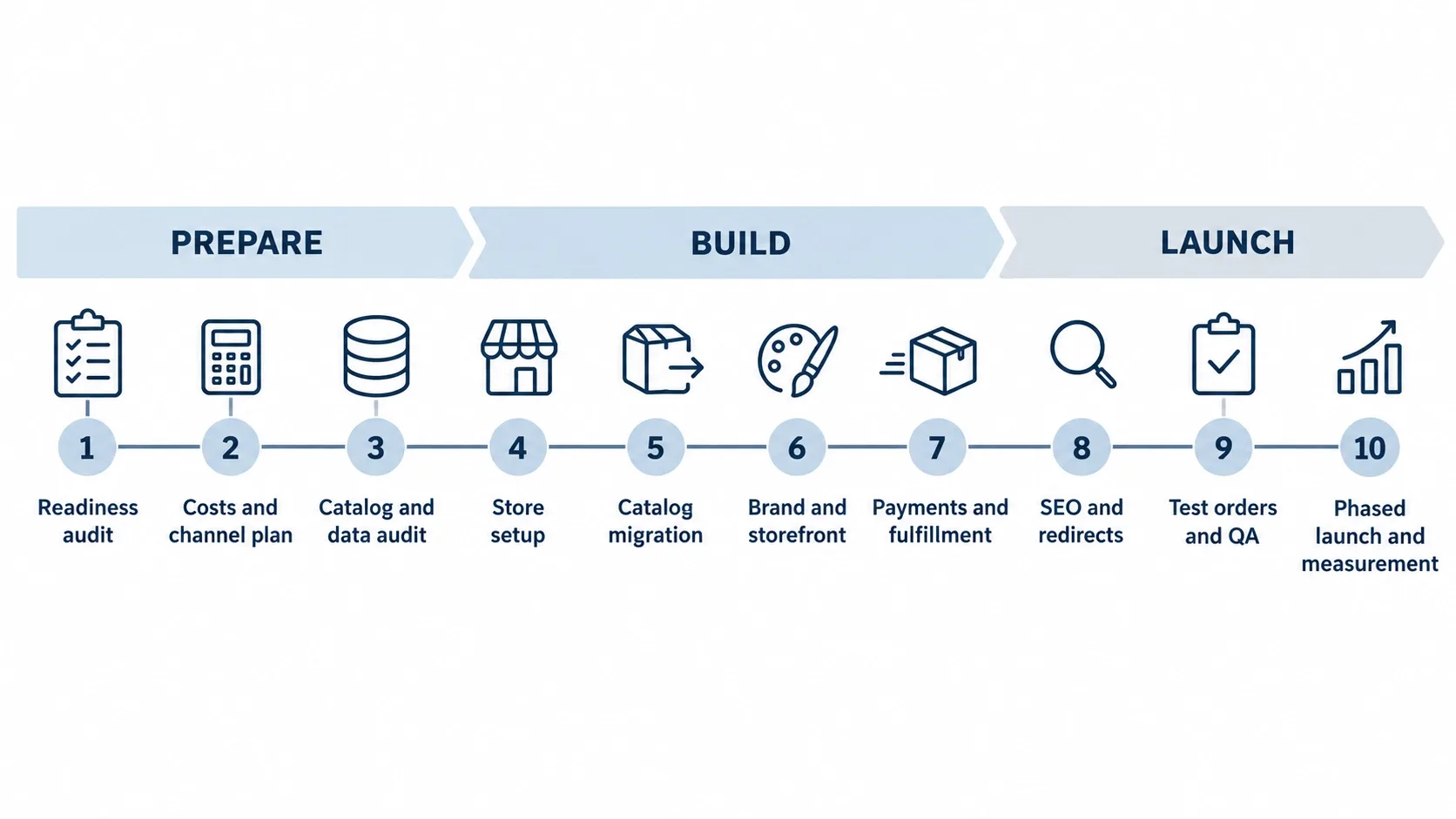
Moving from Etsy or Amazon to Shopify: A 10-Step Plan
Work through these in order. Skipping the audit and jumping to theme shopping is the most common mistake I see.
Step 1: Run a Readiness Audit
Start with what the marketplace actually gives you. Export your last 12 months of sales and sort by product, not by order. This is where migrations break: sellers move the whole catalog when only a handful of products drive the profit.
- Rank products by margin after all fees, ads and returns.
- Mark which products depend on marketplace search and which have repeat buyers.
- List every workflow you rely on: shipping labels, returns, customer messages, tax.
- Note your review count and rating on each top listing.
That list becomes your launch order. The products with the best margin and strongest repeat demand go first.
One term to know here: contribution margin is what's left from a sale after every direct cost, including fees, shipping, packaging, returns and ad spend. Marketplace sellers often discover that a bestseller has a thin contribution margin once ads are counted. That product may be the worst one to move first, and the best one to keep on the marketplace for now.
Step 2: Plan Your Domain and Brand Architecture
Decide where the store lives before you build. A domain is your web address, like yourbrand.com. Use a name that matches your marketplace shop name where possible, so loyal buyers can find you with a quick search.
If a brand site already exists on another platform, treat this as a full site move and plan redirects first. I covered that in how to migrate your website without losing SEO rankings. For structure, think in terms of collections (groups of products), a clear navigation, and policy pages that are written for your brand rather than copied from a template. If you want a hand with the build, our eCommerce web development services cover that, but the planning above is yours to do either way.
Step 3: Export, Clean and Import Your Catalog
A CSV (comma-separated values file) is a spreadsheet saved as plain text, and it's how most catalogs move. Etsy lets you download your listings as a CSV, though the export covers active listings only. On Amazon, the Active Listings Report is the usual starting point, and you will map its columns to Shopify's product template.
Clean it before you import. Each product needs a SKU (stock keeping unit, your internal code for one exact variant), a handle, a price, weight and images. Shopify's CSV import guide notes the file cannot exceed 15 MB, so large catalogs get split into batches.
- Fix duplicate SKUs and blank variants before the upload.
- Strip marketplace-only phrases such as "free shipping on Amazon".
- If you also bring customers and orders, import products first, then customers, then orders, so records link correctly.
For catalogs with complex variants or bundles, a Shopify development partner or a migration app can save you from hand-editing hundreds of rows. Test with ten products before you run the full file.
Don't forget images. Marketplace photos are often cropped for thumbnails and carry text overlays or badges. Re-export clean originals where you can, and keep file names descriptive, such as lavender-soy-candle-8oz.webp, because they help with image search later.
Your Catalog Deserves a Store Built Around It
Vareweb builds Shopify stores on custom Online Store 2.0 themes with clean Liquid code and a lean app stack, so your products land in a fast, brand-first store that is easy for your team to manage.
Step 4: Elevate the Brand, Not Just the Listing
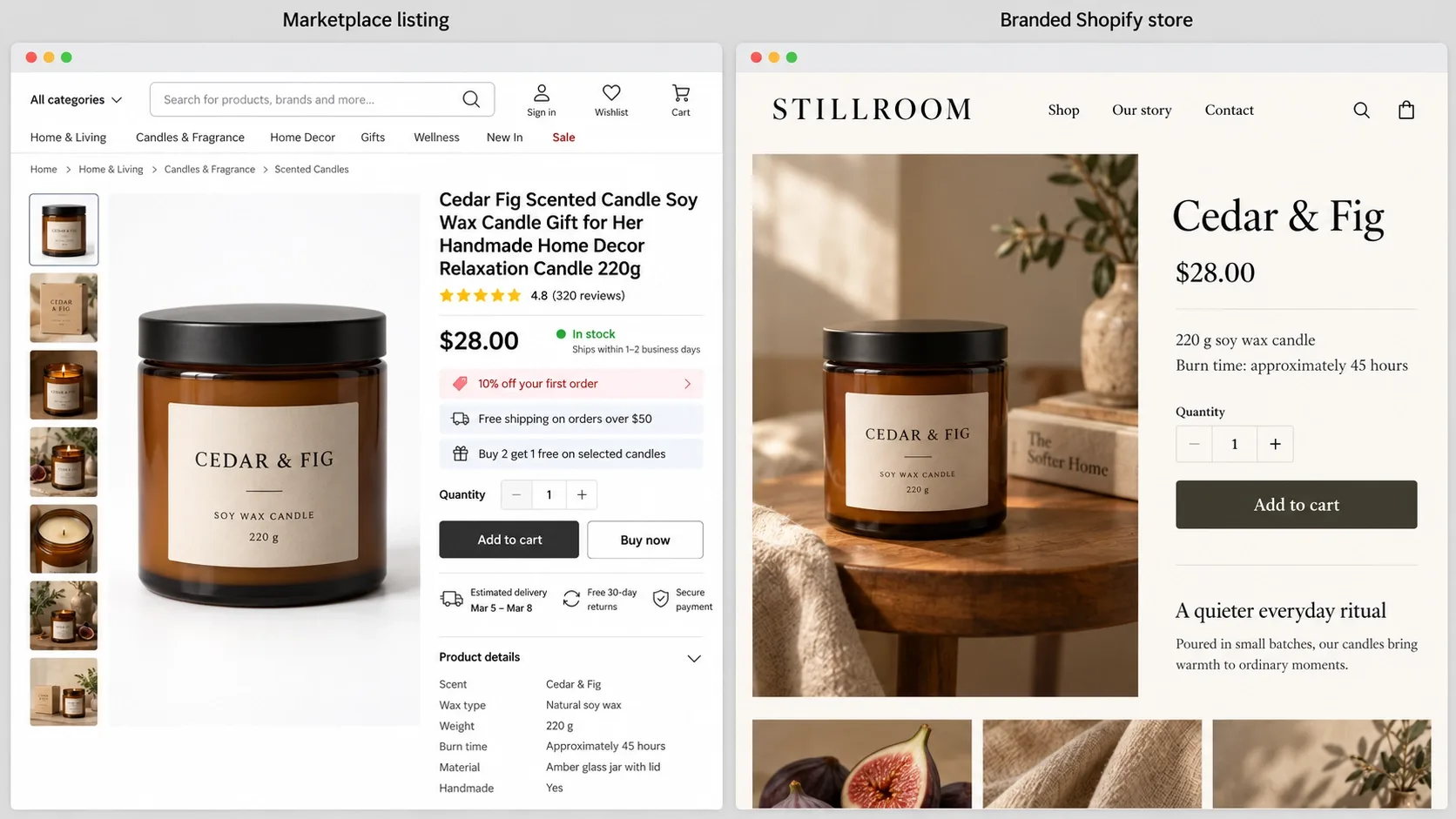
Marketplace titles are written for a search algorithm. Your product page can be written for a person. Same product, two jobs.
Here is an illustrative before and after:
- Marketplace title: Handmade Soy Candle 8oz Lavender Gift Set for Women Home Decor Aromatherapy Birthday
- Shopify product page: Lavender Soy Candle, 8 oz, hand-poured in small batches. Below it: what it smells like, burn time, how it is made, and who it suits as a gift.
Add what a marketplace never gave you room for: your story, process photos, care instructions, and a simple FAQ. Keep the keyword in the product title and headings, but write the rest the way you'd talk to a customer.
Step 5: Migrate or Rebuild Reviews the Legal Way
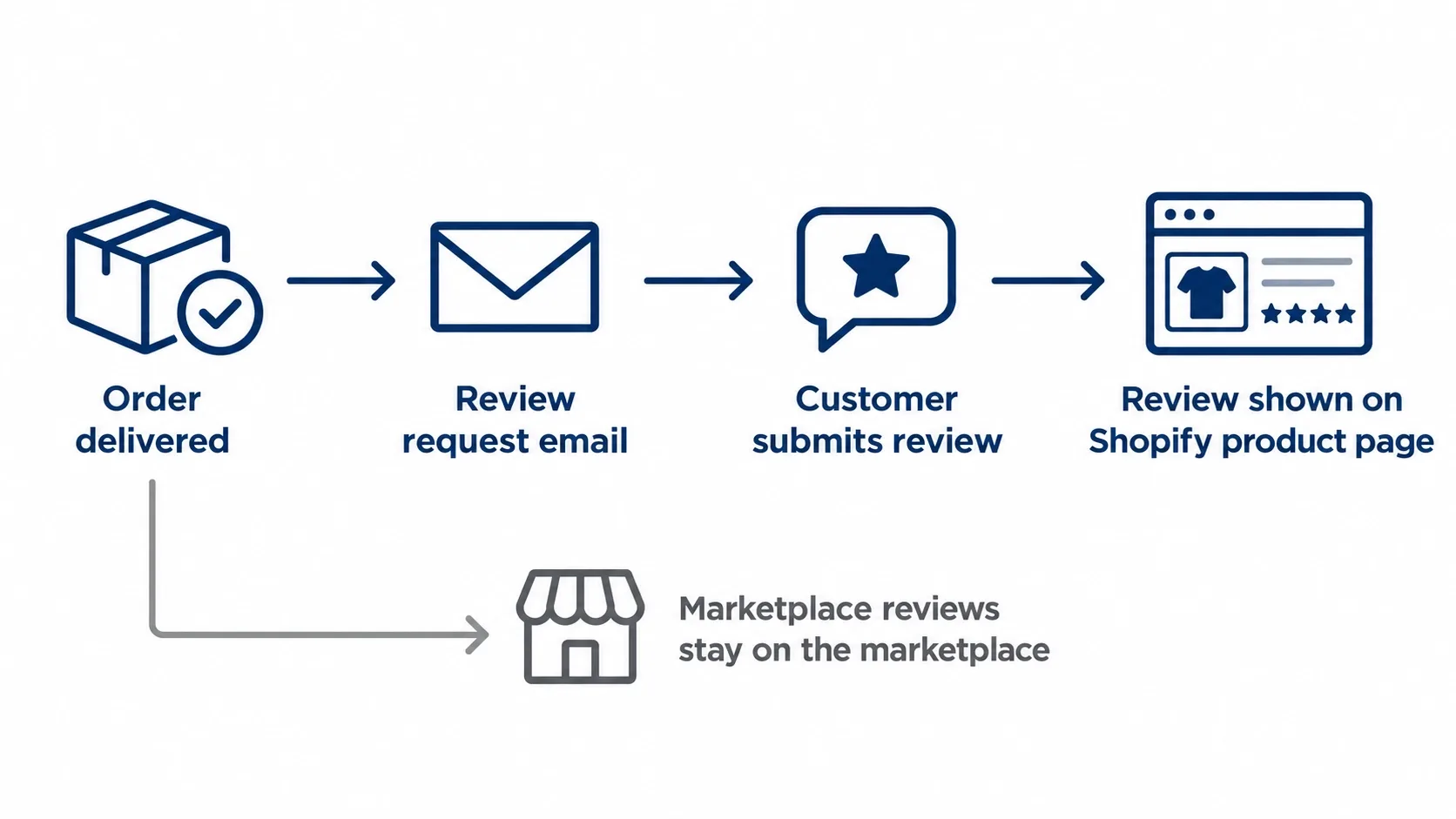
Reviews are the part sellers worry about most, and they're right to. Marketplace reviews live on the marketplace listing. Treat them as the platform's content and check its current terms before copying anything.
- Amazon: I do not have a way to export Amazon reviews, and I would not scrape them. Your listing keeps its reviews there; you start fresh on Shopify.
- Etsy: Reviews stay attached to your shop and listings. If you want to display feedback on your own site, check Etsy's current policy first and prefer asking customers directly.
The clean route is to rebuild. Install a review app (Judge.me, Loox and Yotpo are examples, not recommendations) and request reviews from Shopify customers after delivery. For past buyers who joined your list with consent, a polite email asking for a review on your own site is a normal ask. Be patient. Social proof comes back slowly.
Step 6: Preserve Search Intent and Build Shopify SEO
Here is something many guides skip: marketplace rankings do not transfer to Shopify. You can't set a 301 redirect (a permanent forwarding rule from an old URL to a new one) from a marketplace-owned listing, because you don't control those URLs. Redirects only matter if you are moving between pages on a domain you own, and Google recommends keeping them for at least a year.
So what do you carry over? Search intent, meaning the reason someone typed the query. Look at the terms your marketplace listings win and build pages for them.
Your seller dashboards are the best research source you have. Where they show search terms and traffic sources, export them and group the terms by intent: people looking for a specific product, people comparing options and people shopping for a gift. Each group usually points to a different page type, whether product, collection or guide.
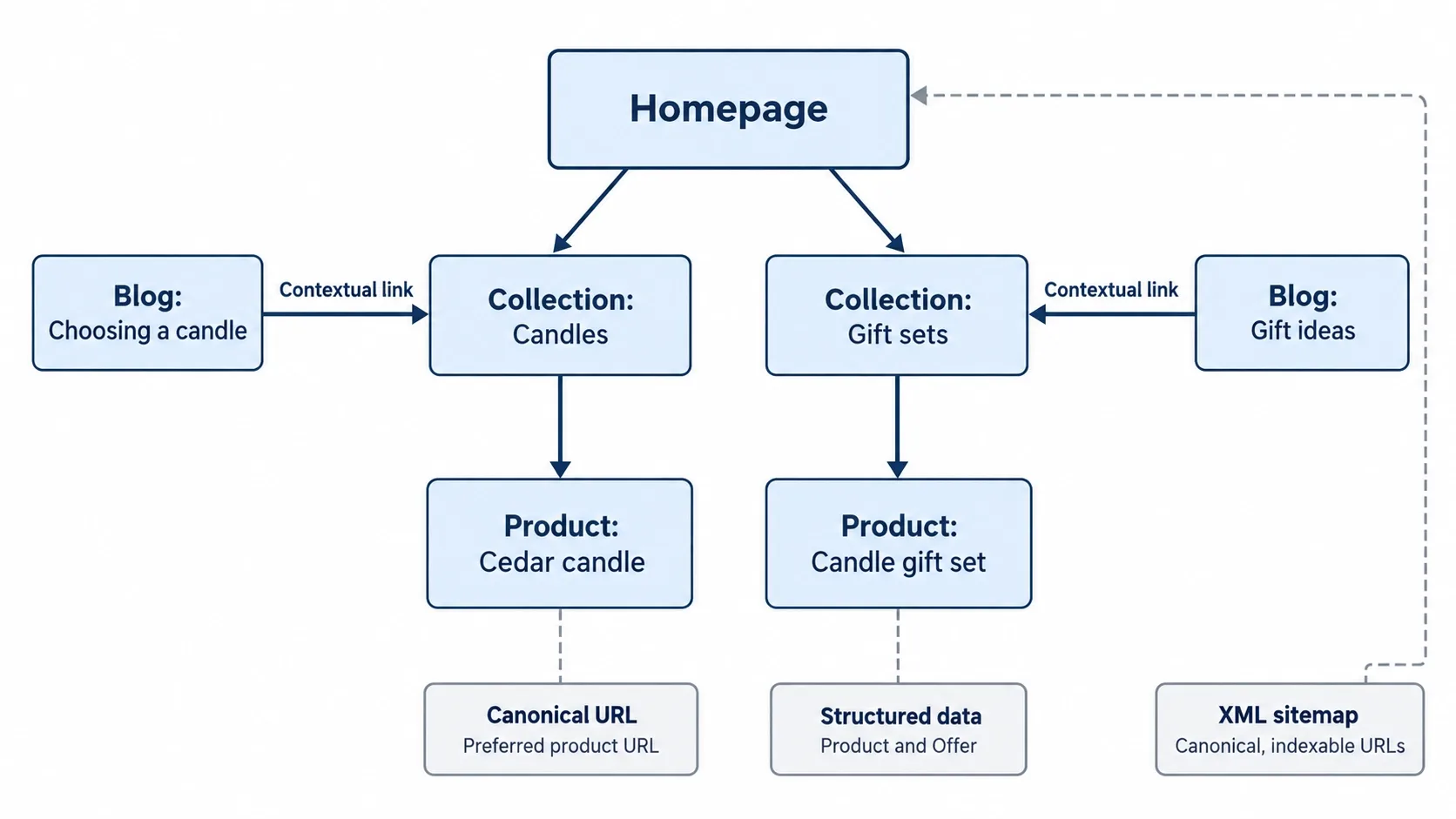
- Put your highest-intent terms on collection pages, not only product pages. I explain how in my guide to optimizing ecommerce category pages for SEO.
- Write unique titles, descriptions and headings for every product and collection.
- Add structured data, code that labels price, availability and reviews so search engines understand the page. Google's structured data introduction explains the basics, and I wrote a walkthrough on structuring product schema for AI Overviews and ChatGPT citations.
- Set up Search Console, GA4 and, if you run Shopping ads, Merchant Center before launch.
Marketplace Rankings Don't Transfer. Your Own Search Visibility Has to Be Built.
Collection pages, product schema, clean URLs, and search architecture decide whether your new store gets found. Vareweb's ecommerce SEO team builds that foundation so organic traffic can replace marketplace traffic.
For the longer game, my post on how to get Shopify to rank for keywords lays out the content and structure side. Set expectations early: a new store starts with no authority, so this is a build, not a switch.
Step 7: Transition Customers Without Breaking Marketplace Rules
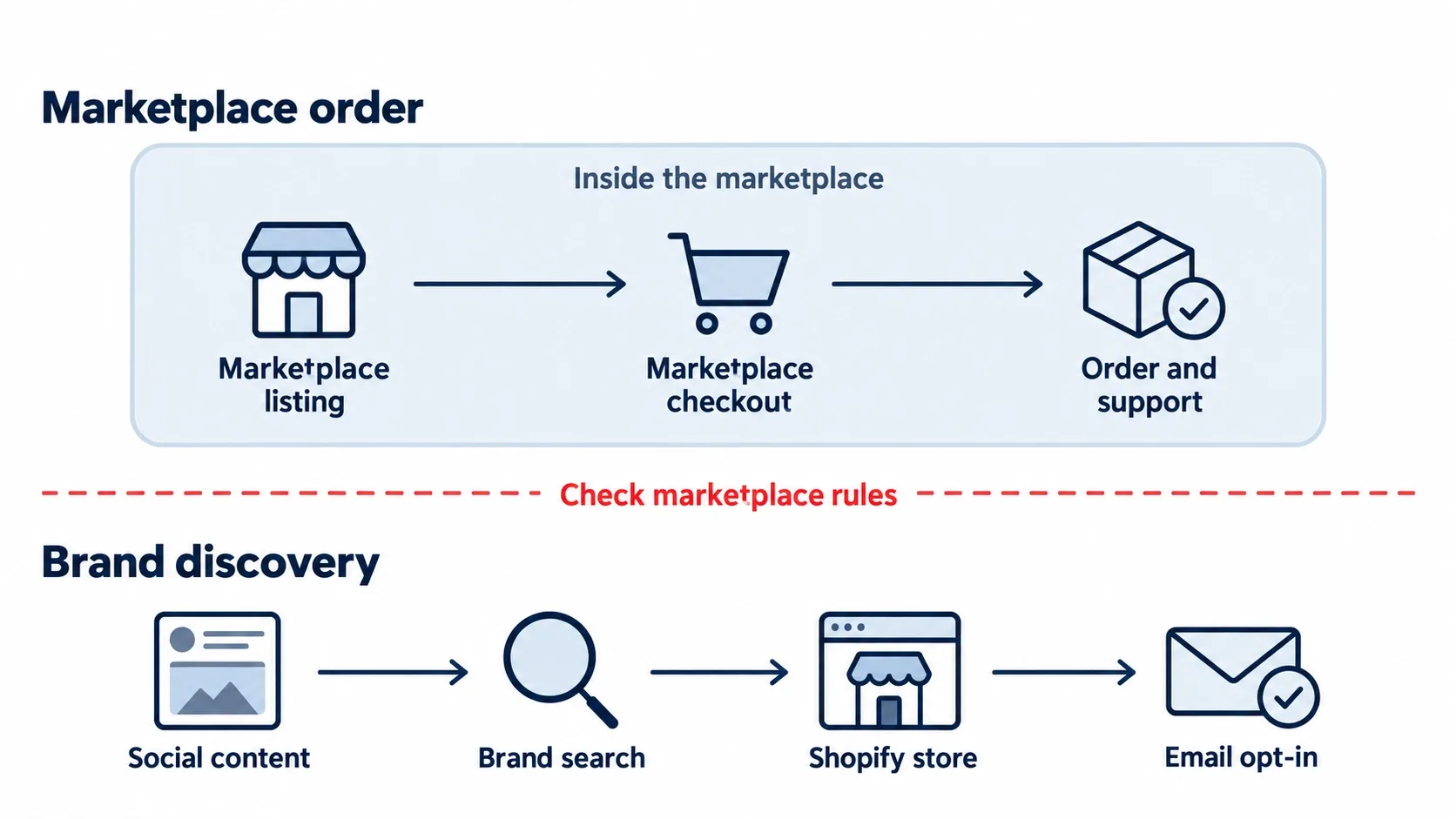
This is where sellers get nervous, and where they can get into trouble. Both marketplaces restrict how you talk to their buyers. I'm not a lawyer, so read the current policies yourself.
Etsy's Seller Policy (updated October 5, 2026) says sellers must not facilitate off-platform transactions, and it limits buyer information to Etsy-related communications and Etsy-facilitated transactions. It also bars adding Etsy members to your email list without their consent. Amazon has its own communication guidelines in Seller Central, which require a login, so I'm not quoting them here. Check yours before you put anything in a package.
What can you do that is normally lower risk?
- Build awareness through your own social accounts and content, not through marketplace messages.
- Give people a reason to look for your brand by name, such as a story, a community or a product line only you sell.
- Collect emails on your own site, through opt-in forms and checkout, never by pulling them from marketplace order data.
When in doubt, ask marketplace support or a qualified advisor. An account suspension costs far more than a slower list build.
Step 8: Capture First-Party Data With Consent
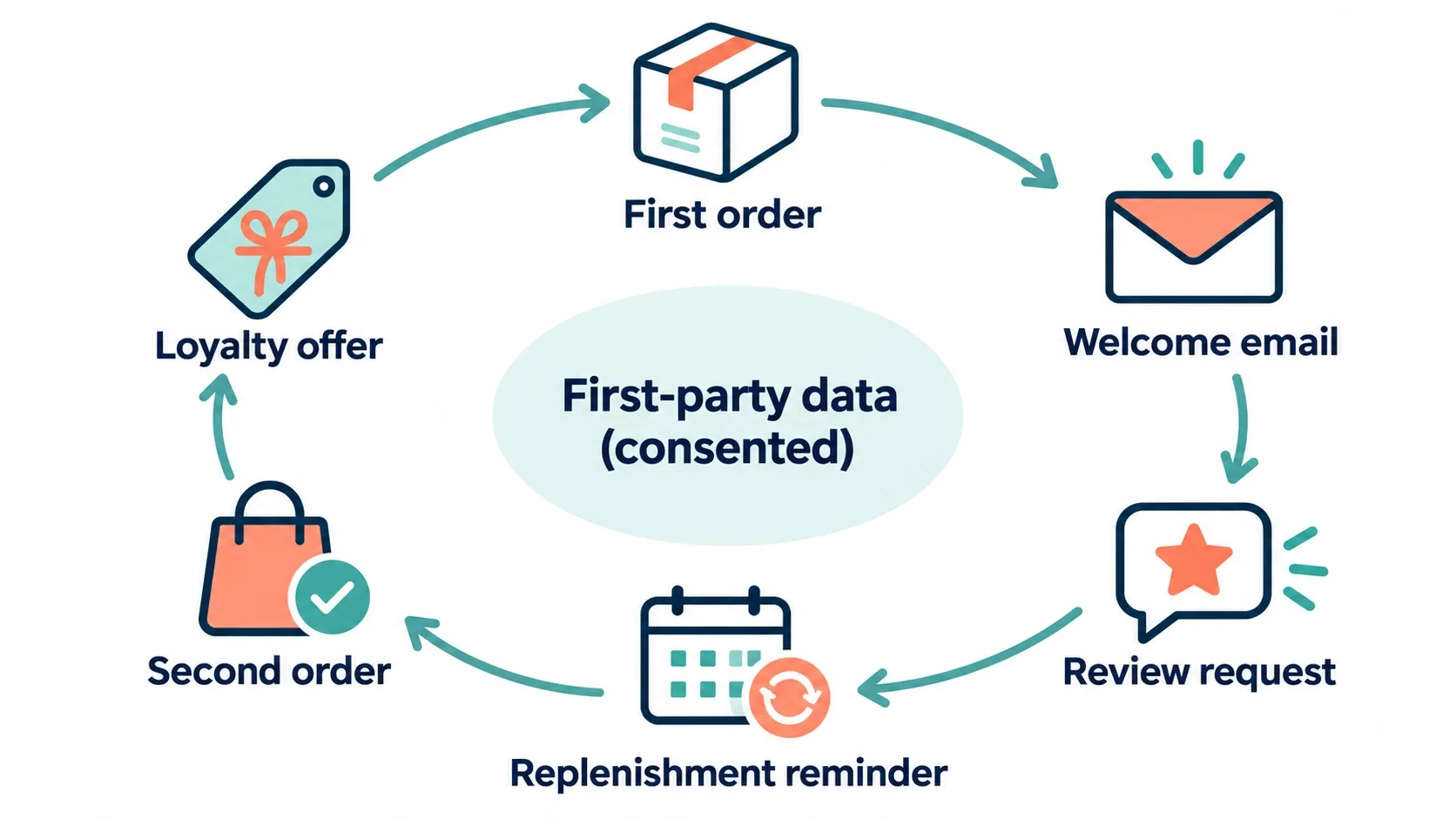
First-party data is information customers give you directly: email, order history, preferences. It's the main thing you gain by owning the store. And it only works when it's earned.
- Offer a clear reason to subscribe, such as early access or care tips, not just a discount.
- Use a plain-language consent checkbox for email and SMS.
- Ask one post-purchase question, such as how they heard about you, to learn which channels work.
- Send a short welcome series, then a post-delivery check-in that asks for a review.
That is how retention starts. A repeat buyer you reach by email costs far less than a new one you buy through ads.
Step 9: Sort Out Inventory, Fulfillment, Payments, Tax and Returns
This is the unglamorous step that decides whether launch week is smooth or painful.
- Inventory: If you sell on both channels, you need one source of truth, with SKUs that match exactly everywhere, or you will oversell.
- Stock buffers: Hold back a small safety quantity on each channel for your fastest sellers. Overselling on a marketplace can hurt your account standing, so this is cheap insurance.
- Fulfillment: Amazon's Multi-Channel Fulfillment (MCF) can ship Shopify orders from stock held at Amazon. Check current fees, packaging options and category limits in Seller Central before relying on it.
- Payments: Compare payment options for your country, including processing rates and payout timing.
- Tax: Confirm how sales tax or VAT is calculated in each region you sell to.
- Returns: Write your own return policy. Marketplaces handle returns their way; on Shopify, the rules are yours.
Step 10: Launch in Phases and Measure
Launch quietly first. Open the store to a small group, such as your email list or social followers, and fix what breaks. Then widen traffic. Run a technical check against the common Shopify SEO issues before you push paid ads, because duplicate pages and thin collection content are easier to fix before launch.
Track a short list of numbers weekly:
- Conversion rate and average order value.
- CAC by channel against your marketplace cost per sale.
- Repeat purchase rate and email revenue.
- Margin per order after every cost.
Move more catalog to Shopify only as these numbers hold. If they don't, you've learned that cheaply.
My rule of thumb is simple. If a product earns a better margin per order on Shopify than it does on the marketplace after ads, give it more shelf space on Shopify. If it doesn't, leave it where it sells best and improve the page before moving it again. That keeps the decision tied to your own data instead of a deadline.
Plan a monthly review for the first few months after launch. Look at which collections convert, which emails drive repeat orders and which products still need the marketplace to sell. I like a simple dashboard for this, and my guide on which weekly SEO metrics to measure is a good starting point for the search side.
Let's Plan Your Move Off the Marketplace, Step by Step
From store design and build to SEO and launch, Vareweb handles the Shopify side while you keep your marketplace sales running. Book a free call and we'll map out a phased plan that fits your catalog and margins.
Shopify Migration Checklist
☐ Ranked products by margin and repeat demand
☐ Reviewed marketplace fee reports for the last 12 months
☐ Chosen a path: marketplace-first, hybrid or Shopify-led
☐ Registered the domain and set up brand email
☐ Exported listings and cleaned SKUs, titles and images
☐ Imported a 10-product test batch and checked variants
☐ Rewrote top product pages and collection pages
☐ Installed a review app and drafted the review request email
☐ Read each marketplace's current rules on messaging and inserts
☐ Set up opt-in forms with a clear consent checkbox
☐ Configured payments, tax, shipping and return policy
☐ Connected Search Console, GA4 and Merchant Center
☐ Tested checkout on mobile with a real order
☐ Planned a phased launch and weekly metrics review
Frequently Asked Questions
Should I shut down my marketplace store when I launch on Shopify?
Usually no. Keep it running while you learn how much traffic and repeat business your own store can generate. Many sellers shift weight over time rather than switching off in one day. Close it only when your Shopify numbers cover what the marketplace was contributing.
Can Amazon or Etsy ban me for using QR codes or inserts in packages?
It can happen, and the risk depends on what the insert says and how it's used. Both marketplaces restrict directing buyers to off-platform purchases or using buyer data for marketing without consent. I can't give legal assurances, so read the current policy for your marketplace and ask their support team if the wording is unclear before printing anything.
How does Shopify's cost compare with marketplace fees?
They're different kinds of cost. Marketplaces charge per listing, per sale and for advertising, so cost rises with sales. Shopify charges a plan fee plus payment processing, and you also pay for your theme, apps and traffic. Compare your real totals from the last 12 months against a realistic Shopify budget instead of a headline rate.
How will I get traffic without the marketplace's built-in audience?
You build it from several sources: search, email, social content, paid ads, partnerships and word of mouth. Search and email compound over time, while paid ads work faster but stop when you stop paying. Start with products that already have repeat buyers, because they're the easiest to bring across.
Is migrating listings to Shopify hard?
The mechanical part is manageable if your data is clean. You export a CSV, fix titles, SKUs, variants and images, and import in small batches to test. The harder work is rewriting product pages so they sell without the marketplace around them. Plan more time for content than for the import itself.
Can I transfer my Amazon or Etsy reviews to Shopify?
Treat reviews as staying on the marketplace. Amazon does not provide a way to export them, and copying content in bulk may break platform terms. The safer path is collecting new reviews on your store from real customers after delivery, using a review app. Check the current terms of your marketplace before displaying feedback from it elsewhere.
Can I use Amazon MCF to ship my Shopify orders?
Yes, in many cases. Multi-Channel Fulfillment lets you ship orders from other channels using inventory stored at Amazon. Limits apply, including packaging options, category rules and fees that change, so confirm the current details in Seller Central. Test with a few orders before you depend on it for launch week.
How long does it take to become profitable on Shopify?
There's no universal timeline. It depends on your margins, your traffic sources, your repeat purchase rate and how much you spend building the store. Sellers with an existing audience and strong repeat products tend to move faster than those starting cold. Track margin per order monthly and judge the store on those numbers.
Will my SEO rankings carry over from Amazon or Etsy?
No. Marketplace rankings belong to the marketplace listing and don't move to your domain. What does carry over is your knowledge of what customers search for, which you can use to build collection and product pages. Your new store starts without authority, so it takes steady content and technical work to earn visibility.
Should I replace the marketplace or work alongside it?
For most sellers, working alongside it first is the lower-risk choice. The marketplace keeps bringing discovery while your store builds brand and retention. Replace it only when the data shows your own channel can carry sales on its own. The right answer depends on how much of your revenue the marketplace supplies today.

Written by
Kashaf
Kashaf is a veteran SEO specialist with deep expertise in AI SEO, generative engine optimization, ORM, web strategy, and marketing automation. With a Master's in Computer Science, he blends search strategy with technical insight into websites, automation workflows, and AI-driven platforms, helping brands dominate traditional search while adapting to the future of AI-powered discovery.