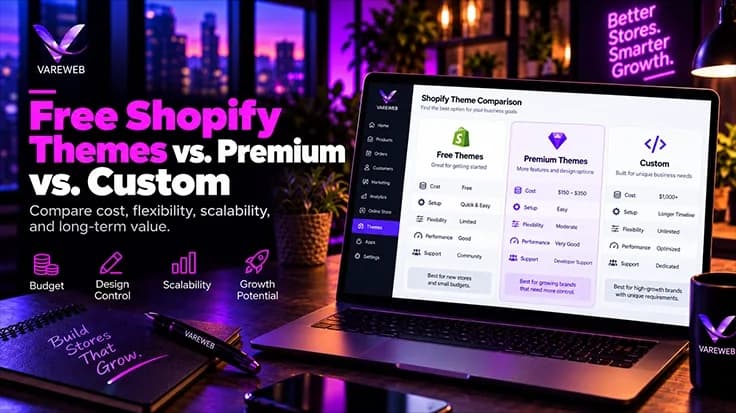
Quick Answer: Free Shopify themes like Dawn suit stores still validating demand. Premium themes, which in my experience cluster around $350-$485, suit stores with proven demand that need merchandising features without a pile of apps. A custom theme suits established brands whose traffic, margins and complexity can multiply a better storefront. That is my framework, not a Shopify rule: the trigger is when patching a generic theme cost more than owning a purpose-built one.
Founders ask which theme to buy as if they were picking a paint color. It is closer to picking an engine: it renders your catalog, runs your cart and decides how much JavaScript a customer’s phone must chew through before a button responds.
Here is the brutal truth, in the form I would defend to a CFO: once the cost of theme limitations, app dependency, slow performance, conversion friction and slow development exceeds the amortized cost of a custom architecture, patching a generic theme becomes the more expensive decision. Revenue is only shorthand for when that happens. With Prestige and Impact both listed at $400 on the Shopify Theme Store this October, a premium theme is cheap next to a $15,000+ build, and it wins more often than agencies admit.
At a Glance: Free vs. Premium vs. Custom Shopify Themes
| Feature / area | Free themes (Dawn, Horizon) | Premium themes (Prestige, Impact) | Custom-built themes |
|---|---|---|---|
| Upfront cost | $0 | One-time license; Prestige and Impact list at $400, others vary | Planning range of $15,000–$50,000+ |
| Core Web Vitals | Clean baseline; field results swing with apps and media | Varies; can pass with discipline | Set by performance budgets; not faster by default |
| App dependency | Grows as feature gaps appear | Lower when native features replace apps | Lowest when built in; specialist apps stay |
| Code and DOM size | Lean, broad feature set | Larger; built for many merchants | Only what templates need, if governed |
| Customization | Theme Editor plus code edits | Vendor settings; deep changes mean overrides | Component system built around your journey |
| Maintenance | Shopify-managed updates | Vendor updates; conflicts after heavy edits | You own releases, QA and monitoring |
| Best for | Validating demand | Proven demand, conventional journey | Complex catalogs or journeys, backed by evidence |
Choose Based on Constraints, Not Ego
| Store condition | Recommended starting point | Why | Upgrade trigger |
|---|---|---|---|
| New store with unvalidated demand | Free Shopify theme | Protects capital while testing offer, acquisition and product-market fit | Consistent sales plus clear feature or UX limits |
| Growing store with proven demand | Premium theme | Faster deployment and more native merchandising features | Customization debt, app dependency or a performance plateau |
| Established store with simple UX | Optimized premium theme | Custom engineering may not add enough value | Measurable limits begin affecting revenue or operations |
| Established brand with unique customer journey | Custom theme | Generic templates cannot model the experience efficiently | Not applicable; focus shifts to continuous product development |
| Poor performance caused mainly by apps | App-stack cleanup first | A new theme may not remove third-party bottlenecks | Custom build only if theme architecture remains a constraint |
| Complex ERP, PIM or product-builder requirements | Custom architecture | Integration and data needs exceed generic theme assumptions | Build after technical discovery and integration planning |
The Engineering Reality: Free Shopify Themes vs. Premium vs. Custom: Which Is Right for You?
Everything below is my own engineering and investment framework, not a Shopify rule. Revenue is shorthand. The real decision also weighs sessions, mobile share, conversion rate, average order value, markets, catalog and variant complexity, app load, Core Web Vitals, merchandising workflows, accessibility, ERP, PIM, CRM and fulfillment integrations, and what the current theme costs to maintain. A profitable $700,000 store selling configurable products may justify custom work early. A simple $3 million store with healthy field data can thrive on a well-chosen premium theme.
Tier 1: Free Shopify Themes (The Validation Stage)
The Technical Pros (OS 2.0 Compliance, Fast Baseline)
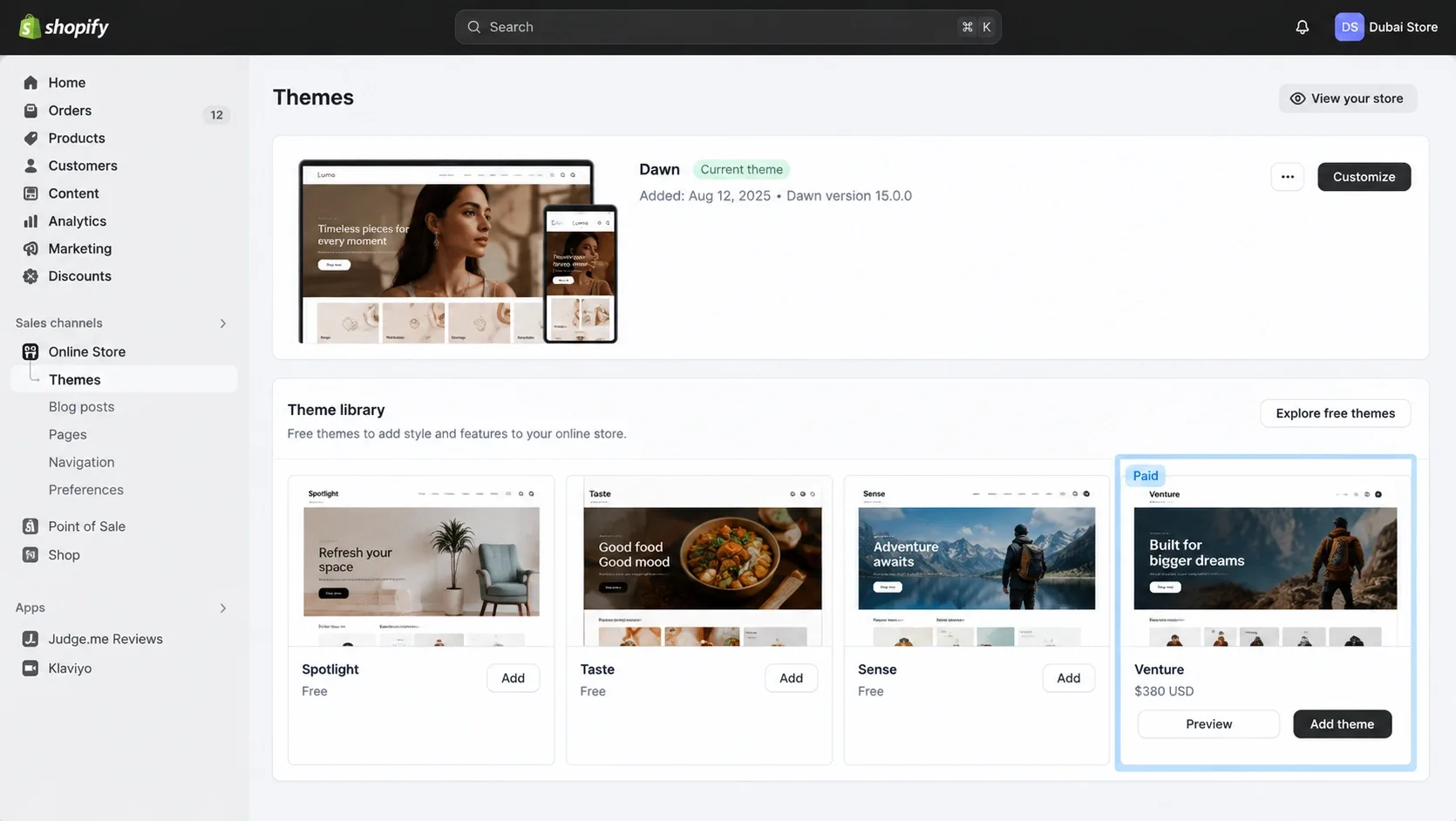
Shopify's free themes, Dawn first among them, cost $0 and are built for Online Store 2.0: JSON templates, sections everywhere, blocks and app blocks, with modest JavaScript and server-rendered Liquid. For a store with a handful of SKUs testing an offer, that is the right place to be.
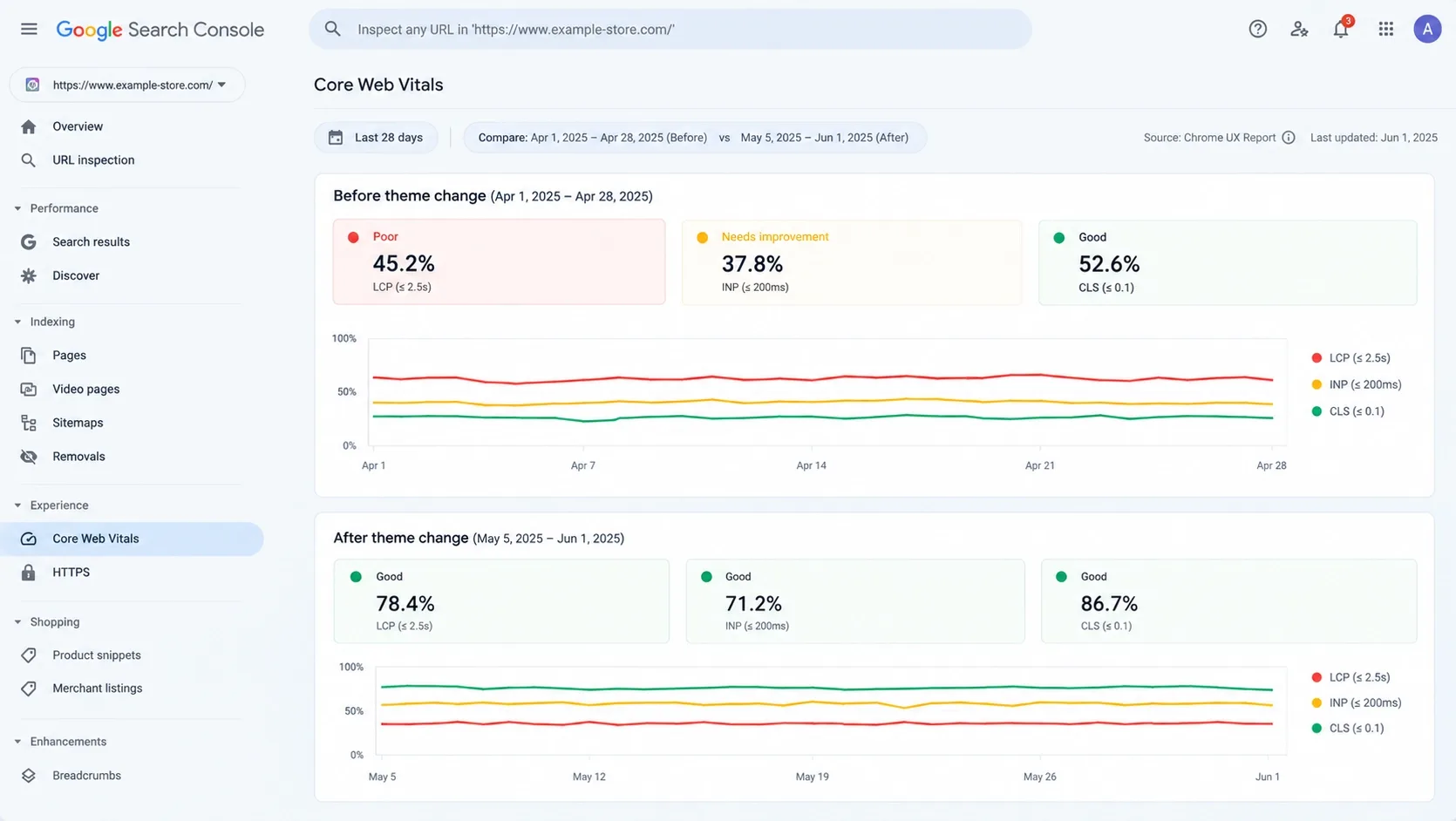
Field data agrees. ShopThemeDetector's mobile Chrome UX Report analysis, updated October 8, 2026, has 71.1% of 8,461 Dawn stores passing Core Web Vitals, and 68.4% of free-theme stores against 71.1% of paid ones at the same app load. Horizon, the newer free theme, sits at 56.7% across 2,600 stores. That is association, not verdict: the stores running a theme shape its numbers as much as its code.
Free Does Not Mean Technically Inferior
Shopify-built free themes are a sound baseline: native to Shopify's architecture, flexible in the Theme Editor, built on sections, blocks and app blocks, and predictable to update. The limit is not code quality. It is the gap between a deliberately broad feature set and a growing brand's needs. Features vary by theme and version, so I never assume a free theme lacks a cart drawer, filtering, predictive search, swatches or a mega menu. I check.
The Technical Cons (App Bloat and Tech Debt)
Free gets expensive when merchants bolt on features without a plan. I have inherited stores where filtering, badges, countdowns, upsells and reviews each came from a different vendor, several loading on every page, and nobody knew which still earned their place. Each storefront app competes for the same main thread, and Shopify knows it: to be published, an app must not reduce storefront Lighthouse performance scores by more than 10 points. The result is conflicting markup and compounding tech debt.
Tier 2: Premium Shopify Themes (The Growth Stage)
Built-In Features vs. App Dependency
A premium theme is an investment in consolidation. Trust badges, countdown timers, swatches, quick add, predictive search, mega menus and cart drawers can live in the theme's own Liquid, retiring app subscriptions. You can preview a paid theme first, but you must buy it before you can publish it, and the license covers only the store it was bought for.
Verify the price yourself. Theme Store pricing varies and changes. I treat $350-$485 as the central bracket, but not every paid theme sits inside it: Prestige and Impact list at $400, while some presets from the same designer list at $320. Confirm the current license price before you buy.
Premium Themes Are Products, Not Bespoke Systems
A premium theme is built for reuse across thousands of merchants. That is its economic advantage and its architectural limit. A good one brings merchandising sections, predictive search, quick add, swatches, mega menus, cart drawers, localization, accessibility work and vendor support, yet every component must still serve stores with nothing in common.
I separate five things people blur together. Available code is everything in the package. Delivered code is what a page downloads. Executed code is what the browser runs. Rendered code is the markup in the DOM. Used functionality is what customers touch. A theme can ship a 3D model viewer and never deliver it to a page without a 3D model.
The Danger of "Multi-Purpose" Theme Bloat
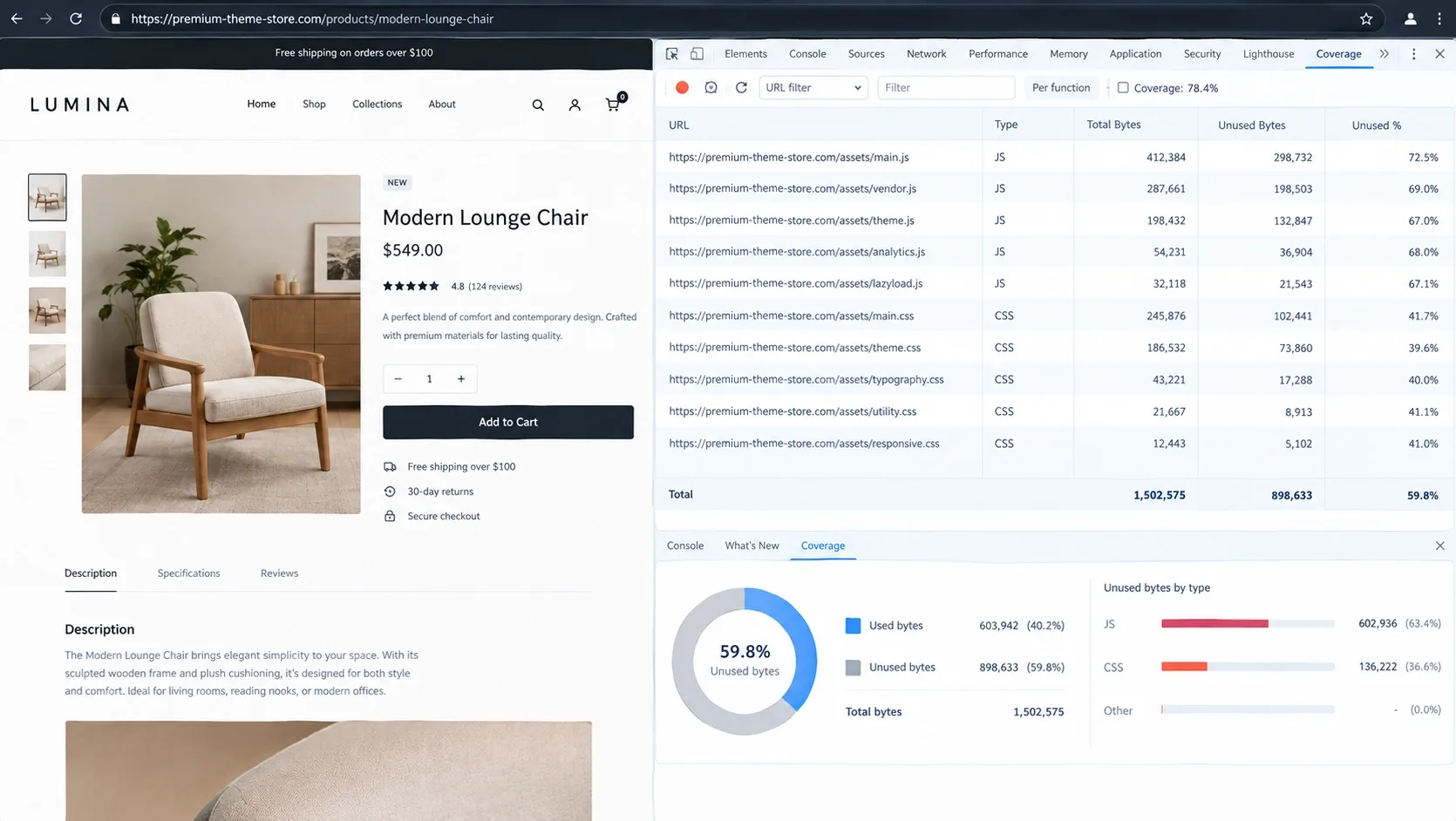
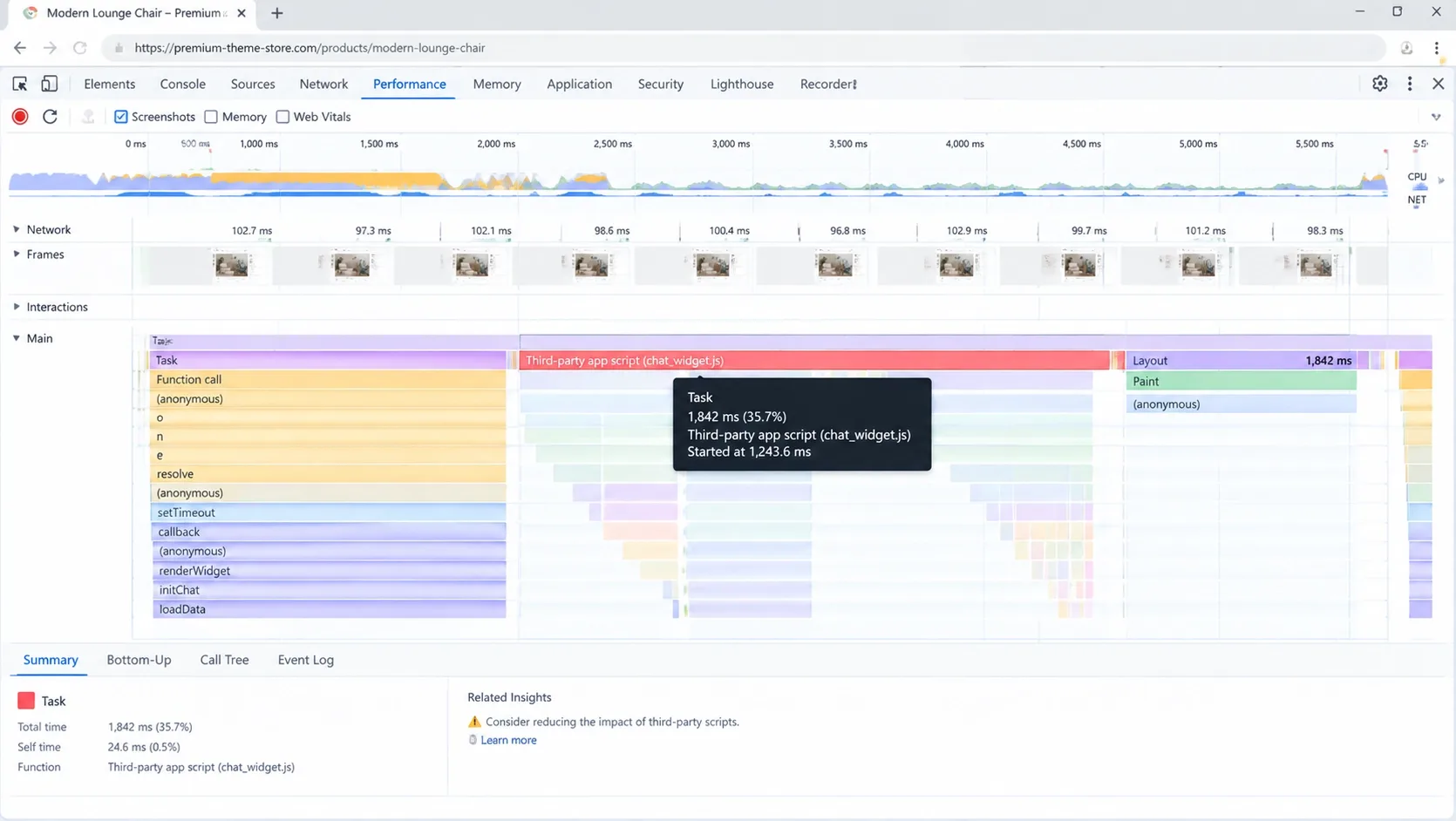
Multi-purpose themes are where I hunt for trouble, but I do not assume it. Many unused modules never load. I check whether each is bundled globally, loaded conditionally, initialized only when its element exists, imported after interaction, shipped in CSS regardless of use, or rendered in the DOM and hidden. DevTools Coverage and a Performance recording answer that in minutes.
Field data shows why the answer varies. In the same dataset (see their methodology), 78.9% of 3,300 Prestige stores and 78.2% of 2,555 Impulse stores pass mobile Core Web Vitals, while Impact passes on 68.7% of 1,884. Same tier, different outcomes.
Apps Are Not the Enemy - Uncontrolled Frontend Execution Is
App count alone is a weak metric. A store with 25 admin-only or server-side apps can outperform one with five badly built storefront apps. I ask whether an app loads storefront JavaScript globally, blocks rendering, creates long tasks, duplicates native features, adds large DOM trees, calls external APIs before first paint, shifts layout or blocks interaction, and whether removing it removes its theme code.
Know the type: admin-only apps, theme app extensions and app blocks, script-tag integrations, checkout extensions, server-side integrations, and hardcoded snippets left behind after an uninstall. That last one is the quiet killer. Shopify's August 2026 write-up shows how much one script matters: after Poptin replaced synchronous network requests, its p75 INP across thousands of stores fell 57%, from 280 ms to 120 ms. I give no maximum app number. I run an app-impact audit.
Where Premium Stops Paying Off
The signs repeat. Developers override third-party code every sprint. Theme updates collide with your edits. Apps exist only to patch missing behavior. Campaign launches need risky code changes. The product model outgrows the theme, mobile performance stays poor after targeted optimization, and the patched theme costs more than a purpose-built one. When a store needs a bespoke component system, controlled JavaScript execution, integration-specific data flows, and a storefront that can be tested without fighting a third-party codebase, custom Shopify theme development stops being a cosmetic upgrade and becomes an engineering decision.
Tier 3: Custom Shopify Themes (The Enterprise Stage)
Custom Does Not Mean Starting With an Empty Folder
"Custom Shopify theme" covers five non-interchangeable models: a heavily modified premium theme; a custom design on Shopify's reference architecture; a bespoke Liquid theme from a lean foundation; a fully custom Online Store theme with its own component system; and a headless storefront on Hydrogen or similar. I mean the third and fourth: a purpose-built Liquid storefront.
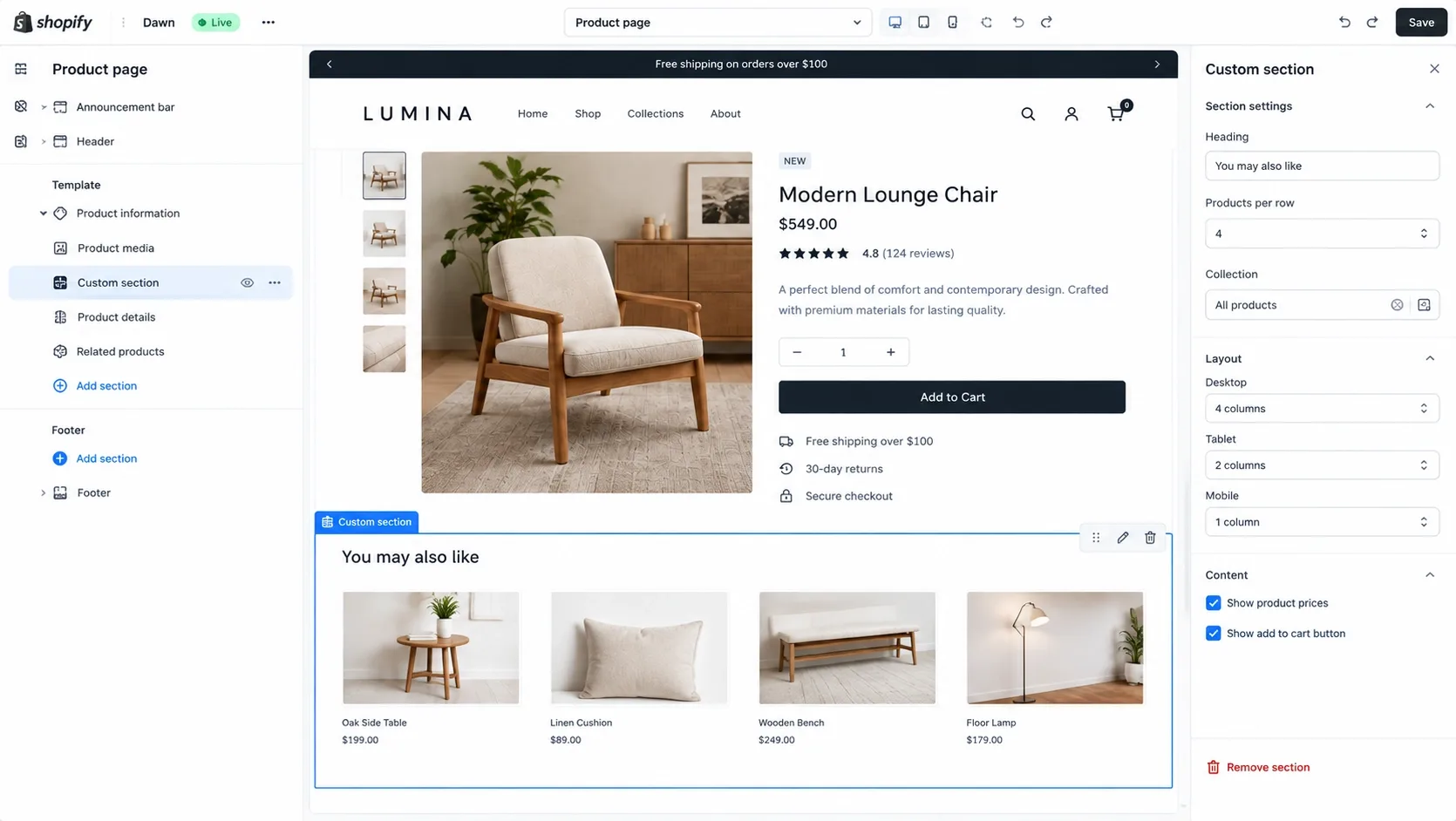
A strong one keeps the Theme Editor, JSON templates, reusable sections, configurable blocks, app blocks, dynamic sources, metafields and metaobjects, Markets support and native cart behavior. A fast theme that needs a developer ticket for every landing page is not a successful build.
Architectural Freedom and Component-Driven Design
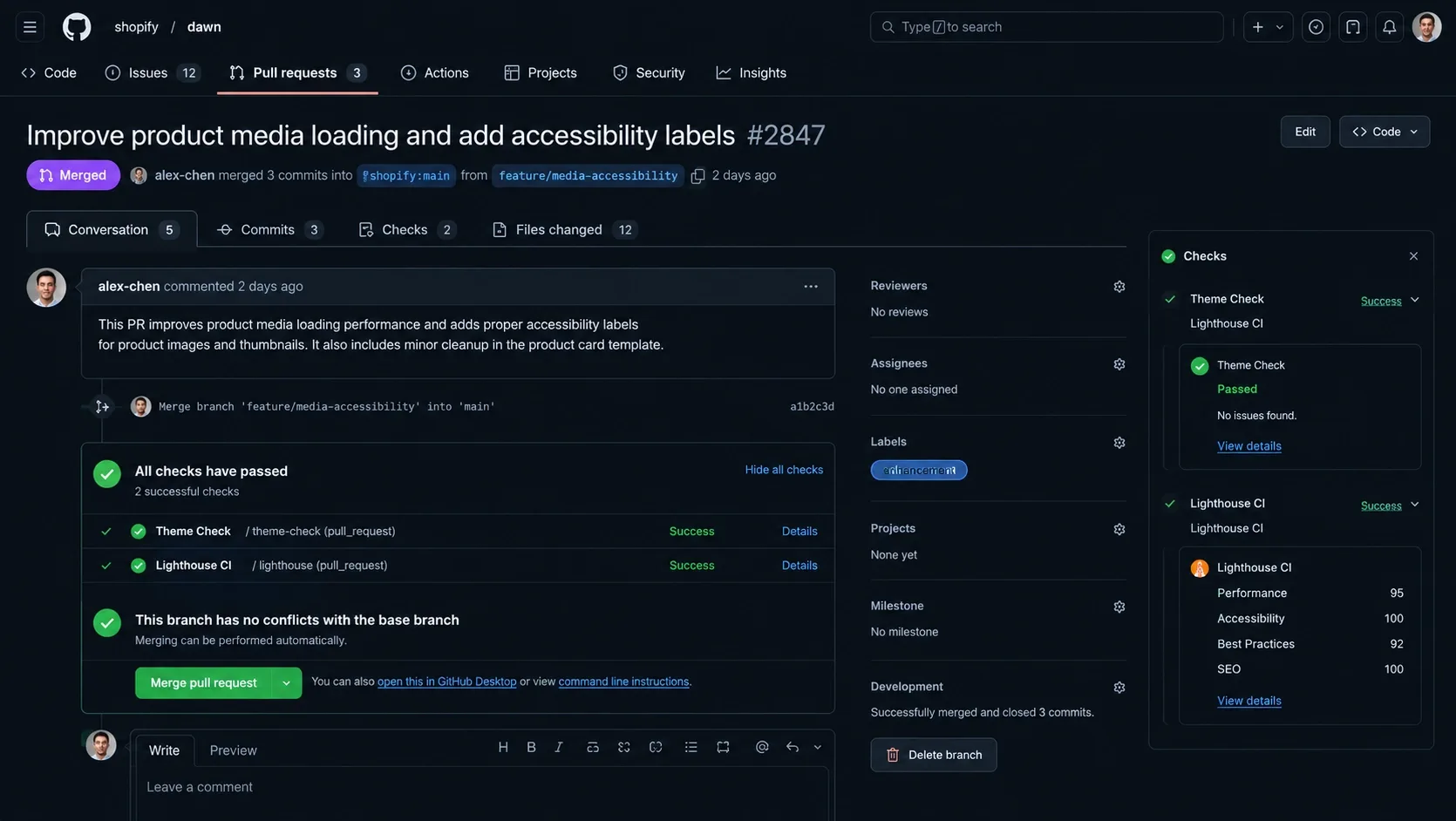
My workflow uses Shopify CLI development themes, Git with Shopify's GitHub integration, pull requests, code review, branch protection, Theme Check linting, Lighthouse CI or similar, preview links, unpublished staging themes, structured QA, release notes, rollback procedures and production monitoring. Tailwind CSS is optional and does not speed anything up by itself; if used, it needs production compilation, purged utilities and no client-side runtime. Well-structured native CSS can perform just as well.
Stripping the DOM and Optimizing Core Web Vitals
A custom theme can load only the CSS and JavaScript each template needs, but only if someone enforces it. It is not faster by default. Start from explicit performance budgets, not a promise to "make it fast": JavaScript transferred and executed, CSS, page weight, third-party origins, long tasks, DOM nodes, LCP image weight, fonts, layout shifts and component initialization time. Set them from required functionality, field data, device mix, competitor benchmarks and business goals. No universal budget exists.
One platform detail I protect: Shopify now streams the layout up to content_for_header before the template finishes rendering, and median-store TTFB at p75 fell about 29% in the September 2026 rollout, with LCP improving 2-6%. It only applies to pages rendered from JSON templates whose layout prints that tag plainly in the head. Use .liquid templates, or wrap the tag in a conditional, and you hand the gain back.
A Custom Theme Should Be a Conversion System, Not a Collection of Pages
Mature builds start with reusable primitives: buttons, inputs, selectors, product cards, price displays, promotion labels, variant and quantity controls, cart items, drawers, modals, accordions, recommendation rails, media galleries, stock states, and error and success states. Consistent components make testing, accessibility, QA, campaigns, localization and analytics cheaper, and A/B tests safer: you change one component instead of maintaining three versions of the same interaction.
Custom API Integrations and Data Layers (GEO/AEO)
A custom theme can take ERP, PIM and product-builder data that generic themes strain to support, and it lets you decide which system owns structured data. More on that below.
The Financial Tipping Point: When Do You Actually Upgrade?
Treat $15,000-$50,000+ as a planning range for a custom build, not a quote; maintenance comes on top. My ROI model: take annual qualified sessions, conversion rate and average order value; estimate a conservative conversion lift; calculate incremental orders and gross revenue; apply gross margin; subtract added fulfillment, platform, payment and operating costs; compare the contribution margin with build and maintenance cost; then model conservative, expected and optimistic cases.
Mind the wording: a 0.5% relative improvement on a 2.0% conversion rate reaches 2.01%, while a 0.5 percentage-point improvement reaches 2.5%.
Hypothetical example, not a forecast. A store has 1,000,000 annual qualified sessions, a 2.0% conversion rate and a $100 average order value. A hypothetical lift to 2.5% adds 5,000 orders and $500,000 in gross revenue. The relative version (2.01%) adds 100 orders and $10,000. At an assumed 40% gross margin, the 2.5% case leaves $200,000 before fulfillment, payment and platform costs.
Real results depend on traffic quality, demand, pricing, merchandising, acquisition mix, inventory, seasonality, implementation quality and measurement accuracy. I will not say a build pays for itself in months until your numbers show it. At $100,000 a year, keep the premium theme.
Theme Price Is Not the Same as Theme Cost
Price is what you pay at checkout. Cost is what you pay over three years.
- Free theme: $0 license, plus apps that fill gaps, developer modifications, performance remediation, growing subscriptions, upgrade conflicts and staff time.
- Premium theme: license, configuration, custom development, app subscriptions, vendor updates, rework after heavy customization, performance optimization and UX limits.
- Custom theme: discovery, UX research, design system, development, integrations, QA, accessibility, analytics, migration, post-launch support, documentation and maintenance. Not a one-time expense.
A premium theme is not cheap if you spend thousands a month on apps, agencies and recurring fixes.
What I Audit Before Recommending Any Shopify Theme
I never recommend a theme from its demo, screenshots or feature list. A polished demo hides problems: a small controlled catalog, optimized sample media, few production apps, limited analytics, no personalization, no consent platform, no reviews or loyalty tools, no international logic and no live merchandising complexity. So I audit the real thing, free or paid.
Code and architecture. I read how templates, sections, blocks and snippets are organized and hunt for deeply nested Liquid loops, repeated metafield or variant access inside loops and excessive snippet nesting. I check how variants are serialized, whether features load conditionally or globally, and whether developers can extend components without overriding core files.
JavaScript. I measure what is transferred and executed, find long main-thread tasks, scripts loading on pages that never use them and monolithic bundles, and test cart drawers, predictive search, filters, variant selectors and quick add. I confirm app scripts are not the real bottleneck before blaming the theme.
CSS and DOM. I look for one oversized global stylesheet, unused component styles, render-blocking resources and overrides that signal customization debt. Then I record DOM node count and depth and inspect mega menus, product cards, swatches, modals and hidden content. A large DOM is a warning sign, not a diagnosis; poor INP usually traces more directly to main-thread JavaScript, expensive event handlers and long tasks.
Merchant usability. I test the Theme Editor, confirm non-technical staff can build landing pages safely, and watch how settings behave when sections are added, removed or reordered.
Accessibility. Keyboard navigation, focus states, menu and modal behavior, form labels and validation, contrast, options that rely on color alone, reduced motion, and screen-reader announcements for cart updates and errors.
"A theme that scores well in a controlled demo but becomes unmaintainable after six months is not a high-performance theme. It is delayed technical debt."
How I Measure Theme Performance Without Lying to Myself
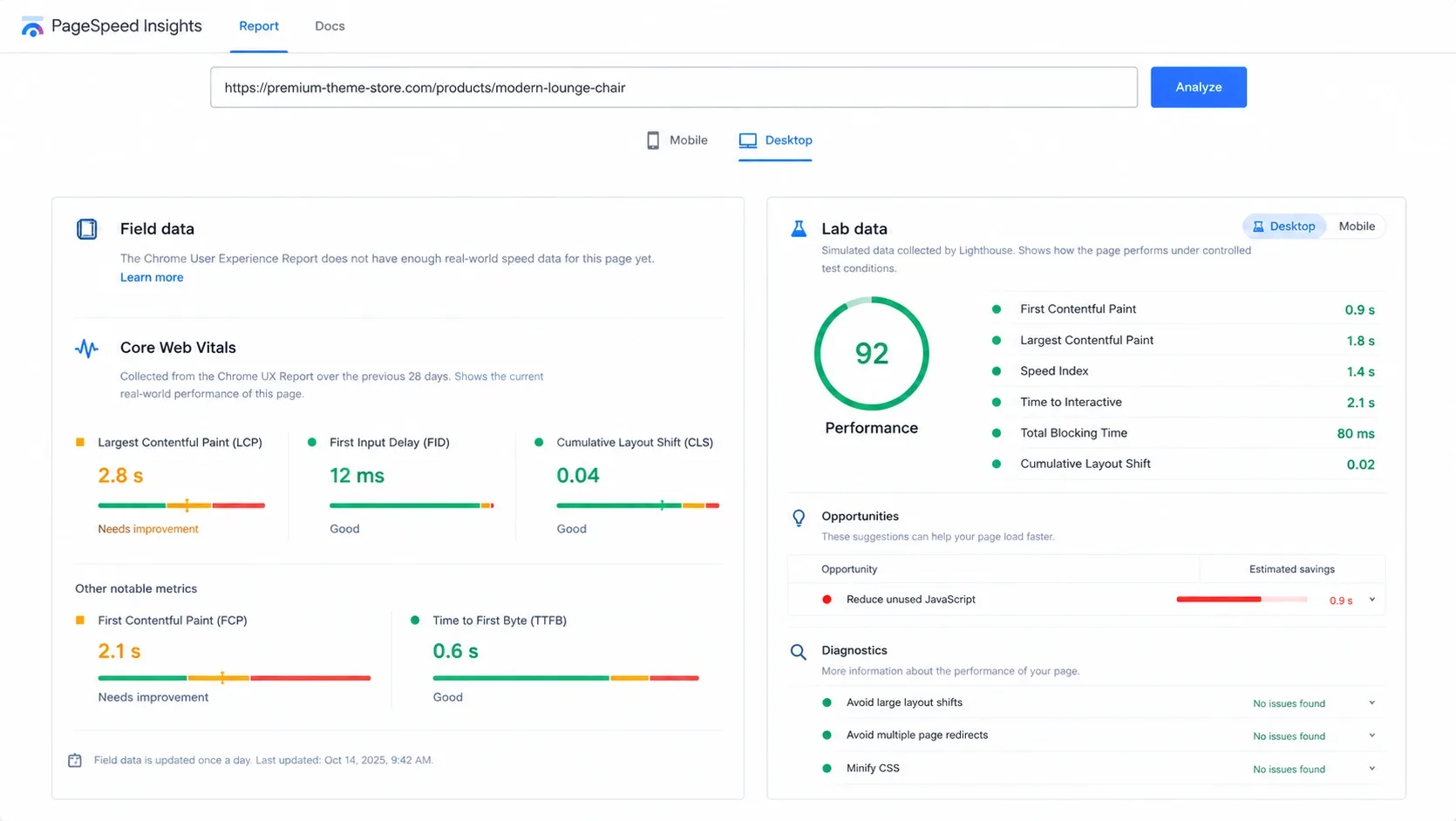
One Lighthouse run is not evidence. Lighthouse and PageSpeed Insights lab diagnostics are synthetic tests, good for finding causes. The Chrome User Experience Report is field data from real Chrome users. Real user monitoring and profiling add template-level detail and show what the main thread is doing. I always say which kind of number I am quoting.
The current "good" thresholds on web.dev are LCP of 2.5 seconds or less, INP of 200 milliseconds or less and CLS of 0.1 or less, at the 75th percentile, segmented across mobile and desktop. Kashaf, our SEO Manager, covers the design side in UI/UX design tips for Core Web Vitals.
A development store can look fast while production crawls: production has apps, analytics, consent tools, a bigger catalog, heavier imagery, slower devices and distant users. So I test templates, not just the home page: product, collection, search results, cart drawer and page, a landing page, a high-variant product and any logged-in experience.
A development store can look fast while production crawls: production has apps, analytics, consent tools, a bigger catalog, heavier imagery, slower devices and distant users. So I test templates, not just the home page: product, collection, search results, cart drawer and page, a landing page, a high-variant product and any logged-in experience.
A Note on the "4 Seconds to 800 ms" Story
You will hear that number attached to theme rebuilds. I will not present it as a case study, because I cannot publish one with the data attached. Take a hypothetical instead: a product page with a lab LCP near 4 seconds on throttled mobile, a lazy-loaded hero image and a render-blocking app script. Remove the blocker, prioritize the LCP image, and the number can fall a long way. A credible claim still states lab or field data, the template and device, what changed, and whether the gain survived deployment.
Custom Liquid Theme or Headless Shopify?
A custom theme does not automatically mean Hydrogen, React or headless. I recommend a custom Liquid theme when Shopify's native storefront supports the experience, the business wants Theme Editor control and lower infrastructure complexity, and the problems are theme architecture, UX and performance.
I consider headless only for complex multi-system orchestration, application-like experiences, unusual routing, sophisticated personalization and a mature in-house engineering team. It adds hosting, deployment, monitoring, caching, preview environments, checkout handoff, SEO rendering, redirects, schema ownership and staffing. It is not the natural next step after a premium theme. I wrote a fuller breakdown of what headless Shopify is and whether you really need it.
Which Layer Should Own Each Feature?
Feature
Best owner
Why
Warning sign
Core navigation
Theme
Essential, globally available storefront functionality
Menu depends on a heavy third-party script
Product-gallery behavior
Theme
Core product interaction
Gallery breaks when an unrelated app is removed
Reviews
Specialized app or platform integration
Requires moderation, storage and syndication
Several review tools output conflicting markup
Product recommendations
Shopify-native logic, theme, or justified app
Depends on merchandising sophistication
Three overlapping recommendation widgets
Subscription purchasing
Specialist integration
Requires recurring-commerce logic
Subscription state is disconnected from variant selection
Structured product data
One clearly assigned system
Prevents duplicate JSON-LD entities
Theme and multiple apps output conflicting Product schema
Cart drawer
Theme, unless requirements are highly specialized
Core transactional UI
Cart depends on a generic popup application
Consent management
Compliant specialist solution
Legal and regional complexity
Consent tool blocks or duplicates analytics unpredictably
| Feature | Best owner | Why | Warning sign |
|---|---|---|---|
| Core navigation | Theme | Essential, globally available storefront functionality | Menu depends on a heavy third-party script |
| Product-gallery behavior | Theme | Core product interaction | Gallery breaks when an unrelated app is removed |
| Reviews | Specialized app or platform integration | Requires moderation, storage and syndication | Several review tools output conflicting markup |
| Product recommendations | Shopify-native logic, theme, or justified app | Depends on merchandising sophistication | Three overlapping recommendation widgets |
| Subscription purchasing | Specialist integration | Requires recurring-commerce logic | Subscription state is disconnected from variant selection |
| Structured product data | One clearly assigned system | Prevents duplicate JSON-LD entities | Theme and multiple apps output conflicting Product schema |
| Cart drawer | Theme, unless requirements are highly specialized | Core transactional UI | Cart depends on a generic popup application |
| Consent management | Compliant specialist solution | Legal and regional complexity | Consent tool blocks or duplicates analytics unpredictably |
Custom development should shrink unnecessary app dependency without rebuilding every specialist service from scratch.
What Must Happen Before Anyone Writes Theme Code
A credible project starts with discovery, not Figma or Liquid: stakeholder interviews, analytics, search and funnel analysis, support insight, session recordings, accessibility, theme and app audits, an integration inventory, an SEO crawl, a Core Web Vitals review, content, market and product-data review, campaign-workflow mapping and a technical-risk register.
The output: prioritized requirements, component inventory, template and integration maps, analytics plan, SEO migration plan, performance budget, accessibility requirements, acceptance criteria and a launch-and-rollback plan. A custom theme without discovery is merely an expensive guess.
A Custom Theme Is Wasted Without Measurement
A custom build needs an analytics specification: product and collection views, search and result selection, filters, variant selection, add to and remove from cart, checkout initiated, promotion and recommendation clicks, form errors, out-of-stock interactions and back-in-stock requests. The data layer should avoid duplicate events, use consistent product IDs, separate parents from variants, respect consent, preserve attribution, and be documented and validated before launch. Analytics does not raise conversion by itself. It creates evidence for better decisions.
Why Theme Architecture Now Affects AI Discovery
A custom theme does not automatically earn AI citations. A coherent storefront makes product information easier for search engines and answer systems to interpret: stable canonical URLs, consistent identifiers (SKU, GTIN, MPN where they exist), accurate price and availability, ProductGroup and variant relationships, shipping and return details, visible specifications, breadcrumbs, genuine reviews and FAQs from real customer questions. Google's product structured data documentation shows how variants tie back to a parent ProductGroup.
JSON-LD must describe what shoppers can see, not manufacture relevance. The failure I find most often is the theme, a review app and an SEO app each printing a different Product schema. Assign schema ownership on purpose. Kashaf, our SEO Manager, goes deeper in structuring product schema for AI Overviews and ChatGPT citations.
Accessibility Is Part of the Architecture
You cannot repair accessibility at the end with an overlay. It starts with semantic HTML and heading hierarchy, then keyboard navigation, visible focus, dialog focus trapping and Escape behavior, screen-reader announcements, form errors, option labels, alternatives to color-only swatches, contrast, reduced motion, touch targets, zoom and cart-status updates. Evaluate against the WCAG 2.2 target agreed in scope, and never promise legal compliance.
How to Move From Premium to Custom Without Damaging the Store
Changing themes usually keeps product and collection URLs intact, but custom template logic, navigation, metadata, structured data, app embeds and tracking can still be lost or altered. Sequence matters.
- Document first. Crawl the live store. Export URLs, metadata, canonicals, redirects and structured data. Inventory apps. Record analytics and Core Web Vitals baselines. Map every template, metafield and theme setting.
- Preserve what ranks. Keep SEO-critical content or replace it deliberately.
- Build and test unpublished. Test every journey from product to checkout, plus markets, currencies, analytics, consent, structured data, accessibility and performance on realistic content.
- Launch with a net. Freeze risky changes, publish in a controlled window, monitor revenue, errors and crawling, and keep a tested rollback path. Remove obsolete code and app remnants only after validation.
Zero downtime is a deployment objective, not a guarantee. On the search side, Kashaf, our SEO Manager, wrote about migrating a website without losing SEO rankings, and the guide to common Shopify SEO issues and how to fix them doubles as a post-launch checklist.
The Theme Is a Product After Launch
A custom theme needs named code ownership, documentation, developer onboarding, dependency management, browser and accessibility regression testing, performance monitoring, Theme Editor governance, release management, app-installation review and quarterly audits. Even a lean theme bloats when someone installs an app, pastes a script into theme.liquid or bypasses the design system. Govern the architecture.
When I Tell a Client Not to Build Custom Yet
I say it more often than people expect. My reasons:
- Product-market fit is unproven, or traffic is too low for reliable behavioral evidence.
- The offer, pricing or merchandising is the real problem.
- The company cannot maintain a custom codebase, or the project would consume essential operating capital.
- The budget would work harder on inventory, content, acquisition or retention.
- The team wants custom design mainly because competitors use the same theme.
- No one has defined measurable success criteria.
- The performance problem comes mostly from third-party apps.
- The current theme performs well, or a premium theme already supplies the functionality cleanly.
"I would rather tell a founder to keep a $400 theme for another year than sell them a $25,000 build their business cannot yet multiply."
When a Premium Theme Is Still the Correct Enterprise Decision
Some established stores should stay put: the journey is conventional, the catalog is not structurally complex, the theme already supports their merchandising, field performance passes, customizations are limited, the app stack is controlled and the conversion bottlenecks sit elsewhere. A $3 million store like that does not need a rebuild. It needs someone to leave the theme alone.
Evidence I Require Before Recommending a Rebuild
- Real-user Core Web Vitals
- Template-level performance profiles
- JavaScript execution cost
- App and third-party impact
- DOM and rendering analysis
- Funnel drop-off data
- Conversion rate by device
- Search and navigation behavior
- Theme-maintenance cost
- Developer lead time for routine changes
- Failed or delayed campaign requirements
- Integration constraints
- Accessibility findings
- Revenue and margin model
"If the evidence does not show an architectural problem, I will not prescribe an architectural rebuild."
My Final Theme Decision Framework
Choose a free Shopify theme when:
- You are validating demand and capital preservation matters more than brand exclusivity.
- Your journey is simple and you will upgrade once evidence arrives.
Choose a premium Shopify theme when:
- You have proven demand and need stronger merchandising quickly.
- Its native features replace several justified app subscriptions.
- Your journey fits its architecture, its production performance is acceptable, and you want vendor support and updates.
- Custom development would not yet produce enough return.
Choose a custom Shopify theme when:
- Your brand has a proven commercial engine and generic theme assumptions constrain the customer journey.
- App dependency and customization debt are expensive, and performance limits persist after optimization.
- You need a distinct component system, or have complex product, market or integration requirements.
- Your traffic and margins can multiply small conversion gains, and you can fund ongoing maintenance.
- The rebuild is supported by measurable evidence.
I choose the least expensive architecture that can support the next meaningful stage of the business without creating predictable technical debt.
FAQs
Is Dawn the fastest Shopify theme available?
No. Dawn is a lean, dependable baseline, but in one October 2026 field dataset several themes pass Core Web Vitals more often than Dawn's 71.1%. Apps and media affect speed as much as the theme.
Why is my premium Shopify theme loading so slowly even after compressing images?
Images are one cause among many. Check app scripts, long main-thread tasks, DOM size, render-blocking resources and whether the LCP element is prioritized. Review field data before blaming the theme.
How much does a custom Shopify theme development project usually cost?
Plan for roughly $15,000 to $50,000 or more, depending on scope, integrations, discovery and design-system depth. Treat it as a planning range, not a quote, and budget for ongoing maintenance.
How long does it take an agency to build a custom Shopify theme?
A focused build with limited integrations is usually measured in months, not weeks, and complex catalogs or integrations take longer. Distrust any date promised without a scoped template and integration list.
Do I lose access to the Shopify Theme Editor if I go custom?
No. A well-built custom Liquid theme keeps the Theme Editor, JSON templates, sections, blocks and app blocks. Make merchant editing an acceptance criterion. Headless builds are different.
Will a custom theme improve my Google SEO rankings?
Not automatically. It can improve crawlable structure, performance and structured data, but rankings also depend on content, links, search intent and a clean migration. Test the gain; do not assume it.
How many Shopify apps are too many before my store breaks?
There is no universal number. What matters is which storefront code each app loads, how much JavaScript it runs and whether it duplicates native features. Run an app-impact audit instead of counting.
Can I migrate from a premium theme to a custom theme without downtime?
Zero downtime is a goal, not a guarantee. Build unpublished, test every customer journey, validate analytics and structured data, publish in a controlled window and keep a tested rollback ready.
Does a seven-figure Shopify store always need a custom theme?
No. Revenue is a signal, not a verdict. Architecture, traffic, complexity, conversion constraints, app dependency and maintenance cost should determine the decision.
Is a custom Liquid theme the same as headless Shopify?
No. A custom Liquid theme stays within Shopify's native theme system. A headless build uses a separate frontend and adds engineering and infrastructure responsibilities.
Can a premium Shopify theme pass Core Web Vitals?
Yes. A carefully selected, configured premium theme can pass, especially with controlled apps, optimized media and disciplined customization. Field data matters more than the demo or a single Lighthouse run.
Does installing many Shopify apps always make a store slow?
No. App count alone is not diagnostic. What matters is what storefront code each app loads, where, how much JavaScript it runs and whether it duplicates native functionality.
Can a custom Shopify theme still use apps?
Yes. Keep specialized apps that create real value and avoid apps used only to patch basic theme limitations.
Is Tailwind CSS necessary for a custom Shopify theme?
No. Tailwind can support a disciplined component system when compiled properly, but well-structured native CSS can perform equally well. Architecture matters more than the styling method.
How do I know whether my theme or my apps are causing poor INP?
Use real-user data and browser profiling. Identify long tasks, expensive event handlers, repeated initialization and third-party execution before blaming the theme.
Will changing themes affect my Shopify SEO?
It can. URLs may stay stable, but headings, internal links, metadata, structured data, pagination, canonicals and content can change. Require an SEO migration checklist and a post-launch crawl.
What should be included in a custom-theme maintenance agreement?
Code ownership, support scope, response times, browser testing, Shopify platform changes, security review, performance monitoring, accessibility checks, analytics validation and release management.

Written by
Minhaj
Minhaj Ahmed is an experienced web and software development professional specializing in web applications, mobile apps, SaaS platforms, and AI-powered solutions. As Head of Development at Vareweb, he brings a strong software engineering background to building scalable digital products and automation systems. He writes about web development, mobile apps, AI, software engineering, and emerging technologies.