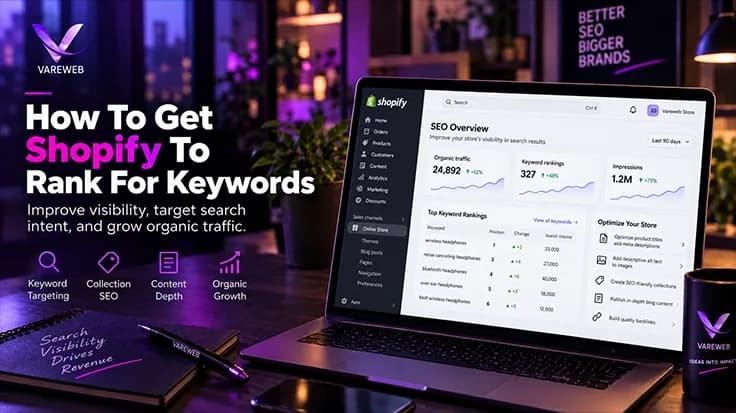
Quick Answer: Getting a Shopify store to rank for competitive keywords requires more than installing another SEO app. Shopify provides a strong ecommerce foundation, but stores can still develop issues around duplicate URL paths, collection and filter crawlability, theme and app script bloat, Core Web Vitals, and incomplete structured data. Strong Shopify SEO means creating a clean site architecture, managing canonicals and crawl paths carefully, optimizing Liquid and third-party scripts for performance, and implementing accurate JSON-LD schema so Google and AI search systems can clearly understand products, collections, pricing, availability, and the relationships across your catalog.
In my experience troubleshooting Shopify stores at scale, the biggest ranking bottleneck is almost never content - it's default platform code quietly working against the content team's best efforts. A brand publishes genuinely good collection copy, builds real backlinks, and still can't crack page one, because the theme underneath all of it is generating duplicate canonicals, bloated tag pages, and render-blocking scripts the content team never sees and never gets asked about.
Here's the scale worth keeping in mind before any of this feels academic: Shopify's own Q2 2026 results, filed with the SEC, put platform-wide GMV at $216.3 billion for the first half of 2026 alone, up 33% year over year. That's an enormous, fast-growing volume of commerce running through a platform whose default technical SEO posture most merchants never touch - which means the merchants who do fix it are competing against a majority who haven't. Overcoming Shopify's native canonical constraints is exactly why our eCommerce web development services focus on clean, theme-level engineering rather than band-aid apps, and it's the same reason Shopify Development Services built around this specific platform outperform a generic build applied to it after the fact.
Most Shopify Stores Never Touch Their Default SEO Posture
That's not a knock on Shopify - it's the platform working exactly as designed for speed of launch, not search performance. Vareweb's Shopify Development and Ecommerce SEO teams fix the canonical, crawl, and schema issues templates ship with by default, not band-aid them with another app.
Quick Comparison: Default Shopify SEO vs. Search-Engineered Shopify
| # | Area | Default Shopify (Out of the box) | Search & AI-engineered Shopify |
|---|---|---|---|
| 01 | Canonical structure | Duplicate /collections/.../products/ URLs | Internal links point straight to /products/ |
| 02 | Tag & filter pages | Endless indexable filter-combination URLs | Controlled crawling via robots.txt.liquid; page-level noindex where appropriate |
| 03 | Collection copy placement | Wall of text sitting above the product grid | Short teaser above, rich copy below the grid |
| 04 | Schema markup | Incomplete or broken theme microdata | Nested JSON-LD: Product, Offer, AggregateRating |
| 05 | Third-party app scripts | Unmanaged stack, render-blocking by default | Facade-loaded, audited, dead code removed |
| 06 | Blog architecture | Isolated at /blogs/news/, no collection links | Topical hubs linking contextually to collections |
| 07 | Image delivery | Oversized source files, no aspect-ratio | Responsive WebP/AVIF with explicit aspect-ratio |
| 08 | URL hierarchy | Flat catalog under the fixed prefixes | Keyword handles, sub-collections, breadcrumbs |
| 09 | AI crawler access | No llms.txt, mixed or accidental bot signals | Real llms.txt plus explicit answer-engine access |
| 10 | Variant strategy | Every variant defaults to a dropdown option | Split URLs only where long-tail volume justifies it |
| 11 | Heading markup | Styled divs standing in for real headings | Genuine semantic h2/h3 on every template |
| 12 | Crawler rules (robots.txt) | Platform default, rarely edited | Deliberate rules separating scrapers from answer engines |
| 13 | On-site search | Exact keyword matching only | Semantic, vector-based discovery |
| 14 | Internal linking | Manual, inconsistent, easy to forget | Templated modules on every product and collection page |
The Technical Guide: How To Get Shopify To Rank For Keywords
Fourteen fixes, each one addressing a specific default Shopify limitation rather than papering over it with another app.
1. Fix Shopify's Default Canonical URL Duplication
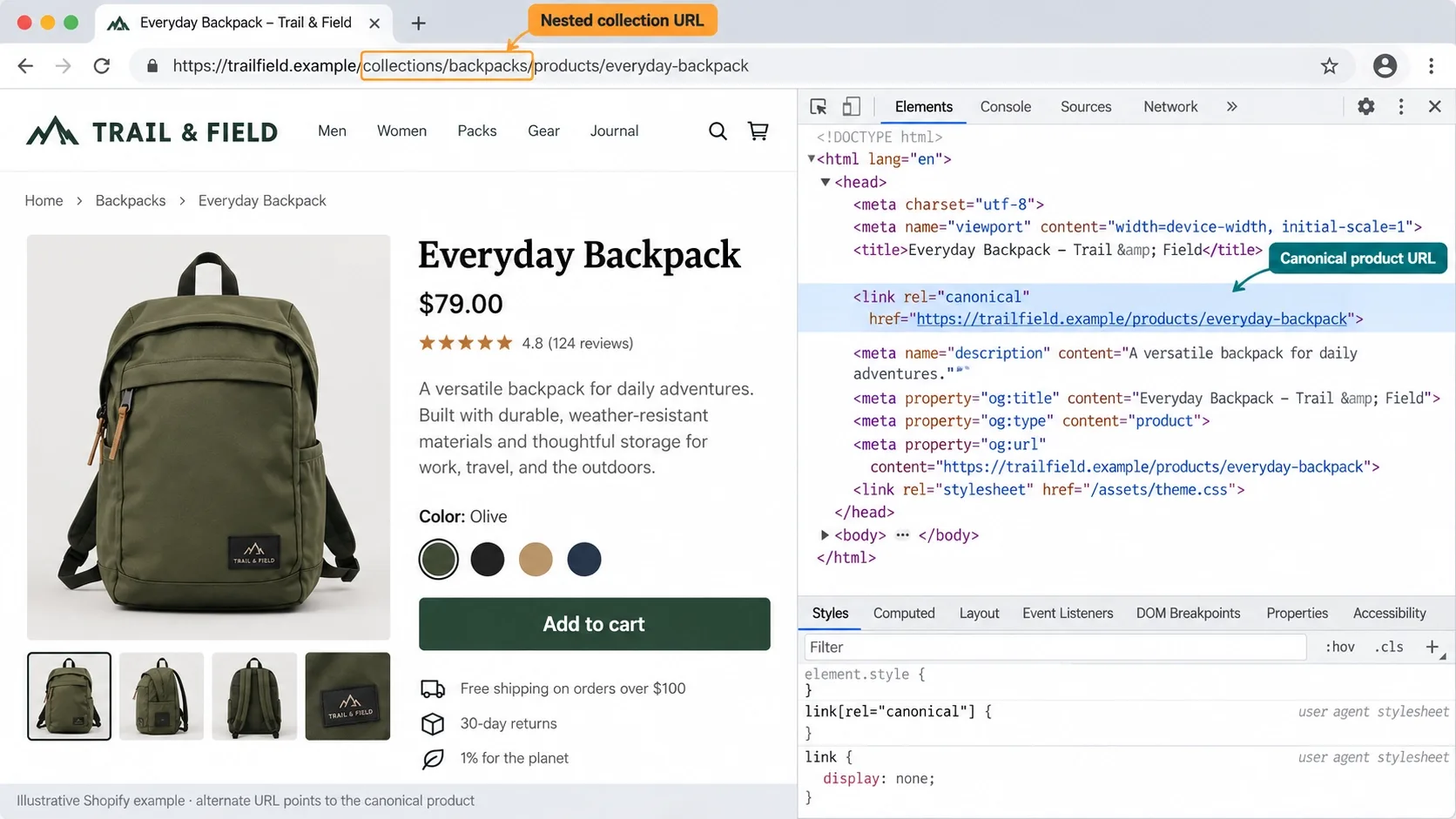
Shopify generates a product at both /products/product-name and /collections/collection-name/products/product-name, and while the platform's own canonical tag usually points back to the clean version, internal links across your theme - collection grids, related-product modules, search results - frequently point to the nested collection URL instead, diluting the internal PageRank that should be consolidating on one address.
Open your theme's product-grid-item.liquid and any related-products snippet, and check exactly which URL variable each link actually outputs. The fix is almost always swapping a relative {{ product.url }} reference for one anchored to the canonical /products/ path, so every internal link across the theme reinforces the same URL Google is already being told is canonical, rather than quietly working against it.
When a brand asks me why their product pages aren't ranking despite genuinely strong content, the first thing I inspect is exactly this - the theme's canonical logic, not the copy. A page can have perfect on-page SEO and still lose to its own duplicate because the internal link graph is voting for the wrong URL.
2. Noindex and Clean Up Collection Tag & Filter Page Bloat
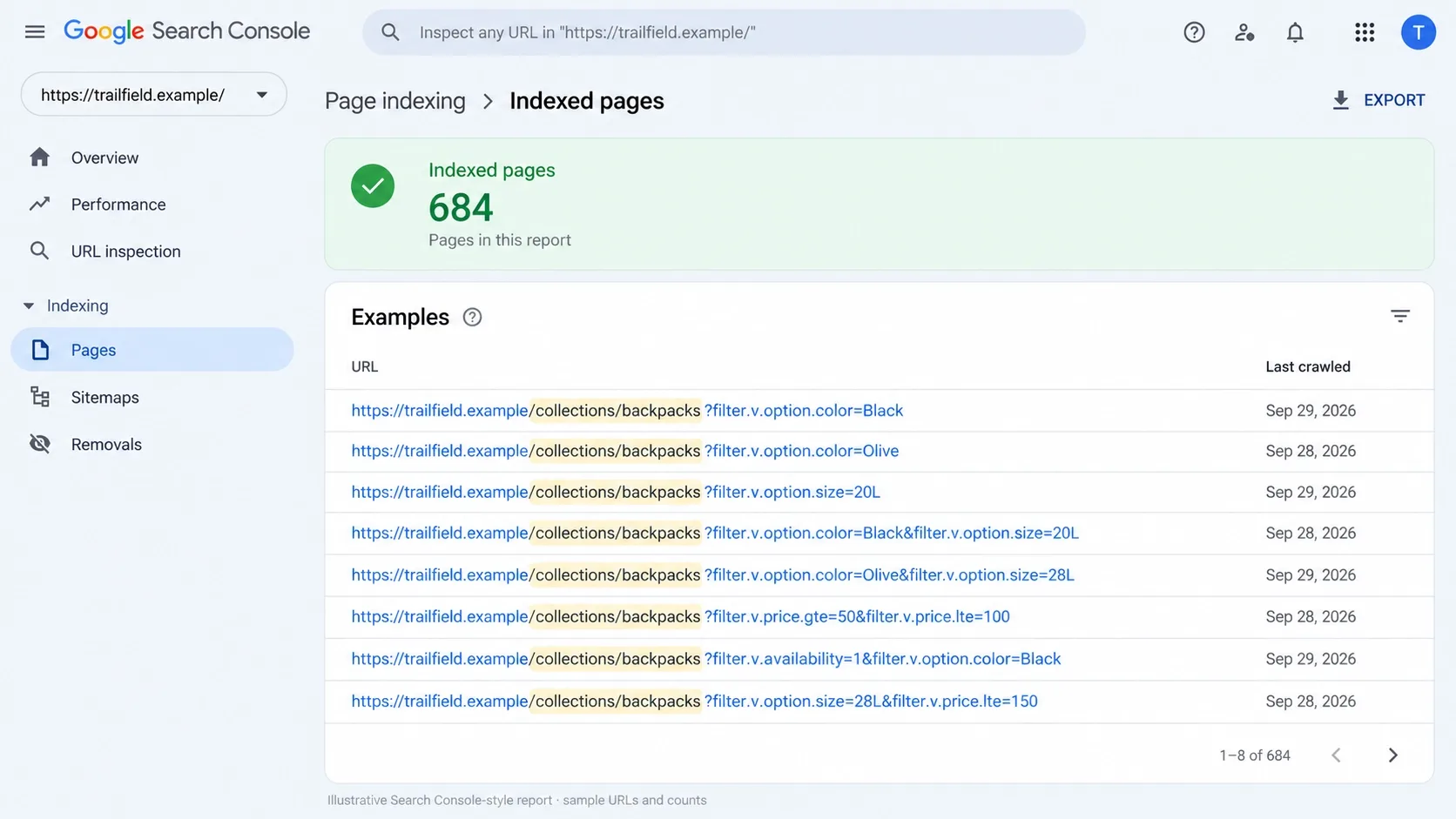
Every tag and filter combination a shopper can apply - /collections/mens-shoes/blue+leather, /collections/mens-shoes/blue+leather+size-10 - generates its own indexable URL by default. Multiply a handful of filter attributes across a few hundred products and you get thousands of near-duplicate pages competing for the same crawl budget as your actual money pages.
Use robots.txt.liquid to disallow parameterized filter paths, or apply a meta robots noindex specifically to filtered collection views while leaving the base collection page fully indexable. The goal isn't hiding filters from shoppers - it's making sure Googlebot spends its limited crawl budget on the few hundred pages that can actually rank, not the several thousand filter permutations that never will. This is one of the most common failure patterns I document across audits, and I go deeper on the full list in Common Shopify SEO Issues and How to Fix Them.
3. Move Collection Page Description Text Below the Product Grid
Collection pages are genuinely valuable real estate for high-volume commercial keywords, but a giant block of SEO copy sitting above the product grid is exactly the kind of thing that tanks mobile engagement - a shopper who came to browse shoes gets three paragraphs of text before seeing a single product.
Code a two-part layout instead: a tight two-sentence teaser above the grid that states what the collection is and who it's for, then the rich, keyword-structured copy below the grid where it still gets crawled and indexed without making a shopper scroll past it to see products. This is the same above-the-fold discipline behind how important page speed and perceived load actually are for SEO - content that ranks and content that converts don't have to fight for the same pixels.
Collection Copy That Ranks Shouldn't Cost You Engagement
A two-part layout - a short teaser above the grid, rich copy below it - lets a collection page target commercial keywords without pushing products below the fold. Vareweb builds this pattern into every Shopify theme we touch, not as an afterthought.
4. Replace Native Theme Microdata with Nested JSON-LD Schema
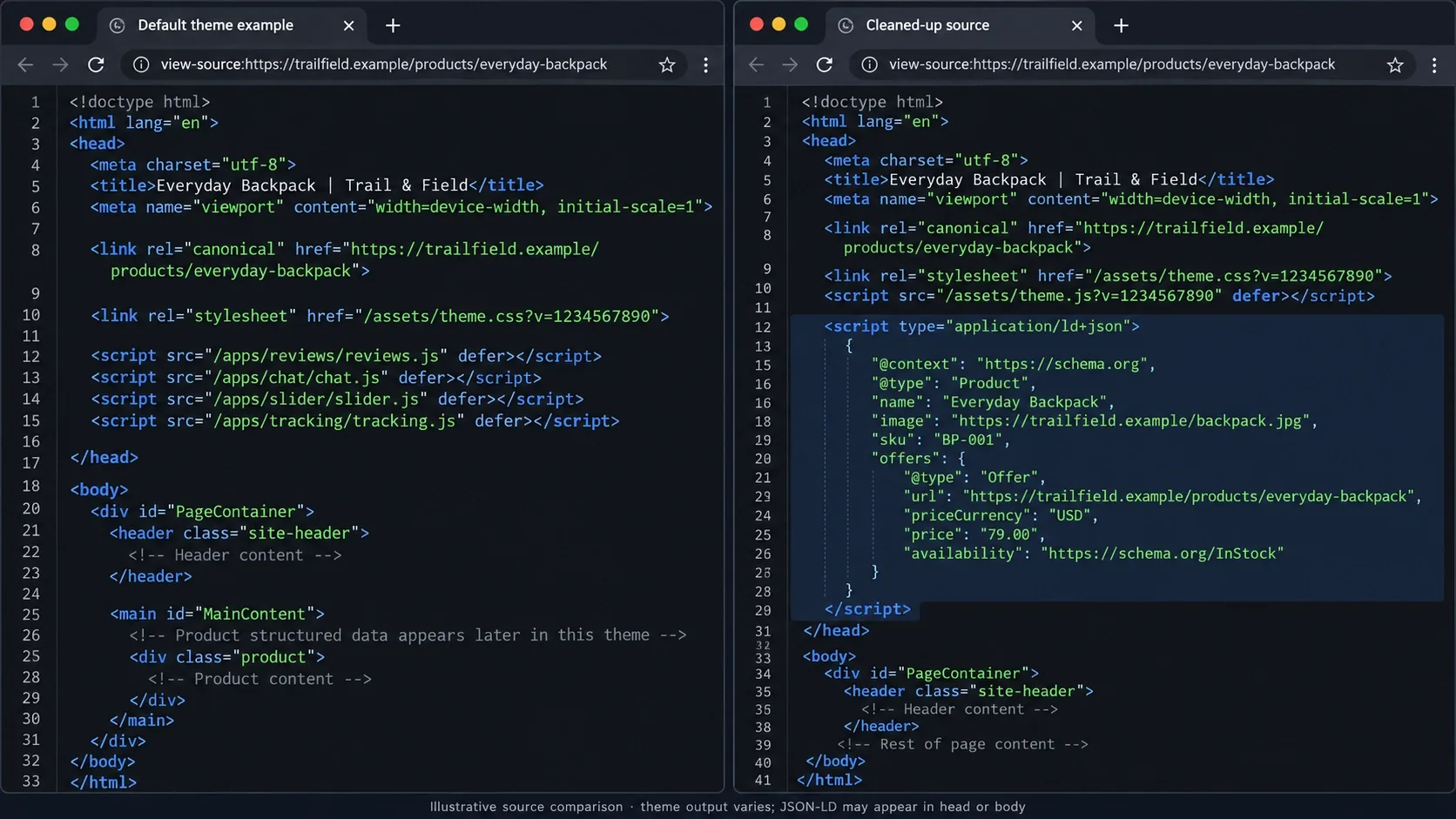
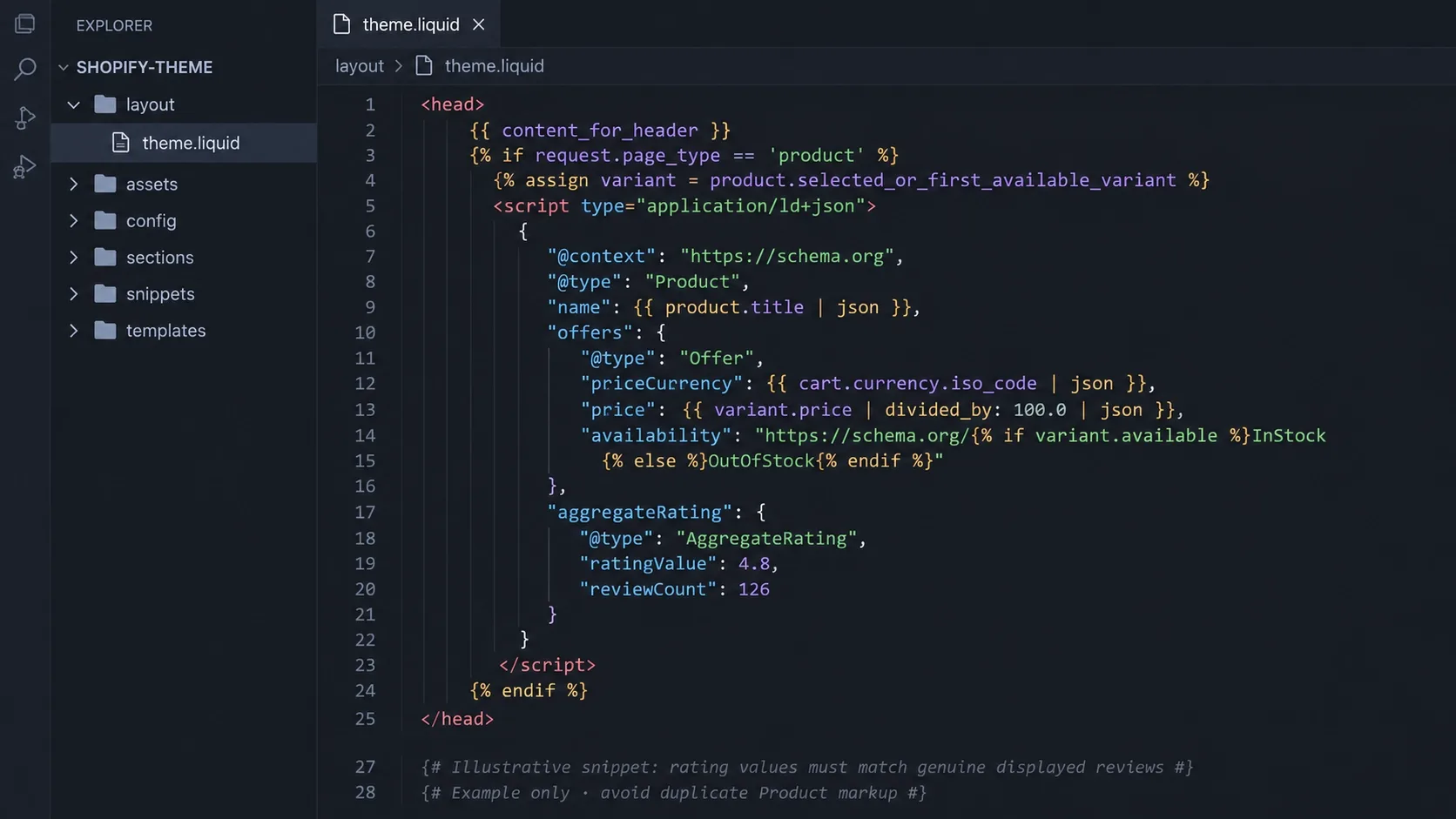
Shopify themes frequently ship incomplete or outright broken Microdata - a Product type missing its Offer, or an AggregateRating block that only populates when a specific reviews app is installed. JSON-LD now runs on 55.5% of the web, and it's the format both Google and AI answer engines trust most precisely because it sits cleanly in the page head, independent of whatever visual markup the theme renders.
Inject clean, nested JSON-LD directly in theme.liquid - Product, Offer, AggregateRating, and MerchantReturnPolicy, all populated dynamically from the same Liquid objects the page already renders, so price and stock data can never drift out of sync between what a shopper sees and what a crawler reads. I cover the template-level mechanics in more depth in How Schema Markup and Web Design Work Together.
5. Ruthlessly Audit Third-Party App Scripts
Store owners love installing apps for popups, trust badges, and loyalty programs, and each one ships its own render-blocking script whether the current page actually needs it or not. Shopify's App Store alone now lists over 30,000 published apps from more than 18,000 vendors, and the average store isn't running one or two - it's running a genuine stack.
Open Chrome DevTools' Coverage tab on your top templates and look at how much of each loaded script is actually executed versus simply parsed and discarded. Replace what you can with a static facade that only loads the real script on click or hover, and manually strip leftover theme code from apps you uninstalled months ago - most theme files still carry dead snippets nobody remembered to remove. BootLeads' August 2026 field data put Shopify's own Core Web Vitals pass rate at 81.7% of stores with complete data, meaningfully ahead of other major platforms in the same dataset - a real advantage that an unmanaged app stack erodes one popup at a time.
An Uninstalled App Rarely Takes Its Code With It
Dead scripts from apps you removed months ago are still costing render time right now. Vareweb audits your actual theme code - not just your app list - as standard practice on every Shopify build.
6. Build a Content Hub Architecture
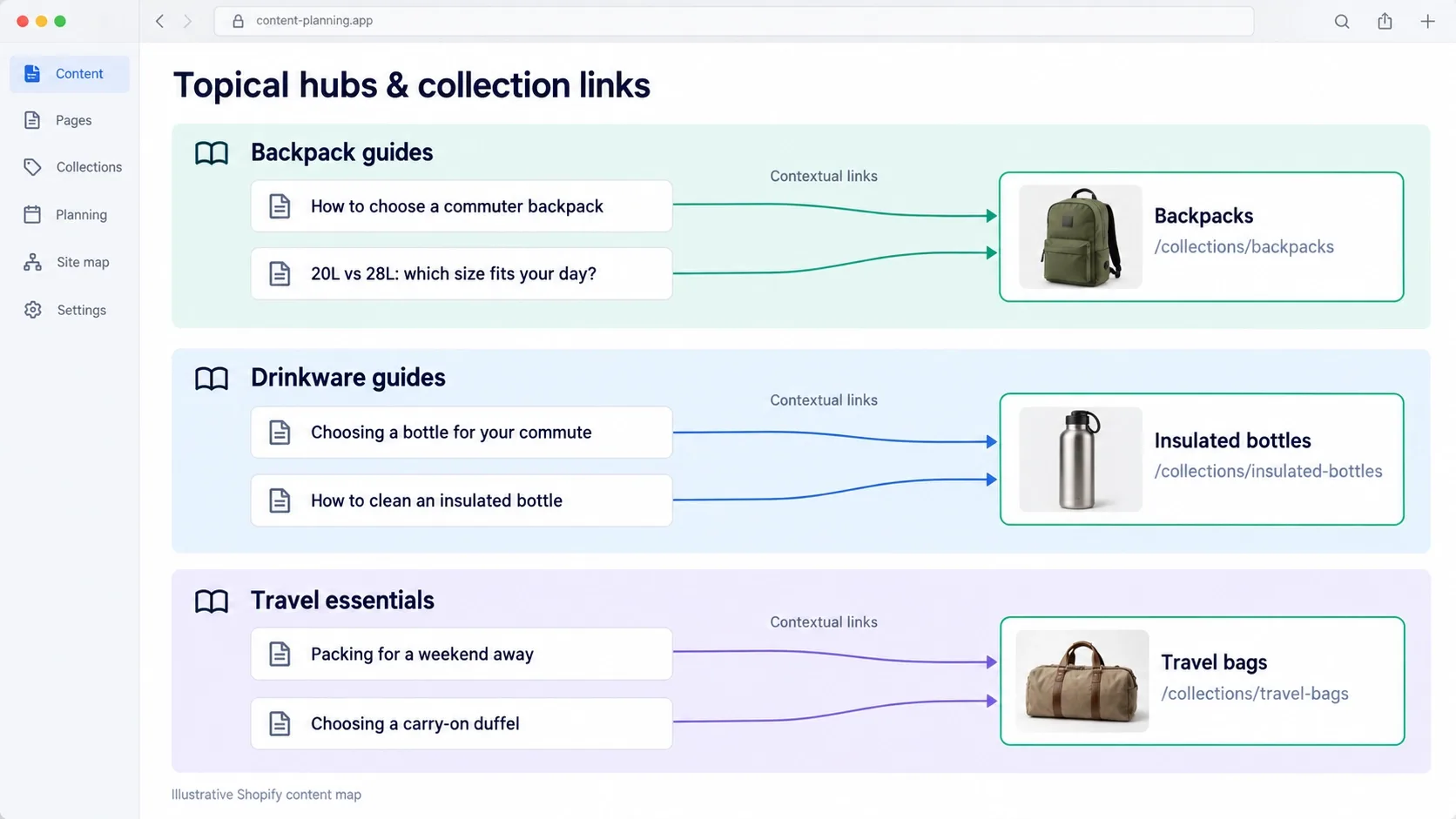
Shopify's blog lives at /blogs/news/ by default, isolated from the collections it should be driving revenue toward. A brand can publish genuinely good buying guides for years and see almost none of that traffic convert, because nothing on the page tells a reader - or a crawler - which collection that guide actually supports.
Group articles into clear topical hubs and link contextually back to the specific collection each one supports, using descriptive, keyword-rich anchor text rather than a generic "shop now" button. A guide on layering winter jackets should link directly to the winter-jacket collection mid-paragraph, not just in a footer CTA - that's the difference between a blog that builds topical authority and one that sits completely isolated from the revenue it should be generating.
7. Optimize Shopify Image Delivery with WebP/AVIF and Native Aspect Ratios
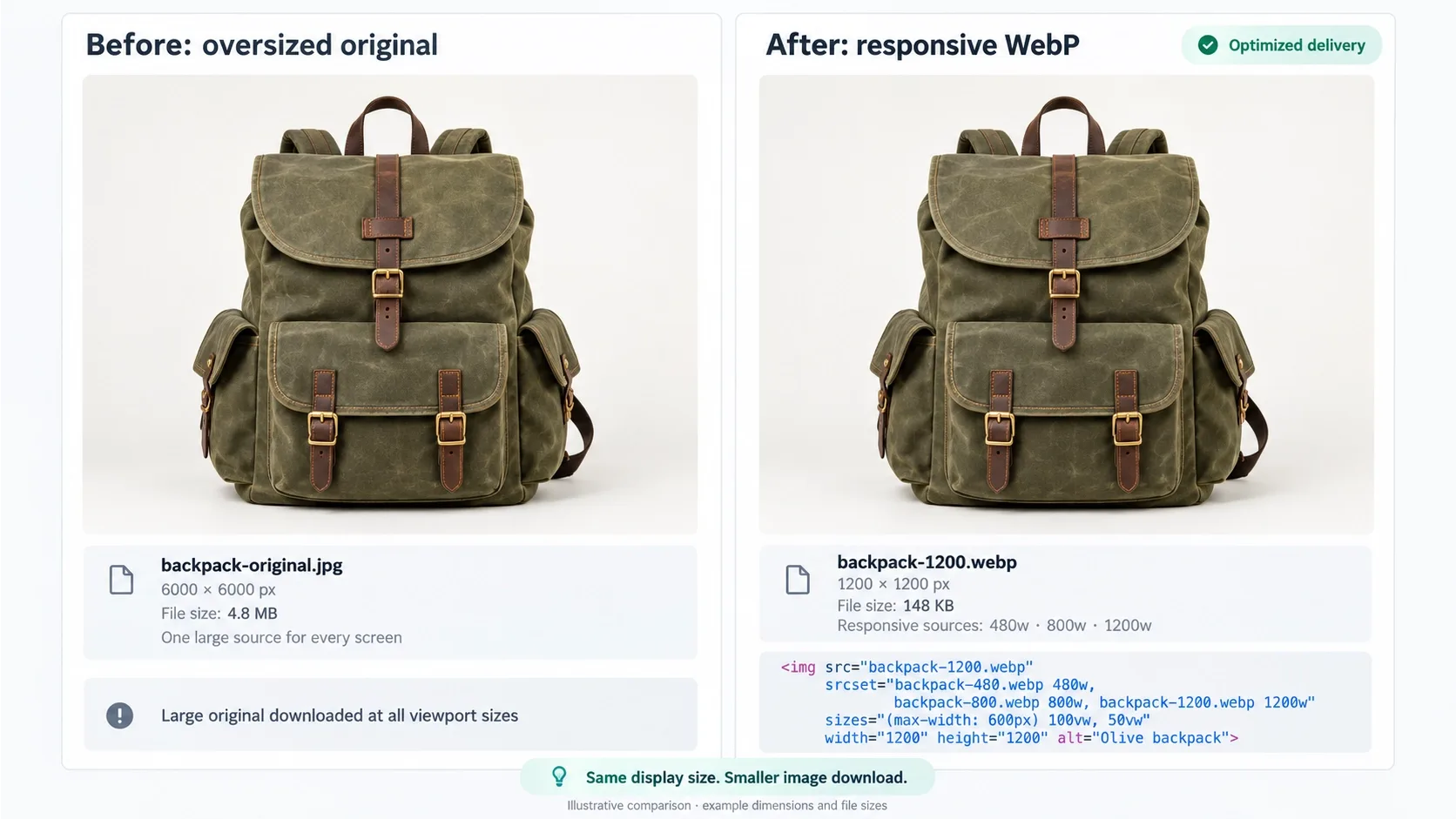
Shopify's CDN handles image delivery, but it can't fix oversized source assets on its own - a 4MB product photo uploaded straight from a DSLR still ships at a size no mobile connection renders quickly, CDN or not.
Use Liquid's image_url and image_tag filters with explicit srcset and sizes attributes, forcing genuinely responsive delivery rather than relying on the browser to guess. Pair every image with an explicit aspect-ratio so the layout never shifts while the image loads - I cover this exact CLS mechanism in more depth in 11 Best UI/UX Design Tips for Flawless Core Web Vitals, and it applies identically whether the image in question is a hero banner or a product thumbnail three rows down a collection grid.
8. Overcome Shopify's Rigid URL Structure Limitations
Shopify forces /products/, /collections/, /pages/, and /blogs/ as permanent URL prefixes, and no amount of app-store shopping removes them - this is a platform-level constraint, not a configuration option.
Work with the hierarchy instead of fighting it: logical, keyword-focused handles for every product and collection, a genuine sub-collection structure rather than one flat catalog dumped into broad categories, and BreadcrumbList schema on every template so both users and crawlers understand exactly where a page sits in that hierarchy. A rigid prefix is a minor cost. A flat, unstructured catalog underneath it is a much bigger one.
I've seen stores treat the fixed prefix as an excuse to skip sub-collections entirely, reasoning that the URL is already constrained so further structure barely matters. That reasoning gets the cost backwards - the prefix is fixed either way, so the only lever actually left in your control is everything after it, which makes getting that part right more important, not less.
The Fixed Prefix Is a Minor Cost. What's Under It Is the Real Lever.
Shopify's /products/ and /collections/ prefixes aren't going anywhere - but logical handles, real sub-collections, and BreadcrumbList schema are entirely within your control. Vareweb builds that structure in from the start.
9. Implement an llms.txt File for Generative Engine Optimization
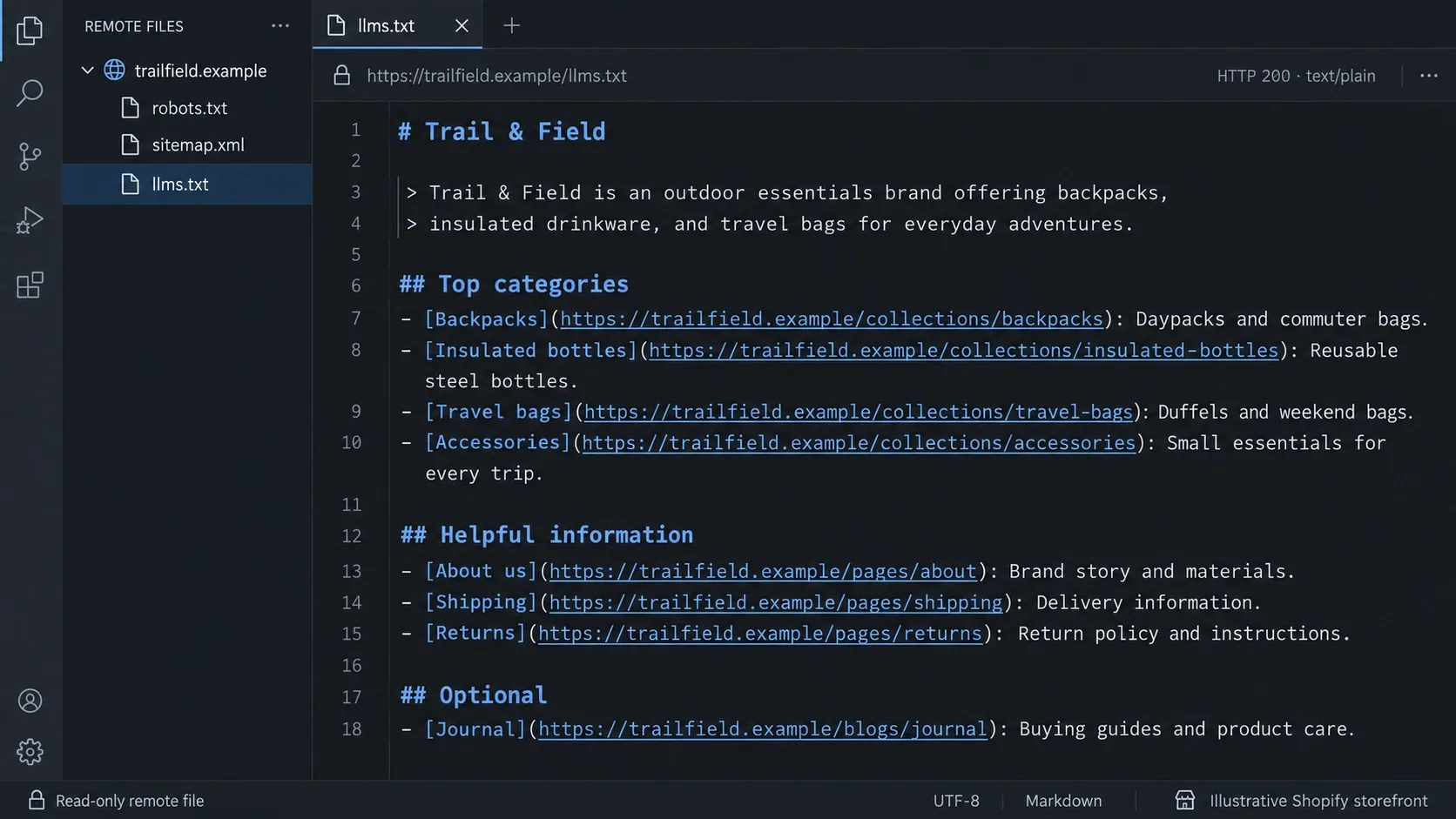
AI shopping assistants increasingly work from submitted product feeds and machine-readable summaries rather than crawling your page the way a human browses it. OpenAI's own March 2026 update to ChatGPT shopping confirmed merchants now share catalogs through the Agentic Commerce Protocol so their products are fully represented inside conversational search, with major retailers already integrated.
Host a genuine llms.txt file at your store's root - served as a static asset or through Liquid - summarizing your brand, top categories, and buying policies in plain Markdown an agent can parse without executing a single script. I go deeper on the broader access question in Tips to Build AI-Agent-Friendly Websites, and pair this with the citation mechanics in How to Get Your Website Cited by AI Search Engines.
Treat this the way you'd treat a new sales channel launch, not a technical footnote - a submitted feed that goes stale the week after launch does more harm than no feed at all, since an agent citing outdated stock or pricing damages trust in a way a missing citation never does.
10. Optimize Product Variant Strategy
Whether color variations should be separate product pages or dropdown options is a genuine strategic decision, not a default to accept blindly. A dropdown keeps reviews and page authority consolidated on one URL. Separate pages let you target specific long-tail keywords - "black leather biker jacket" against "red leather biker jacket" - directly, each with its own title tag and description.
Split variants into distinct URLs only when search volume genuinely justifies it and the variants differ enough to avoid self-cannibalization - two nearly identical pages competing for the same query just splits your own authority between them. Check actual keyword volume per variant before deciding; the split is a win when the long-tail terms are real, and a self-inflicted wound when they aren't.
11. Use Semantic HTML for Structural Headers
Theme builders default to styled <div> tags for visual hierarchy far more often than genuine <h2> and <h3> elements, because a div is easier to style freely. The visual result can look identical. The underlying signal to a crawler is not - heading tags are how both Google and an AI extraction pass understand what a section of the page is actually about.
Audit your product and collection templates specifically for this: product titles, collection descriptions, and section headers all need genuine semantic tags, not a div with a heading-sized font applied through CSS. This single fix does double duty, since the same heading structure that helps Google parse a page is what a screen reader relies on too - accessible markup and machine-extractable markup are, in practice, the same underlying requirement.
12. Customize robots.txt.liquid to Control Crawling
Shopify now lets merchants edit robots.txt.liquid directly, which closes a gap that used to force reliance on whatever the platform shipped by default. Use it deliberately: disallow internal search result pages, cart URLs, and admin-adjacent paths that were never meant to rank, while explicitly confirming that AI crawlers - OpenAIbot, PerplexityBot, ClaudeBot - retain access to your actual catalog.
This is the same distinction worth making everywhere crawler access comes up: blocking a scraper you have real cause to distrust is a defensible policy choice, and blocking the same answer engines you want citing your products is a self-inflicted visibility problem wearing a security-policy costume.
Blocking the Answer Engines You Want Citing You Is a Policy Mistake
A security-focused robots.txt template inherited by default can quietly block OpenAIbot, PerplexityBot, and ClaudeBot right alongside the scrapers you actually want kept out. Vareweb sets crawler rules deliberately, not by accident.
13. Upgrade On-Site Search to Semantic Discovery
Native Shopify search relies heavily on exact keyword matching, which fails the moment a shopper types "warm jacket for rainy weather" instead of a literal product name. Site searchers convert at consistently higher rates than browsers across virtually every ecommerce benchmark study, for the obvious reason that typing into a search bar signals real purchase intent rather than idle browsing.
Integrating a genuinely semantic, vector-based search layer - whether through a dedicated app or a custom API endpoint - closes the gap between what a shopper means and what your catalog's product titles literally say, which matters most for exactly the high-intent searchers a weak native search engine currently fails.
Check your own zero-results rate before assuming this isn't worth the build - most merchants have never actually pulled this number from their search analytics, and it's routinely far higher than expected once someone finally looks. Every zero-results query is a shopper who told you exactly what they wanted and left empty-handed.
Ready to Fix What's Capping Your Shopify Rankings?
Vareweb's Shopify Development and Ecommerce SEO teams fix canonical logic, crawl paths, schema, and performance together - so your store stops competing against its own architecture. One team, accountable for the whole result.
14. Implement Internal Link Modules in Product & Collection Templates
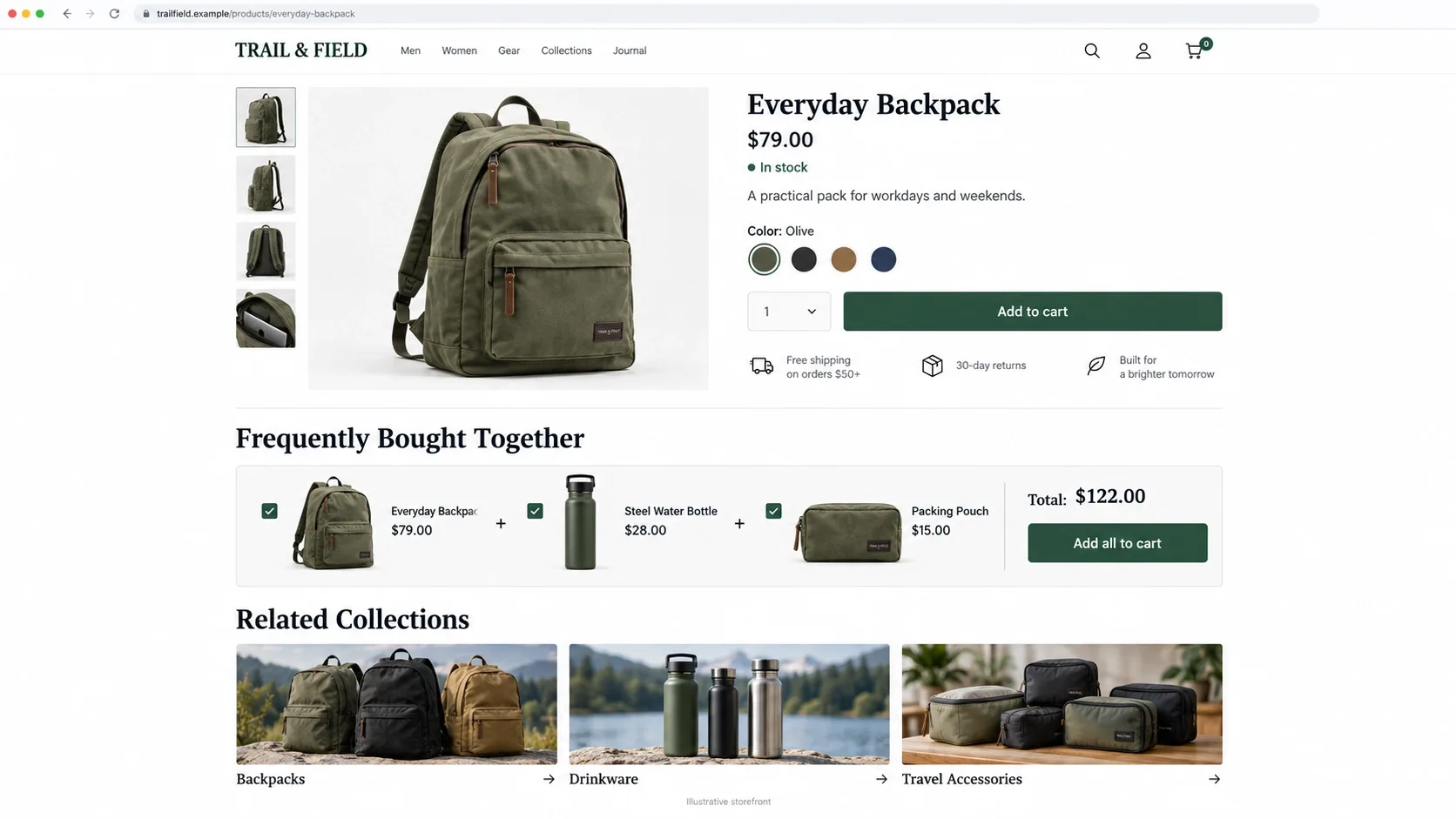
Build automated cross-linking directly into your Liquid templates rather than hoping a merchandiser remembers to add it manually to every new product. "Related Collections," "Frequently Bought Together," and "Popular Categories" modules coded into the template layout spread internal PageRank across deeper catalog pages automatically, every time a new product gets added.
This matters most for the pages furthest from your homepage - a product four clicks deep in a sub-collection rarely earns a link any other way, and it's exactly the kind of page a manual linking strategy quietly forgets. A templated module fixes that permanently, whereas an editorial checklist item just gets skipped the third time someone's in a hurry.
FAQs
Is Shopify bad for technical SEO out of the box?
Not bad, but unfinished - the platform handles basics like SSL, sitemaps, and canonical tags reasonably well, while leaving duplicate URL patterns, tag-page bloat, and incomplete schema as default gaps most merchants never realize they need to close.
How long does it take for a Shopify store to rank on page 1 of Google?
Highly variable, but three to six months of consistent technical and content work is a realistic baseline for competitive commercial terms, longer for genuinely high-competition categories and faster for narrow, well-served niches.
Do I need an SEO app to get my Shopify store to rank?
No - most SEO apps only add basic microdata and title-tag editing, both of which can be handled directly in theme code with more control and no added script weight. Apps add convenience, not capability you couldn't otherwise build.
How do I fix duplicate content issues on Shopify?
Audit every internal link source - collection grids, related products, search results - for which URL variant they actually output, and standardize all of them to the canonical /products/ path rather than the nested collection URL.
Why are my Shopify collection pages not ranking for keywords?
Usually one of three causes: thin or absent collection copy, that copy sitting entirely above the product grid where engagement metrics suffer, or tag-page bloat from filters diluting the crawl budget the base collection page needs.
Can Shopify stores get cited in ChatGPT and Google AI Overviews?
Yes - through clean, dynamically populated JSON-LD, a genuine llms.txt file, and explicit crawler access for answer engines rather than blanket bot-blocking rules inherited from a security-focused robots.txt template.
Should I delete unused Shopify apps to improve SEO?
Yes, and check the theme code afterward too - uninstalling an app rarely removes every script and snippet it left behind, and those orphaned fragments keep costing render time long after the app itself is gone.
What is the best URL structure for Shopify products and collections?
Logical, keyword-focused handles within Shopify's fixed /products/ and /collections/ prefixes, genuine sub-collections rather than one flat catalog, and consistent BreadcrumbList schema confirming hierarchy on every template.

Written by
Kashaf
Kashaf is a veteran SEO specialist with deep expertise in AI SEO, generative engine optimization, ORM, web strategy, and marketing automation. With a Master's in Computer Science, he blends search strategy with technical insight into websites, automation workflows, and AI-driven platforms, helping brands dominate traditional search while adapting to the future of AI-powered discovery.