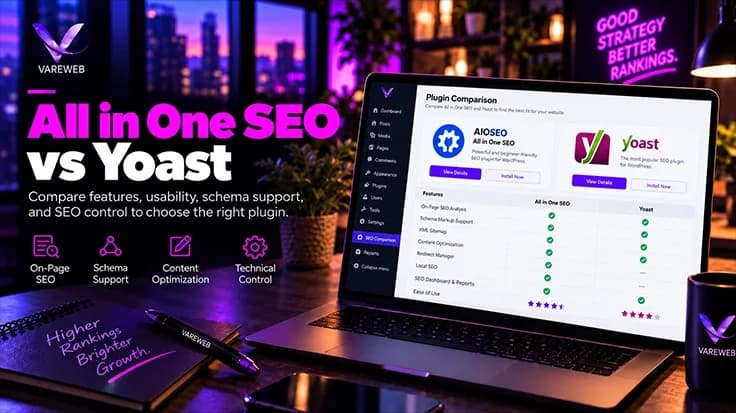
Quick Answer: Which is better, All in One SEO or Yoast? Neither one ranks your site better on its own, because Google only sees the HTML both of them produce. Yoast fits editorial teams that want strict guardrails, steady releases and a connected schema graph out of the box, while All in One SEO fits beginners and marketers who want setup wizards, block-based local tools and a newer interface. Choose the plugin your team can use to ship clean meta tags, JSON-LD and sitemaps fastest.
Here is the raw truth about the All in One SEO vs Yoast debate: Google never sees which plugin you installed. It sees HTML. A title tag, a canonical, a robots meta tag, a JSON-LD graph, an XML sitemap. Both plugins output all of it, so the real decision is workflow, database footprint and how much friction each one adds for your team. As of October 6, 2026, Yoast SEO lists more than 10 million active installations at version 28.6, released September 29. All in One SEO lists 2+ million at version 5.0.2.1, even though its own description claims over 3 million website owners. I trust the directory's measured tier over a marketing line. Either way, these are the two legacy giants.
Most Yoast vs All in One SEO posts I read are written from an affiliate dashboard, not from a database. I would rather tell you what I check on real sites. Whether I am optimizing a local blog or providing full-stack eCommerce web development services, the SEO plugin has to stay out of the way of server response time, the editor and the developer who inherits the site next year.
I have run both plugins on publisher blogs, affiliate sites, local service sites and WooCommerce stores, and I have moved sites between them in both directions. I judge them on schema depth, indexation reliability and database impact, not on which vendor sends the friendlier newsletter. For the wider market beyond these two, I ranked ten options in my review of the best SEO plugin for WordPress.
The Plugin Is Rarely What's Holding Your Rankings Back
Google only sees your HTML, so crawlability, indexation, site structure, and content matter more than which plugin writes your meta tags. Vareweb runs a free technical and competitive audit and shows you what to fix first.
Quick Comparison: Yoast vs AIOSEO at a Glance
| Feature area | Yoast SEO (Free & Premium) | All in One SEO (Free & Paid) |
|---|---|---|
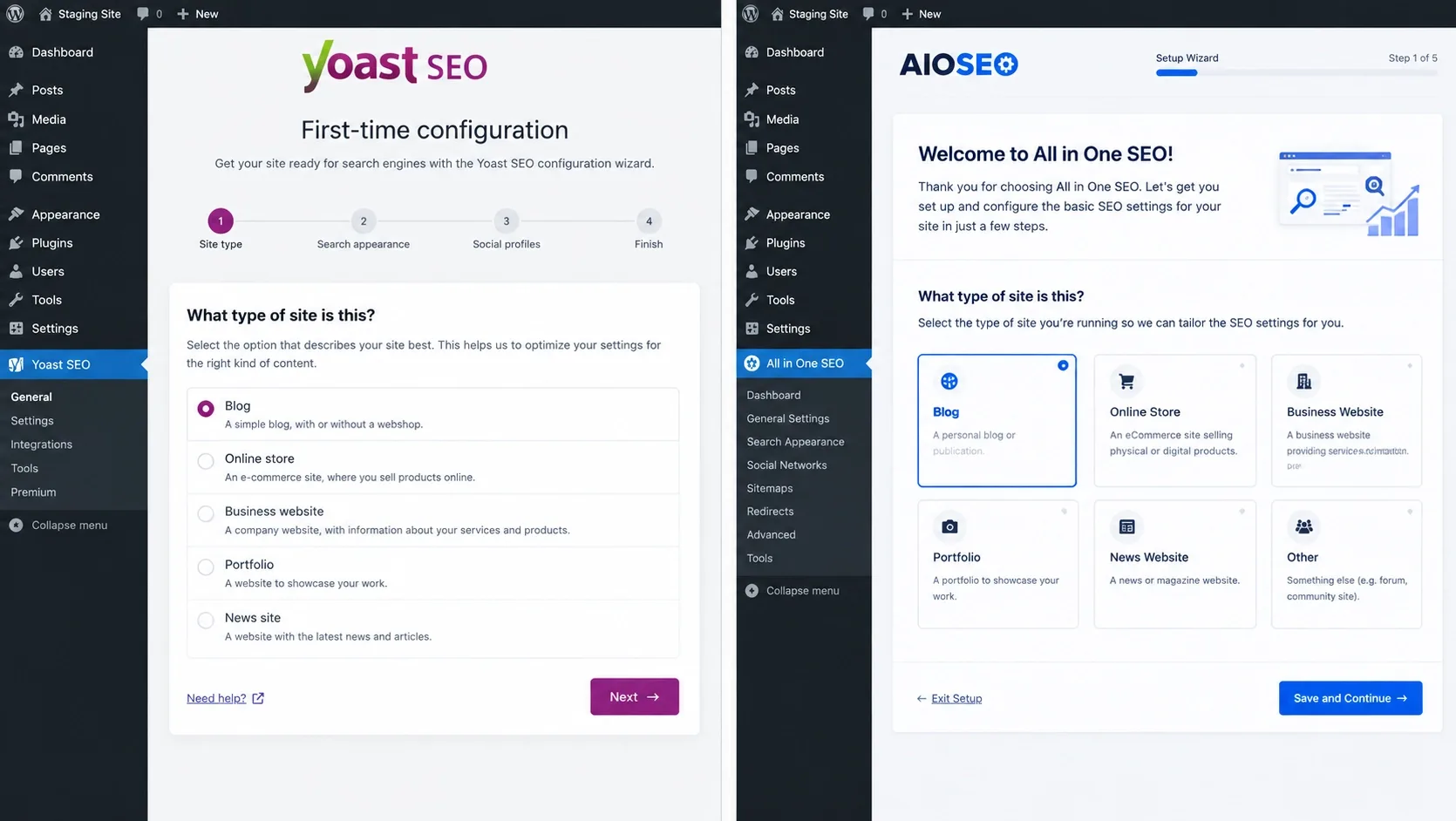
| Setup | First-time configuration wizard covering the essentials and schema basics. Settings then split across several screens. | Setup wizard that promises configuration in under five minutes. Point-and-click importer from Yoast, Rank Math and SEOPress. |
| Content analysis | SEO, readability and inclusive language checks with traffic-light scoring. Up to five keyphrases in Premium. | TruSEO scoring for on-page SEO and readability, plus a headline analyzer. Extended to WooCommerce product categories in 5.0.1. |
| Schema markup | Connected JSON-LD graph generated automatically. Premium adds more types, E-E-A-T signals and schema aggregation for NLWeb. | Visual Schema Generator, AI schema generation, FAQ block with JSON schema and author or reviewer blocks. Some depth is paid. |
| Redirection manager | Premium: bulk tools, CSV import and export, prompts when URLs move or get deleted. | Paid: redirect rules, 404 logging and full-site redirects. |
| Database weight | Indexables tables plus legacy post meta keys. First run needs an SEO data optimization pass. | Custom tables such as aioseo_posts plus aioseo_ options. Post meta copy kept only for compatibility. |
| Local SEO | Yoast Local SEO bundled with Premium: local schema, store locator and opening hours. | Paid Local SEO module with multiple locations, hours, map and location blocks. |
| AI features and visibility | AI Generate, Optimize, Summarize and Content Planner in Premium with no credits. llms.txt management, bot blocker and Abilities API. | AI content, image and schema generators on a credit balance. llms.txt generator, AI Insights report and a built-in MCP server. |
| Security (2026 record) | Three medium-severity CVEs patched (schema block, HowTo block, Premium redirects). Requires WordPress 6.9 or higher. | Medium-severity issues in an AI endpoint, the SEO Preview and search shortcodes, with the latest fixes in 5.0.2 and 5.0.2.1. Lists WordPress 5.7 as minimum. |
| Pricing | Free core. Premium bundles AI tools, redirects, Local, Video and News SEO and support. | Free core. Tiered paid plans. AI runs on credits. Check renewal prices. |
The Legacy Battle: All in One SEO Pack vs Yoast History
The All in One SEO Pack vs Yoast story starts earlier than most users remember. AIOSEO describes itself as the original WordPress SEO plugin, founded in 2007. Yoast's own listing dates its history to 2008. For years the Yoast vs All in One SEO Pack choice was simple. The Pack was the old default everybody installed and nobody loved. Yoast was the plugin that taught writers SEO with a traffic light. Then AIOSEO was rebuilt with a modern admin app and a setup wizard, and the gap closed.
Ownership changed too. The wordpress.org listing now credits the team behind WPForms, MonsterInsights and OptinMonster, which is the Awesome Motive portfolio. That explains the product-suite instincts: cross-promotion, upgrade prompts, a paid tier for everything. Public ratings show how each is received. Yoast sits at 4.8 stars across 27,819 reviews. AIOSEO sits at 4.7 across 5,218.
Both release constantly, which cuts two ways. Yoast ships roughly every two weeks, with 28.5 on September 15 and 28.6 on September 29. AIOSEO's 5.0.2 changelog alone lists dozens of fixes. Neither plugin is set-and-forget, and the sections below show why.
A Plugin Is Only as Good as How It's Configured
Default settings often leave sitemaps, canonicals, structured data, and Core Web Vitals half-finished. Vareweb handles technical SEO implementation end to end, so your setup works in search instead of just turning the traffic lights green.
All in One SEO vs Yoast: The Head-to-Head Breakdown
Each section below gives Yoast SEO and All in One SEO their own sub-heading, so you can read one plugin at a time. Anything both plugins share, and my bottom line, sits outside those sub-headings.
Setup Wizards and Dashboard UI: Who Makes It Easier?
Yoast SEO
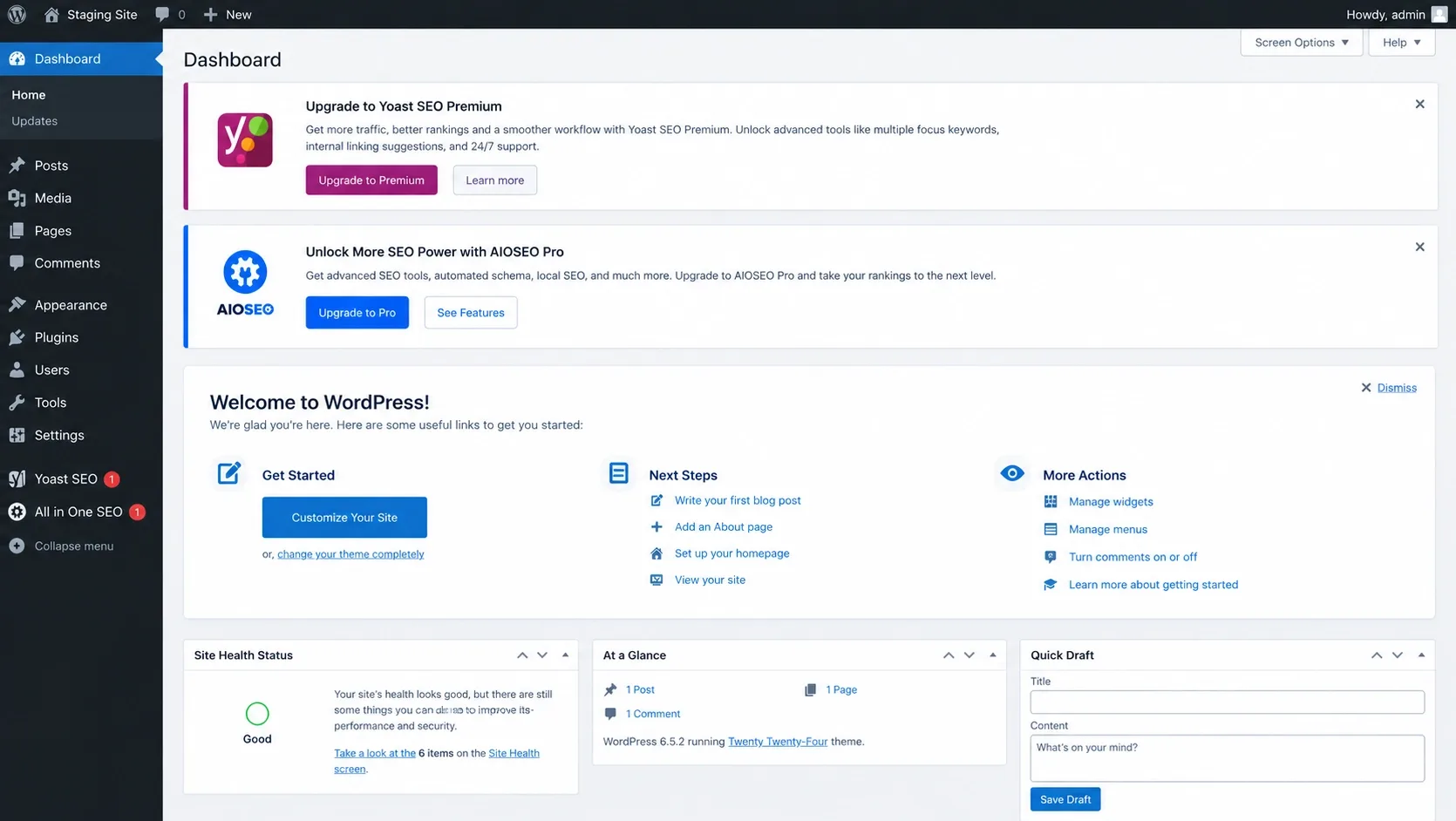
Yoast greets you with a first-time configuration that covers the essentials. After that the settings fragment: general settings, search appearance, an integrations page, tools. Version 28.6 even re-grouped the cards on the integrations page. The editor sidebar carries its own load, with Semrush, Wincher, Elementor and WooCommerce integrations plus Premium prompts you may never need. Its nagging lives in the editor and the sidebar.
All in One SEO
AIOSEO feels more like a single app. The wizard moves quickly, and the importer pulls titles, descriptions and settings from Yoast, Rank Math or SEOPress. The catch is the nudging. AIOSEO keeps promotions in its own notifications table, and that table carries upgrade prompts, including a Get AIOSEO Pro button on a Site Audit announcement. Email reports and dashboard widgets add more. Its nagging lives in a notification center.
Bottom line: Both plugins nag. They just nag in different rooms. On client sites I use Yoast's SEO roles to hand writers the editor panel without the settings screens, which keeps the clutter away from people who should never touch canonicals. A first-time site owner will find the AIOSEO wizard friendlier. A ten-person editorial team will like Yoast's predictable panels.
On-Page Optimization: Traffic Lights vs TruSEO
Here is the raw truth about those green content scores: Google cannot see them. The June 5, 2026 update to Google's guidance on third-party SEO tools says third-party tools do not have access to Google's internal ranking data and cannot guarantee performance. A green dot means you completed the plugin’s checklist. It says nothing about rankings.
Yoast SEO
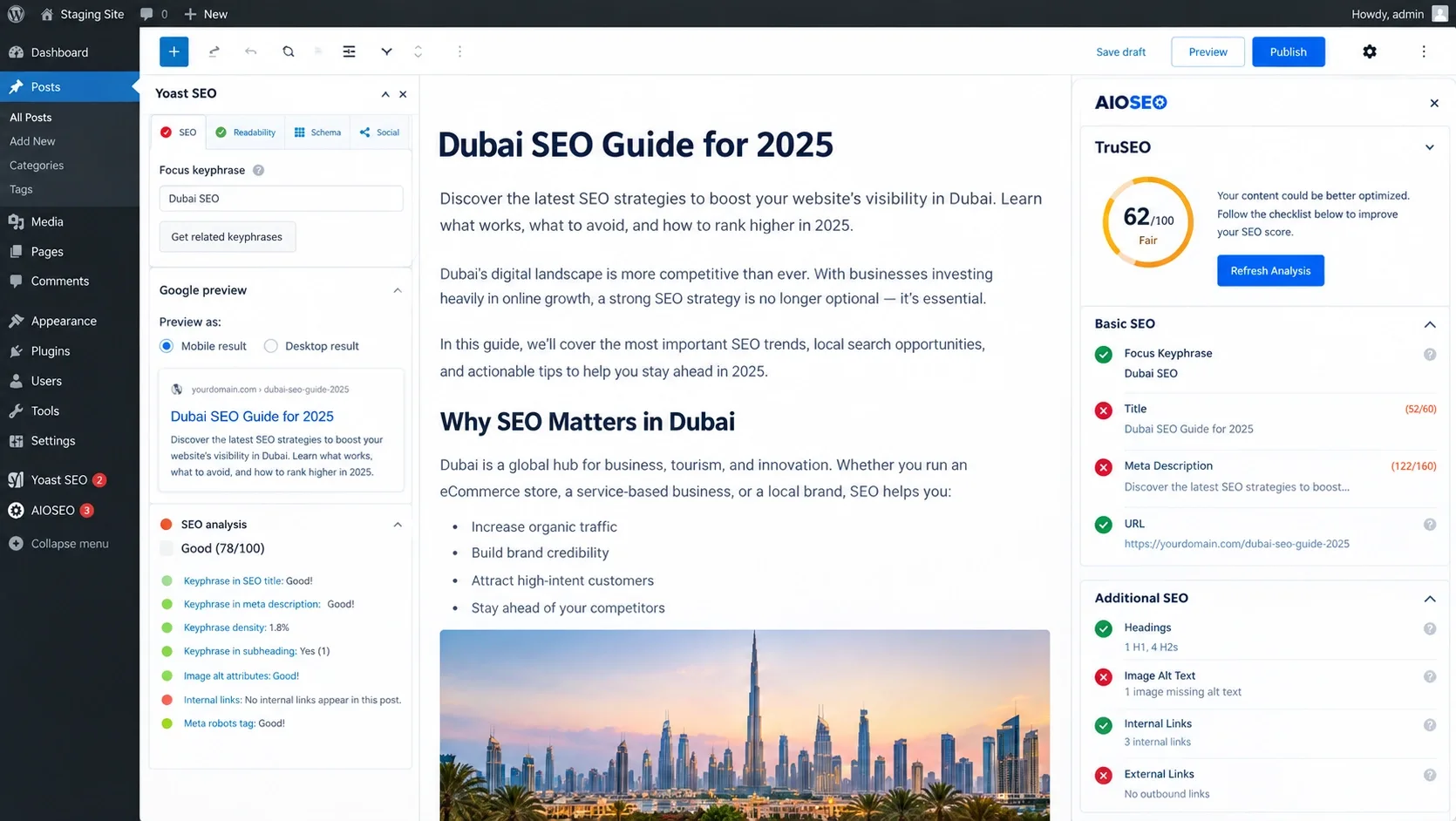
Yoast runs three lenses: SEO, readability and inclusive language, all scored with the traffic light. Premium raises the keyphrase limit to five, and its AI Optimize tool suggests keyphrase placement, distribution and density, with each edit applied or dismissed by you.
All in One SEO
AIOSEO's TruSEO scores on-page SEO and readability and adds a headline analyzer. In 5.0.1 it extended TruSEO to taxonomy terms, starting with WooCommerce product categories, which matters when category pages are your money pages. I cover that side in how to optimize ecommerce category pages for SEO in 2026. One warning: AIOSEO 5.0.2 fixed a bug where the Regenerate TruSEO Score bulk action could clear focus and additional keyphrases. Take a backup before you bulk anything.
Bottom line: Where scoring helps is training. A junior writer learns to use one H1, place the keyphrase early and break up long paragraphs. Where it hurts is obsession. I have watched good paragraphs get rewritten three times to flip a dot, and come out worse. Google's language systems do not count keyphrase density. They read the page. Use the scores as a formatting checklist and nothing more.
Technical SEO and Schema Markup: JSON-LD and AI Readiness
This is the part that matters most in 2026, so I will be specific. Why the markup and the design need to agree is something I unpack in how schema markup and web design work together.
Yoast SEO
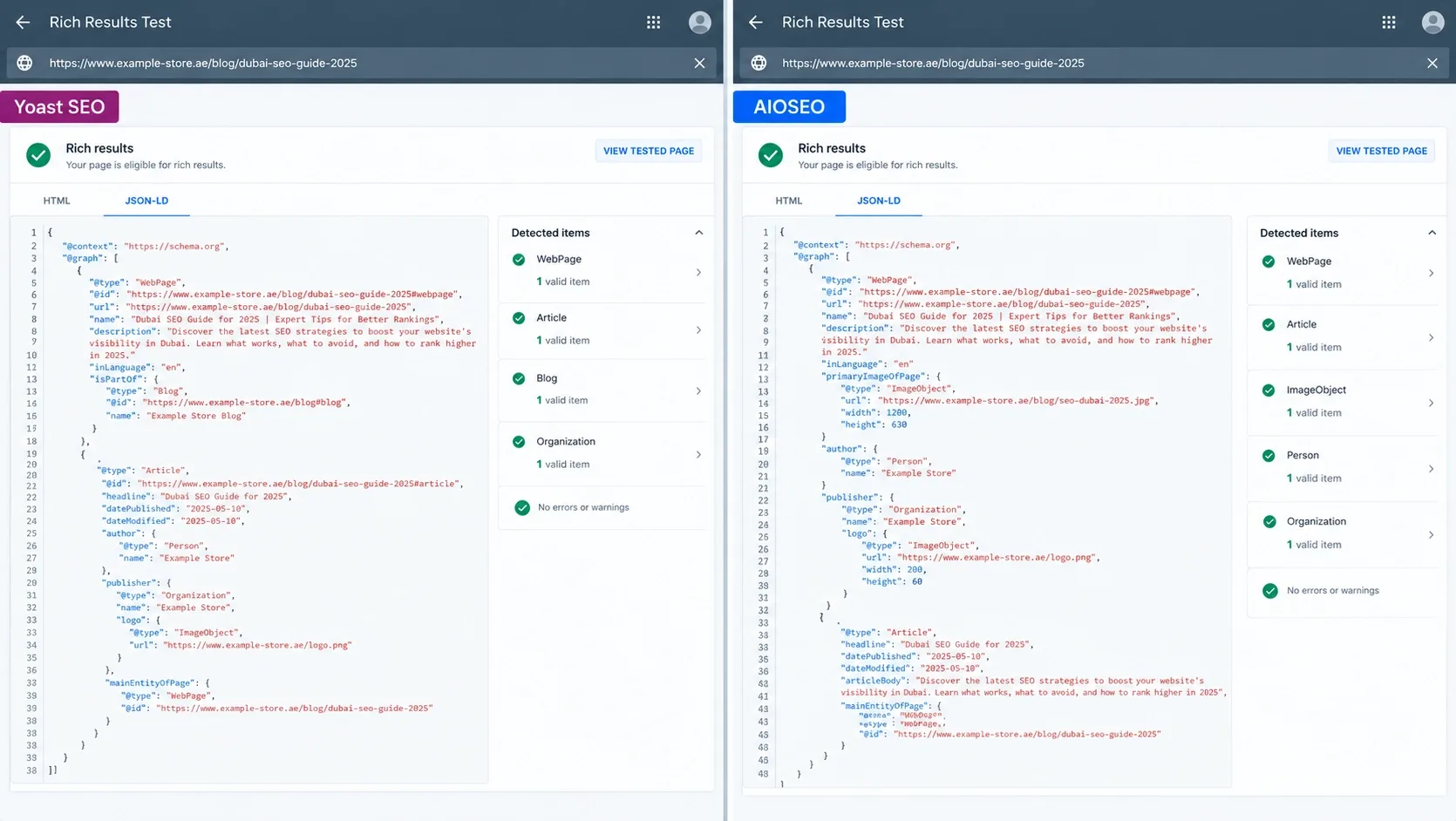
Yoast builds one connected JSON-LD graph per page: WebPage, Article, Organization or Person and Breadcrumb pieces that reference each other. Its Schema API lets developers edit or extend those pieces. Premium outputs more schema types, including E-E-A-T signals, and adds schema aggregation for NLWeb, which merges your structured data into one deduplicated graph.
All in One SEO
AIOSEO takes the visual route: a Schema Generator, an AI schema generator that builds markup from prompts, an FAQ block with JSON schema, author and reviewer blocks for E-E-A-T, and Local Business blocks. Some of that depth is paid.
Schema types compared. For Article, both generate it for posts by default. For LocalBusiness, Yoast supplies it through Local SEO, now bundled with Premium, and AIOSEO through its paid Local SEO module. For FAQPage, both ship FAQ blocks. Google's documentation updates log shows the FAQ rich result stopped appearing in Google Search on May 7, 2026, and the documentation was removed in June. The markup is still valid schema.org and other systems can read it, but it will not earn you an accordion in Google. Keep the block when the questions help readers. Do not pay for it as a rich-result play.
AI Features and AI Visibility: What Each Plugin Actually Offers
Separate three things: AI that helps you write, signals that help machines read your site, and tools that let agents act on it. Be careful with the second. Yoast's own FAQ says nobody can guarantee an AI assistant will mention your site, and Google's documentation log shows a June 15, 2026 note that Google Search does not need llms.txt files, plus an October 1, 2026 update to its generative AI content guidance.
Yoast SEO
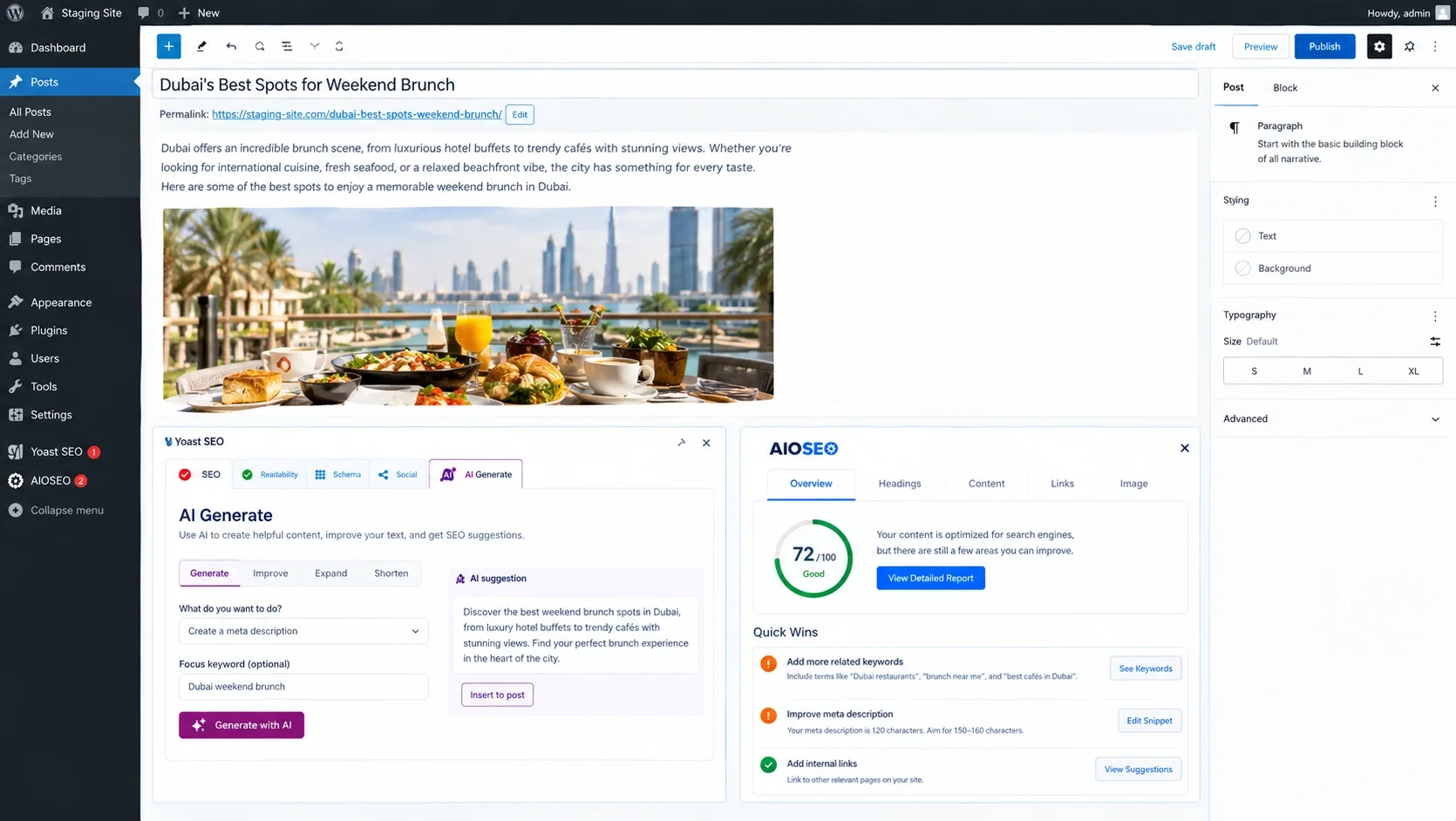
Writing: AI Generate produces five titles and meta descriptions with one-click regeneration, AI Optimize suggests keyphrase fixes, AI Summarize builds a post summary, and Premium adds an AI Content Planner that proposes five site-specific post ideas with a starter draft. Every suggestion waits for your approval, and there is no separate AI subscription or credit top-up. Visibility: llms.txt management with manual page control, a Premium bot blocker for crawlers such as GPTBot, CCBot and Google-Extended, and schema aggregation for NLWeb. Remember that blocking Google-Extended is a training decision. Google's log states it does not affect Google Search.
All in One SEO
Writing: an AI Content Generator for titles, descriptions, FAQs, image alt text and full articles, an AI Assistant block in the editor, bulk AI actions and an AI Image Generator. Visibility: an llms.txt generator, an AI schema generator, and an AI Insights keyword report that, according to its listing, tracks how your brand and content appear in ChatGPT and Google AI Overviews. That is vendor-reported measurement, so cross-check it against Search Console. Agents: a built-in MCP server and Abilities API support. The catch is metering. AI runs on a credit balance with pay-as-you-go top-ups.
No Plugin Can Promise AI Citations. Content and Structure Earn Them.
llms.txt and schema toggles help machines read your site, but they don't make AI engines trust it. Vareweb optimizes for Google and AI search, including AI Overviews, ChatGPT, and Perplexity, through content, entity signals, and technical structure.
Agent access. Both plugins now expose SEO data to AI agents. Yoast 28.6 added two Abilities that let agents get and update SEO data, and AIOSEO pairs its MCP server with Abilities API support. Giving an agent write access to titles and robots rules is a permissions decision, not a feature toggle, and I would start read-only. Minhaj, our Head of Development, explains where AI belongs in a build in where AI fits in the web design process. If you want your site readable by agents in the first place, I list the basics in tips to build AI-agent-friendly websites.
Bottom line: Yoast's AI is bundled and editor-focused. AIOSEO's reaches further, into images, full articles, AI visibility reporting and agent access, but it is metered by credits. Neither plugin makes you citable. Content and structure do that work, and I cover what earns citations in how to get your website cited by AI search engines. Before you publish AI drafts at scale, reread Google's generative AI content guidance.
XML Sitemaps, Redirects and Advanced Controls
Yoast SEO
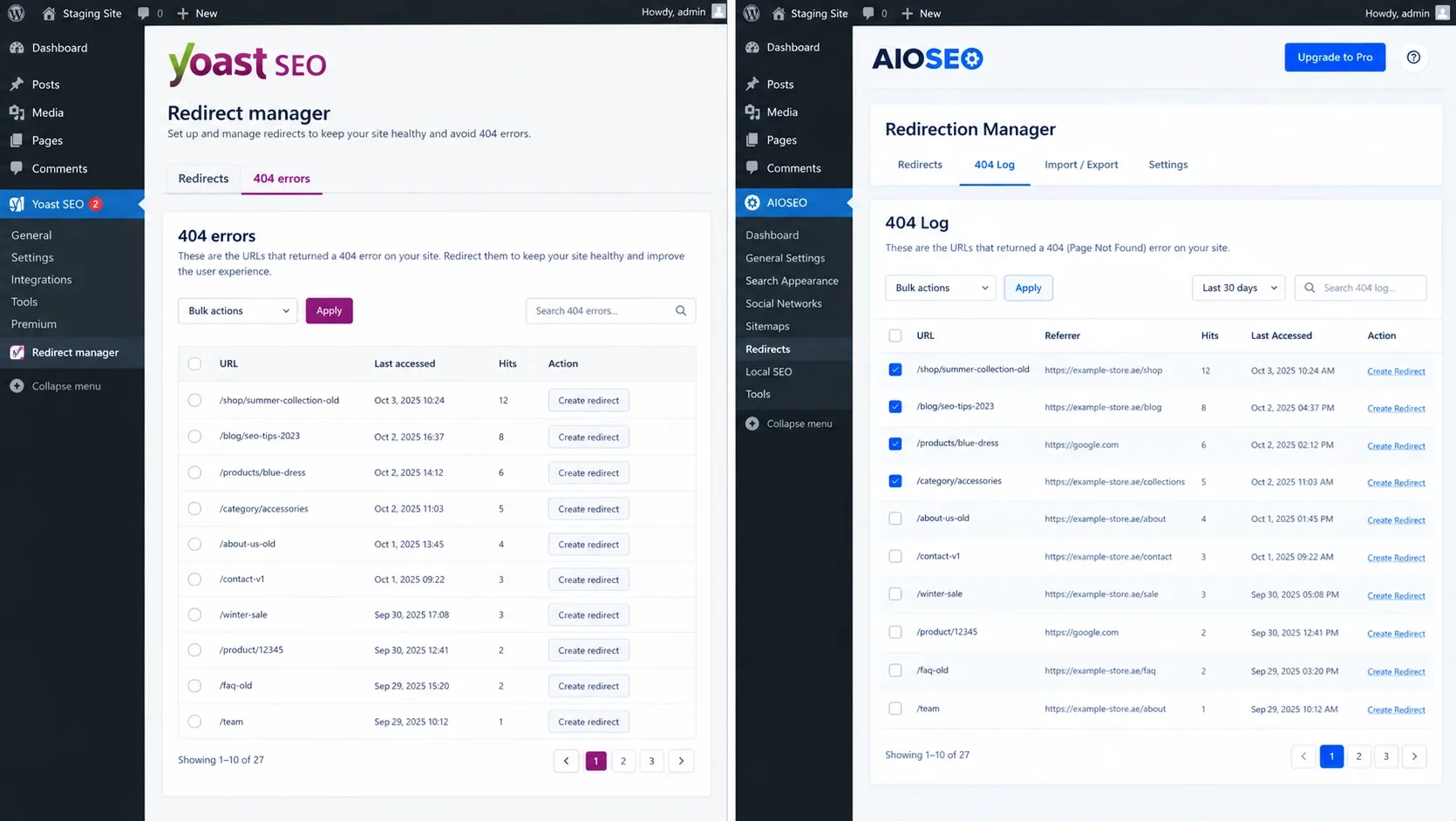
Yoast updates its sitemap index automatically and leaves noindexed post types out. For crawling, it offers crawl settings that reduce unnecessary bot access, with extra options in Premium. Its redirect manager is a Premium feature with bulk tools, CSV import and export, and prompts when content moves or gets deleted.
All in One SEO
AIOSEO adds video, news, RSS and HTML sitemaps, per-sitemap link limits and include or exclude controls. That flexibility has a cost in edge cases. Version 5.0.2 fixed excluded terms still showing up in the sitemap along with their posts, and RSS entries sorted in the wrong order. It also includes a robots.txt editor and per-page robots meta controls. Its Redirection Manager is paid as well and logs 404 errors.
Bottom line: Both replace the default WordPress sitemap, get it mostly right and support IndexNow. Re-crawl the sitemap after updates. Canonicals deserve the same suspicion, because 5.0.2 also fixed canonical and og:url tags pointing to a wrong address on paginated static front pages. My standing rule: after any SEO plugin update, spot-check canonicals on the homepage and on page two of an archive. Both redirect managers suit dozens or low hundreds of rules. For a large migration I prefer server-level rules.
Performance and Database Bloat: The Developer's View
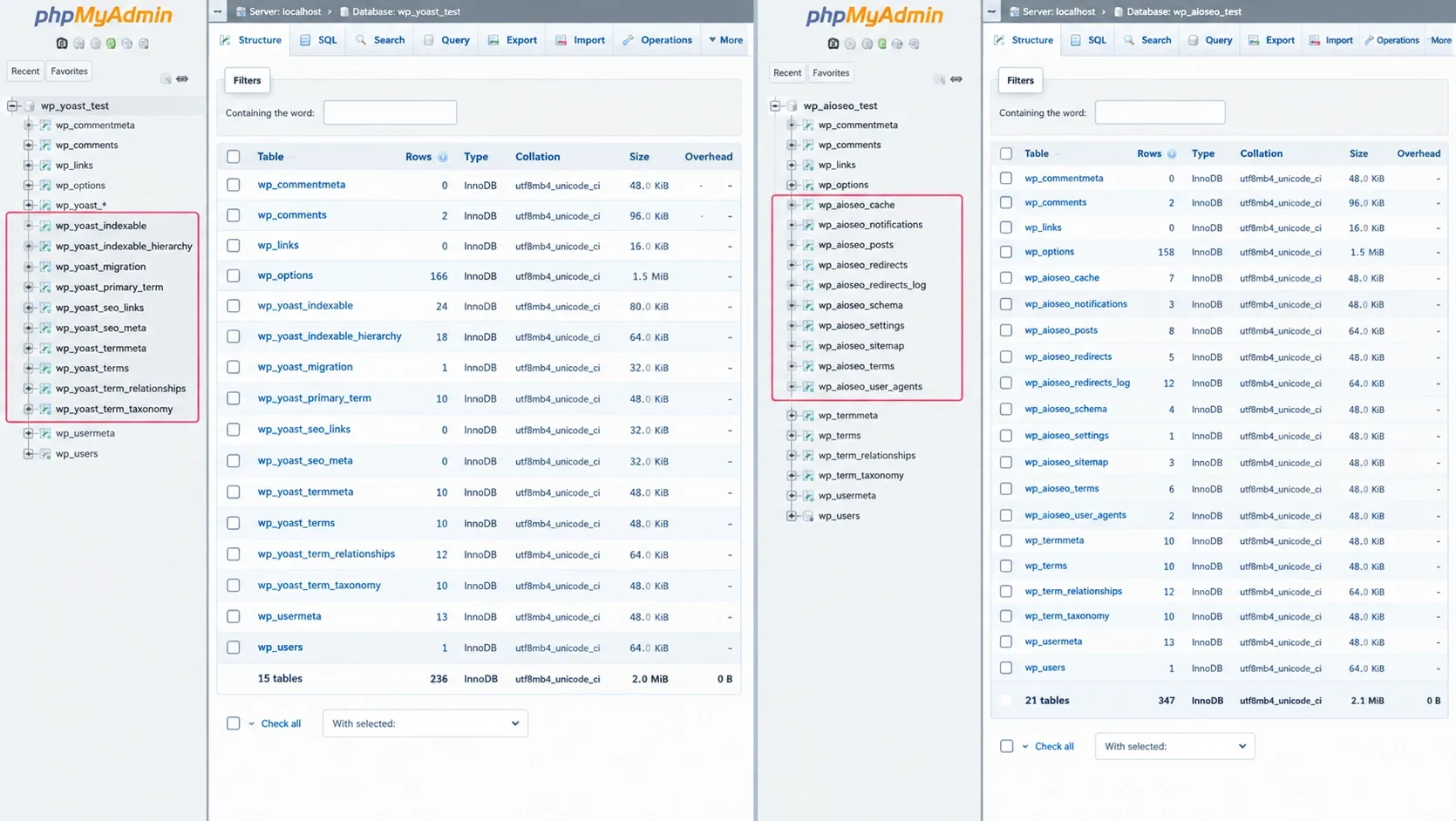
This is where my audit habits matter. Open phpMyAdmin on a fresh install of each and compare.
Yoast SEO
Yoast changed its architecture in version 14.0, when it introduced indexables, which its own announcement describes as a database table holding metadata and URLs for every indexable object. The point was speed: a page’s metadata comes back in one query instead of many. The cost is backend weight. The tables I check first are wp_yoast_indexable and wp_yoast_indexable_hierarchy, and Yoast still writes _yoast_wpseo_ keys to wp_postmeta alongside them.
Indexables need filling. On first run Yoast asks you to run the SEO data optimization, and on large sites the WP-CLI reindex command (wp yoast index, with a --reindex option) does the same job more efficiently. That is the same machinery behind the endless-loop bug fixed in 28.5. When indexing misbehaves on a big site, that table is where I start looking.
All in One SEO
AIOSEO went a different way. Its REST API documentation refers to the custom post and term tables where it keeps SEO data, and its support team has said the real titles and descriptions live in aioseo_posts, with only a compatibility copy in post meta. Settings sit in wp_options under aioseo_options and related keys. Add a cache table, a notifications table and Action Scheduler jobs for migrations. Version 5.0.2 reduced duplicate database queries on admin page loads, which tells you the team watches the admin side too.
Bottom line: Neither plugin is light. Minimalist options such as The SEO Framework are lighter by design. Under high traffic, a page cache hides most of the front-end difference, so the cost shows up in the editor, in cron and in imports. I will not hand you millisecond benchmarks, because host, PHP version, theme and cache change them. Run Query Monitor on the same staging page with each plugin active, compare time to first byte with caching off, and read how important page speed is for SEO in 2026 for what to do with the numbers.
Security and Trust: Vulnerabilities, Permissions and Patching
I checked each plugin's 2026 record instead of trusting either vendor's marketing. This is not an exhaustive database pull, and a raw CVE count proves little, because bigger install bases attract more researchers. What matters is where the bugs sit and how fast they get patched.
Yoast SEO
I found three medium-severity issues, all patched. CVE-2026-1293 (February 6) was a stored XSS through the yoast-schema block attribute that a Contributor could trigger in versions up to 26.8, fixed in 26.9. CVE-2026-3427 was a similar stored XSS in the HowTo block, fixed in 27.2 on March 17. CVE-2026-10821 (September 2) let an Author-level user inject Apache directives into the .htaccess file in Yoast SEO Premium before 27.6.1 when file-based redirect mode was on. None of the entries I found names the current 28.6 release.
All in One SEO
The newest items are only days old. CVE-2026-85492, published October 2, is a DOM-based XSS in the SEO Preview panel for versions up to 5.0.1.1. A user with the aioseo_manage_seo capability has to open a crafted link, and Patchstack lists the fix in 5.0.2. Databases score it between 6.1 and 7.1. CVE-2026-100152, published October 3, covers arbitrary shortcode execution through the search parameter in versions up to 5.0.2, and the 5.0.2.1 changelog lists improved shortcode protections on search pages, so make sure you are on 5.0.2.1. Earlier in the year, a missing capability check on an AI credits REST route let Contributor-level users read the global AI access token in versions up to 4.9.2.
The pattern: every one of these sits in a feature that accepts input from someone below admin level: schema blocks, redirect creation, preview panels, AI endpoints. Both vendors shipped fixes as normal point releases, and wordpress.org shows Yoast with 28 of 32 support issues resolved in the last two months and AIOSEO with 25 of 27. One structural difference: Yoast requires WordPress 6.9 or higher, while AIOSEO still lists 5.7. Check your own core version, because an outdated WordPress is a bigger risk than either plugin.
What I do on client sites: turn on auto-updates for the SEO plugin, keep Contributor and Author accounts to people I trust, use Yoast's SEO roles or AIOSEO's capabilities so only editors reach SEO settings, switch off features nobody uses, keep AI agents read-only, and watch a vulnerability feed. Treat AI features as a data flow as well. Generation runs through the vendor's service, so read the privacy policy before you send client or patient content.
Too Many Plugins Slowing Down Your WooCommerce Store?
Every plugin adds database weight, update work, and security risk. Vareweb audits your plugins, theme, and hosting first, then cuts the bloat, fixes Core Web Vitals, and keeps your store updated and monitored.
Pricing and Premium Features: Are They Worth It?
Both free versions cover a blog’s basics: titles, meta descriptions, sitemaps, schema and Search Console connections. Start free and stay free until a specific missing feature costs you time.
Yoast SEO Premium
Yoast Premium bundles AI title and description tools with no separate credits, a redirect manager, internal linking suggestions, IndexNow, a bot blocker for AI crawlers, schema aggregation, Local, Video and News SEO, and support. For stores, its WooCommerce SEO extension builds on Premium.
All in One SEO Paid Plans
AIOSEO's paid plans add the Redirection Manager, Local SEO, keyword rank tracking, the Link Assistant and WooCommerce SEO, and its AI tools run on a credit balance, so watch that. AIOSEO sells four paid tiers, but every comparison I checked disagreed on which tier unlocks which feature. I am not quoting dollar figures because promotions and renewal prices change. Confirm the tier and the renewal rate on each vendor's page before you buy.
Bottom line: Premium earns its fee on particular jobs, not as a badge. Pay for redirects at scale, internal linking suggestions or local tools when you will use them this quarter. Neither plugin fixes a structural problem, so read common WooCommerce SEO issues and how to fix them before you expect a plugin to rescue a store.
The Final Verdict: Which Is Better All in One SEO or Yoast?
Which is better All in One SEO or Yoast? It is the wrong question. Ask which one your team will configure correctly and keep updated.
Choose Yoast if you have a large editorial team used to its workflow, you want a connected schema graph without manual configuration, and you value steady two-week releases. Its Local, Video and News SEO bundle with Premium also narrows the gap on local work more than most comparison posts admit, and its AI tools come bundled with no credit meter.
Choose AIOSEO if you are a marketer or a local business owner, you want a more modern interface, and you rely on built-in tools like the Link Assistant, the Redirection Manager and block-based local pages, or you want AI visibility reporting, an image generator and agent access in one plugin and are happy to watch a credit balance. If local is the whole business, the plugin module is the easy ten percent. Citations, your profile and reviews are the rest, which is local SEO proper.
Choose neither if your priority is the smallest footprint. That is the lighter-plugin argument I make in my plugin review. Whichever you pick, stay on the latest release, because both plugins shipped security fixes in 2026.
Switching Plugins or Platforms? Don't Lose Rankings in the Move.
Metadata, redirects, schema, and sitemaps all need to carry over cleanly. Vareweb handles migration and optimization with redirect mapping and launch QA, so what you've earned in search stays put. Book a free call and we'll map out the safest route.
If you do switch, treat it as a small migration. The importers carry titles, descriptions and settings, and AIOSEO's documentation says to deactivate the old plugin afterward to avoid duplicate meta tags. Crawl before and after, compare canonicals, and watch Search Console. I list the safeguards in how to migrate your website without losing SEO rankings.
FAQs
Is it safe to switch from Yoast to All in One SEO without losing rankings?
Yes, if you treat it carefully. AIOSEO's importer migrates titles, meta descriptions, schema settings and social meta from Yoast, and redirects need their own import. Deactivate Yoast afterward so you do not output duplicate meta tags. Crawl the site before and after, compare titles, canonicals and robots tags on a sample of URLs, and watch Search Console for a few weeks.
Do I need the premium version of Yoast or AIOSEO?
Not for a simple blog. The free versions handle titles, descriptions, sitemaps and basic schema. Upgrade when a specific paid feature saves real time, such as redirects at scale, internal linking suggestions, local SEO or bulk AI metadata.
Which plugin is better for WooCommerce and eCommerce stores?
Both have paid WooCommerce support, and neither wins on features alone. Yoast offers a dedicated WooCommerce SEO extension built on Premium, with product structured data and a store-specific sitemap. AIOSEO includes WooCommerce SEO in its paid plans and extended TruSEO analysis to product categories. Your catalog structure, canonicals and category content matter more than the plugin logo.
Will running both plugins at the same time help my SEO?
No, it will hurt. Both plugins will try to print title tags, canonicals, robots meta and schema, which creates duplicate or conflicting markup, and duplicate schema graphs are especially messy. Pick one, import the data, and deactivate the other.
Does the Yoast green light guarantee a page-one ranking?
No. The traffic light checks formatting and keyphrase placement against the plugin's own rules. Google has said third-party tools do not have access to its internal ranking data and cannot guarantee performance. Treat green as a checklist, and judge success in Search Console.
Which is lighter on site speed: Yoast or All in One SEO?
Neither is light, and I will not name a winner without your stack. Yoast uses indexables tables to speed up front-end queries and adds backend weight. AIOSEO uses its own custom tables and options. With a page cache, the visitor-facing difference is usually small. Test both on staging with Query Monitor.
Which plugin is more secure, Yoast or All in One SEO?
Neither can be called safer on CVE counts alone. Both patched medium-severity issues in 2026, mostly in features that accept input from lower-privileged users, such as schema blocks, redirects, previews and AI endpoints. As of October 6, 2026, AIOSEO users should be on 5.0.2.1 after two issues disclosed in early October, and Yoast users on the current 28.x release. Turn on auto-updates, limit Contributor and Author accounts, and watch a vulnerability feed.
Do these plugins automatically optimize my site for AI Overviews?
No. They produce structured data, sitemaps and optional llms.txt files, which help machines understand your pages, but nobody can guarantee an AI mention. Google has said Google Search does not need llms.txt and that no special markup is required for its AI features. What gets cited is original, clear, well-supported content. The plugin is the delivery layer.

Written by
Kashaf
Kashaf is a veteran SEO specialist with deep expertise in AI SEO, generative engine optimization, ORM, web strategy, and marketing automation. With a Master's in Computer Science, he blends search strategy with technical insight into websites, automation workflows, and AI-driven platforms, helping brands dominate traditional search while adapting to the future of AI-powered discovery.