Quick Answer: If you want the most versatile, feature-rich schema builder and technical suite, Rank Math SEO is the top practitioner choice right now, with one 2026 caveat covered below. If you prioritize an ultra-lightweight footprint, automated metadata and zero dashboard bloat, The SEO Framework is superior. Yoast SEO stays reliable for legacy team workflows, but Rank Math and a dedicated tool like Schema Pro give you much deeper JSON-LD control.
WordPress runs 40.2% of all websites W3Techs tracks as of October 2026, and on most of them one plugin decides what Google and every AI crawler reads in the head of each page: the title, the canonical, the robots directive, the sitemap, the JSON-LD. That is a lot of authority to hand to a settings screen.
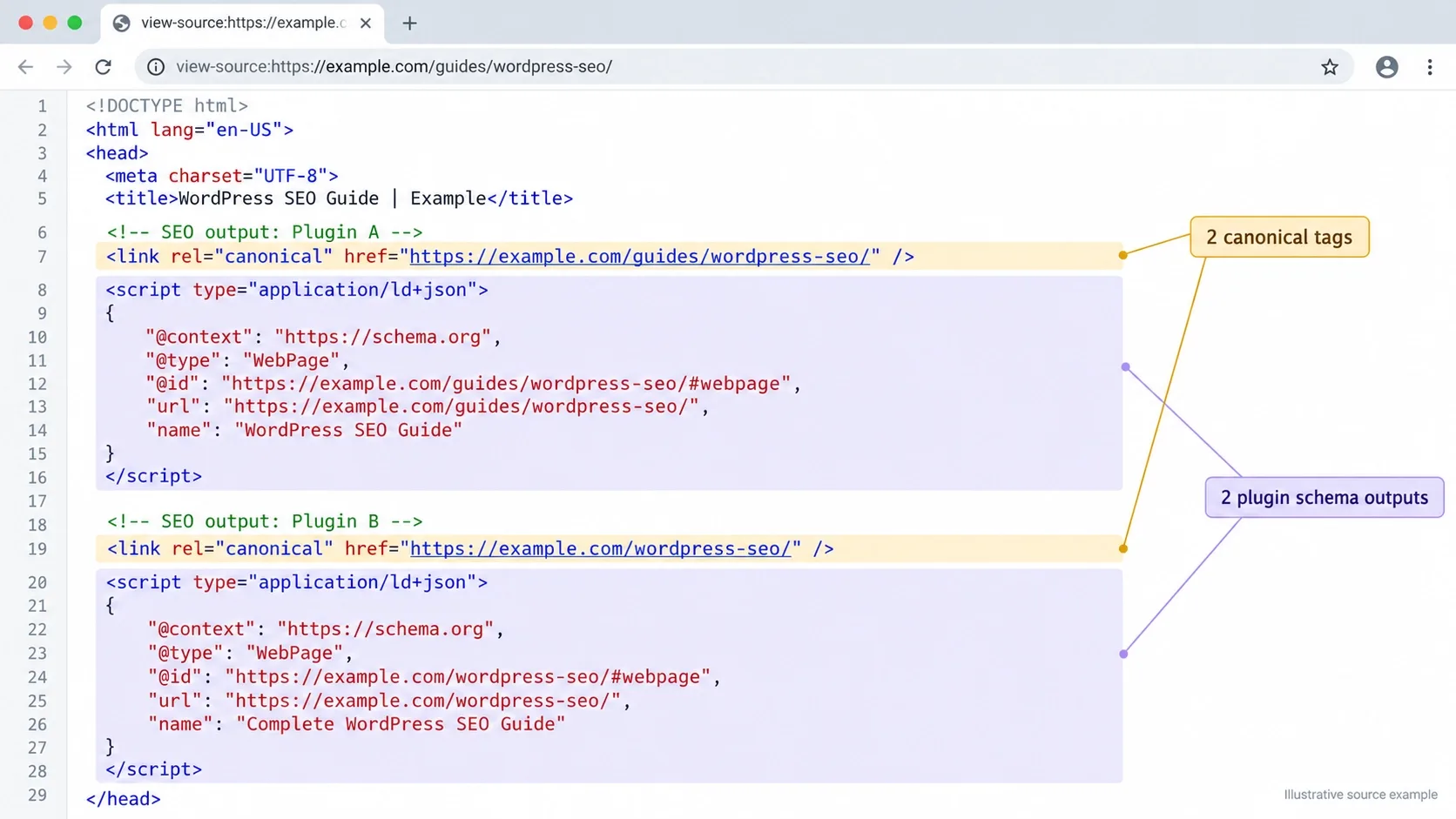
In my day-to-day work auditing client sites, the biggest issue I see with SEO plugins isn't which one is installed. It's two of them installed at once, both printing canonicals and schema, the page head quietly contradicting itself. Most non-SEOs think the main job of a plugin is to give you a green smiley face. Real SEOs judge it by what it writes into the HTML, how much control it gives them over that output, and what it costs the page in weight.
That discipline runs through everything we build. When we are delivering custom eCommerce web development services on WooCommerce, we vet every plugin against the same three tests: does it inflate DOM weight, does it duplicate output another plugin already owns, and does it slow server response. A plugin that fails any of them taxes every product page on the store.
Two things before the reviews. There are no affiliate links in this article. And there is one conflict worth naming: The SEO Framework, one of the ten plugins below, is built by the developer who raised the loudest 2026 criticism of another, Rank Math. I have weighted that accordingly.
Two SEO Plugins Printing Two Canonicals Is More Common Than You'd Think
A page head that quietly contradicts itself rarely shows up as an error - it shows up as rankings that stall for no visible reason. Vareweb audits what your site actually prints in the head, not what the plugin dashboard says it's doing.
Quick Comparison: The 10 Plugins at a Glance
| Plugin | Primary SEO strength | Schema & AEO capabilities | Workflow & interface | Honest practitioner verdict |
|---|---|---|---|---|
| Rank Math SEO | Modular suite with built-in redirects and 404 log | Built-in schema builder; llms.txt output; AI-assistant abilities | Setup wizard; many modules to prune | Most versatile; read changelogs after the Aug 2026 Support Agent pause |
| The SEO Framework | Automated, unbranded, lean head output | Breadcrumb and site JSON-LD; Articles and Local extensions; no builder | Native-feeling, no ads, SEO Bar | Cleanest footprint; stage-test on WordPress 7.x |
| Yoast SEO | Mature defaults and editorial analysis | Connected schema graph; free opt-in llms.txt; agent Abilities | Sidebar analysis; Premium prompts | Safe team default; less schema granularity |
| SEOPress | White-label agency toolkit, no ads | Schema types, Connected Schemas and Agent Ready in Pro | Clean, grouped admin | Best for agencies; budget for Pro |
| All in One SEO | Guided setup and local SEO | Schema generator, AI schema, built-in MCP server | Wizard-led; frequent Pro prompts | Good for non-technical local sites |
| Schema Pro | Dedicated structured-data engine | Display rules and field mapping, including ACF | Type, rules, then mapping | Buy it when data lives in custom fields |
| Redirection | 301 mapping and 404 monitoring | None; protects crawl paths | Simple table; import and export | Essential if your SEO plugin lacks redirects |
| Link Whisper | Internal link distribution and orphan detection | None directly; strengthens topical links | Editor sidebar suggestions | Worth it on big libraries; review every anchor |
| Squirrly SEO | Guided, AI-assisted content workflow | AI crawler controls; Abilities for AI assistants | Cloud-connected live assistant | For non-technical teams wanting guardrails |
| WPSSO Core | Meta-tag, Open Graph and schema precision | Broad Schema.org coverage; Merchant feed focus | Dense tabbed settings | Niche powerhouse for WooCommerce and publishers |
The "Green Light" Trap: What Real SEOs Evaluate in a Plugin
Chasing a 100/100 score in a plugin sidebar is an outdated tactic, and the reason is simple. The score is the plugin's own heuristic. It checks whether a phrase appears in the title, the first paragraph and a subheading. It cannot check whether your page says anything another page hasn't already said.
Search has moved to entities, intent and what Google's own documentation calls non-commodity content. Google's guide to optimizing for generative AI features, last updated in July 2026, says unique, useful content will likely influence your presence in AI search more than any other suggestion in the guide. Its example of commodity content is a generic list of tips for first-time homebuyers. Its example of the opposite is a first-hand account of waiving an inspection and what the sewer line looked like. That is Information Gain in plain English.
The same page is blunt about tooling. It says you can ignore llms.txt files for Google Search, because Google Search itself doesn't use them, and that structured data isn't required for its generative AI features, though it still supports rich result eligibility. It also warns against third-party tools that claim access to internal Google metrics. A plugin cannot buy you an AI Overview citation. What it can do is keep you indexable, snippet-eligible, consistent and fast.
So here is what I actually evaluate. Control over canonicals, robots meta and hreflang. Whether schema output is customizable and can be switched off cleanly when something else owns it. How sitemaps behave when content is noindexed. How redirects and 404s are handled. The weight added on the front end. How clean the changelog and security record are. How portable the data is on the way out. None of that shows up as a smiley face, and all of it shows up in crawl data. I check the results afterwards using the routine in what weekly SEO metrics you should measure.
A Plugin Can't Buy You an AI Overview Citation. Non-Commodity Content Can.
Google's own guidance says unique, useful content influences AI search presence more than any other single suggestion - and no plugin writes that for you. Vareweb pairs the technical foundation with the content strategy a settings screen can't supply.
Evaluating the Best SEO Plugin for WordPress: 10 Honest Reviews
Ten reviews, each in the same four parts, so you can compare like with like. Install counts come from each plugin's wordpress.org listing as of this week, and wordpress.org caps its top tier at 10+ million.
1. Rank Math SEO
What It Does
Rank Math is a modular SEO suite: titles and meta, XML sitemaps, a schema generator, redirections with a 404 monitor, local and WooCommerce modules and Search Console integration, each switchable on its own. wordpress.org lists 4+ million active installations, and the release pace is fast. Version 1.0.279 shipped on September 22, 2026.
The SEO Practitioner's View
Here is my honest, hands-on experience: it replaces what used to take four plugins, and the setup wizard imports data from other plugins, including Redirection. The cost is surface area. Every module left on is something else to update, secure and audit, so I switch off what a site doesn't use.
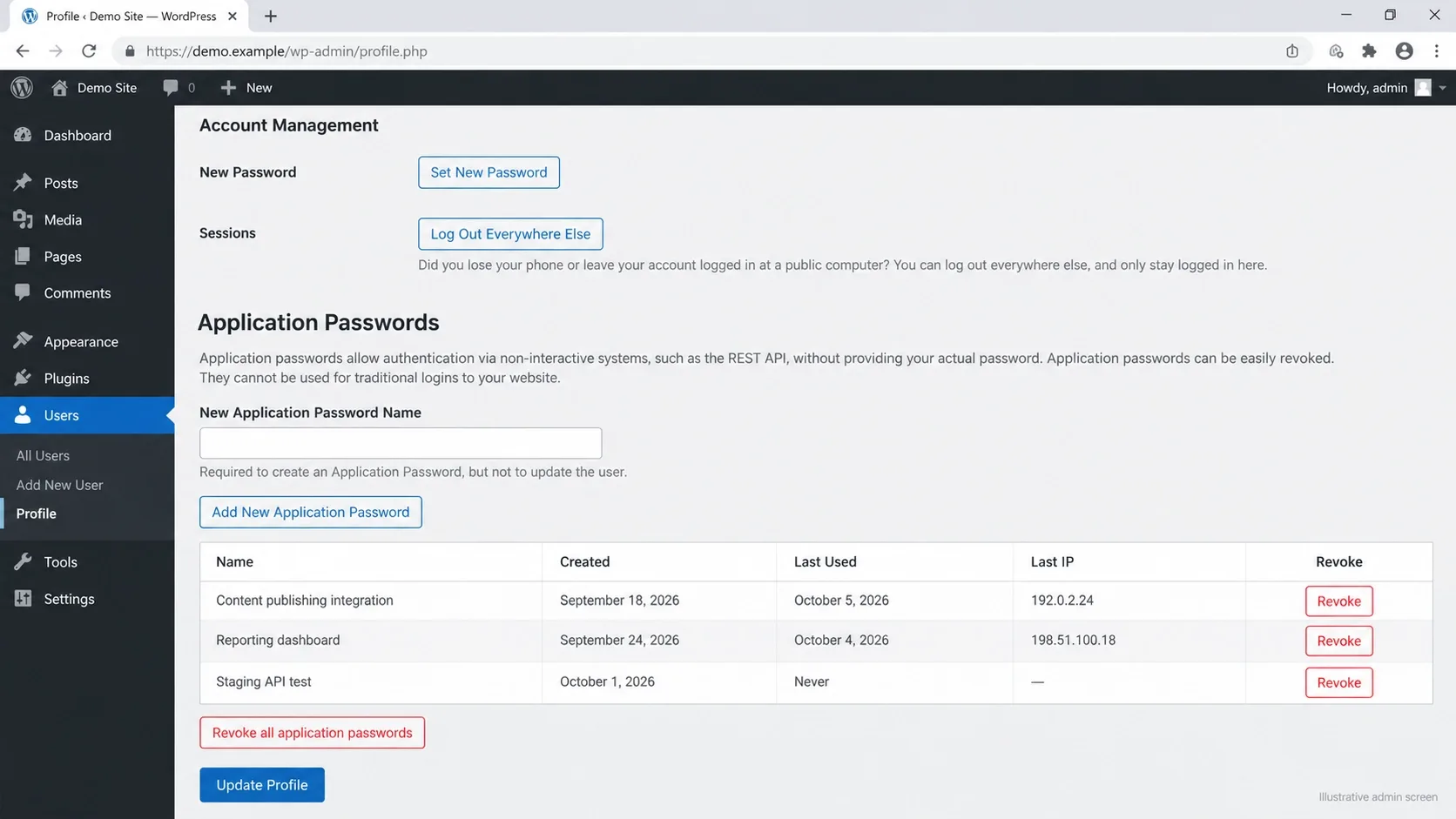
The 2026 episode belongs in any honest review. Version 1.0.277 added a Support Agent on August 26. On August 30, Search Engine Journal reported allegations from The SEO Framework's developer that opening Help & Support, while connected to a free Rank Math account, created a WordPress Application Password tied to the admin user. Rank Math's own changelog shows the feature was temporarily paused on August 31 to add transparency about how it requests site access. Weigh the source, then verify for yourself: under Users, Profile, Application Passwords, revoke any entry starting with "WAP –" that you don't recognize.
Schema & AI Readiness
The schema builder is where Rank Math pulls ahead of most free tiers: built-in types, per-post overrides and WooCommerce product markup. It also generates llms.txt, and version 1.0.279 changed that output to follow the latest specification. Per Google's guidance, none of it is required to appear in AI Overviews, so treat llms.txt as optional insurance for other AI systems.
Honest Verdict
Still the most capable all-rounder for sites that need schema depth and built-in redirects, with one habit attached: read the changelog before auto-updating anything that matters. If your tolerance for that kind of risk is lower, The SEO Framework or SEOPress are the calmer choices.
2. The SEO Framework
What It Does
The SEO Framework (TSF) generates titles, descriptions, canonicals, robots meta, sitemaps and social tags automatically from your WordPress environment. It is free, has no premium edition, and ships extras through a free companion plugin called Extension Manager. wordpress.org shows 200,000+ active installations.
The SEO Practitioner's View
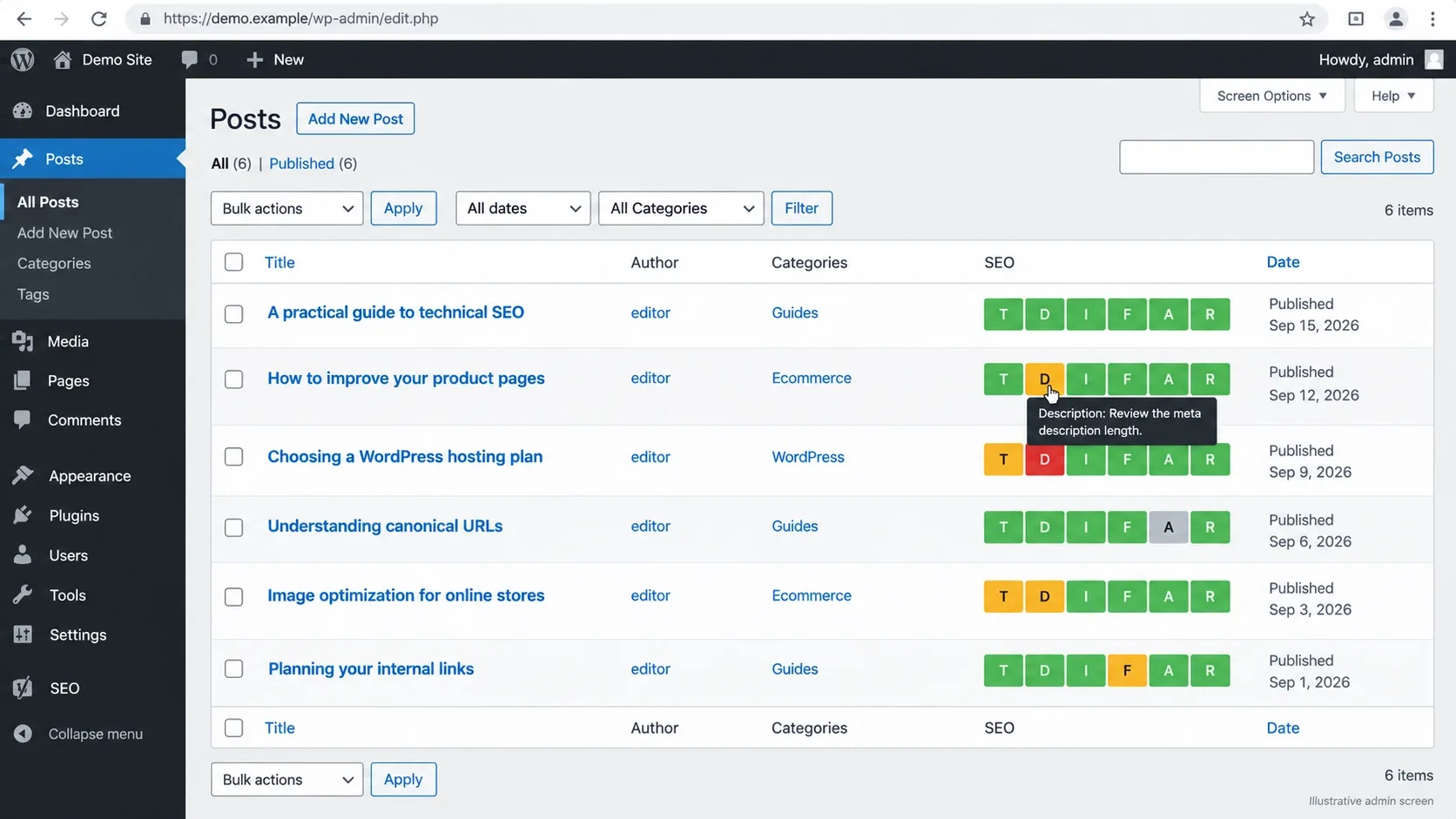
This is what I install when the brief is: don't touch my head output and don't nag my editors. No ads, no dashboard widgets, and an SEO Bar on list tables that flags problems at a glance. It is also deliberately incomplete. Its FAQ says it has no analytics or 404 monitoring because that work belongs outside the site, so you pair it with Redirection or a crawler.
One due-diligence note. The listing shows version 5.1.4, last updated about ten months ago, and tested up to WordPress 6.9.9, while Yoast and Rank Math list 7.1.2. That isn't proof of a problem in a plugin this small, but I would stage-test it on WordPress 7.x before rolling it across client sites.
Schema & AI Readiness
TSF outputs JSON-LD for breadcrumbs, site search and organization or person data. Its free Articles extension adds Article markup and Local handles business details. There is no visual schema builder, so complex types need Schema Pro or code. Since version 5.1 it can also add AI-trainer and SEO-crawler blocks to robots.txt. Read which user agents that list contains before switching it on, because you don't want to block the bots that fetch pages for answers.
Honest Verdict
The cleanest footprint on this list and the best fit for developers and technical SEOs. Its developer, Sybre Waaijer, is the source of the Rank Math allegations above, so read his claims next to Rank Math's changelog, not instead of it.
3. Yoast SEO
What It Does
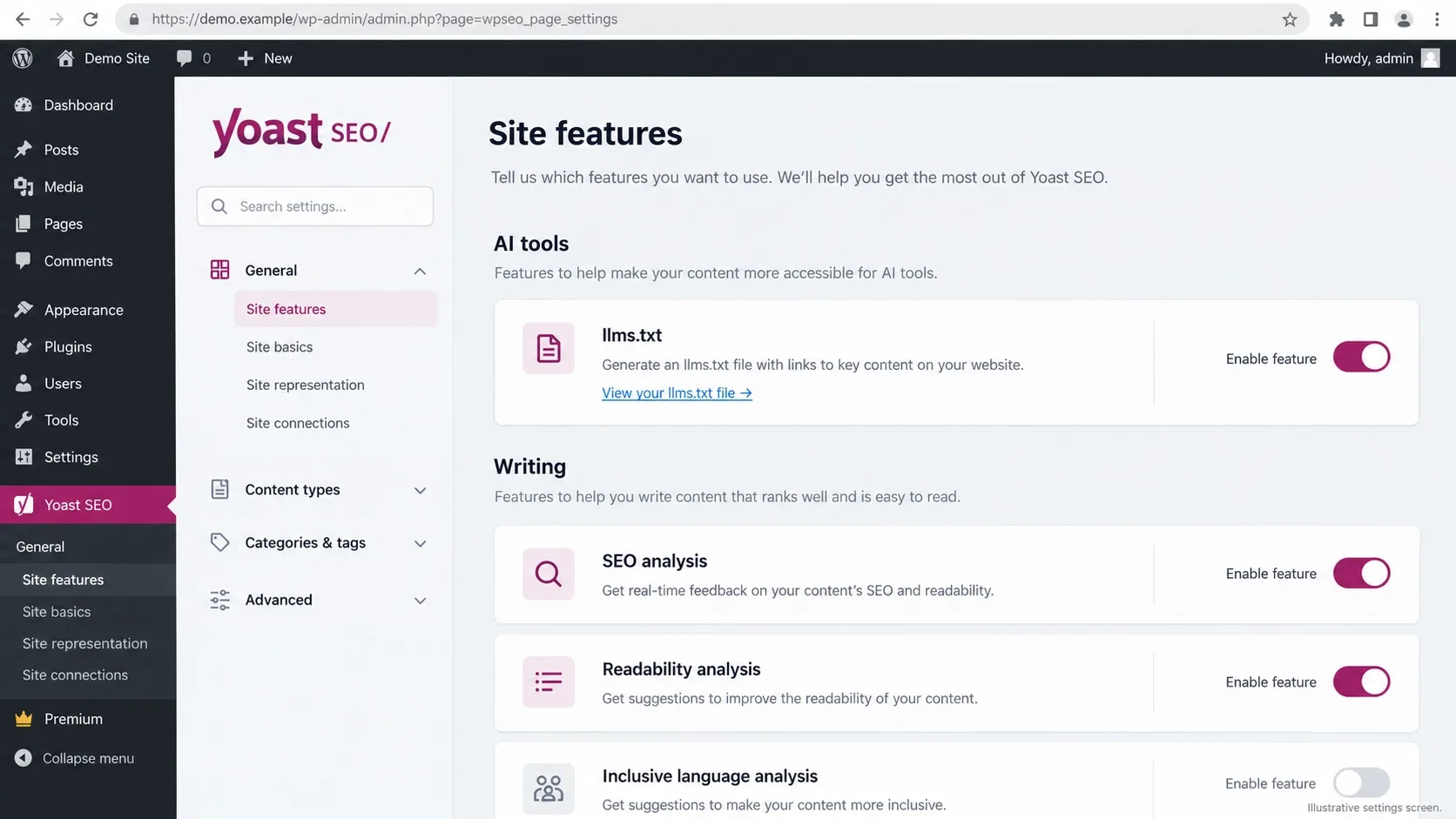
Yoast is the plugin most teams already know: meta templates, XML sitemaps, breadcrumbs, and readability and SEO analysis in the editor, with extras in Premium. wordpress.org shows 10+ million active installations, the highest tier it displays, and the listing says Yoast ships an update every two weeks. Version 28.6 landed on September 29, 2026.
The SEO Practitioner's View
The traffic-light analysis is why editors love it and why I handle it carefully. It trains writers to chase bullets, and I would rather they answered the reader's question. The interface also carries Premium prompts. Against that, the defaults are sensible, the plugin is clearly maintained, and nearly every developer and freelancer has met it, which cuts handover friction.
Schema & AI Readiness
Yoast outputs a connected schema graph, with the organization, website, page, article and author entities linked to one another, and developers can extend it through filters. Its llms.txt generator is free and opt-in, with automatic or manual page selection, and version 28.6 added two Yoast Abilities that let AI agents read and update SEO data. Google says llms.txt does nothing for Google Search, so enable it for the other systems you care about.
Honest Verdict
Reliable for editorial teams and for agencies inheriting sites. If you need per-post schema type control without code, Rank Math or Schema Pro give you more.
4. SEOPress
What It Does
SEOPress covers titles and meta, XML and HTML sitemaps, social tags and analytics settings in a free core, while Pro adds structured data types, a site audit and internal linking tools. wordpress.org lists 300,000+ active installations, and version 10.2 is tested up to WordPress 7.1.2.
The SEO Practitioner's View
Think of it as the agency-friendly option. There are no ads, no data collection, and white label is a free feature, so the plugin name and logo can be replaced on client sites. The admin is grouped sensibly and quick to learn. The catch is that the features serious schema work needs sit in Pro, so budget for it from day one rather than discovering the paywall mid-build.
Schema & AI Readiness
SEOPress 10.3, released in early October 2026, introduced Connected Schemas and an MCP integration, and 10.2 added an Agent Ready option that serves a Markdown version of a page to AI agents, a Pro feature. These are early features. Test them, but don't expect them to change anything in Google.
Honest Verdict
The best pick for agencies and freelancers who want a clean, unbranded plugin and are happy to pay for Pro.
The Plugin Is Easy to Install. Configuring It for Your Site Is the Real Work.
Every module left switched on is something else to update, secure, and audit - and Pro features you discover mid-build cost more than the ones you planned for. Vareweb configures and maintains the SEO stack as part of every build, so nothing prints twice.
5. All in One SEO (AIOSEO)
What It Does
All in One SEO is the guided option: a setup wizard, TruSEO checks, sitemaps, local SEO tools, a schema generator, redirects and SEO Alerts that notify you of critical issues by email and Slack. wordpress.org currently lists 2+ million active installations, and the 5.0 line added AI features.
The SEO Practitioner's View
For a local business owner who wants to click through a wizard and be done, it works. The alerting is the feature I would copy into any plugin. A stray noindex left on after a redesign is the sort of silent failure that costs a quarter, and an alert catches it in a day. The free interface shows Pro prompts often, which I find intrusive on client sites.
Schema & AI Readiness
AIOSEO's schema generator covers the common types, and its listing says it can create schema with AI and let agents such as Claude and Gemini connect through a built-in MCP server and the WordPress Abilities API. I treat AI-generated schema as a draft and validate it against what the page visibly says, because markup that disagrees with the page is worse than none.
Honest Verdict
Strong for non-technical local businesses. Heavier than The SEO Framework and pushier about upgrades than SEOPress.
6. Schema Pro
What It Does
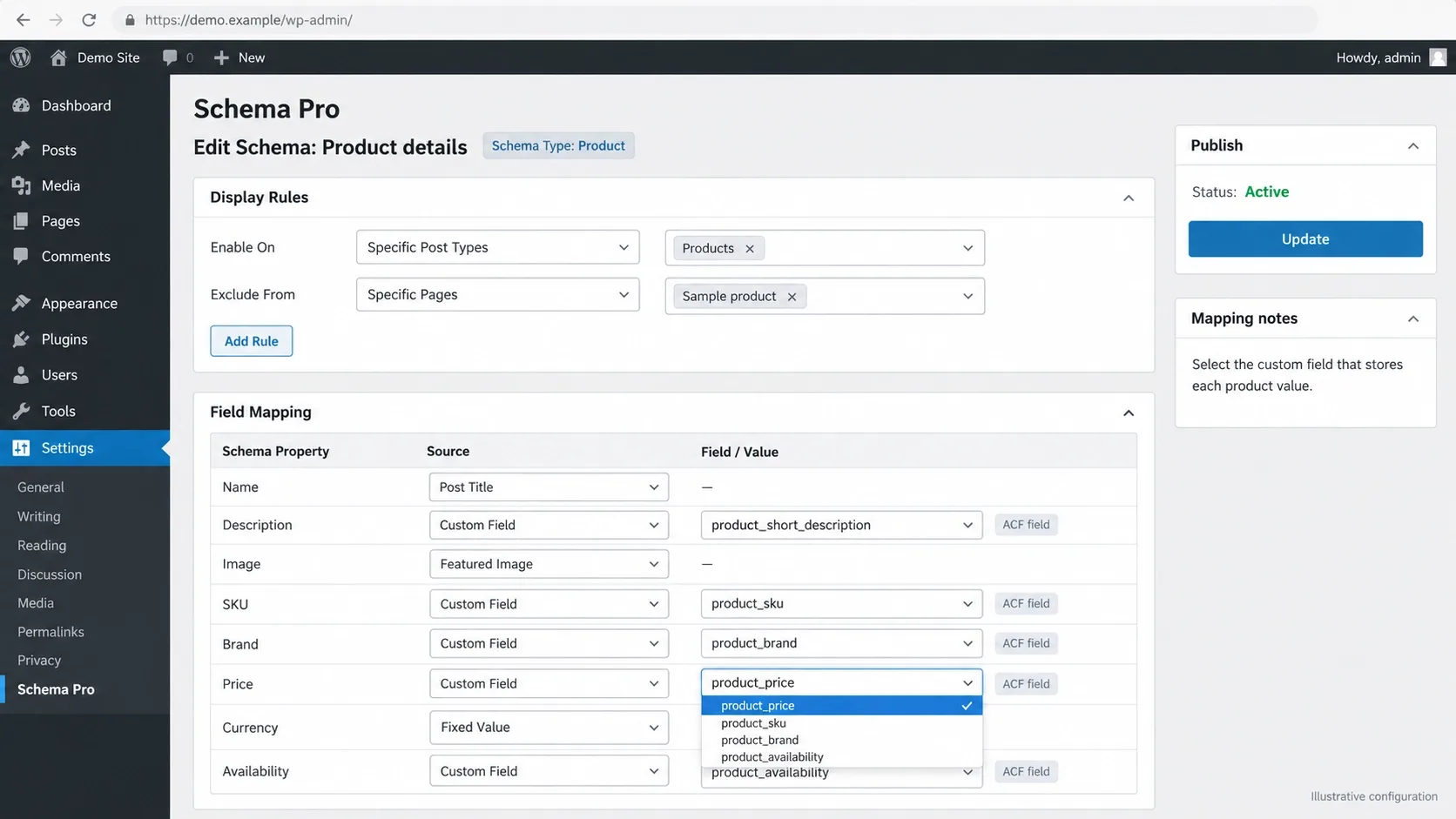
Schema Pro, from Brainstorm Force, is a paid-only schema engine sold through its own site rather than wordpress.org. You choose a schema type, set display rules for where it applies, and map its fields to post data or custom fields, including ACF, as its own documentation describes.
The SEO Practitioner's View
It earns its price on custom post types where the data already lives in fields: a property listing, a course, a clinic's physician directory. The schema reads from those fields rather than from a second copy that drifts out of date. It is not an SEO plugin, though. It doesn't handle titles, canonicals or sitemaps, so pair it with a lean base like The SEO Framework or SEOPress and switch off the base plugin's schema for those types, or you'll print duplicate Organization and Article blocks.
Schema & AI Readiness
This is the deepest field-level control on the list, but discipline matters more than the tool. Product markup has to match the visible price and availability, which I cover in how to structure product schema for AI Overviews and ChatGPT citations. For clinics, Minhaj, our Head of Development, lists the Physician and MedicalEntity markup a practice needs in healthcare website design tips that build patient trust, exactly the kind of job field mapping suits. Google says no special schema is needed for its AI features, but schema still earns rich result eligibility.
Honest Verdict
Buy it when your data lives in custom fields and you want schema generated from it. If your sites are mostly posts and pages, Rank Math's builder is enough.
7. Redirection
What It Does
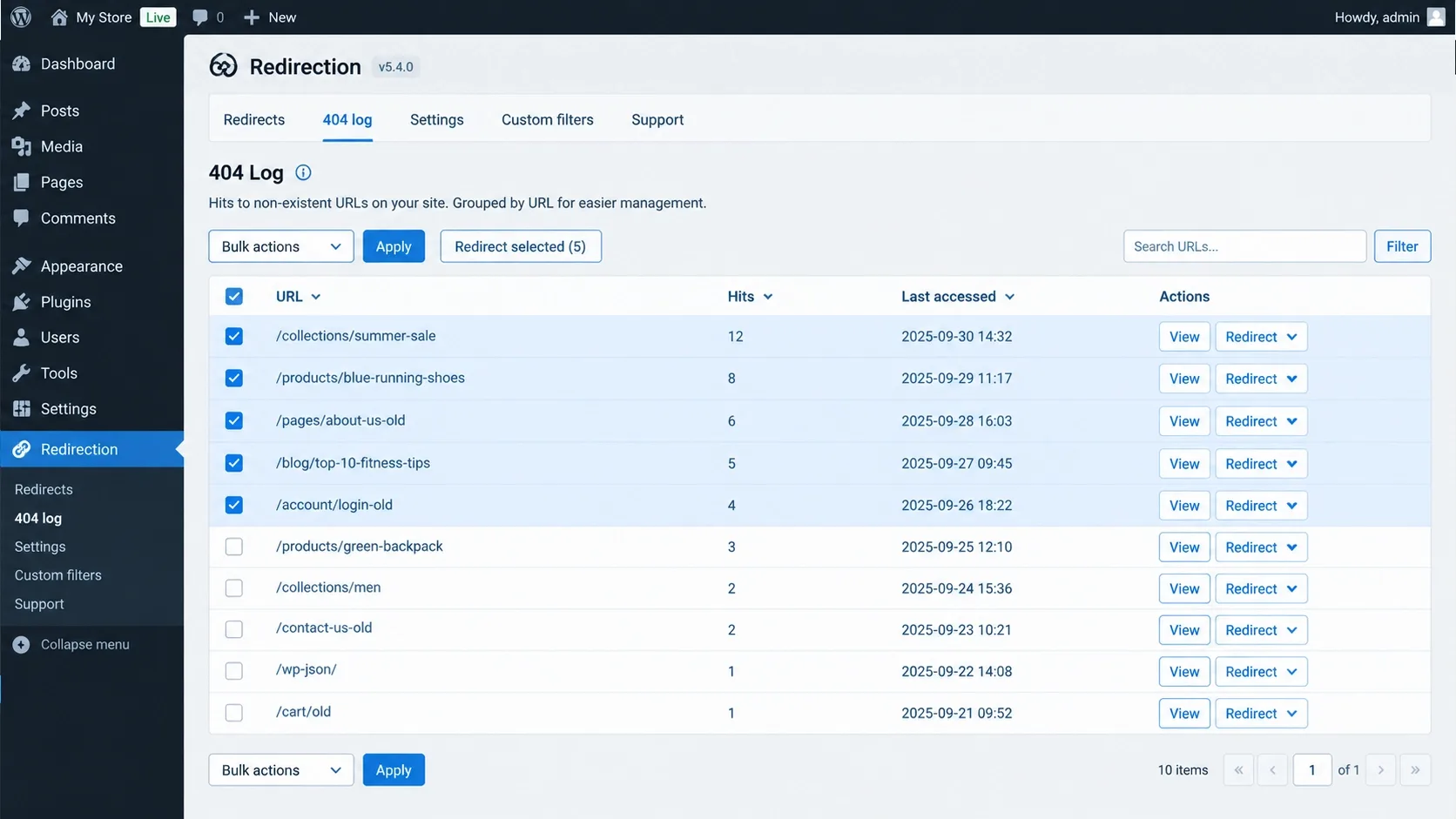
Redirection, by John Godley, is a free redirect manager and 404 logger: 301s and other redirect types, conditional rules, import and export, and logs showing which broken URLs people and bots actually hit. wordpress.org shows 2+ million active installations, and version 5.10.1 shipped on September 17, 2026.
The SEO Practitioner's View
I install it on every site move, because the 404 log shows what the old URL structure was still earning after launch. One rule applies: a single owner for redirects. If Rank Math, AIOSEO or SEOPress already handles them, don't run Redirection beside it. Set log retention so the 404 table doesn't grow without limit.
Schema & AI Readiness
None, and that is fine. Its contribution to AI visibility is indirect. Crawlers follow redirects, and a clean one-hop 301 means the URL that answer engines already know still resolves to the right page. Redirect chains waste crawl effort for everyone.
Honest Verdict
Essential when your SEO plugin has no redirect manager, which describes The SEO Framework (no 404 log, only per-page redirect fields) and the free tier of Yoast. Redundant everywhere else.
8. Link Whisper
What It Does
Link Whisper, from Spencer Haws, suggests internal links as you write, flags orphan posts that nothing links to, and reports on link distribution. There is a free version on wordpress.org, and premium adds auto-linking rules and cross-site suggestions. Its changelog now refers to AI linking credits, so suggestions are metered.
The SEO Practitioner's View
Internal linking is the lever almost no SEO plugin touches, and it is where a lot of stores and blogs leak authority. Link Whisper gives you a working queue instead of a vague intention. Review every suggestion: it proposes links, you decide on anchors. I only accept descriptive anchors, because a dozen links reading "click here" teach nobody anything. On stores, category-to-product links matter most, which I walk through in how to optimize ecommerce category pages for SEO in 2026.
Schema & AI Readiness
No schema. Its effect on AI visibility is indirect: clear internal paths help any crawler find and relate your pages.
Honest Verdict
Worth it on libraries with hundreds of posts, where orphan pages are a real problem. Skip it on a twenty-page brochure site.
Internal Linking Is the Lever Almost No SEO Plugin Touches
Stores and blogs leak authority through orphan pages and vague anchors long before they lose it to a competitor. Vareweb builds internal linking into templates and content hubs so every new page strengthens the ones around it.
9. Squirrly SEO
What It Does
Squirrly is a guided, AI-assisted workflow: a Live Assistant in the editor, a Briefcase for keyword research and rankings, and automation rules for titles, meta and schema. Its wordpress.org listing is now titled GEO Plugin by Squirrly SEO, with 30,000+ active installations and version 14.2.6 released in mid-September 2026.
The SEO Practitioner's View
It's built for content teams without an in-house SEO: the assistant tells writers what to fix as they go. The trade is a cloud dependency, because it works through a Squirrly account, and redirects, 404 monitoring and custom JSON-LD live in a separate Advanced Pack plugin. I wouldn't put it on a lean technical build. I compare similar tools in AI SEO tools for small business.
Schema & AI Readiness
Version 14.0.0 added AI crawler controls for GPTBot, ClaudeBot, PerplexityBot and Google-Extended, and on WordPress 6.9 and above it registers Abilities so Claude or ChatGPT can read and update titles, meta, keywords and schema types under your normal login. Who gets to decide is the real question, and Minhaj, our Head of Development, tackles it for design work in where AI fits in the web design process. The same line applies here: AI can draft your titles, and a person approves them.
Honest Verdict
Good for non-technical teams that want guidance, weaker for developers who want a lean, scriptable head.
10. WPSSO Core
What It Does
WPSSO Core is a metadata engine rather than a traditional SEO plugin: Open Graph and social tags, Schema.org JSON-LD, sitemaps and a strong focus on WooCommerce and Google Merchant feeds. It has 4,000+ active installations, with version 22.7.0 released on September 12, 2026, and a Premium edition above the free one.
The SEO Practitioner's View
Settings are dense and tabbed, and there is a real learning curve. In return you get precision most plugins don't offer: dedicated image ratios for Google Rich Results and Open Graph, a wide range of Schema.org types, and WooCommerce product data built for merchant listings. Its listing says it can run alongside other SEO plugins to improve their structured data, which is powerful and risky in equal measure. Two systems printing Product markup is how stores end up with conflicting schema, a failure I've documented in common WooCommerce SEO issues and how to fix them. Decide who owns schema first.
Schema & AI Readiness
Schema.org coverage is the broadest on this list. The Merchant feed focus matters because Google says visibility for products and local businesses in AI responses is supported by Merchant Center feeds and Business Profiles, not by markup alone.
Honest Verdict
A niche powerhouse for structured-data-heavy WooCommerce and publisher builds, and overkill for a ten-page business site.
Two Systems Printing Product Markup Is How Stores End Up With Conflicting Schema
Decide who owns schema before launch, not after Search Console starts flagging errors. Vareweb's WooCommerce team builds with a single owner for every piece of structured data, so price and stock never disagree with the page.
How to Safely Migrate SEO Plugins Without Losing Rankings
A plugin swap is a small site migration, and it fails the same way: silently. Here is the sequence I use.
- Back up and stage. Take a full database and file backup, then run the entire swap on a staging copy first.
- Crawl before you touch anything. Export titles, meta descriptions, canonicals, robots directives, status codes and schema from a full crawl. Screaming Frog is my default for this, and I explain where it fits against Ahrefs in Screaming Frog vs Ahrefs.
- Import, don't retype. Use the new plugin's importer. SEOPress supports more than ten source plugins, and The SEO Framework's free Transport extension migrates metadata from Rank Math, Yoast and SEOPress.
- Never run both. Once the import finishes, deactivate the old plugin but leave it installed until verification is done, so you can roll back.
- Verify the head. Re-crawl and diff against your baseline: titles, descriptions, canonicals, robots meta, hreflang and schema. Spot-check a dozen templates in Google's Rich Results Test and confirm each page has exactly one canonical and no duplicate JSON-LD.
- Check the sitemap. Plugins name sitemaps differently. Confirm the new one is submitted in Search Console and robots.txt points at the right file.
- Watch for a month. Monitor indexing and crawl stats for several weeks, and only delete the old plugin once nothing has moved.
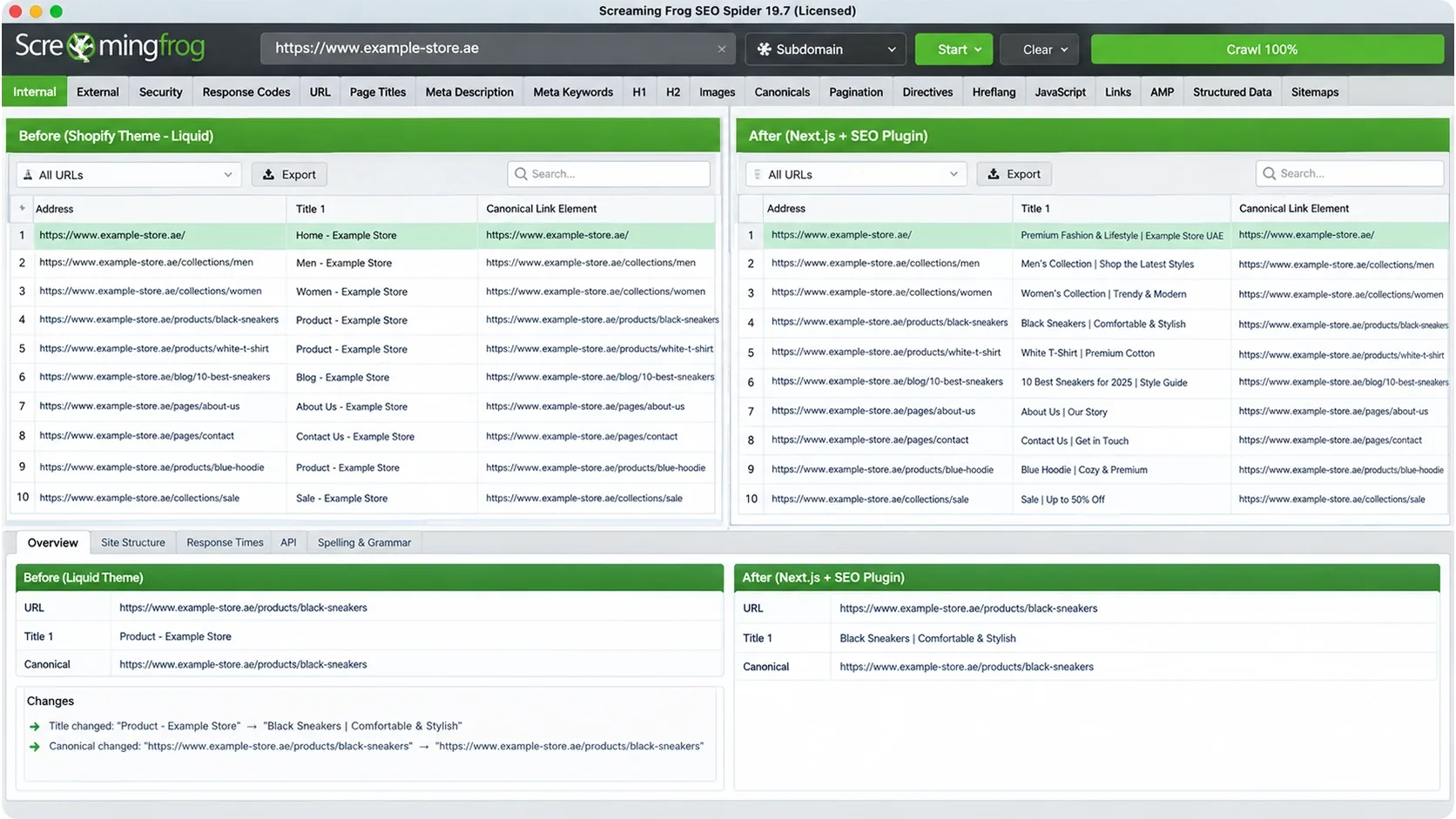
For a full domain or platform move, follow my guide on how to migrate your website without losing SEO rankings. A plugin swap is the lighter version of the same discipline, and it is the kind of crawl difference we run as part of our search engine optimization services.
Ready to Switch SEO Plugins Without Losing Rankings?
Vareweb runs the full crawl, diff, and redirect mapping that keeps a plugin swap or platform migration from costing a quarter of your traffic. One team, accountable for the whole result.
FAQs
Do I really need an SEO plugin for WordPress in 2026?
Not strictly. WordPress core generates XML sitemaps, and a good theme can output titles and canonicals. But you lose per-page control over titles, meta descriptions, canonicals, robots directives and structured data, which you then have to hand-code and keep consistent. For most sites, one plugin is the cheaper and safer way to manage those signals. The key is choosing one, and only one, to own the page head.
Will running two SEO plugins at the same time help my rankings?
No, and it usually hurts. Each plugin prints its own title tag, canonical, robots meta and JSON-LD, so the page head contradicts itself and search engines have to guess which version wins. The only safe exception is a deliberate split of duties, such as a lean base plugin plus a dedicated schema tool, with overlapping features switched off in one of them. Confirm with view-source that each page has one canonical and one set of JSON-LD.
Which SEO plugin is best for a massive WooCommerce store?
Rank Math, Yoast with its WooCommerce add-on and SEOPress Pro are the common choices, and all three handle product schema and archive controls. The plugin is the smaller lever, though. Faceted filters, duplicate category archives and theme weight decide most large-store outcomes, which is why I focus on front-end weight in my eCommerce web design best practices. If product schema is the priority, decide whether the SEO plugin or a dedicated tool owns it, and switch the other off. A good ecommerce SEO audit starts with exactly that question.
Does the premium version of Yoast or Rank Math actually improve rankings?
No plugin tier improves rankings by itself. Premium versions add features such as extra focus keywords, redirect and schema tools, and AI helpers that make good work faster or more precise. They cannot make a page more useful than its competitors. Buy premium when a specific feature saves you hours or removes a risk, not because it promises better positions.
How do SEO plugins impact Core Web Vitals and site speed?
On the front end, most of an SEO plugin's work is printing a few tags into the page head, so the direct cost is small. The real impact comes from what else it loads: admin scripts on public pages, analytics modules, unused schema output and database-heavy logs. Switch off modules you don't need, test with and without the plugin on staging, and judge by real-user data rather than one lab score. I cover what actually moves those numbers in how important page speed is for SEO in 2026.
Can an SEO plugin optimize my site for Google AI Overviews and ChatGPT?
Partly, and not the way marketing pages suggest. Google's own guidance says no special markup or file is needed to appear in AI Overviews or AI Mode, and that Google Search ignores llms.txt. A plugin helps with the fundamentals Google does name: indexability, snippet eligibility, consistent canonicals and accurate structured data. Plugin-generated llms.txt files and AI abilities are optional extras for other systems, with no proven effect on Google. The part no plugin can supply is non-commodity content, and my guide to getting your website cited by AI search engines covers that side.
What happens to my SEO if I deactivate and delete my SEO plugin?
The tags it printed disappear first: custom titles, meta descriptions, canonicals, robots directives, schema and often the sitemap. Your pages fall back to theme and WordPress defaults. Most plugins store settings in your database, so data often survives deactivation, but some uninstall routines remove it on deletion. Check the uninstall setting, export your metadata first, and never delete a plugin before another one outputs equivalent tags.
Is the Rank Math Support Agent issue a reason to switch plugins?
It's a reason to review your site, not an automatic reason to switch. In late August 2026, Rank Math version 1.0.277 added a Support Agent, and allegations reported by Search Engine Journal said it created an administrator-level Application Password when Help & Support was opened. Rank Math's changelog shows the feature was temporarily paused on August 31. Check your user profile for unfamiliar Application Passwords and read changelogs before updating on important sites.

Written by
Kashaf
Kashaf is a veteran SEO specialist with deep expertise in AI SEO, generative engine optimization, ORM, web strategy, and marketing automation. With a Master's in Computer Science, he blends search strategy with technical insight into websites, automation workflows, and AI-driven platforms, helping brands dominate traditional search while adapting to the future of AI-powered discovery.