Quick Answer: The most important part of WooCommerce SEO in 2026 is control: of crawlable URLs, template and database speed, product data accuracy and structured data. WooCommerce is flexible enough to compete with any platform, but the theme, host, filters, extensions and custom code layered on top decide whether that flexibility becomes an asset or technical debt. Passing Google's Core Web Vitals thresholds is the minimum; for revenue-critical US templates, an internal LCP target below 1.5 seconds is a sensible stretch goal where your infrastructure allows it.
Here is the diagnosis I give most store owners: you probably do not have a content problem. You have a system problem, and more blog posts will not fix it. When I audit a WooCommerce store, the first thing I check is not its keywords. I check parameter handling, indexable URL growth, the active template stack and the database.
The stakes are rising. Adobe reported that AI-driven traffic to US retail sites grew 393% year over year in Q1 2026, and the same report found product pages scored only 66% on machine readability. A store that search engines and AI systems cannot parse cleanly is leaving that traffic to competitors.
A 13-Step Checklist Is a Lot. Want Us to Run It for You?
Vareweb's ecommerce SEO team goes after revenue, not just rankings. We audit your WooCommerce store for crawl waste, speed, and product data problems, then fix them in order of commercial impact.
Default WooCommerce vs. Search-Engineered WooCommerce
| SEO or architecture area | Unmanaged or default-led implementation | Search and AI-engineered implementation |
|---|---|---|
| Faceted navigation | Filter links crawlable in any combination | Filters classified; crawl paths deliberately limited |
| Parameter handling | Sort and tracking parameters left open | Parameters controlled and excluded from indexing |
| Product variations | Swatches and variants create stray URLs | One strategy per product, matched to demand |
| Category architecture | Bare product grid under a title | Intro, subcategories, buying guidance, internal links |
| Database access | Uncached lookups, autoload creep | Profiled queries, persistent object cache |
| WooCommerce sessions | Session rows pile up unnoticed | Session growth monitored and cleaned safely |
| Scheduled actions | Failed and pending actions accumulate | Queue reviewed and alerted on |
| HPOS | Legacy order storage on older stores | Compatibility verified before switching |
| Caching | Several overlapping cache plugins | One coherent layered strategy |
| Core Web Vitals | Lab scores only | Field data per template, with budgets |
| JavaScript and CSS | Everything loads everywhere | Conditional loading, tested in staging |
| Product schema | Theme, plugin and core all output Product | One owner, one graph |
| Merchant Center consistency | Feed and page prices drift apart | Page, schema and feed validated together |
| Image delivery | Desktop images shrunk with CSS | Responsive sources, prioritized LCP image |
| XML sitemaps | Everything included by default | Canonical, indexable, final-status URLs only |
| Internal linking | Random product links in posts | Guide to category to product paths |
| AI-answer readiness | Specs buried in images or tabs | Specs, policies and compatibility in crawlable text |
| Analytics | Traffic counted, revenue ignored | Landing-page revenue and AI referrals tracked |
| Release management | Edits made on production | Staging, rollback, post-deploy checks |
| Multi-store governance | Each store its own experiment | Shared policy, known owners |

The Master Architecture: The Ultimate WooCommerce SEO Checklist for 2026
WooCommerce is a blank canvas, and that is both its biggest advantage and its biggest SEO liability. I compared the platforms honestly in Shopify vs WooCommerce in 2026: A Practical Decision Framework, and my conclusion is simple: WooCommerce competes well when you deliberately own the decisions that hosted platforms partly standardize.
The thirteen items below are the ones I check first. Each names the owner of the behavior, because "WooCommerce" is rarely the real culprit: it is WordPress core, the theme, a plugin, the filter, the host or custom code.
1. Tame Faceted Navigation and Prevent Index Bloat
Filters for color, size, price, brand, rating and sorting can turn a few hundred categories into a huge URL space when links are crawlable, such as ?filter_color=black, ?min_price=50 & max_price=100 or ?orderby=price. Not every filtered URL is duplicate content, because some represent real search demand.
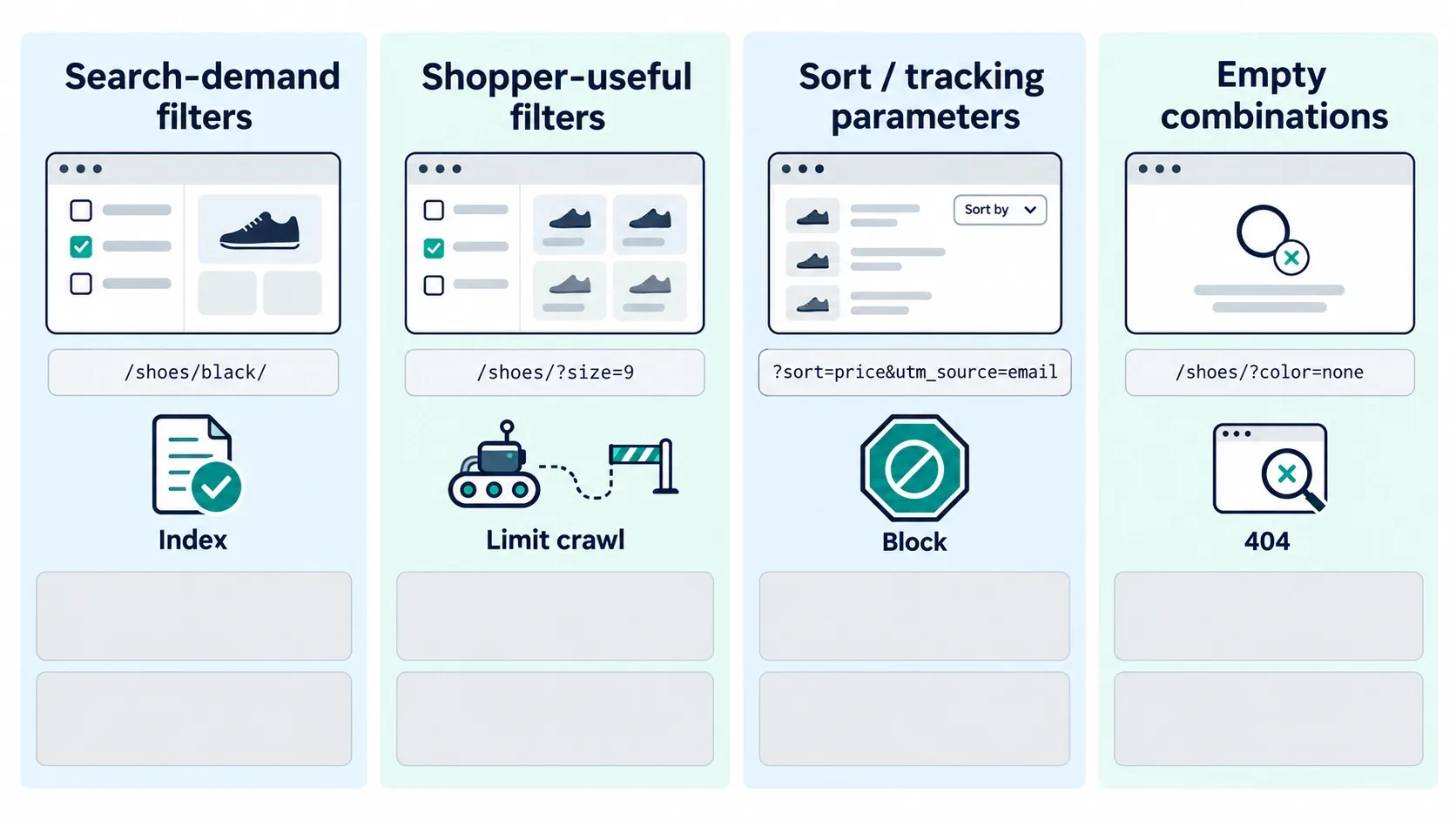
I sort every filter into four groups:
- Search-demand filters: stable landing pages with a unique title, H1, useful copy, stock, internal links and a self-referencing canonical.
- Shopper-useful but search-redundant filters: keep them usable, but control discovery and indexation.
- Sort, tracking, session and display parameters: never indexable landing pages.
- Empty or impossible combinations: do not link to them. Google's faceted navigation guidance says to return a 404 for combinations with no results instead of redirecting them to a generic page.
Choose controls accurately. That same guidance says robots.txt is the stronger way to stop crawling of filtered URLs you do not need in Search, and canonicals and nofollow are weaker, long-term signals. Noindex only works if the page can be crawled, as Google's robots meta documentation states.
To verify, measure filter dimensions, parameter order, pagination and sort combinations, then compare Search Console impressions, sitemap inclusion and server-log crawl behavior.
2. Audit Cart Fragments Before Disabling Them
The request ?wc-ajax=get_refreshed_fragments comes from the wc-cart-fragments script, which keeps a legacy mini-cart in sync. The context matters: since WooCommerce 7.8, the script is no longer enqueued on every page route by default and loads when the cart widget renders. The same post says the Mini-Cart block does not use the cart fragments API.
So I do not assume it is firing. Themes, plugins or custom code may still enqueue it, and cart fragments do not directly cause slow origin response. They can add frontend requests, cache complexity and interaction overhead on pages that do not need them.
My diagnostic workflow:
- Find get_refreshed_fragments in the Network panel and trace the initiating script.
- Identify whether the store uses a legacy widget, a theme drawer or a block-based cart.
- Test guest and logged-in states, empty and full carts, and product, category, blog, cart and checkout templates.
- Dequeue or load conditionally only where safe, then re-test totals, currency, tax and cached mini-cart contents.
Always keep staging and a rollback path. A stale mini-cart on a cached page is a revenue bug, not a speed win.
Slow WooCommerce Store? Find Out What's Dragging It Down.
Vareweb audits your plugins, theme, and hosting first, then cleans up bloat, caching, and database weight without breaking your cart or checkout. Our WooCommerce builds average a 60% cut in plugin count.
3. Evaluate the /product-category/ Base Before Removing It
Shorter URLs are not automatically better. I do not change a mature URL structure because a shorter slug looks cleaner.
Removing the base can clash with page and product slugs, break pagination or filters, and strand backlinks and indexed URLs. If a change is justified, I require:
- An export of every affected URL and a one-to-one redirect map.
- Updated internal links, canonicals, XML sitemaps, breadcrumbs and product feeds.
- Tested pagination and filters, plus a crawl of old and new URL sets.
- Search Console monitoring after launch.
URL stability, hierarchy and intent match matter more than cosmetic brevity.
4. Establish One Structured-Data Owner
Product markup can come from WooCommerce core, the theme, an SEO plugin, a schema plugin, a review platform or custom code. The result is often duplicate Product entities, conflicting prices, ratings that do not match visible reviews and several breadcrumb graphs.
Do not override everything blindly. Inventory every source first, then assign one owner. I wrote up the mechanics in how to structure product schema for AI Overviews and ChatGPT citations.
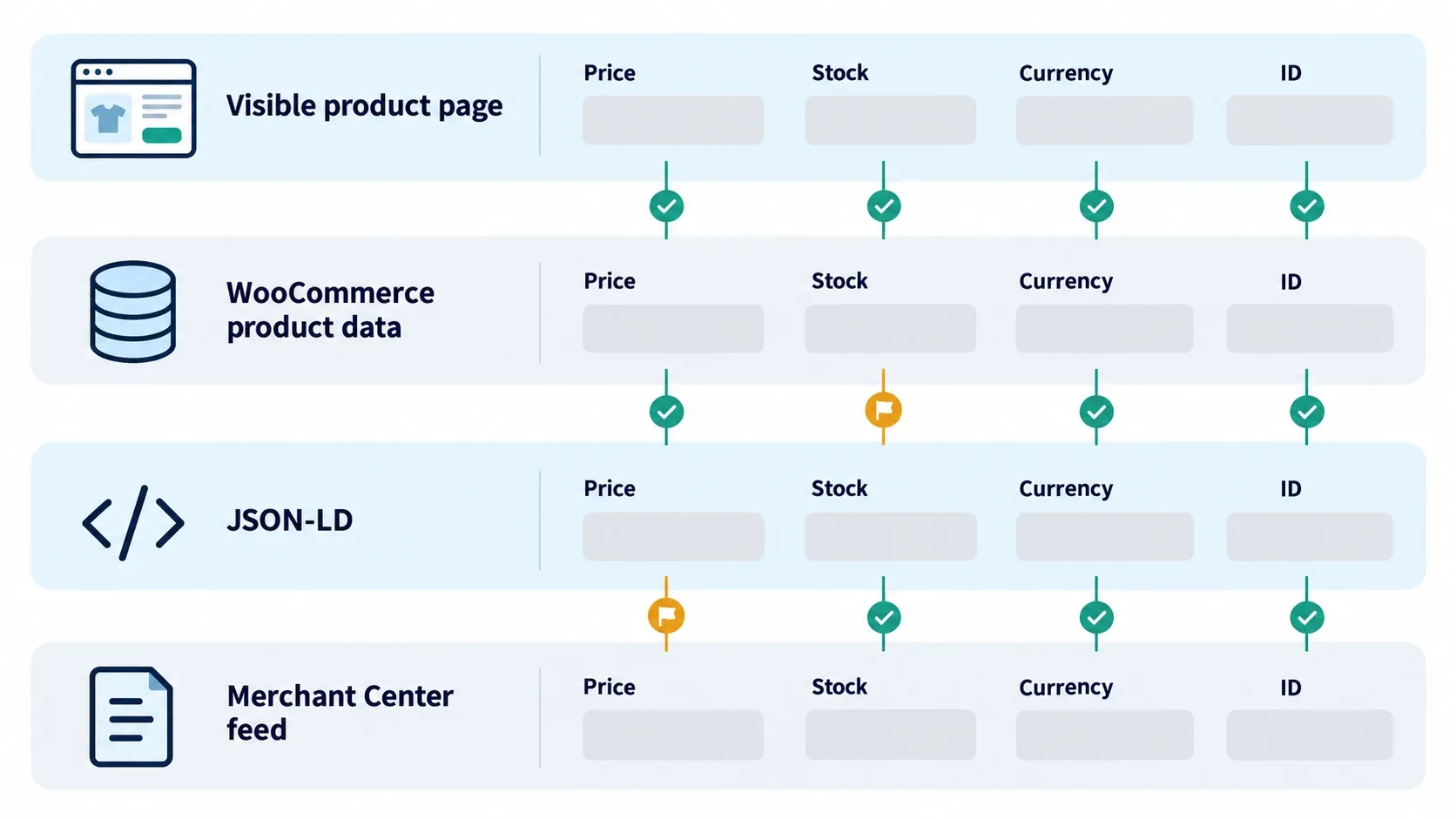
Four layers must agree: visible storefront content, WooCommerce product data, JSON-LD and the Merchant Center feed. Check price, sale price, currency, stock, identifiers (SKU, GTIN, MPN), variant identity, reviews, shipping and returns. Google's product structured data guidance recommends putting Product data in the initial HTML.
Validate with the Rich Results Test and the Search Console Product Snippets and Merchant Listings reports. Valid schema creates eligibility and clarity, not guaranteed rich results or AI citations.
5. Turn Product Categories Into Commercial Decision Pages
Categories are usually your main commercial landing pages, and a bare grid gives shoppers and search engines little context. My template has a clear H1, a short useful introduction, visible subcategories, stable product cards, buying guidance below the grid, real FAQs, breadcrumbs and links to supporting guides.
Do not push walls of generic copy above products, and do not hide useful text behind interactions crawlers or users may miss. There is no universal word count; the page should help a shopper evaluate the category without delaying access to inventory. I go deeper in my guide to ecommerce category page optimization.
6. Profile and Clean the WooCommerce Database Safely
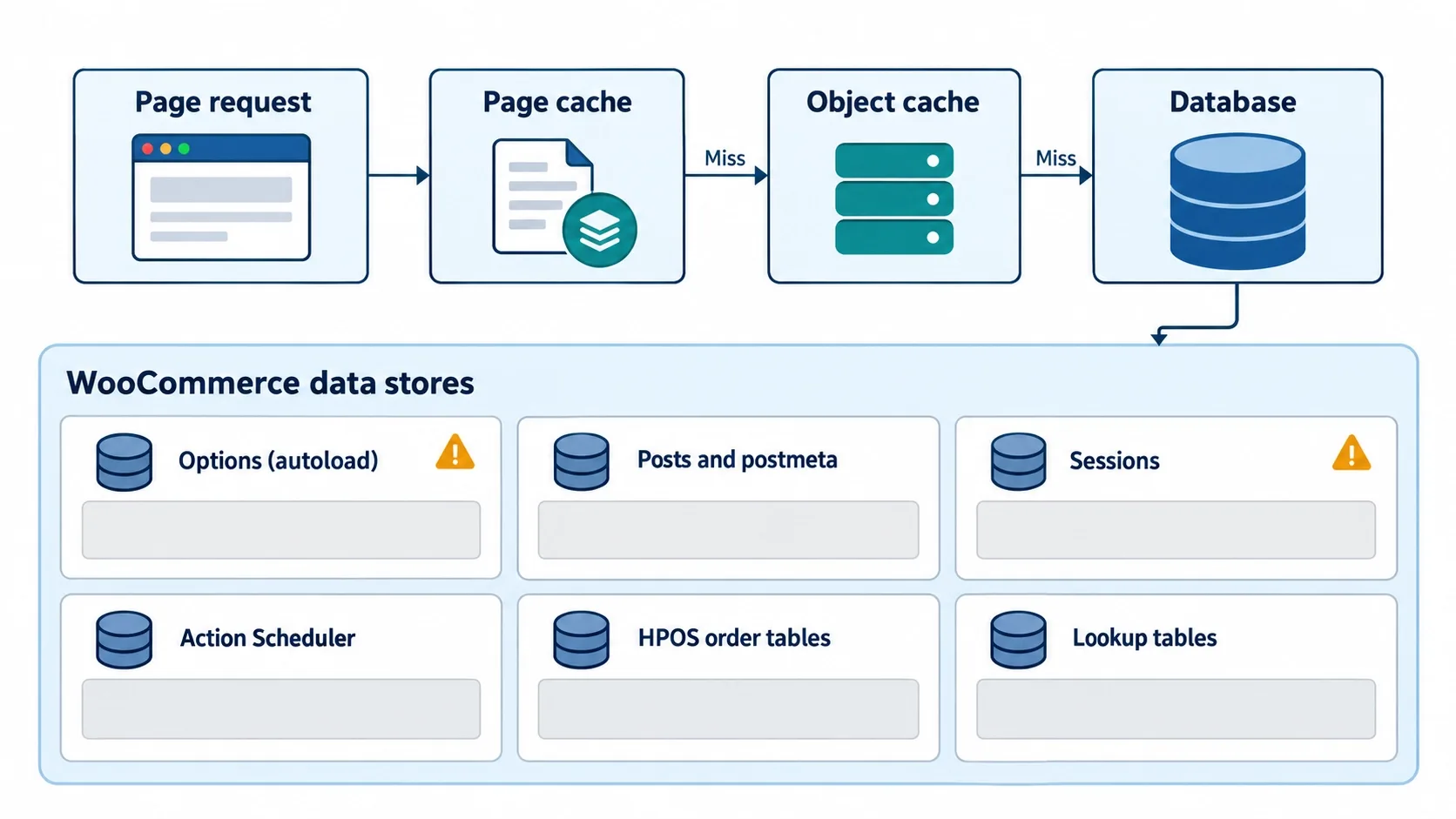
Now look at the database. Slow stores usually trace back to a few specific tables, not general "bloat":
- wp_options: slow when too much data is autoloaded on every request.
- wp_posts and wp_postmeta: products and variations generate heavy post and metadata activity.
- wp_woocommerce_sessions: customer sessions; clearing all of them can empty active carts.
- Action Scheduler tables: pending, failed or accumulated scheduled actions.
- HPOS order tables: WooCommerce's High-Performance Order Storage is on by default for new installs since WooCommerce 8.2, while older stores must enable it and check extension compatibility.
Database size alone proves nothing. Profile queries with Query Monitor, slow-query logs, WP-CLI and hosting tools, and check PHP workers, cron and object-cache hit rate. Redis or Memcached reduce repeated object lookups but do not repair inefficient queries, and they are not the same as full-page, CDN or browser caching.
Work safely: back up and test the restore, clone to staging, identify who owns each data set, clean in a controlled way, test products, cart, checkout, orders and subscriptions, measure before and after, and keep a rollback. Never run a generic delete query on production.
When hosting, database access, theme rendering, product data and cache behavior all need redesigning together, eCommerce web development services become an architectural requirement rather than a visual redesign.
7. Treat llms.txt as an Experiment, Not an AI-Ranking Standard
The llms.txt file is a proposed convention for giving language models a curated Markdown index of important pages. It does not replace robots.txt or XML sitemaps, and no search engine treats it as a ranking directive.
Google is explicit: its AI features documentation says you do not need new machine-readable files, AI text files or markup to appear in AI Overviews or AI Mode. If you try it anyway, curate it: core categories, buying guides, shipping, returns, warranty, brand and support pages, all on canonical URLs.
Treat it as a low-risk test you can watch in server logs. The real GEO foundation is crawlable pages, accurate product data, strong internal links and original expertise.
8. Choose a Deliberate Product-Variation Strategy
One variable-product URL is often right when variants have no independent demand. Separate indexable pages make sense when a variant has distinct demand, stock, imagery, specifications or a separate identifier, and enough content to avoid a near-duplicate.
Risks include cannibalization, thin variant pages, parameter indexing, conflicting canonicals, wrong feed URLs, duplicate schema and swatches that create crawlable link explosions. Where supported, Google's product variants guidance uses ProductGroup with hasVariant, variesBy and productGroupID to express the relationships.
The rule: visible product state, canonical URL, structured data, feed URL and price must agree.
Variants, Canonicals, Schema, and Feeds Must All Tell the Same Story
When one layer disagrees, rankings and shopping visibility suffer. Vareweb optimizes product and category pages, product schema, and feed alignment together, so your catalog sends one consistent signal.
9. Rebuild Product-Image Delivery Around Mobile LCP
Product galleries drive LCP, bandwidth, CLS and conversion. Use responsive srcset and sizes, explicit width and height, sensible compression and WebP or AVIF where they help, delivered through a CDN with proper cache headers.
- Do not lazy-load the image likely to become the LCP element; do lazy-load below-the-fold gallery images.
- Do not upload desktop-size files and shrink them with CSS.
- Write contextual alt text per angle, not one repeated keyword string.
WebP alone does not fix LCP. Diagnose whether the delay is server response, resource discovery, image transfer, render-blocking CSS, JavaScript, slider initialization or font loading.
10. Build XML Sitemaps for Catalog Control
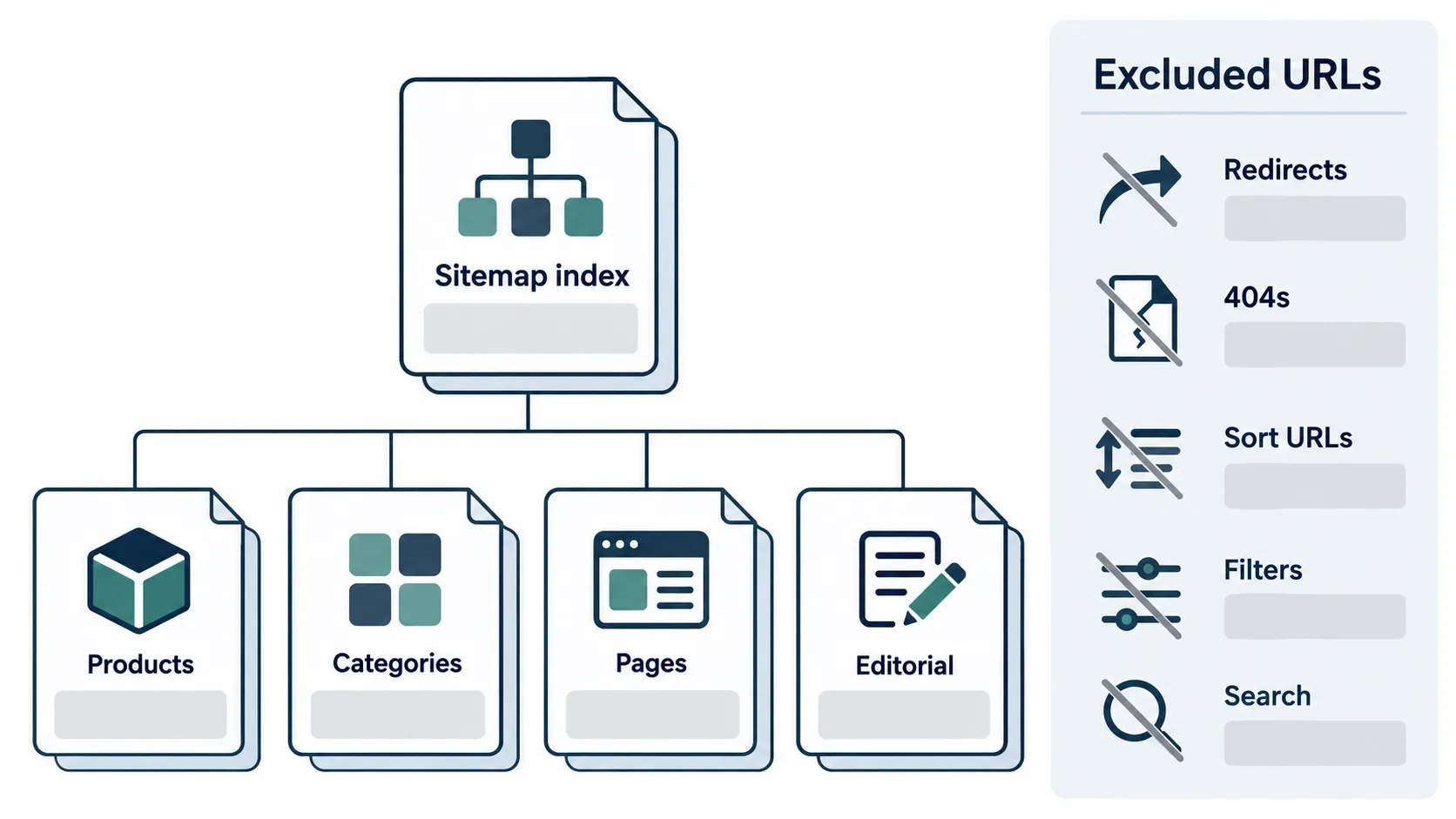
A sitemap should list canonical, indexable, final-status URLs you actually want discovered. Exclude noindexed pages, redirects, 404s, utility pages, sort and tracking URLs, search results and low-value filter combinations.
Google's sitemap documentation limits each file to 50,000 URLs or 50MB uncompressed, so large catalogs need segmented files and an index. It also says lastmod is used only if it is consistently and verifiably accurate, so do not refresh every date when a template changes.
Compare submitted, indexed and excluded URLs against canonical targets and Merchant Center destinations. A sitemap does not guarantee crawling or indexing.
11. Audit Render-Blocking Plugin and Theme Overhead
The problem is not the plugin count. An admin-only plugin may add nothing to the storefront, while one poorly built frontend plugin can cost more than five lean ones. Removed plugins can also leave scripts, options, tables and scheduled actions behind.
I audit CSS and JavaScript delivered and executed, long main-thread tasks, third-party origins, duplicate libraries and global versus conditional loading, using Chrome DevTools Coverage, the Performance panel, PageSpeed Insights, Real User Monitoring and Query Monitor. Tools like Asset CleanUp or Perfmatters are implementation aids, not a diagnosis.
Careless dequeuing breaks checkout, payment fields, variation selection, currency switching, consent and fraud protection. Test in staging first, then watch production.
12. Fix Breadcrumb Architecture and Schema
Breadcrumbs orient users, build internal-link hierarchy and feed BreadcrumbList markup. Conflicts arise when WooCommerce, the theme, the SEO plugin and custom code each output their own.
Use one visible system and one matching schema graph, and reflect the store's real hierarchy rather than every tag assigned to a product. Decide a primary category for products in several categories. Plugin features differ, as I covered in my comparison of the best SEO plugin for WordPress, but plugin choice does not replace architecture.
13. Build a Blog-to-Category-to-Product Internal-Linking Flywheel
Blog posts should not link to products at random. I build a path: informational guide, comparison, category, subcategory, product, complementary product, support resource, with descriptive anchors and links that disappear when stock does.
Embed products with native blocks, shortcodes or server-rendered components, not large client-side grids in every article. Categories should link back to guides that help shoppers choose. I connect this with wider cleanup in common WooCommerce SEO issues and how to fix them.
How I Measure WooCommerce Performance Without Guessing
The official good thresholds on web.dev are LCP of 2.5 seconds or less, INP of 200 milliseconds or less and CLS of 0.1 or less, judged on real-user data at the 75th percentile. Sub-1.5-second LCP is my internal target for important templates, not Google's pass mark.
- Lighthouse and synthetic tests find causes; Chrome UX Report, Search Console and Real User Monitoring show what users experienced.
- Test the homepage, category, product, high-variation product, search, cart drawer, cart, checkout and blog templates.
- Expect staging to look faster: it usually lacks analytics, consent tools, reviews, a full catalog and real traffic.
- Set budgets for JavaScript, CSS, images, fonts, third-party origins, long tasks, DOM size and origin response time, without one universal number.
How I Manage SEO Across Multiple WooCommerce Stores
Standardizing does not mean forcing every store onto one architecture. When I manage several WooCommerce stores, I do not allow each dashboard to become its own technical experiment. Every store needs a known owner, a known release process and a known rollback path.
Start with an inventory: WordPress, WooCommerce, PHP and database versions, HPOS status, theme, host, CDN, cache layers, SEO plugin, and the named owner of schema, sitemaps, redirects, feeds, analytics, consent and backups. Then write shared rules for canonicals, filters, variations, sitemaps, discontinued products, images, plugin installs and deployments.
My Multi-Store WooCommerce Health Dashboard
| Signal | Why it matters | Monitoring source | Review frequency | Escalation trigger |
|---|---|---|---|---|
| Indexable URL count | Detects index bloat | Crawler, Search Console | Weekly | Sudden unexplained growth |
| 5xx responses | Lost sales and crawl trust | Server logs, uptime tool | Daily | Repeated spikes |
| LCP | Mobile experience | Field data, RUM | Weekly | Template leaves good range |
| INP | Interaction speed | Field data, RUM | Weekly | Template leaves good range |
| CLS | Layout stability | Field data, RUM | Weekly | Template leaves good range |
| Database growth | Query load | Hosting tools | Monthly | Faster than catalog growth |
| Autoload growth | Slow every request | System Status, WP-CLI | Monthly | Large unexplained jumps |
| Failed scheduled actions | Broken syncs and feeds | Action Scheduler screen | Daily | Backlog building |
| Merchant Center disapprovals | Lost shopping visibility | Merchant Center | Daily | New disapproval class |
| Product-schema validity | Eligibility | Search Console reports | Weekly | New errors |
| Organic landing-page revenue | Commercial outcome | Analytics | Weekly | Traffic up, revenue down |
| AI referral sessions | AI discovery signal | Analytics referrals | Monthly | Sharp drop or spike |
| Checkout success | Revenue protection | Synthetic tests, analytics | Daily | Any sustained fall |
| Inventory synchronization | Accurate pages and feeds | Sync logs | Daily | Mismatch with source |
| Product-feed freshness | Correct prices and stock | Feed logs | Daily | Stale feed |
Set escalation levels in proportion to each store's catalog, traffic and revenue.
How I Build a WooCommerce SEO Strategy to Compete in the US
US results mix Amazon, Walmart, specialist retailers, Google Shopping grids, publishers, forums, video and AI Overviews. You will not beat them by publishing the longest article; you win specific searches with better decision utility, accurate data, specialist knowledge, clear policies and a faster buying path.
Map intent across product, category, attribute, use case, brand, comparison, compatibility, problem-solving, shipping, returns, warranty, availability and conversational questions. Use US English, USD pricing, real US shipping terms and accurate stock, and do not manufacture city pages without distinct local value.
Compare competitors by template, not by site, then build what shoppers need to choose: sizing, fit, materials, compatibility, installation, care and delivery, plus original testing where you genuinely did it.
US Ecommerce Competitor Gap Analysis
| Search need | Marketplace weakness | Specialist-retailer weakness | WooCommerce opportunity | Page type to build |
|---|---|---|---|---|
| Product comparison | Generic listings | Thin comparison content | Expert side-by-side tables | Comparison guide |
| Compatibility | Seller-supplied data varies | Buried in PDFs | Searchable fit and compatibility | Compatibility page or tool |
| Shipping confidence | Third-party sellers vary | Unclear delivery terms | Visible, accurate delivery rules | Shipping policy page |
| Variant selection | Confusing variant pages | Overloaded option menus | Clear variant strategy | Product page with guidance |
| Returns and warranty | Policy varies per seller | Hidden terms | Plain-language policies | Returns and warranty pages |
| Specialist advice | Reviews only | Generic buying copy | Real product expertise | Buying guide |
| Replacement parts and support | Hard to find parts | Little post-purchase help | Part finder and support hub | Support resource |
WooCommerce AEO: How Product Data Becomes Answerable
AEO and GEO are extensions of solid SEO and product-data work, not separate hacks. Pages still need to be crawlable, indexable, fast, helpful and eligible for snippets, and Google's own documentation says no special optimization is required for AI features.
What helps retrieval is clarity: stable canonical URLs, precise product names, brand and model identifiers, SKU, GTIN, price, currency, stock, variant relationships, specifications, compatibility, shipping, returns, warranty, original images and reviews that match visible content. For the wider picture, I laid out seven tactics in how to get your website cited by AI search engines.
The commercial case is real but needs care. Adobe's data shows AI referrals to US retail sites converted 42% better in March 2026, up from converting 38% worse a year earlier; that is a retail-wide average, not a promise for any one store.
A mention or citation helps sales only when the answer matches real inventory, the landing page resolves the next question, and shipping, returns and mobile checkout work. Add comparison, compatibility and specification tables and real FAQs where they help shoppers, never filler built for machines.
Be the Product AI Search Engines Can Actually Recommend
Vareweb optimizes for Google and AI search, including AI Overviews, ChatGPT, and Perplexity, by structuring your product data, content, and technical foundation so machines can read and cite it.
How I Measure Whether AI Discovery Is Bringing Sales
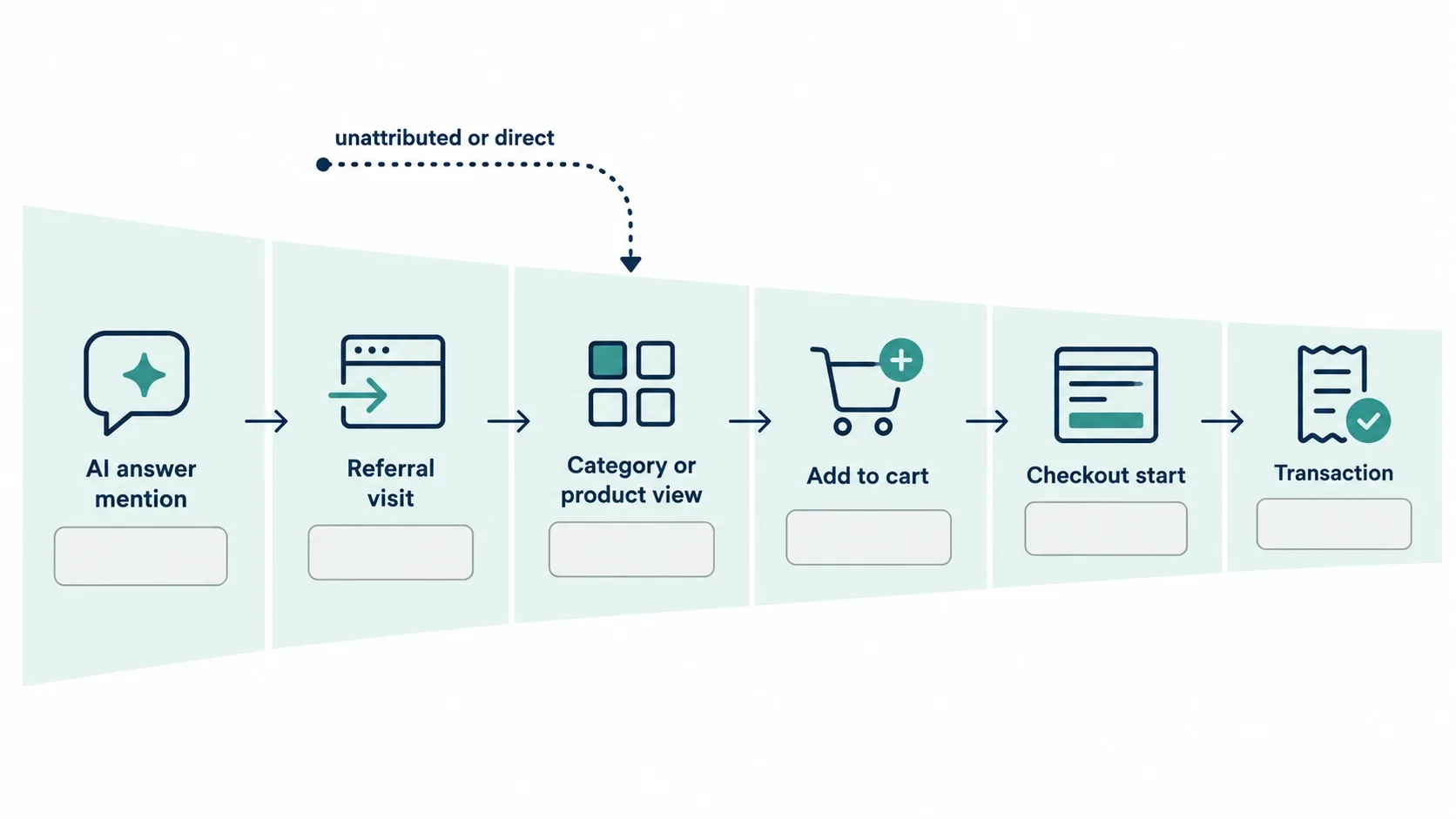
Track referrals from ChatGPT, Perplexity, Copilot, Gemini and similar sources where visible, along with landing pages, engaged sessions, add-to-cart, checkout starts, transactions, revenue and assisted conversions. Some AI influence will land as direct traffic, so referral data is never the full picture.
Annotate when a page earns a citation, schema changes, a feed is corrected or a comparison page launches, and compare cohorts before and after.
WooCommerce SEO Is Not Successful Until It Reaches Commercial Outcomes
Traffic is not success. Track non-brand visibility, indexable pages, snippet and merchant-listing errors, category entrances, add-to-cart rate, checkout progression, revenue, margin where available and AI referrals.
- Did the right pages gain visibility, and did qualified product interactions rise?
- Did traffic grow while revenue fell, or did out-of-stock products attract unusable visits?
- Did Merchant Center and storefront data stay aligned, and did speed work preserve checkout?
How I Deploy WooCommerce SEO Fixes Without Breaking Revenue
An SEO fix that breaks checkout is not an SEO improvement. I require staging, a current backup, version control, code review, a change log, pre- and post-deployment crawls, performance, schema and analytics baselines, synthetic cart and checkout tests, feed checks and a rollback plan.
Test products, variable products, categories, filters, search, cart, checkout, account, coupons, taxes, shipping, payment gateways, currency, subscriptions, inventory, consent and emails.
Want These Fixes Shipped Without Putting Revenue at Risk?
Vareweb handles the audit, the staging tests, the rollout, and the monitoring for WooCommerce stores, so your SEO gets stronger while your checkout keeps converting. Book a free call and we'll tell you where to start.
Which WooCommerce SEO Fixes Should You Implement First?
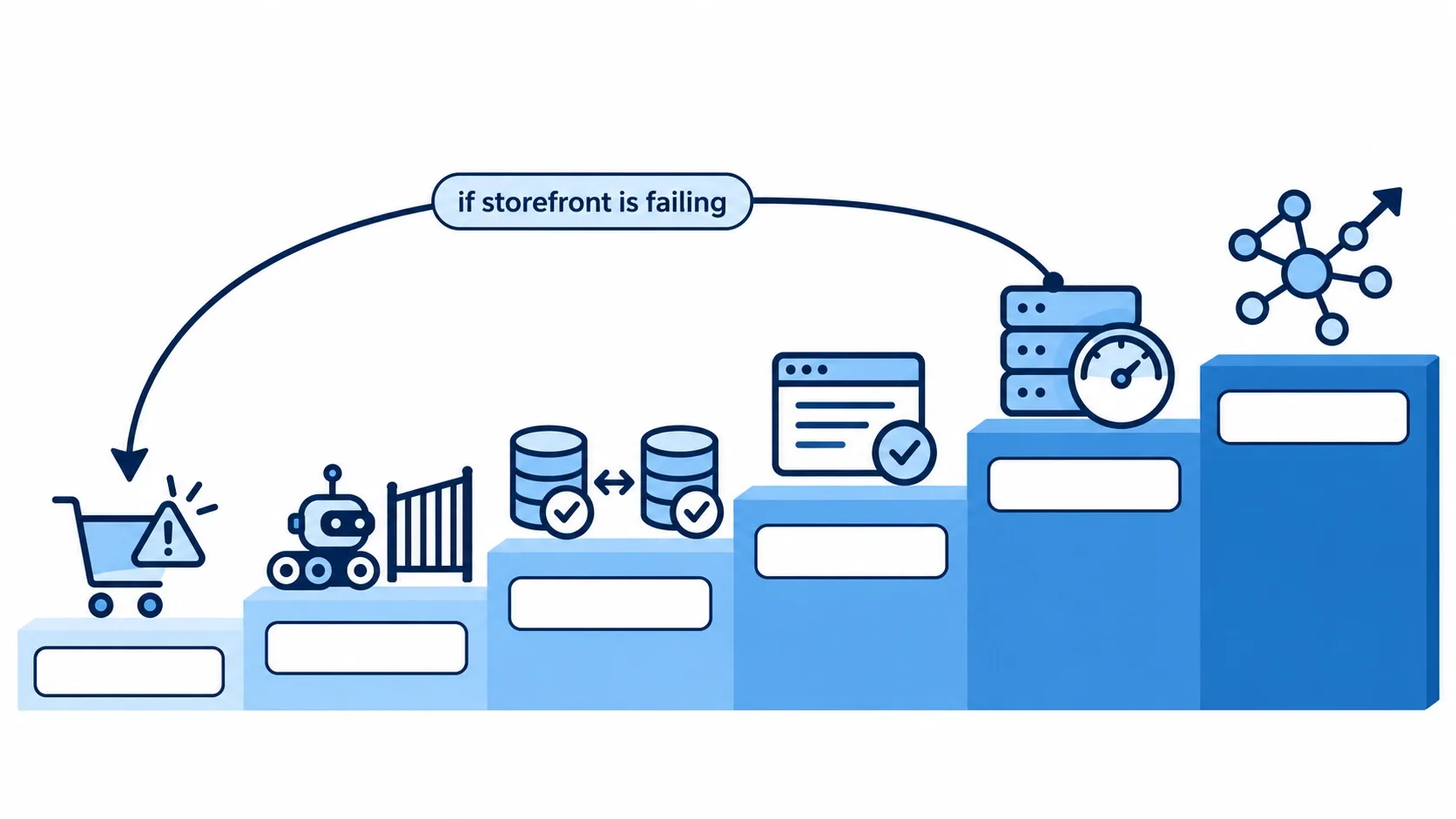
- Priority 1, revenue-threatening failures: checkout problems, server errors, accidental noindex, broken canonicals, wrong prices, feed failures, major mobile failures.
- Priority 2, crawl and indexation control: faceted crawl spaces, parameter URLs, thin taxonomies, sitemap contamination, redirect chains, wrong status codes.
- Priority 3, data consistency: product schema, Merchant Center, price, availability, identifiers, variants, shipping, returns, reviews.
- Priority 4, commercial-page quality: categories, priority products, buying guides, comparisons, internal links, images, metadata.
- Priority 5, performance architecture: hosting, PHP workers, database queries, caching, scripts, images, fonts, third parties. Move this up to Priority 1 when the storefront is failing.
- Priority 6, AEO and GEO expansion: answerable product content, compatibility resources, comparisons, AI-referral measurement, experimental txt.
FAQs
Is WooCommerce better for SEO than Shopify?
Neither is a universal winner. WooCommerce gives you full control over URLs, templates and data, which helps when you manage them well. Shopify standardizes more of the stack, which helps teams without technical ownership. Your team, catalog and budget decide it.
What is the best SEO plugin for a WooCommerce store?
It depends on your requirements, compatibility and who owns schema, sitemaps and redirects. Pick one plugin to own each job and avoid overlapping outputs. No plugin replaces sound architecture.
How do I fix duplicate content in WooCommerce?
First find the source: filters, parameters, variations, tags or theme output. Then choose the right control for each, such as stable landing pages, robots.txt rules, canonicals or 404 responses. Verify with a crawl and Search Console rather than assuming a canonical tag worked.
Do product tags help WooCommerce SEO?
Usually they hurt when added without a search purpose, because they create thin archive pages. They are not always harmful, though. A tag archive with real demand, unique content and a clear role can work, so decide deliberately.
Why are my WooCommerce category pages not ranking?
Common causes are thin context, weak internal links, conflicting canonicals, indexation problems, slow templates and stronger competitors. Check indexation and intent match first, then compare the page against what ranks. Technical fixes cannot compensate for weak products, pricing or inventory.
Can WooCommerce stores appear in Google AI Overviews, ChatGPT and Perplexity?
Yes, but nothing guarantees it. Eligibility depends on crawlability, helpful content, accurate product data and each system's retrieval. Google says no special AI optimization or markup is required, so strong SEO and clean product data are the foundation.
How does database bloat affect WooCommerce SEO?
It affects SEO indirectly, through slow server response, timeouts and weaker mobile experience that can hurt crawling and conversion. Size alone is not proof, so profile queries to find the real bottleneck. Clean up only after a tested backup.
Should I disable WooCommerce cart fragments?
Not automatically. Profile them first, because recent WooCommerce versions limit the default loading and the Mini-Cart block does not use them. If something still loads the script, restrict it carefully and re-test cart totals and cached mini-carts.
Does llms.txt improve AI visibility?
There is no evidence it does, and Google says AI features need no special files. It is optional and experimental, so treat it as a low-risk test you can watch in server logs. Prioritize crawlable pages and accurate product data.
How should I manage SEO across multiple WooCommerce stores?
Inventory every store, assign owners for schema, sitemaps, redirects and feeds, and write shared policies. Add central monitoring for errors, Core Web Vitals, indexable URLs, feeds and revenue. Use one release process with staging and rollback.
What Core Web Vitals should a WooCommerce store target?
Google's good thresholds are LCP of 2.5 seconds or less, INP of 200 milliseconds or less and CLS of 0.1 or less. Measure them with field data, not only lab tests. Aim lower than these on revenue-critical templates if your infrastructure allows.
How can a WooCommerce store compete against Amazon and large US retailers?
Win specific searches rather than everything. Offer clearer compatibility and sizing answers, accurate stock, transparent shipping and returns, and real specialist advice. Pair that with fast templates and consistent product data.

Written by
Kashaf
Kashaf is a veteran SEO specialist with deep expertise in AI SEO, generative engine optimization, ORM, web strategy, and marketing automation. With a Master's in Computer Science, he blends search strategy with technical insight into websites, automation workflows, and AI-driven platforms, helping brands dominate traditional search while adapting to the future of AI-powered discovery.