
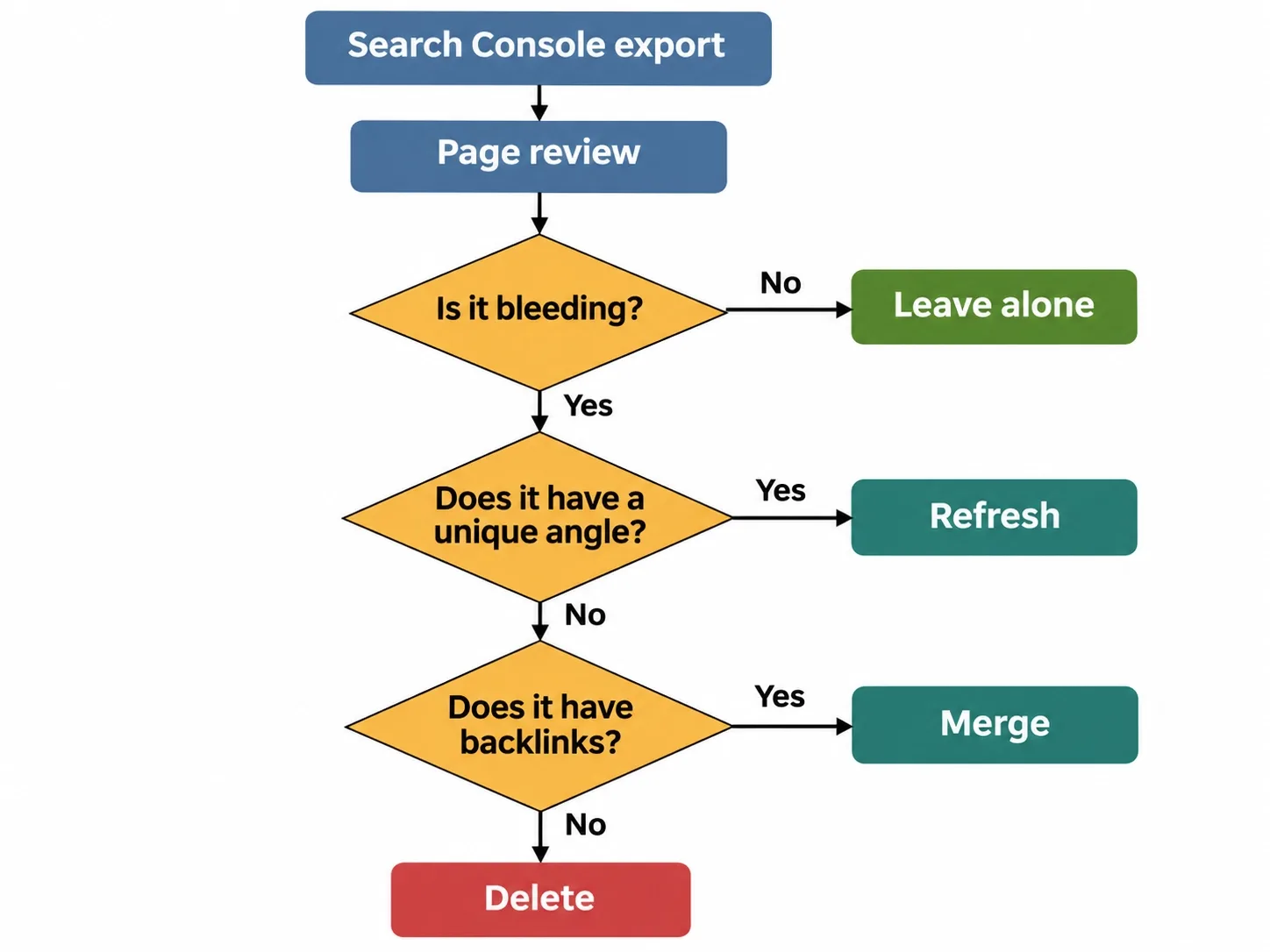
Quick Answer: Content decay is the slow loss of organic traffic, rankings and visibility on pages that used to perform, caused by shifting search intent, algorithm updates and competitors upgrading their content. You fix it by running a Google Search Console audit to isolate the pages that are bleeding, then giving each one a verdict: refresh it with new information, merge it into a stronger page with a 301 redirect, or delete it.
When I audit a mature domain, the fastest growth lever is almost never a new post. It is stopping the bleed on what's already published.
Most teams do the opposite. They keep publishing while older pages quietly lose clicks, and nobody notices because the monthly total still looks fine. Chartbeat data in the Reuters Institute's 2026 trends report shows Google search traffic to about 2,576 news sites down 33% globally and 38% in the US between November 2024 and November 2025, and the publishers surveyed expect roughly 43% less search traffic over the next three years.
Nothing breaks when a page decays. No error shows up and no alert fires. The page just sells a little less every month.
Stop publishing for a month. Fix what you already own.
Organic Traffic Slipping? Find Out Why Before You Publish More.
Vareweb starts with a technical and competitive audit, so you see which pages are decaying, which are cannibalizing each other, and what to fix first, before you spend another dollar on new content.
Quick Overview: Find, Refresh, Merge or Delete
| What the data shows | Stage & action | Hard rule |
|---|---|---|
| Clicks fall over a six-month compare; impressions hold (CTR decay) or drop (ranking decay) | Find: Export the losers and diagnose each one | Touch only pages that are bleeding |
| Page still has the right intent but loses to better pages | Refresh: Add data, expert input, new entities and a better structure | No 10x upgrade possible? Merge or delete |
| Two or more of your URLs rotate for the same query | Merge: Combine into the URL with the best backlinks, then 301 each old URL | Never redirect to the homepage |
| No clicks, no impressions and no referring domains in 12 months | Delete: Remove the page, return a 410 and clean up links and sitemap | Check backlinks before you delete |
| Old posts bury the answer and get skipped by AI answers | AI readiness: Lead with a direct answer, define entities, keep markup honest | No formatting trick guarantees a citation |
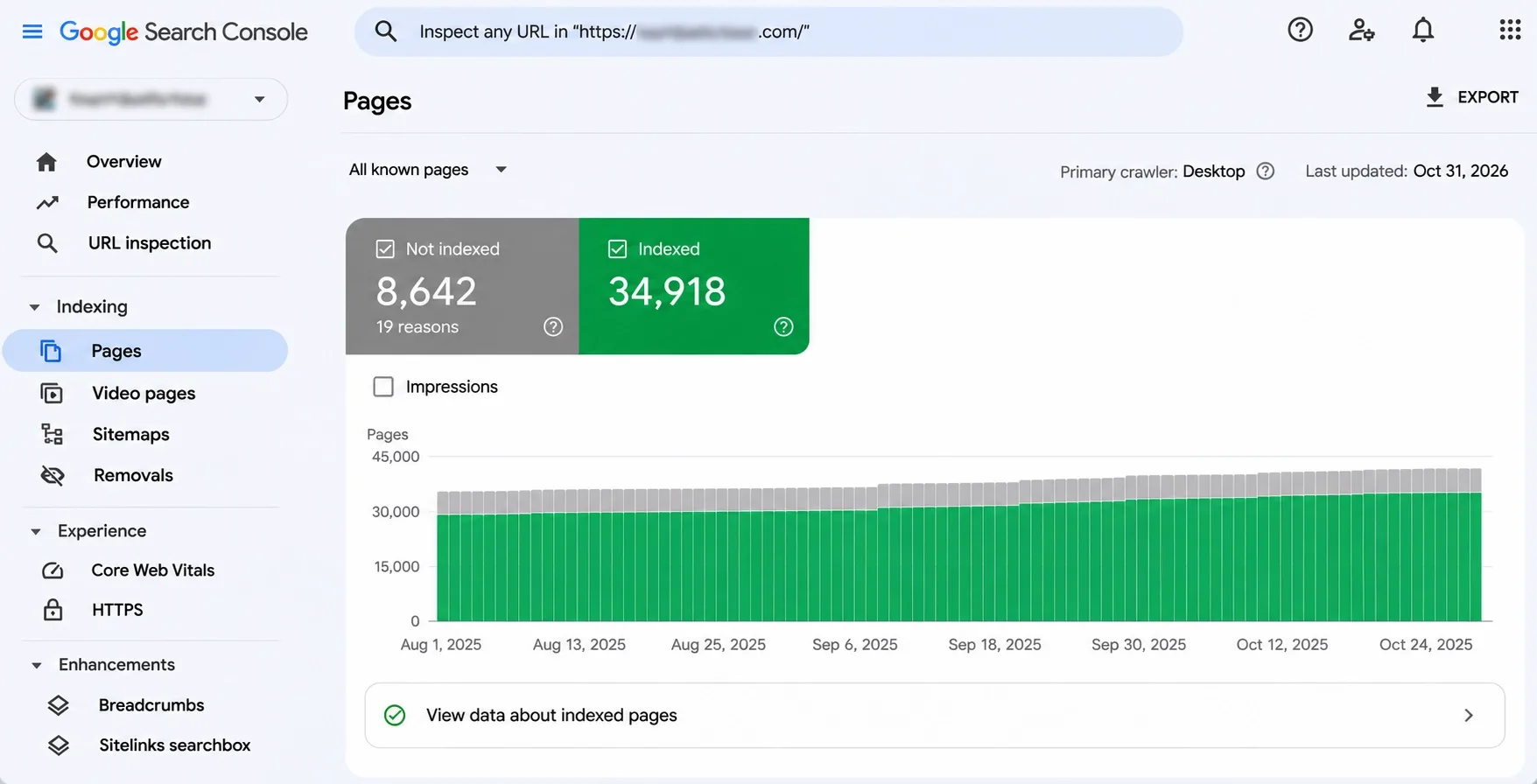
The Silent Killer: Why Google Punishes Index Bloat and Dead Content
Google doesn't hand out a penalty for old content, and I'd distrust anyone who says it does. The damage is quieter, and it comes from three places.
- Dilution: thin or outdated posts sit next to your best pages and blur what your site is actually about.
- Cannibalization: two or three posts chase the same query, split the links and clicks between them, and none of them wins.
- Wasted crawling: on very large sites, Googlebot spends visits on URLs that will never earn a click. Google's crawl budget guide is written for huge sites, so a 400-page blog won't hit that wall, but a site with tens of thousands of tag, filter and archive URLs can.
The pattern shows up on SaaS blogs, agency sites, publishers and online stores alike. We inherit legacy sites buried under auto-generated tag pages, empty archives and outdated taxonomy URLs, and part of delivering our eCommerce web development services is brutally auditing that dead weight and pruning it, so search engines spend their visits on the pages that earn.
The database pays too. Thousands of orphaned posts, revisions and archives make every query heavier. Minhaj Ahmed, our Head of Development, explains where that slowdown starts on WordPress-based sites in his guide on why a WooCommerce site gets so slow.
I check for bloat first. If a site has 600 real pages and Google reports 9,000 indexed URLs, something is generating pages nobody asked for. I wrote down my process in my WooCommerce SEO checklist, and the index checks in it apply to any CMS.
Plenty of agencies miss all of this because new content is easy to invoice. A quota of four posts a month looks like progress, and nobody gets paid to delete anything. I wrote about that trap in my guide on how to choose an SEO company, and the first question I'd put to any agency that sells a content calendar is simple: what happens to the old pages?
Internal links make it worse. Each dead post that sits in your navigation, hub pages or related-post widgets takes a link slot a live page could use, so your own site keeps pointing authority at pages that earn nothing.
You can't out-publish a leak.
I've sat across from marketing managers who refused to touch a five-year-old, 300-word article because the company paid for it. That money is gone either way. The only open question is whether the page keeps costing you rankings. On several audits the blog got smaller and total organic clicks went up.
The Triage System: Content Decay: How to Find, Refresh, Merge or Delete Declining Blog Posts
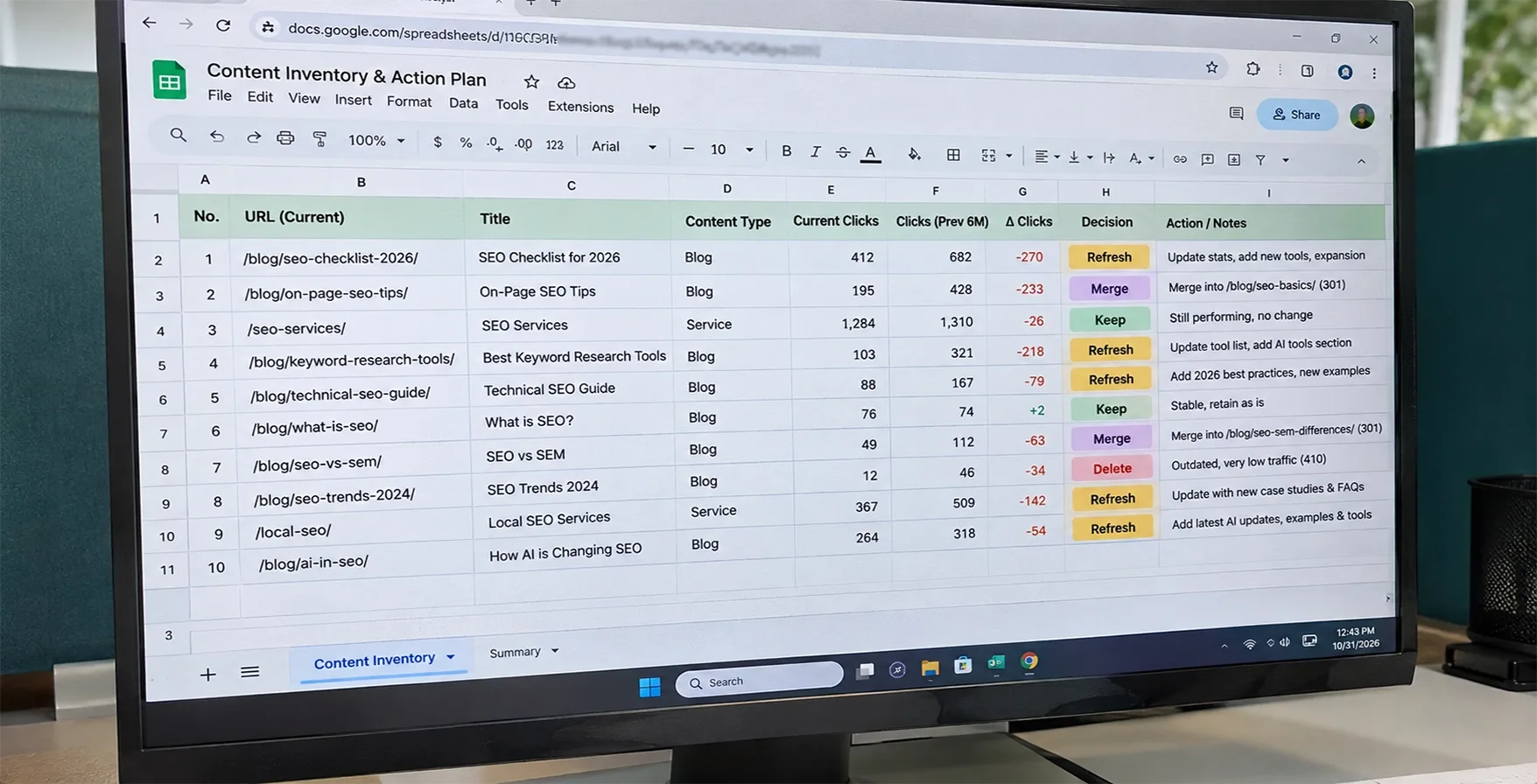
Every page gets one verdict. Find the bleeders first, then decide, page by page, whether to refresh, merge or delete.
FIND: Running the Search Console Forensic Audit
The objective. Stop guessing. Intuition tells you which posts feel old, while clicks and impressions tell you which ones are actually losing ground.
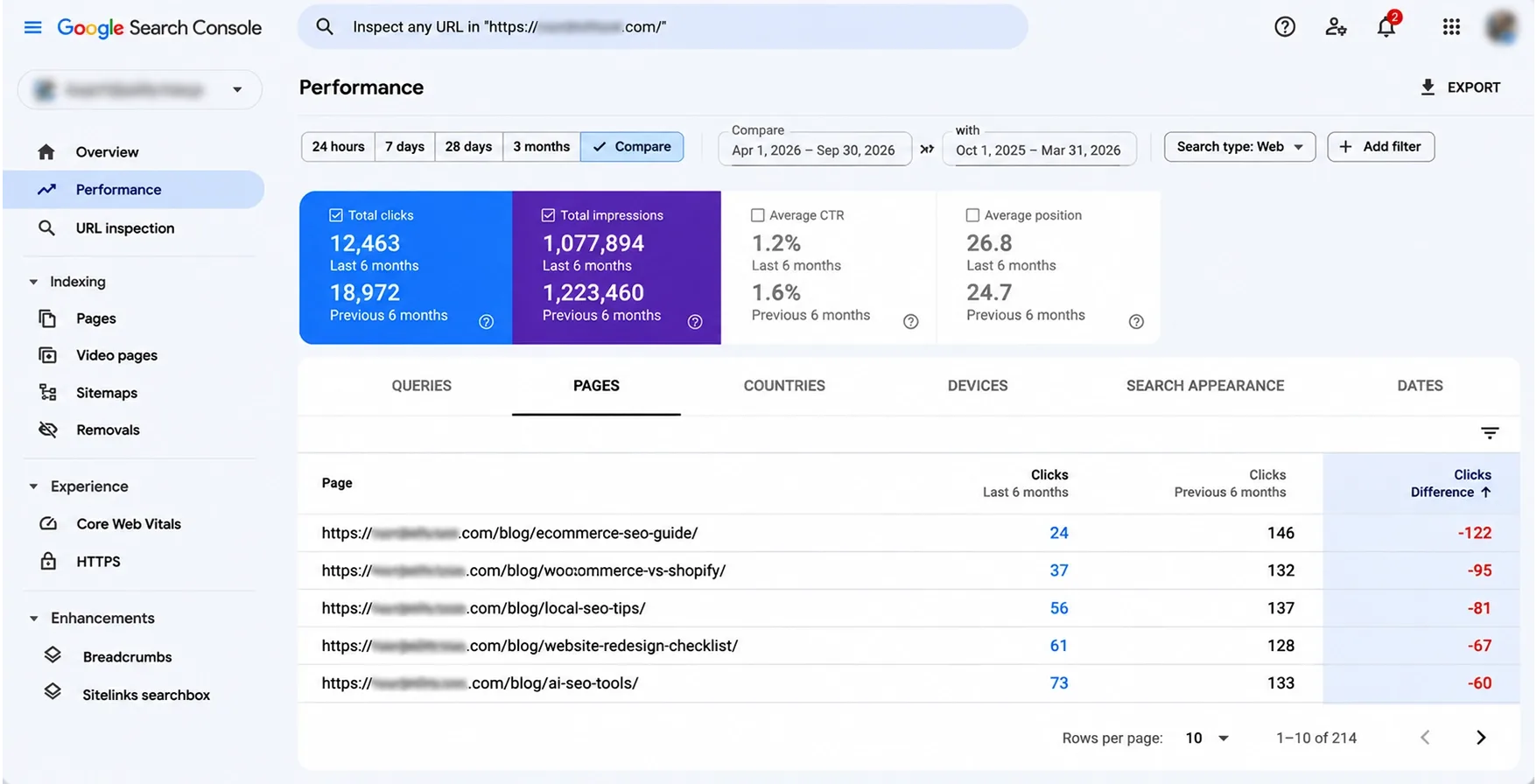
The workflow. Open Search Console, go to Performance, then Search results, and set the date filter to compare the last six months against the previous six. The Performance report keeps 16 months of data, so the compare fits inside it with room to spare.
- Open the Pages tab with Clicks and Impressions switched on, so each URL shows both periods side by side.
- Sort by the click difference, lowest first. The biggest losers float to the top.
- Filter to your blog. Add a page filter for URLs containing /blog/, or switch to Custom (regex) when your URL pattern is messy. Search Console regex uses RE2 syntax.
- Export the table to a sheet and add columns for impression change, CTR and average position.
Narrow the list before you read it. A regex like /blog/.*(audit|checklist) pulls one topic cluster into view, so you can judge a group of related posts together. Then add a column for referring domains from your backlink tool. A page that lost 400 clicks and holds 30 referring domains jumps the queue over one that lost 400 clicks and holds none.
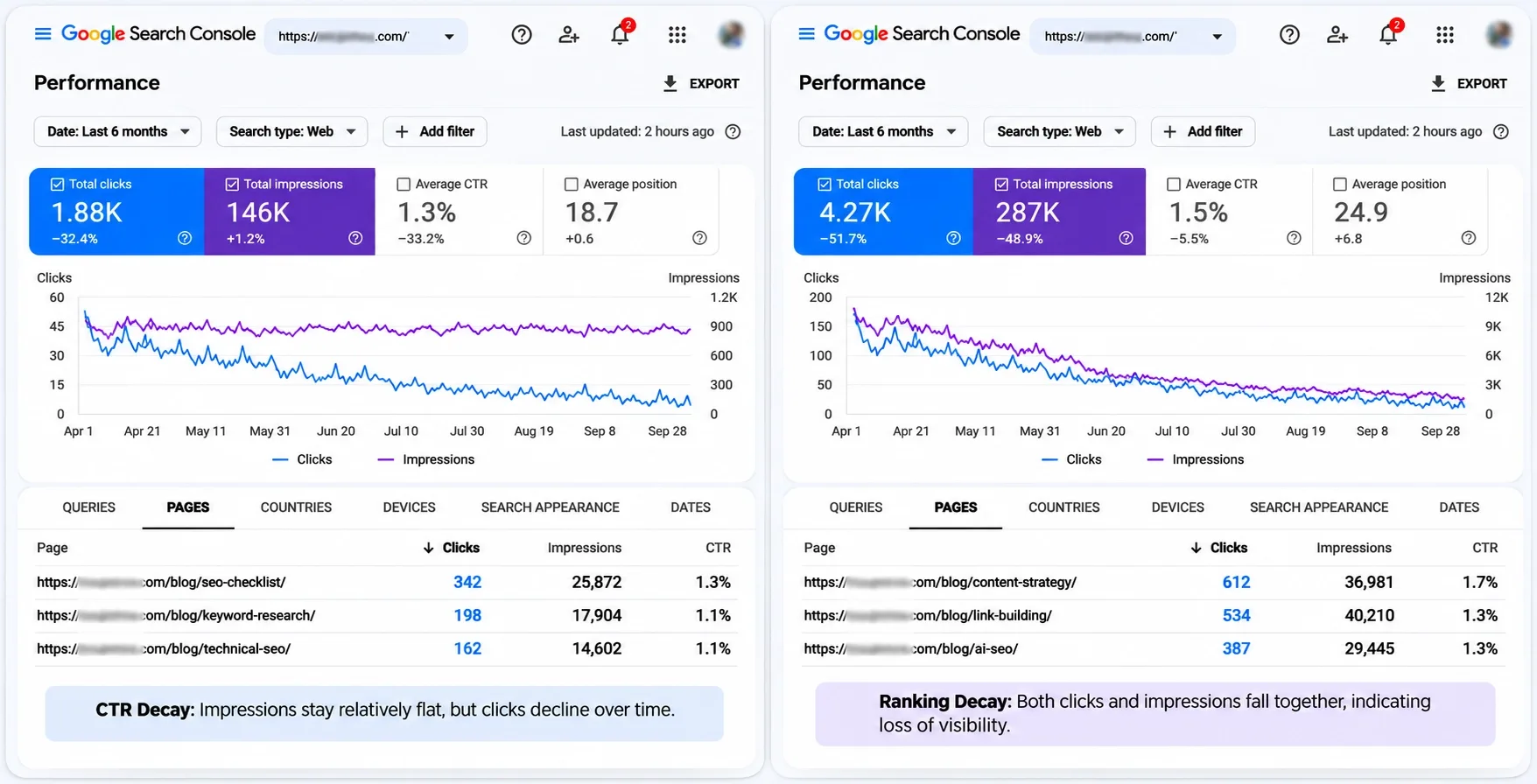
Read the losers next. Two patterns cover most of what you'll see.
CTR decay. Impressions hold steady while clicks fall. Searchers still see you but pick someone else, because a competitor wrote a stronger title, a SERP feature took the space above you, or your snippet stopped matching what people want. The fix lives in the title, the meta description and the opening paragraph.
Ranking decay. Impressions fall along with clicks, and average position slips from page one to page two or worse. Google decided other pages answer the query better. The fix lives in the content itself.
The pattern I see on almost every audit is a post that lost 80% of its year-over-year clicks while impressions barely moved. That's CTR decay, and a title and intro rewrite usually fixes it faster than a rebuild
Go one level deeper before you decide anything. Click a losing page, open the Queries tab and compare the same periods. If the main query slid from position 3 to position 9, you have ranking decay for that query. If the position held and the CTR dropped, look at what now sits above you.
Cross-check every drop against your own change log. A redesign, a plugin swap or a migration can look exactly like decay.
I keep a short weekly check so decay shows up in a month instead of two quarters. My post on which weekly SEO metrics to measure lists what I watch.
The execution rule. Don't touch a page because it's old. Touch it because it's bleeding, or because it earns far less than its backlink profile suggests. A five-year-old post that still brings steady clicks is an asset, so leave it alone.
REFRESH: Upgrading for True Information Gain
The objective. Rebuild the page so it beats what ranks now by offering something those pages don't.
The workflow. Changing the year in the title and rewriting the first paragraph is the lazy version of a refresh, and it does very little. Google's guidance on publication dates says dates should reflect real updates to the page, and a new date on the same text fools nobody.
A real refresh adds information gain, meaning things the current top results lack.
- Your own data: numbers from your store, your tests or your Search Console.
- Original visuals: a diagram, annotated screenshot or chart you made yourself.
- Expert input: a named person who did the work, with a quote or a specific lesson.
- New entities and questions: subtopics, tools, standards and terms searchers now expect.
- A new structure: headings that match what people want today, which may differ from what they wanted when you published.
Want Refreshes That Actually Beat What Ranks Today?
Vareweb's SEO team handles keyword research, content strategy, and on-page optimization, with monthly reporting, so every update is built to win its search, not just change a date.
Find the gaps with an entity pass. Open the top five results for the post's main query and list their headings. Next to each, list the entities they cover: products, tools, standards, people, terms. Mark everything your page lacks.
A TF-IDF tool does a similar job by showing terms that competitors use and you don't. Treat its output as a checklist of missing topics, never as a density target. Then open Search Console for the page and look at queries where it ranks between positions 8 and 20, since those show subtopics Google already links to you.
Rebuild in a fixed order. Rewrite the title and opening for the click. Replace every outdated claim, screenshot and price. Add the data, quote or visual that gives the page its edge, and link it to the newer pages on your site that didn't exist when you first published. Fact-check the result, publish it under the same URL, and let the modified date change because the page changed.
Fix intent before anything else. If the top results are now comparison pages and you wrote a tutorial, no amount of editing closes that gap.
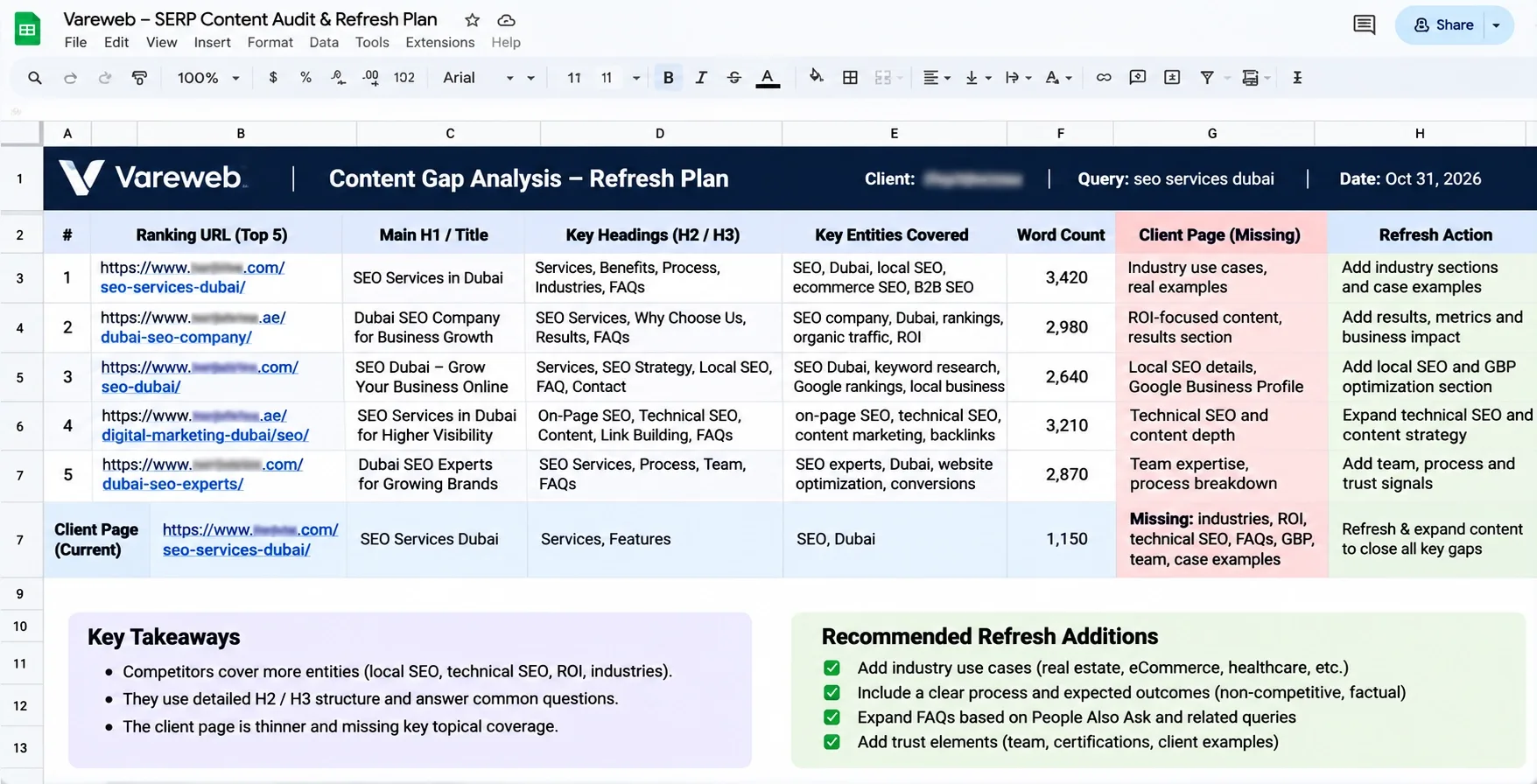
The execution rule. If you can't make the post much better than the current #1 result, don't refresh it. Ask three questions: do we have data they don't, does someone on the team have first-hand knowledge, and can we show it? Two no answers send the page to the merge or delete pile.
MERGE: Consolidating Cannibalizing Pages
The objective. One dominant page in place of three average ones.
The workflow. Spot the fight first. In Search Console, filter by one query and open the Pages tab. If three of your URLs show up and swap positions from week to week, they compete. Posts titled "best project management tools", "project management software guide" and "top tools for managing projects" are a classic case, since all three chase one intent.
Choose the master by authority, not by looks or age. Check referring domains for each URL in Ahrefs or Semrush, then compare clicks and history, and keep the URL with the strongest backlink profile.
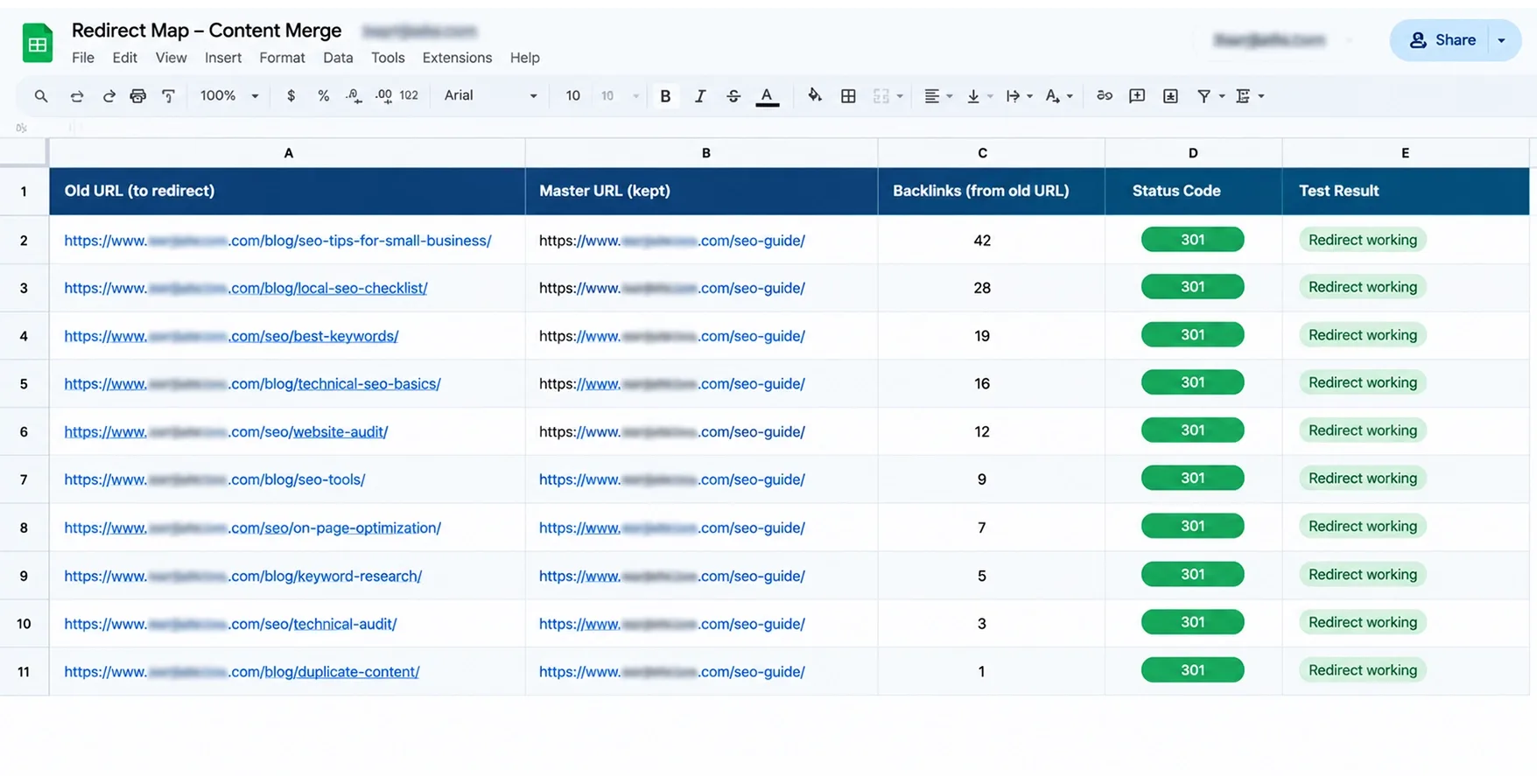
Build the master next. Pull the best sections, data points and entities from the other pages, cut the duplicates, tighten the structure and publish. Then set a strict 1-to-1 server-level 301 from every old URL to the master. Google's redirect guidance calls permanent server-side redirects a strong signal that the target should be the canonical page. Keep them live for at least a year, and update your internal links to point at the master directly.
Write the master like one article, not a pile of pasted sections. Keep a single H1, fold overlapping headings together, and drop any paragraph that repeats a point you already made. The merged page should read shorter on repetition and longer on substance. After it goes live, test every old URL by hand, then check the master in the URL Inspection tool to confirm Google picked it as the canonical.
The redirect map is the same discipline as a site migration. My guide on how to migrate a website without losing SEO rankings shows how I build and test one.
Blog posts also fight your own service, product or category pages for the same commercial query, and the commercial page usually deserves to win. Fold the post's useful parts into that page, redirect the post, and for category pages follow the steps in my guide to optimizing ecommerce category pages for SEO. Duplicate and competing URLs also appear in my post on common WooCommerce SEO issues.
I've merged three mediocre posts into one master guide and watched it reach the top spot within three days. Not every merge moves that fast, but the pattern holds: one strong page beats three weak ones.
The execution rule. Never 301 a removed post to the homepage. Send it to the closest relevant page, so the PageRank flows somewhere useful and Google doesn't treat the redirect as a soft 404. If no relevant page exists, the post belongs in the delete pile.
Merging or Removing Hundreds of Pages? Get the Redirects Right.
One wrong redirect can erase years of work. Vareweb handles large-scale cleanups with a technical audit, redirect mapping, and launch checks, so the rankings you keep stay kept.
DELETE: Pruning the Dead Weight
The objective. Remove pages that give readers nothing and give your site nothing.
The workflow. Run three checks on every candidate.
- Search Console: zero clicks and zero impressions over the last 12 months.
- A backlink tool: zero referring domains.
- Your own team: no sales email, support article or product page depends on it.
A page that fails any check isn't a delete. Pages with backlinks get a 301 to a relevant target, and pages with impressions but no clicks go back to the refresh or merge pile.
Founders hate this step. They paid writers for those posts, and deleting one feels like admitting a mistake. I tell them the invoice is paid whether the page lives or not. A blog hoarded like a storage unit gets harder to link, harder to audit and noisier in the sitemap.
Hoarding also slows every future decision. Each audit takes longer, each redirect map grows, and each new writer has to read through dead posts to learn what the site already covers. A smaller library is easier to keep accurate.
The status code question comes up on every project. A 404 says "not found." A 410 says "gone," on purpose and for good, and the MDN reference for 410 recommends a 404 when you're unsure whether a removal is permanent.
Many guides get this wrong. Google's HTTP status code documentation says it treats 4xx errors, except 429, the same way, so a 410 won't pull a page out of the index faster than a 404 will. I still return a 410 for pages I remove on purpose, because it records the intent for my team and for any tool that reads status codes.
Four details save you from mistakes.
- Don't block deleted URLs in robots.txt. Google has to crawl them to see the error.
- Never serve a soft 404. A page that says "not found" but returns a 200 status confuses crawlers.
- Clean up around the page. Remove internal links and sitemap entries that point to it.
- Use the Removals tool only for urgent cases. It hides a URL temporarily, and Google's guide to removing content explains the permanent options.
The execution rule. Delete only after the backlink check. Ship deletions in batches, and watch Search Console for two weeks after each one.
Make Your Best Pages Easy for AI Search to Quote
Vareweb optimizes for Google and AI search engines, including AI Overviews, ChatGPT, and Perplexity, by restructuring content, structured data, and technical foundations so your answers get found and cited.
The AI Factor: Restructuring Content for GEO
Decay is speeding up because the page you refresh now competes for a different kind of result. AI Overviews, ChatGPT and Perplexity answer first and cite later, so an old post that buries its answer under a long intro loses twice: fewer clicks, and fewer citations.
Search Console now shows part of this. Its Generative AI performance report reports AI Overviews and AI Mode impressions by page, country, device and date, and Google says it rolled out to all sites worldwide as of August 31, 2026. Check which of your pages appear there before you choose what to refresh.
Old posts fail extraction for a plain reason: they were written for scrolling. They lean on "as mentioned above," vague pronouns and sections that only make sense after the three before them. An AI system lifting one passage gets half a thought.
Rewrite each H2 so its first sentence stands alone and answers the heading. A reader who lands mid-page, or a model that quotes one block, should still get a complete answer.
A GEO refresh changes how the page is built.
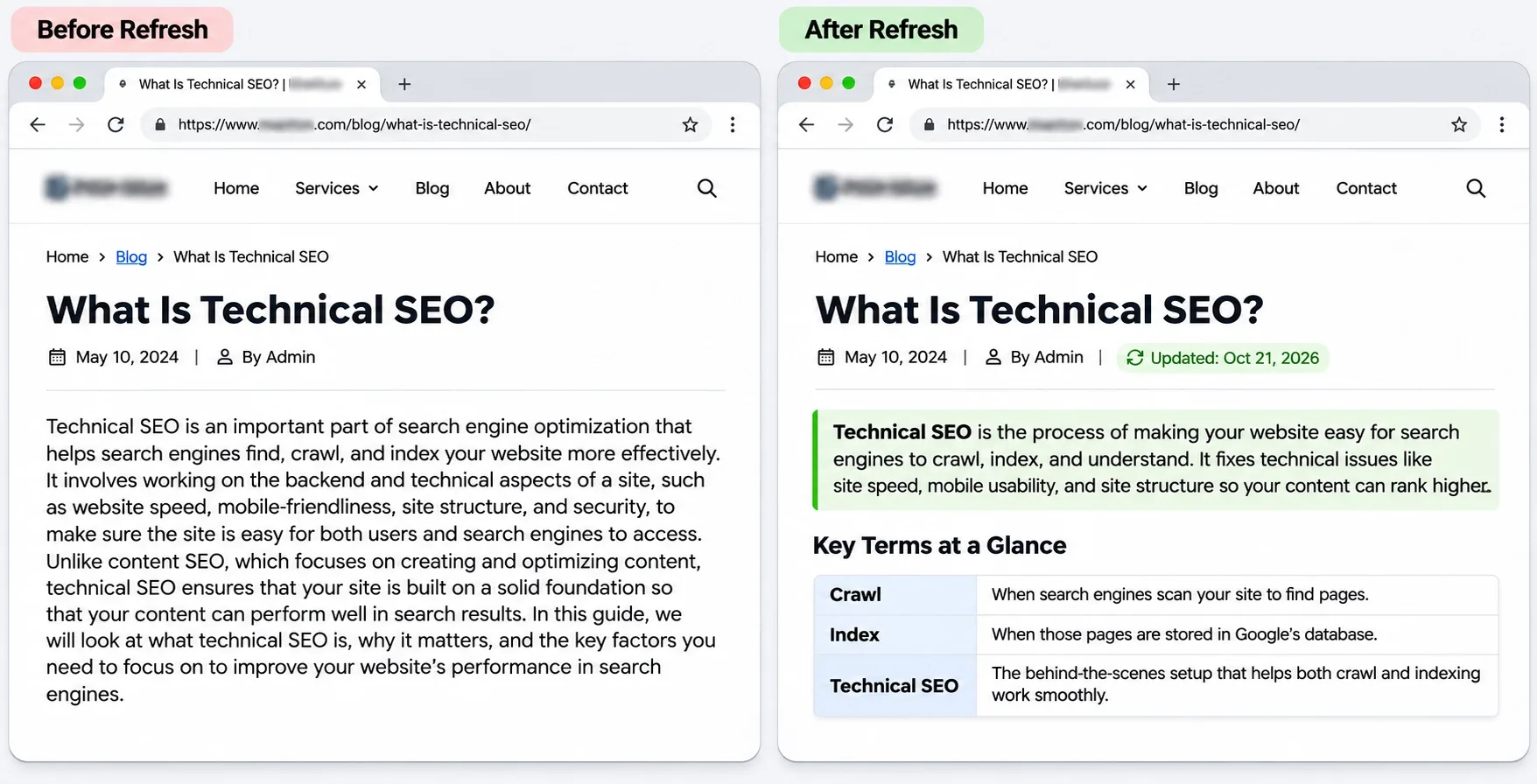
- Lead with the answer. Put a two-sentence direct answer under the H1 and cut the long narrative intro.
- Define entities plainly. Write "X is a..." sentences for your key terms, using the names searchers use.
- Use lists and tables where the content is list-shaped. Steps and comparisons are easier to read and easier to extract.
- Keep the HTML clean. One H1, headings in order, real tables and real lists, never text baked into images.
- Show who wrote it. Add a named author, a role and an update date that reflects a real change.
Schema deserves honesty. Google's guidance on AI features in Search says no special markup is needed to appear in AI Overviews or AI Mode, so schema is not a switch you flip. I use it as clean labeling: Article markup with the author and modified date, and Product or Service markup that matches what a visitor can see on the page.
I covered the practical steps in my guide to getting your website cited by AI search engines, and the page-level checks in my GEO-ready web design checklist.
Nobody can promise you a citation. You control whether the answer sits on the page in plain words, backed by something only you could write.
Frequently Asked Questions
How often should a site run a content decay audit?
Every six months for most sites, which matches the six-month compare window. Large or fast-publishing sites can add a lighter monthly check on their top losers.
Will deleting hundreds of old blog posts hurt my traffic?
Not if the pages earn no clicks, impressions or backlinks, because they take nothing with them. Check backlinks first, redirect any page that has links, and delete in batches while you watch Search Console.
How long does a refreshed post take to recover?
Expect a few weeks to a few months, depending on how soon Google recrawls the page and how competitive the query is. Check the position after four to six weeks, and treat any promised timeline as a guess.
Is it better to write a new post or update an old one?
Update when the page already has links, history and the same search intent. Write a new post when the topic needs a different intent or the old URL is a poor fit.
What is the difference between a 301 redirect and a 410 status code?
A 301 sends visitors and link value from an old URL to a relevant new one. A 410 tells crawlers a page is gone for good, with no replacement. Use a 301 when a relevant target exists and a 410 when it doesn't.
Should I change the URL slug when I update a post?
No. If the URL has backlinks, keep the slug, because a new one forces a redirect and puts link value at risk. Update the title and headings instead.
How does keyword cannibalization cause content decay?
When several of your pages target one query, links, clicks and relevance split between them. Google rotates which page it shows, none of them builds strength, and a competitor with one focused page passes them all.
Want Someone to Run the Content Audit for You?
Book a free call and Vareweb will look at your declining pages, tell you which to refresh, merge, or remove, and show you what a clean-up plan for your site would involve.

Written by
Kashaf
Kashaf is a veteran SEO specialist with deep expertise in AI SEO, generative engine optimization, ORM, web strategy, and marketing automation. With a Master's in Computer Science, he blends search strategy with technical insight into websites, automation workflows, and AI-driven platforms, helping brands dominate traditional search while adapting to the future of AI-powered discovery.