
Quick Answer: You should redesign your website in 2026 when the architecture, not the look, is what stops the business from growing. That means repeated Core Web Vitals failures after focused fixes, weak mobile conversion across the component system, accessibility barriers built into the code, a CMS that blocks publishing, or technical debt that costs more to maintain than to replace. Painting a new design over a broken codebase is like painting a damaged foundation: it looks better for a while, and the engineering problems keep costing you.
Whenever a founder tells me they want a redesign, the first thing I inspect is not the color palette. I inspect field performance, server behavior, conversion drop-off, publishing workflows and the cost of making ordinary changes.
In my experience leading the engineering team at Vareweb, the strongest case for a rebuild shows up in the code and the operating process long before it shows up in the visuals. Google's own Core Web Vitals guidance is a fair place to start, because it gives you thresholds instead of opinions.
The 2026 Baseline
Verified reference points
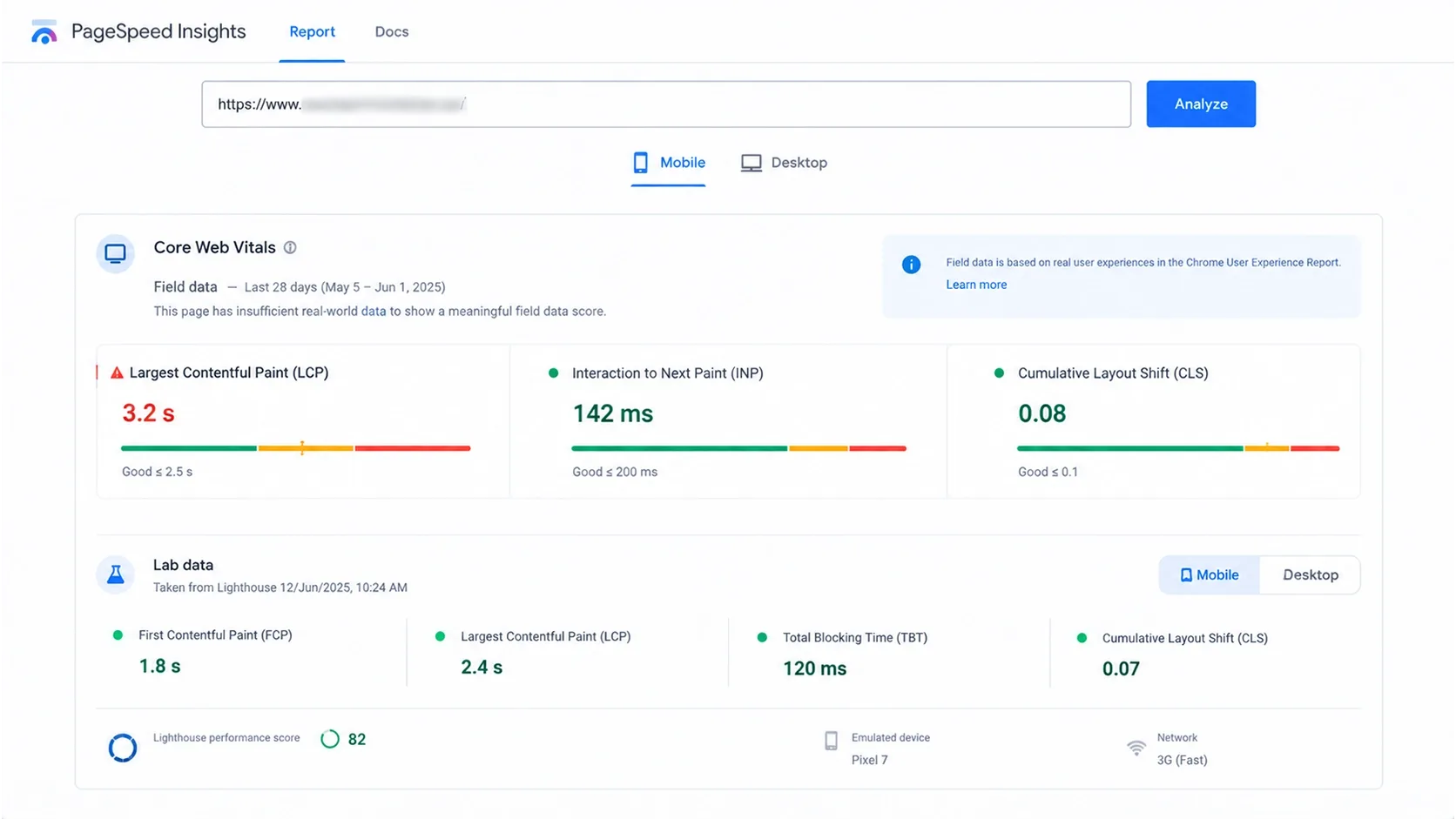
- Core Web Vitals "good" thresholds: LCP of 2.5 seconds or less, INP of 200 milliseconds or less, CLS of 0.1 or less, assessed at the 75th percentile of page loads, per web.dev.
- Mobile share: devices classed as mobile accounted for about 58.5% of global website traffic in 2025, according to Statista's chart of StatCounter data published in March 2026. Your own site can differ sharply.
- Accessibility: WCAG 2.2 is a W3C Recommendation and is also ISO/IEC 40500:2025.
- AI search eligibility: Google says a page must be indexed and eligible to show with a snippet, and that you need no special schema, AI text files or new markup, as its AI features documentation explains.
- Search Console control: since August 31, 2026, the Search generative AI control is available to all sites, and Google says it is not used as a ranking or inclusion signal for other parts of Search.
- Accessibility in practice: the 2026 WebAIM Million analyzed home pages in February 2026 and found detected WCAG 2 failures on 95.9% of them, averaging 56.1 errors per page. Low-contrast text alone affected 83.9%.
- AI referrals are small but measurable: SE Ranking's study of 101,574 sites put ChatGPT at 0.32% of global referral traffic in May 2026, up from 0.23% in April.
- AI Overviews and clicks: Seer Interactive's April 2026 update covered 53 brands and 2.43 billion organic impressions. In February 2026, organic CTR was 2.36% when an AI Overview appeared and 3.82% when it did not; Seer calls its findings directional.
- Migration redirects: Google advises keeping redirects for as long as possible, generally at least one year, in its site move guidance.
Treat these as inputs to your decision, not as a verdict on your site.
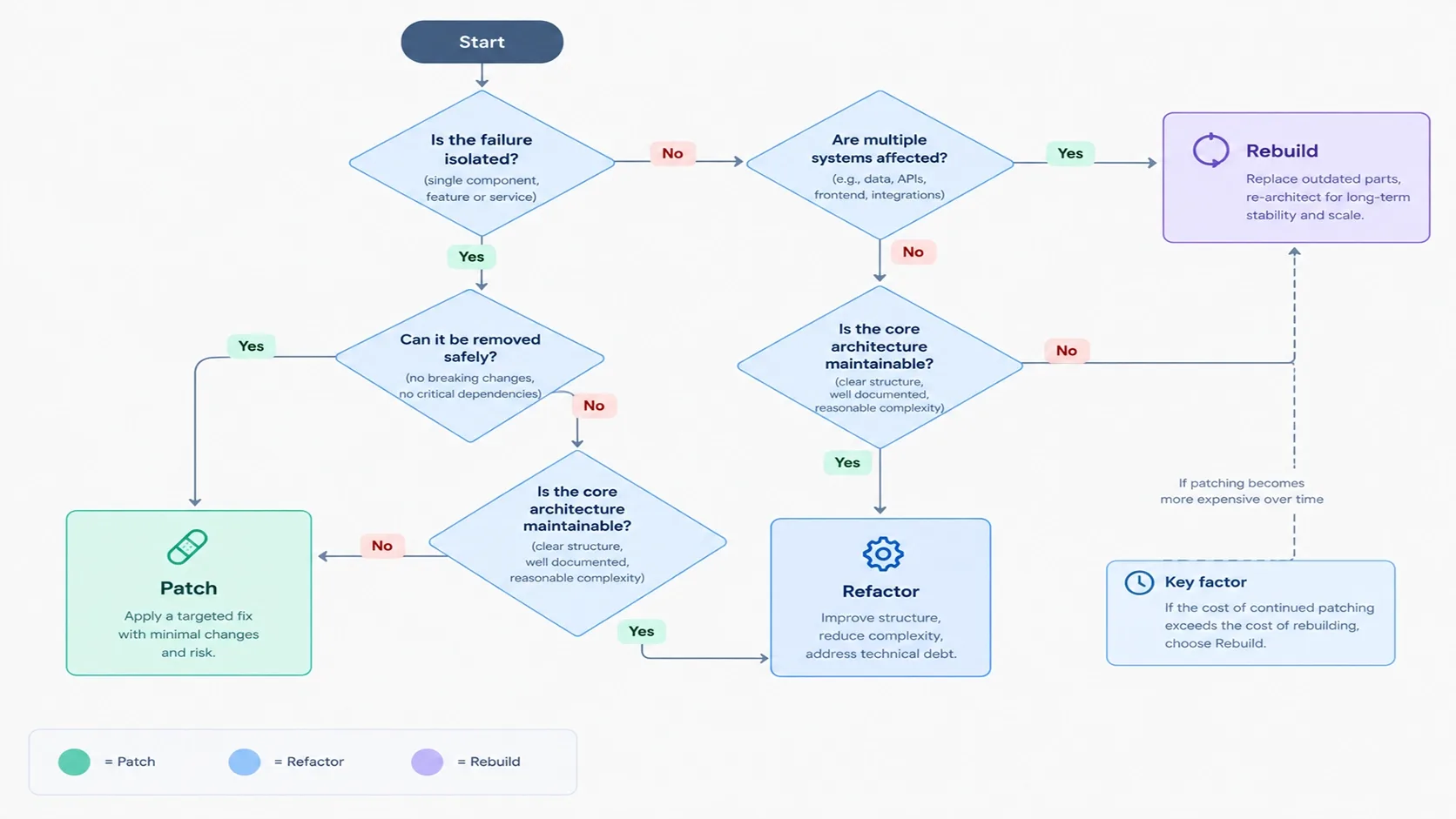
Quick Comparison: Patching vs. Refactoring vs. Full Redesign
| Approach | When to Choose It & Scope | Risk & Timeline | Expected Outcome & Limitations |
|---|---|---|---|
| Minor Patching | Isolated bugs, image issues, metadata errors or slow components. | Low risk; usually quick to implement. | Fixes specific defects but not underlying architectural problems. |
| Modular Refactor | Maintainable platform with inefficient navigation, search, cart or shared components. | Moderate risk; depends on complexity and testing. | Improves speed and consistency but cannot fix an obsolete platform. |
| Full Redesign / Rebuild | Outdated architecture, major integration issues or widespread accessibility problems. | High risk; requires discovery, migration and extensive QA. | Creates a scalable foundation but cannot resolve weak pricing, offers or traffic quality. |

The Engineering Reality: When and Why to Redesign Your Website
Below are the ten triggers I check, with what the business sees, what engineering sees, how to diagnose it and when a patch is still enough.
1. Core Web Vitals Keep Failing After Focused Optimization
The business sees slow pages and weak mobile sessions. Engineering sees a slow LCP (the time the main content takes to appear), a high INP (the delay after a click or tap), or CLS (content jumping during load).
Check TTFB (server response time), render-blocking resources, late-discovered hero images, long tasks and third-party scripts. A long task is any main-thread task over 50 milliseconds, and it blocks the browser from responding.
A large DOM is a diagnostic signal, not a full explanation. Google's article on DOM size and interactivity shows it raises rendering cost, but poor INP usually comes from expensive event handlers, synchronous JavaScript, repeated component initialization, hydration, tags, filtering logic or cart interactions.
- How to diagnose: compare field data from Search Console and the Chrome UX Report with PageSpeed Insights, then profile in Chrome DevTools and add Real User Monitoring (RUM). Field data shows what users experienced; Lighthouse shows lab diagnostics.
- Test templates, not the homepage: service, product, category, landing, blog, search, cart, checkout and account pages.
- Patch when: one oversized image, one font or a few tags cause the failure.
- Rebuild when: the theme or page builder ships code you cannot remove safely, behavior depends on global scripts, every fix causes a regression, and your team cannot maintain the gains.
- Measure: field LCP, INP and CLS at the 75th percentile per template. Internal targets, such as LCP under 1.5 seconds on priority mobile templates, are performance budgets, not Google thresholds.
A Lighthouse score is not a redesign strategy. My colleague Kashaf, Vareweb's SEO Manager, covers the ranking side in How Important Is Page Speed for SEO in 2026?.
2. The Site Cannot Support Search and AI-Assisted Discovery
Many people believe AI crawlers reject "div spaghetti." I do not accept that claim, and Google does not require perfect HTML for its generative features.
Conventional and AI-assisted search both still depend on crawlable URLs, indexable pages, clear titles and headings, readable main content, internal links, stable canonicals, accurate entity information and structured data that matches the page. Semantic HTML still helps accessibility, document structure and maintenance, but it is not a ranking trick.
The data says why this matters without justifying panic. Previsible's 2026 State of AI Discovery report tracked 6.77 million LLM-driven sessions across 166 GA4 properties through May 2026, and ChatGPT accounted for 92.4% of the trackable referrals.
SE Ranking also found that 60% of AI-referred visits landed on homepages, compared with 17% of organic search visits.
- Warning signs: key content only appears after fragile client-side rendering, templates hide crawlable text, structured data (JSON-LD) contradicts visible content, internal links are generated inconsistently, or the CMS cannot store services, products, people, locations, specifications and policies as structured entities.
- Diagnose: compare raw HTML with the rendered page, crawl staging and production, and check canonicals, schema ownership and the URL Inspection tool.
- Patch when: the gap is a missing title template or a handful of broken schema blocks.
- Rebuild when: the CMS cannot represent your information as reusable entities with consistent metadata.
Designing for AEO (answer engine optimization) and GEO (generative engine optimization) means building an understandable, evidence-rich information system. It does not mean adding artificial FAQ blocks or oversized schema graphs, and no implementation guarantees AI citations.
I explored where automation helps and where it does not in Where AI Fits in the Web Design Process (And Where It Doesn't), a post I wrote earlier this year.
3. Technical Debt Makes Ordinary Changes Expensive
Technical debt is the accumulated cost of shortcuts: hardcoded content, duplicate components, abandoned CSS, global JavaScript, plugin conflicts, edited parent themes, unsupported dependencies and missing documentation.
The business feels it as a banner change that needs a developer, a landing page that takes weeks, a navigation fix that breaks checkout, or a plugin update that wrecks the layout. Engineering feels it as fear of deleting code.
- Audit: repository history, dependencies, template ownership, CSS and JavaScript coverage, plugin inventory, third-party scripts, CMS fields, error logs, release frequency and average change lead time.
- Patch when: debt is concentrated in a few modules with clear owners.
- Rebuild when: the ongoing cost and risk of patching exceed the amortized cost of a maintainable architecture.
When a rebuild involves URL preservation, performance budgets, content modeling, structured data, accessibility, analytics, integration work and a controlled migration, professional website design and development services become an engineering safeguard rather than a visual expense.
4. Mobile Traffic Is High but Mobile Conversion Is Weak
The global mobile figure is useful context, but it is not your data. Device mix varies by industry, region, channel and brand, so I never accept a global average in place of first-party evidence.
- Analyze: traffic share by device, conversion rate by device, revenue per session, average order value, form completion, checkout abandonment, search and navigation use, rage clicks, input errors and page speed.
- Compare: traffic share against revenue share, then ask why mobile brings visits but fewer orders.
Common failures include desktop layouts squeezed into narrow screens, tiny touch targets, sticky bars covering content, slow menus, unusable filter drawers, delayed cart drawers, aggressive popups, large consent banners, wrong input types and layout shifts.
Responsive CSS alone is not the target. The experience must work with touch, slow networks, weaker processors, one-handed use, interruptions, zoom and assistive technology.
A redesign is justified when the problems sit in the component system. If one template is broken, fix that template. Kashaf's 11 Best UI/UX Design Tips for Flawless Core Web Vitals is a good companion for the interface side.

5. The Business Model Has Outgrown the Architecture
A site built for a small brochure or a simple checkout struggles when the business adds international markets, multiple currencies, subscriptions, configurators, account-based pricing, ERP, CRM or PIM integrations, inventory sync, customer portals or complex lead routing.
Revenue alone does not decide this. I evaluate catalog or service complexity, publishing volume, integration needs, staff workflow, conversion bottlenecks, market expansion, compliance, maintenance cost and development lead time.
- Engineering sees: workarounds stacked on plugins, duplicate data entry between systems and integrations that fail silently.
- Patch when: one integration needs repair or one workflow needs a new field.
- Rebuild when: the platform cannot model your products, customers or markets without constant custom exceptions.
Choosing a stack is part of this decision. I covered one popular architecture choice in Headless Shopify: What It Is, How It Works, and Do You Really Need It?, and my answer there is the same as here: it depends on your actual requirements.
6. Marketing Cannot Publish Without Engineering Support
Content operations are part of architecture. If developers must build every landing page, editors paste HTML into rich-text fields, one edit changes every page, or campaign pages bypass the design system, the CMS is the bottleneck.
- What to look for: structured content, reusable sections, controlled blocks, design tokens, component variants, safe previews, scheduling, version history, approval workflows, role-based permissions and localization support.
- Examples: Shopify's Online Store 2.0 sections and blocks, WordPress block patterns, custom Gutenberg blocks and headless CMS components.
- Patch when: you need a few more reusable blocks on the current CMS.
- Rebuild when: content is welded to presentation and the platform cannot enforce governance.
A new CMS does not automatically give marketing autonomy, and I do not recommend headless by default. The right choice depends on workflow, preview needs, integrations, engineering capacity, personalization, governance and total cost of ownership.
7. Accessibility Failures Are Embedded in the Component System
Accessibility cannot be repaired at the end with an overlay, and an overlay does not deliver WCAG conformance. Problems live in components, so they repeat wherever those components appear.
The 2026 WebAIM Million shows how common this is: 51% of home pages had missing form labels, 46.3% had empty links and 30.6% had empty buttons.
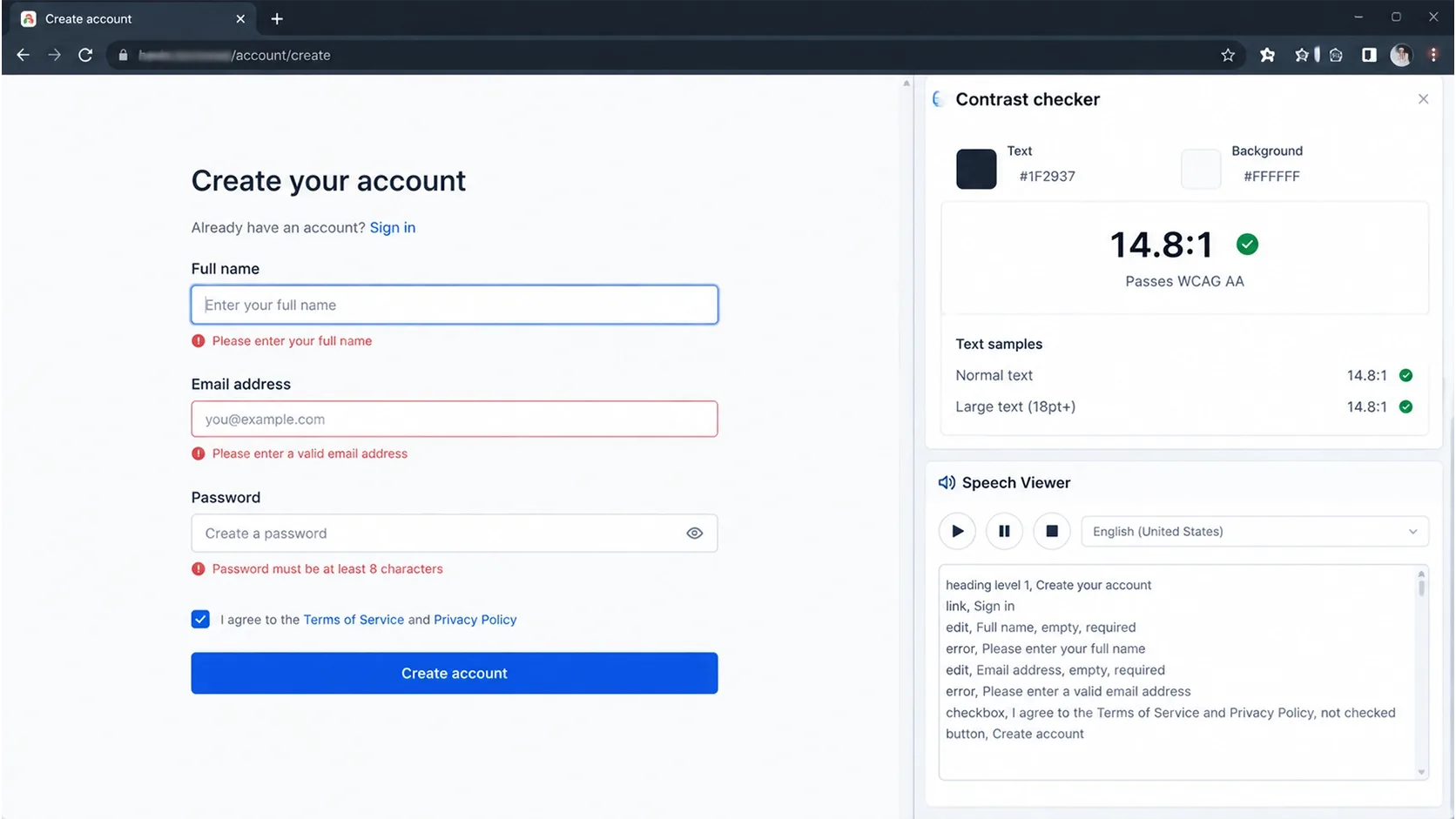
- Audit: semantic structure, heading hierarchy, keyboard navigation, focus visibility and order, focus traps, modal and menu behavior, form labels, error identification, contrast, touch targets, dragging alternatives, reduced motion, text resizing, zoom, screen-reader announcements and accessible authentication.
- Patch when: the failures are isolated, such as missing labels or low contrast on a few elements.
- Rebuild when: navigation, forms, product options, dialogs, carousels, checkout or login all fail in the same structural way.
Use WCAG 2.2 as the technical baseline, but remember that conformance does not automatically settle legal compliance in every jurisdiction. Define the project target with appropriate legal and accessibility specialists, and combine automated tools with manual testing. One automated score proves nothing about real usability.
8. Analytics and the Data Layer Cannot Be Trusted
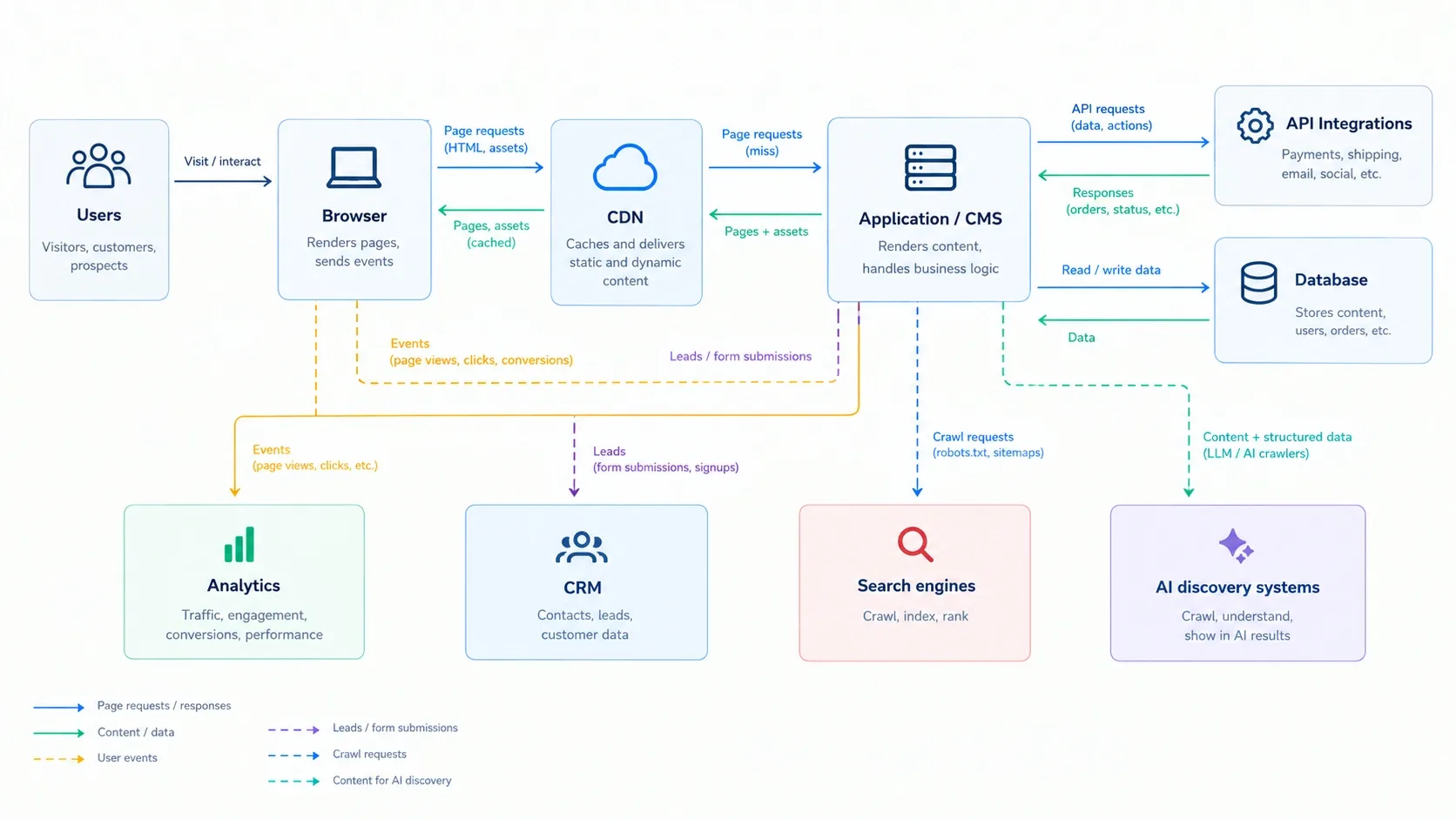
You cannot optimize a site whose measurement is unreliable. I regularly see duplicate page views, duplicate conversions, missing mobile events, mixed parent products and variants, ignored consent states, lost cross-domain attribution, forms tracked before success, revenue that does not match the backend, ungoverned tag containers and old pixels.
AI referral traffic is small, so misgrouping it hides a growing channel. Keep it separate in reports.
- Specify before you build: page, content, product and category views, search, filter use, form starts, errors and success, add to cart, checkout, purchases, lead qualification, CTA clicks, video engagement, promotion impressions and consent state.
- Patch when: one tag or event is broken.
- Rebuild when: the data layer is inconsistent across templates and nobody can say which system owns which event.
Analytics does not improve conversion by itself. It creates the evidence that makes post-launch decisions defensible.
9. Security, Support or Platform Viability Has Become a Risk
- Signals: unsupported frameworks, end-of-life PHP, Node or CMS versions, abandoned plugins, themes with no update path, known vulnerabilities, insecure custom code, manual production edits, untested backups, no recovery plan, fragile authentication and poor permission management.
These are four different jobs: a version update, a dependency replacement, a platform upgrade and a complete replatform. Most teams jump to the last one when the first or second would do.
A rebuild becomes justified when the stack cannot be updated safely without replacing major architectural layers.
10. The Brand and Information Architecture No Longer Match the Business
A rebrand alone may need only new typography, color, imagery, messaging and component styling. A full redesign is appropriate when the audience, market position, product hierarchy, service model, conversion journey, sales process, geography, content structure, navigation or trust requirements have also changed.
Copying a competitor's look is not a strategy. Start with user research, search-intent analysis, a content inventory, conversion analysis, brand positioning, information architecture and component requirements.
If you are weighing an interface overhaul, our website redesign services page shows how Vareweb scopes it.
My Patch, Refactor, or Rebuild Scorecard
| Diagnostic Area & Evidence | Patch Signal | Refactor Signal | Rebuild Signal |
|---|---|---|---|
| Core Web Vitals Field data, RUM, traces |
Isolated asset or script issue | Multiple slow components | Site-wide architectural issues |
| Conversions Funnel and device analytics |
One underperforming step | Shared UX issues | Broken customer journey |
| Accessibility Accessibility audit |
Isolated defects | Repeated component issues | Widespread structural failures |
| CMS Usability Editor feedback |
Missing fields | Poor editing tools | Inflexible content architecture |
| Code Quality Repository audit |
Minor technical debt | Module-level issues | Unmaintainable codebase |
| Integrations Logs and error rates |
One failing connector | Unreliable integrations | Platform limitations |
| Analytics Tag and data audit |
Broken event | Inconsistent tracking | No reliable data layer |
| SEO Architecture Crawls and Search Console |
Metadata errors | Template or linking issues | Limited SEO controls |
| Security Vulnerability audit |
Pending updates | Risky dependencies | Unsupported or unsafe stack |
| Internationalization Market and hreflang audit |
Tag errors | Poor locale handling | Inflexible market support |
| Design System Component audit |
Minor inconsistencies | Reusable component issues | No consistent design system |
| Deployment Release history |
Missing checklist | Weak staging or CI | Unsafe deployment process |
| Maintenance Cost Tickets and invoices |
Low, predictable costs | Increasing maintenance | Rebuild becomes more economical |
No single poor metric justifies a rebuild. Several connected architectural failures create the strongest case.
Evidence should come from analytics, field performance, audits, logs, user testing, development history and operating costs. Engineering, SEO, marketing, design, analytics and business stakeholders should all review it.
If the evidence does not show an architectural problem, I will not prescribe an architectural rebuild.
How I Calculate Whether a Redesign Can Pay for Itself
I build the model from annual qualified sessions, current conversion rate, average order or lead value, gross margin, the mobile conversion gap, publishing and developer labor, current maintenance cost, integration failure cost, accessibility and operational risk, redesign cost and ongoing maintenance. Then I run conservative, expected and optimistic scenarios.
- Ecommerce: incremental contribution margin = incremental orders x average order value x gross-margin rate.
- Lead generation: incremental contribution margin = additional qualified leads × close rate × average customer contribution.
Keep relative and percentage-point changes apart. Moving conversion from 2.0% to 2.2% is a 0.2 percentage-point increase and a 10% relative increase.
Hypothetical example, not a forecast: a store with 500,000 qualified sessions a year, a 2.0% conversion rate, a $90 average order value and a 40% gross margin earns 10,000 orders and about $360,000 in contribution. At 2.2%, it earns 1,000 more orders, or about $36,000 more per year. Compare that with project and maintenance cost before drawing any conclusion.
Traffic quality, seasonality, acquisition mix, demand, pricing, inventory, sales capacity and measurement accuracy all move the result. I will not say a redesign pays for itself unless the model supports it.
The Rebuild Process I Use to Protect Traffic and Revenue
A successful redesign is measured by what survives the migration as much as by what changes. Zero downtime is an engineering objective, not a phrase I promise without a deployment and rollback plan.
- Phase 1, Baseline: crawl all URLs with status codes, canonicals, titles, meta descriptions, H1s, structured data, hreflang, internal links, sitemaps, images and PDFs. Capture backlinks, Search Console and analytics data, Core Web Vitals, conversions, server logs and accessibility issues.
- Phase 2, Discovery: review objectives, user research, search demand, funnels, content workflows, integrations, constraints, accessibility and analytics requirements, security, hosting and team capacity.
- Phase 3, Architecture: define the sitemap, URL policy, content model, component inventory, design tokens, CMS permissions, integration map, analytics specification, structured-data ownership, performance budget and accessibility acceptance criteria.
- Phase 4, Build: use Git, code review, staging, preview links, automated checks, reusable components, semantic HTML and progressive enhancement. Control third-party scripts and design error, loading and empty states.
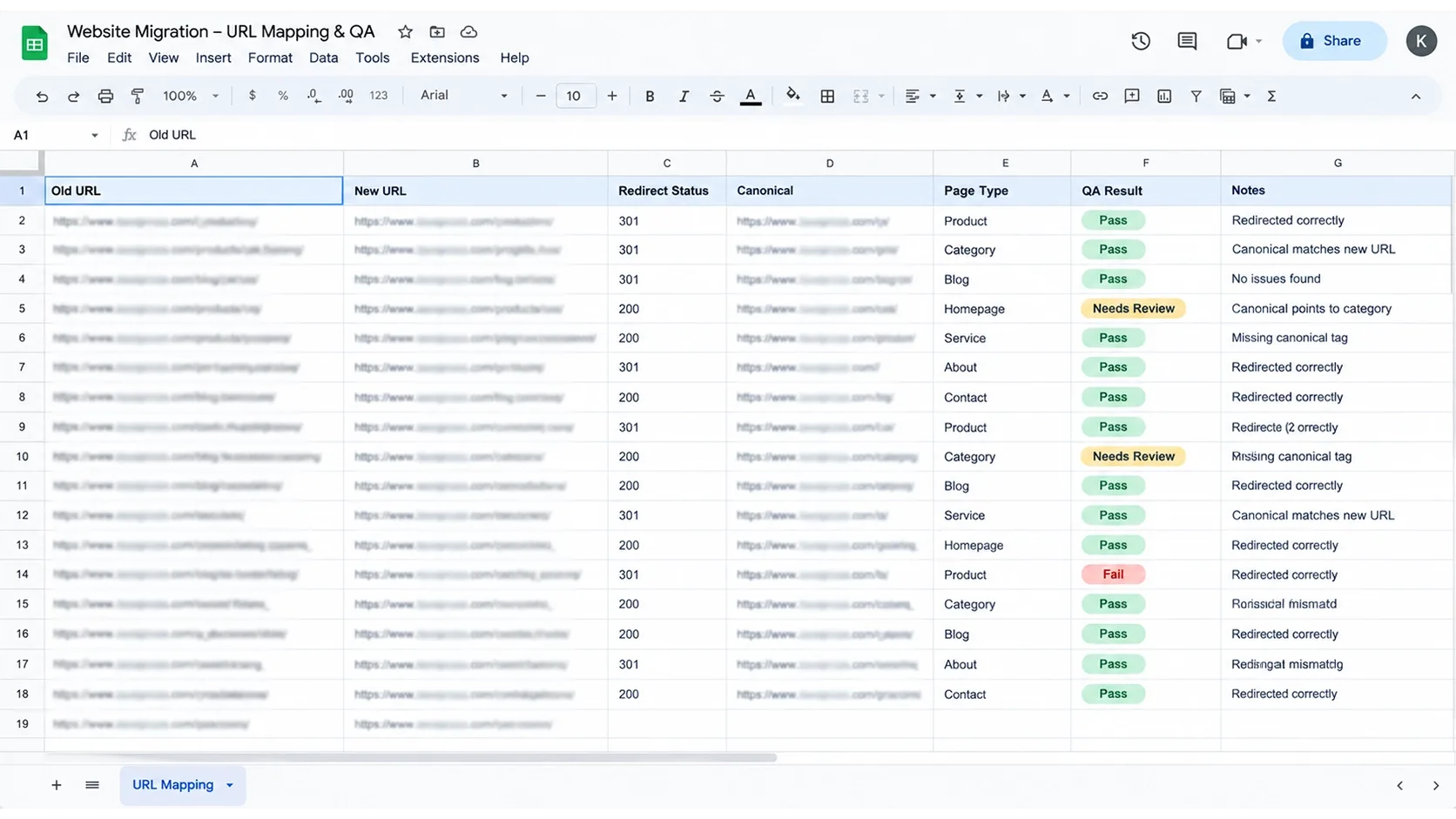
- Phase 5, Migration: create a one-to-one redirect map, then migrate content, metadata, schema, assets, internal links, canonicals, hreflang, sitemaps, analytics and consent behavior.
Do not send every removed page to the homepage. Use direct relevant 301 redirects, return 404 or 410 where no replacement exists, and consolidate content only when it is justified. Kashaf walks through the SEO side in How to Migrate Your Website Without Losing SEO Rankings.
- Phase 6, QA: test desktop and mobile, keyboard use, screen readers where appropriate, forms, search, checkout, authentication, payments, analytics, consent, emails, CRM integration, canonicals, redirects, structured data, sitemaps, performance and browser compatibility.
- Phase 7, Launch: set a controlled window, take a current backup and agree a DNS and CDN plan, a rollback plan and team ownership. Monitor errors, uptime and transactions, run a live crawl and check Search Console.
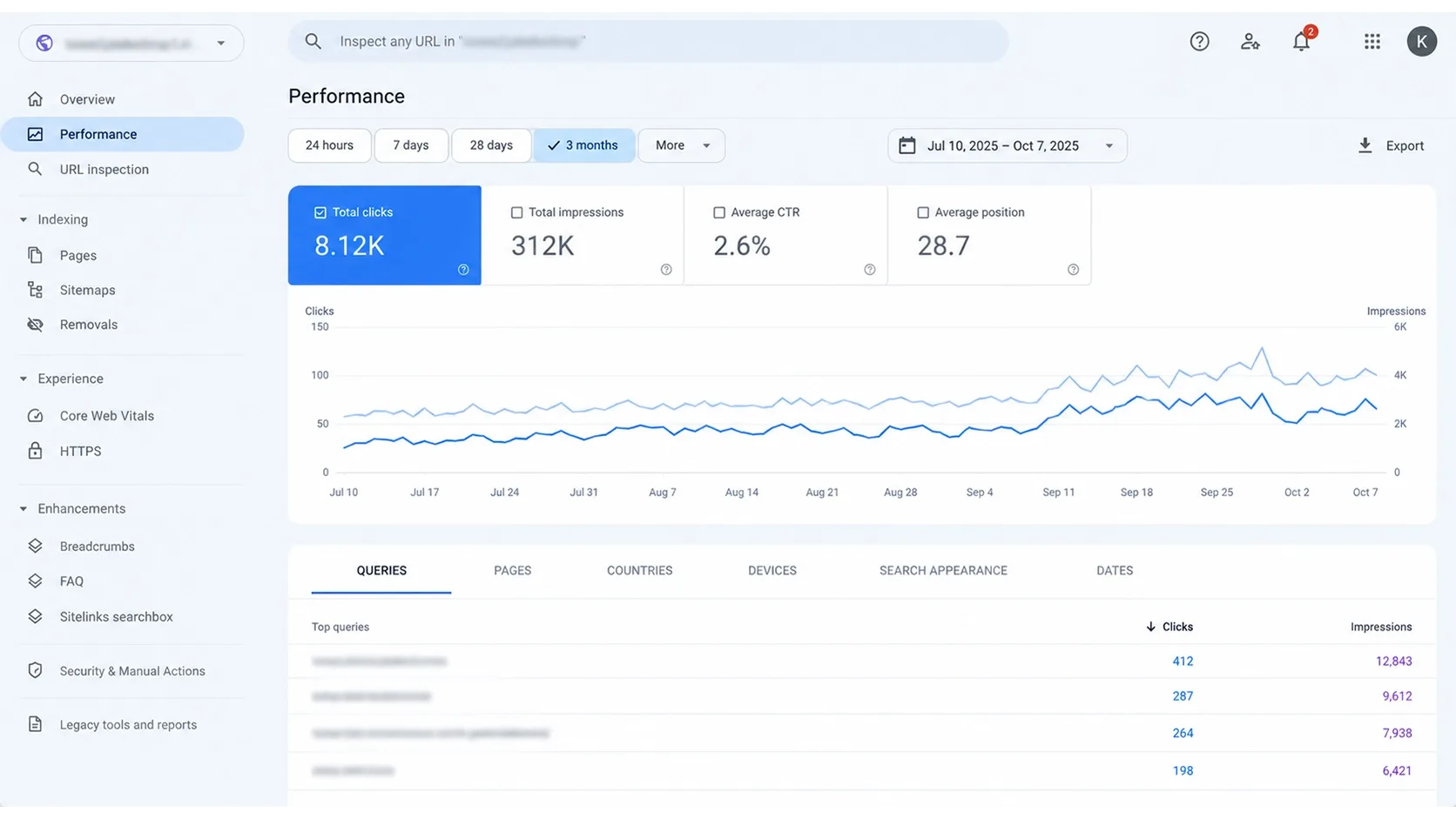
- Phase 8, Monitoring: watch 4xx and 5xx responses, redirect errors, indexation, rankings, organic landing pages, Core Web Vitals, conversion, revenue, form completion, analytics anomalies, structured-data errors and accessibility regressions.
A migration without a rollback plan is not zero risk. Keep redirects live for at least a year, as Google recommends.
When NOT to Redesign Your Website: The False Triggers I Watch For
I advise against a redesign when leadership is bored with the homepage, a stakeholder dislikes the palette without user evidence, a competitor launched a flashy site, or the business wants 3D effects, autoplay video or complex motion with no customer need.
The same goes for problems a new interface cannot fix: poor positioning, a weak offer, uncompetitive pricing, bad traffic quality or unproven product-market fit.
- The current site performs well and is maintainable.
- A focused component refactor would solve the issue.
- The company cannot support content migration, QA or an SEO migration budget.
- No success criteria exist.
- Domain, CMS, branding, content and business model are all changing at once with no phased plan.
- The project would drain capital needed for acquisition, inventory, delivery or retention.
I would rather recommend a controlled refactor than sell a company a complete rebuild it cannot maintain or measure.
Redesigning without fixing governance only recreates the same technical debt in a newer interface.
What I Measure After the Redesign Goes Live
I compare the new site with a documented pre-launch baseline, and the most important metric depends on the objective. If publishing speed was the problem, conversion rate alone does not capture success.
- Technical: LCP, INP, CLS, TTFB, JavaScript and server errors, uptime, failed transactions, redirect coverage, broken internal links, structured-data validity and accessibility regressions.
- Search: indexed URLs, clicks, impressions, CTR, rankings, landing-page traffic, branded versus non-branded traffic, crawl behavior, AI-search visibility where measurable and referrals from answer platforms.
- Commercial: conversion rate, mobile conversion rate, revenue per session, form completion, qualified leads, add-to-cart rate, checkout completion, average order value and acquisition efficiency.
- Operational: time to publish a landing page, developer tickets, deployment frequency, failed releases, approval time, component reuse and maintenance cost.
FAQs
How often should a company redesign its website?
Let evidence trigger it, not a calendar. A well-governed component system can evolve for years without a full rebuild.
Will a website redesign hurt existing Google rankings?
It can, if URLs, content, internal links, canonicals, rendering, metadata or structured data change carelessly. A controlled migration reduces the risk but cannot guarantee zero fluctuation. Plan for monitoring and a rollback path.
How long does a full custom website redesign take?
It depends on discovery, content, integrations, accessibility work, migration, stakeholder approvals and QA. I do not quote a universal duration because complexity matters more than page count. Ask for a timeline built on your actual scope.
How much does a professional website redesign cost in 2026?
There is no single price. A visual refresh, a modular refactor, a custom marketing site, an ecommerce rebuild and an enterprise replatform are different projects. Compare quotes by what they include: strategy, content, engineering, integrations, migration, QA, analytics and support.
What is the difference between a website refresh and a full redesign?
A refresh changes visual presentation or isolated components. A redesign may change information architecture, templates, content models, integrations and frontend behavior. The second carries far more migration risk.
How do I prevent SEO loss during a website migration?
Start with a full URL inventory and a one-to-one redirect map, and preserve valuable content. Update internal links, canonicals, structured data and XML sitemaps, crawl staging before launch, and watch Search Console afterward.
What is the most important metric after launching a redesigned website?
It is the one tied to the original problem. Use a balanced set of technical, search, commercial and operational measures, and compare each against the pre-launch baseline.
Do I need a redesign to pass Core Web Vitals?
No. Image, script, font, caching and third-party problems can often be fixed without rebuilding. A redesign becomes relevant when poor performance is embedded across templates and survives targeted remediation.
Does a redesign improve visibility in ChatGPT, Perplexity or Google AI Overviews?
Not automatically. A redesign can improve crawlability, content structure, entity clarity, performance and data consistency, but no implementation guarantees AI citations.
Should I choose a traditional CMS, headless CMS or custom application?
Decide from your publishing workflow, preview needs, integrations, personalization, engineering capacity, latency, maintenance and total cost of ownership. Headless is an architectural option, not a badge of technical maturity.

Written by
Minhaj
Minhaj Ahmed is an experienced web and software development professional specializing in web applications, mobile apps, SaaS platforms, and AI-powered solutions. As Head of Development at Vareweb, he brings a strong software engineering background to building scalable digital products and automation systems. He writes about web development, mobile apps, AI, software engineering, and emerging technologies.