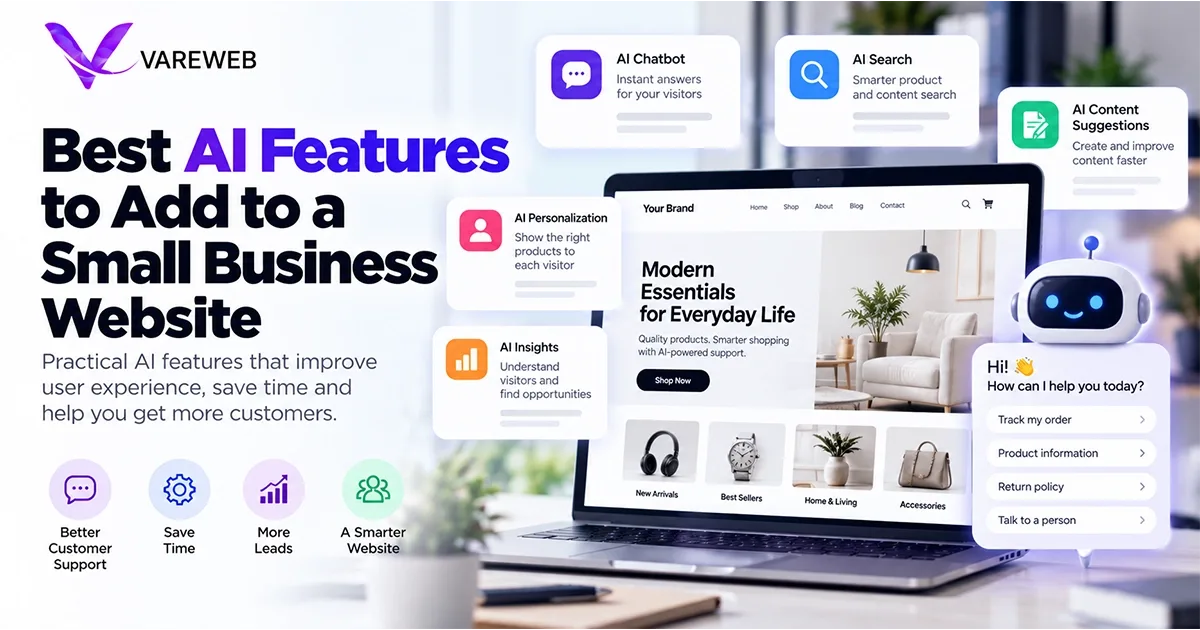
Quick Answer: The best AI features to add to a small business website in 2026 are the ones that run on your server through an API, not the ones that load a third-party widget into every visitor's browser. Semantic site search, a support agent grounded in your own pricing and policies, conversational lead capture and clean structured data earn their place. Anything that adds heavy JavaScript to the main thread can cost you more in speed and trust than it ever returns in leads.
Half of American adults now use AI chatbots. According to Pew Research Center's June 2026 report, 49% say they use them, up from 33% in 2024, and 44% say they use ChatGPT specifically.
Your customers are already comfortable asking a machine a question. What they will not forgive is a machine that answers wrongly on your behalf, or a page that freezes while it loads one.
Business adoption is far less settled. The U.S. Census Bureau's Business Trends and Outlook Survey put AI use at 19.8% of businesses as of May 3, 2026, and found no significant change among firms with fewer than 20 employees between December 2025 and May 2026.
Small businesses are still deciding what to do, which is exactly where bad advice does the most damage.
I lead development at Vareweb, and the first thing I check when an owner asks which AI tool to install is how much JavaScript it pushes into the main thread. Below are the twelve features I would actually build, how each one works under the hood, and where I would say no.
Wiring a language model into your live inventory or booking system is engineering work, which is why growing brands lean on professional website design services instead of stacking plugins. I also covered where automation belongs in a project in where AI fits in the web design process, a post I wrote earlier.
AI Features Only Work on a Website That's Fast and Well Built
Vareweb designs and hand-codes custom websites with performance, accessibility, and search built in from the start, so any AI feature you add sits on a solid foundation instead of slowing it down.
Quick Overview: Gimmick AI vs. Engineered Backend AI
| AI feature | The gimmick (avoid) | The engineered approach (implement) |
|---|---|---|
| 1. Site search | Exact-match keyword search | Hybrid keyword and semantic search that handles typos and intent |
| 2. Support agent | Generic chatbot widget with no business data | RAG agent that answers only from your own documents and live data |
| 3. Personalization | Pop-ups that ignore context | Server-side swaps of banners and offers by source, location and behavior |
| 4. llms.txt | Treating it as a ranking trick | A cheap, optional summary file next to strong crawlable HTML |
| 5. Lead capture | Ten-field contact form | Short conversational flow that pre-qualifies before the CRM |
| 6. Dynamic pricing | Unbounded automated price changes | Rules and margin floors, with a human approving the limits |
| 7. Localization | Raw machine translation pasted live | Machine draft, human review and correct language tags |
| 8. Schema | Generated markup nobody validates | Template-driven JSON-LD matched to visible content and tested |
| 9. Accessibility | Overlay widget promising compliance | Accessible code first, light user preferences second |
| 10. Image placeholders | Heavy blurred full-size previews | Tiny encoded placeholders under the real, prioritized LCP image |
| 11. Exit offers | Pop-up the moment the cursor moves | Restrained, rule-based offers triggered by real intent signals |
| 12. Owner analytics | Dashboards of vanity charts | Plain-English summaries of anomalies from your own data |
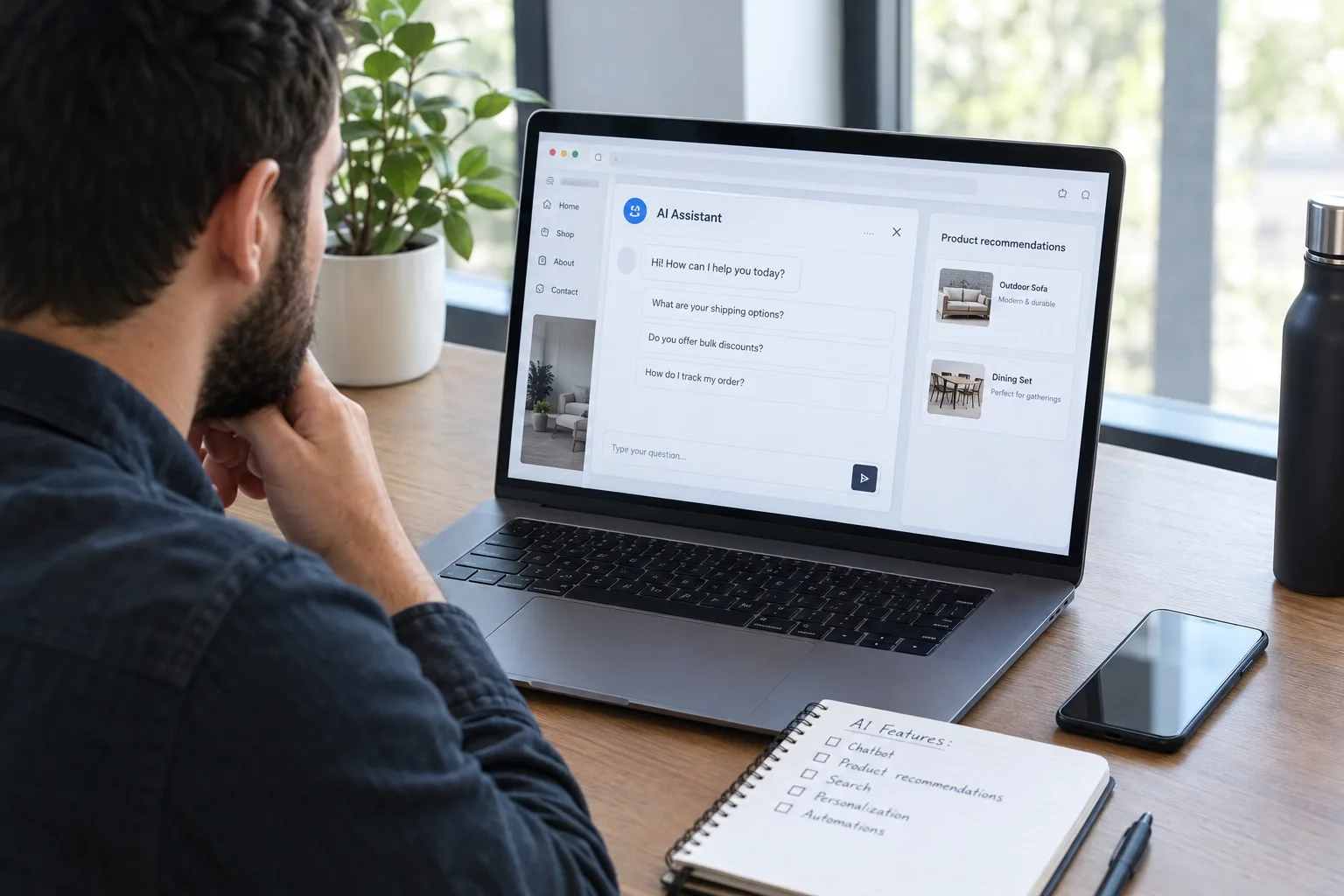
The Engineering Reality: Best AI Features to Add to a Small Business Website
Here is the technical reality. An AI feature is only an asset if it answers faster than a human, answers correctly, and costs the page nothing in speed. Each feature below is judged on those three tests.
Before the details, here is the order I would build in for a typical small business:
- First: accessible, fast, crawlable pages with accurate structured data. Nothing else works on a weak base.
- Second: semantic search and conversational lead capture, because they sit closest to revenue.
- Third: a grounded support agent, once your documents are clean enough to retrieve from.
- Last: personalization, pricing rules and predictive analytics, which need data volume to justify the effort.
Skip the order if your situation is different. A service business with a phone-heavy sales process may want the support agent and lead flow before search.
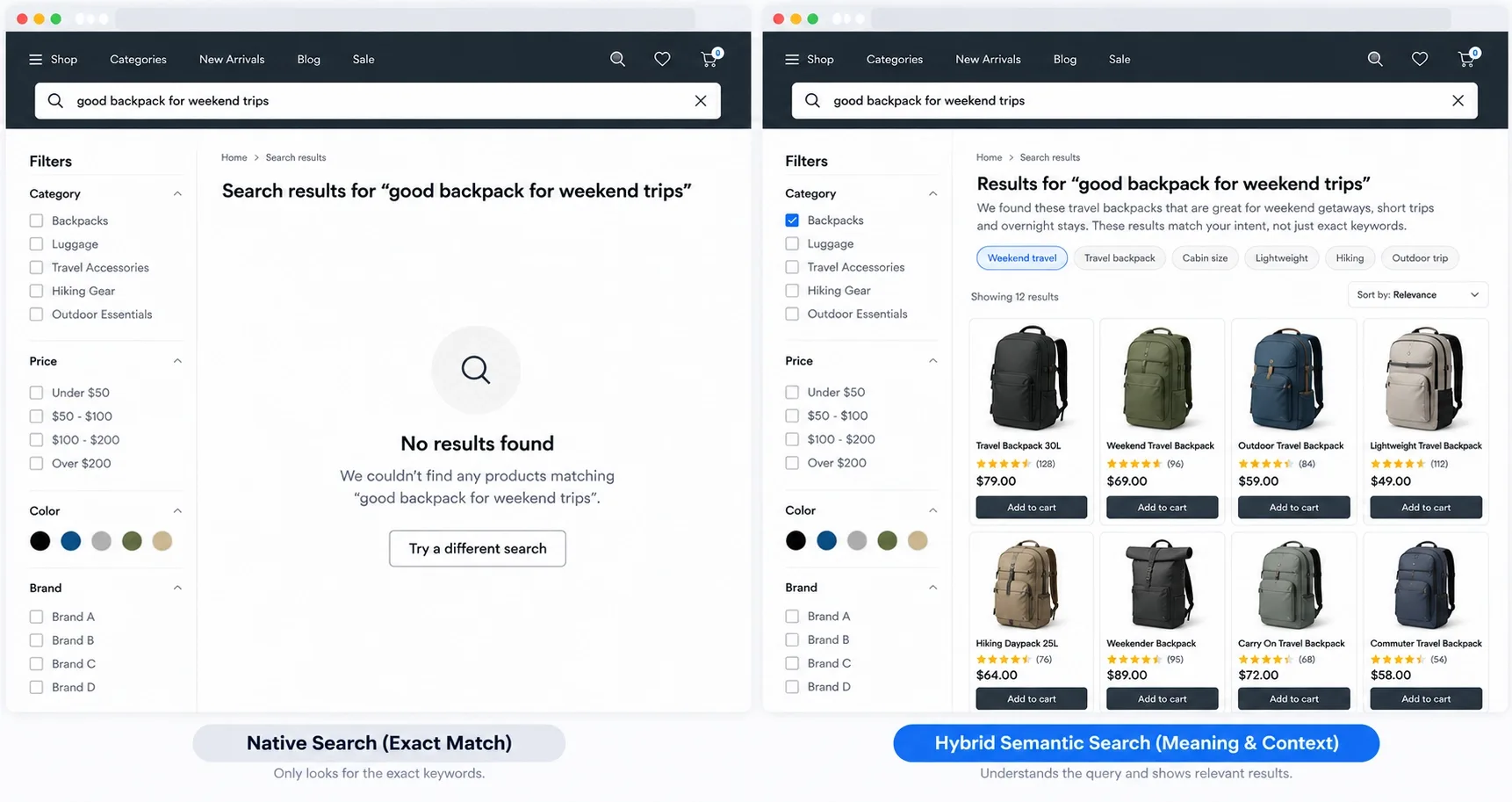
1. Semantic Vector Search (Replacing Broken Exact-Match Search)
Most native WordPress and Shopify search boxes match characters, not meaning. A visitor typing "something to wear to a summer wedding" gets nothing, because no product title contains those words.
The problem is measurable. Baymard Institute's search benchmark, updated April 29, 2026, rated 56% of the 170+ sites it tested as mediocre or worse for search UX, rising to 58% on mobile. It also found 43% of sites had issues with use-case queries such as "party dress", and 66% struggled with non-product queries such as "return policy".
Semantic search fixes this by converting your catalog or content into embeddings, which are numeric representations of meaning. A query is converted the same way, and the engine returns the closest matches. Typesense documents this as vector search with hybrid keyword queries, and Algolia offers a comparable hosted option.
- Use hybrid, not pure vector: keep keyword matching for exact model numbers and SKUs, and add semantic matching for intent.
- Index your non-product pages too: shipping, returns and service-area pages are what people actually search for.
- Log zero-result queries: this list is free product research.
Where the store sits on a modern platform, search can run through an API on the server side, which is one reason I wrote up headless Shopify and when you actually need it in my earlier guide. For store owners looking beyond search, Kashaf, our SEO Manager, lists more friction fixes in how to improve ecommerce customer experience.
2. RAG-Powered Autonomous Support Agents
A chatbot is a chat window. A support agent is a system that retrieves facts before it speaks.
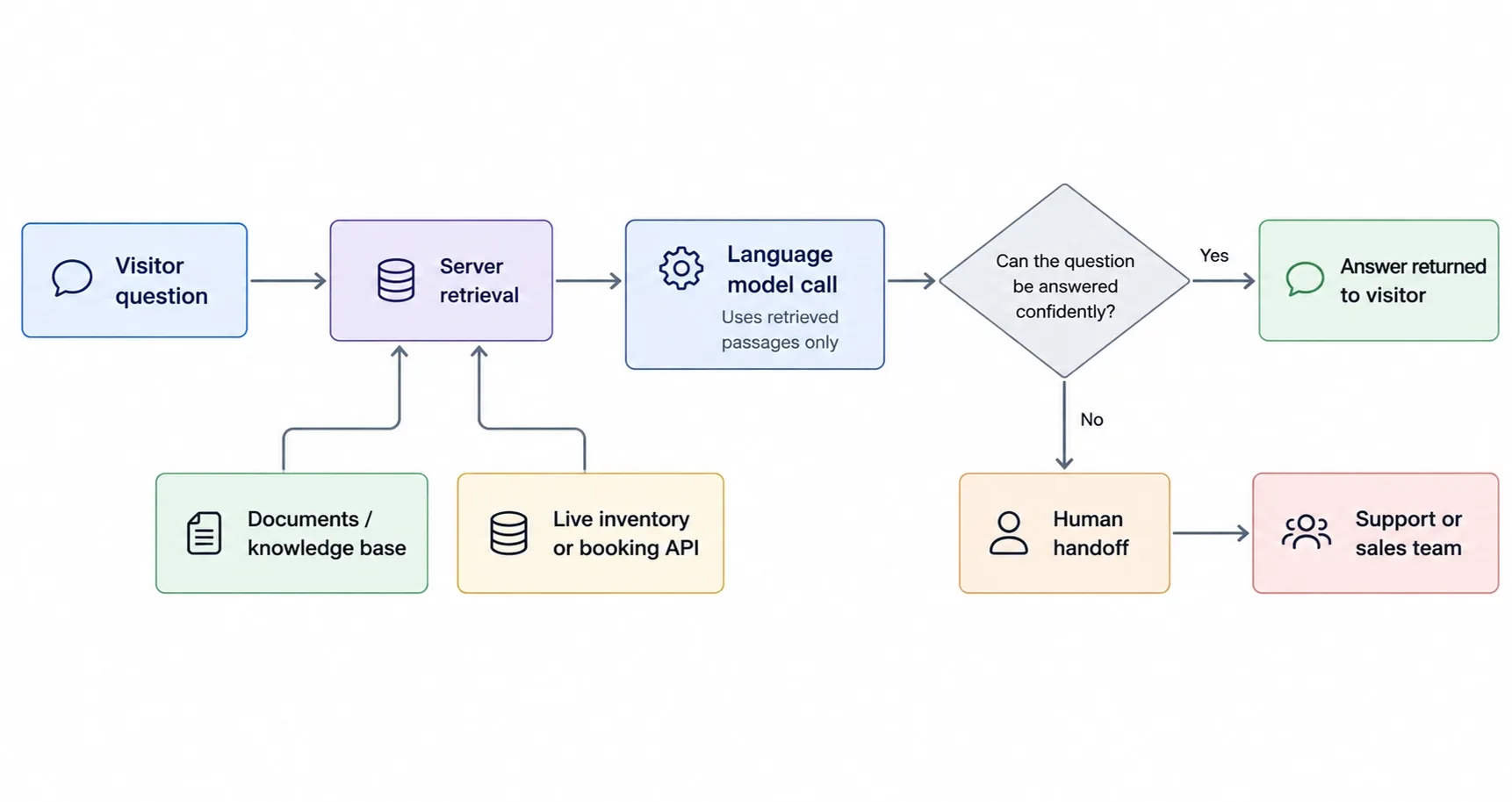
That system is retrieval-augmented generation, or RAG. When a visitor asks a question, your server searches your own documents first, hands only the relevant passages to the language model, and instructs it to answer from them.
- Sources: PDFs, pricing sheets, policy pages, service-area lists and a live inventory or booking API.
- Guardrails: if retrieval finds nothing relevant, the agent says so and offers a human handoff.
- Actions: the useful agents book, quote or check stock through your own endpoints, not just talk.
A Support Bot Is Only as Good as What It's Trained On
Vareweb builds custom AI chatbots trained on your own products, pricing, and policies, tested against real historical customer questions before launch, with a clean handoff to your team when a human is needed.
The risk of skipping this is real, and it has a legal precedent. In February 2024, a British Columbia tribunal ruled that Air Canada was responsible for what its website chatbot told a customer about bereavement fares, and ordered it to pay about 650 Canadian dollars. It rejected the idea that the chatbot was a separate legal entity.
The lesson for a small business is simple: whatever your bot says, you said. That is why we build custom AI chatbot development on retrieval, with logging and a clear escalation path.
Retrieval quality decides the result. I clean source documents first, split them by topic, and remove outdated versions, because a model will happily quote an old price sheet if it can find one.
I will not quote a hallucination rate, because none applies across setups. Test your agent against fifty real questions from your inbox before launch, and again after every document update.
3. Dynamic Content Personalization Engines
Personalization means the page changes based on who is looking. A visitor from a local ad sees the service area and phone number, a returning customer sees a reorder prompt, and a first-timer sees the proof that builds trust.
I do this on the server or at the edge, not with a script that rewrites the page after it loads. Client-side swaps cause flicker and layout shift, which hurts both users and Core Web Vitals.
- Signals worth using: referral source, campaign parameter, language, approximate region and whether the visitor has bought before.
- Signals to skip: anything you cannot explain to the visitor in one sentence.
- What to swap: the hero heading, the primary call to action and one recommendation block, not the whole page.
A local service business can swap the hero line and phone number by city, while a store can swap a recommendation block for returning buyers. Both take a day of work, not a quarter.
Start with rules, not machine learning. A handful of if-then rules based on source and region will beat a model that has too little data to learn from.
Keep a default version for crawlers and for visitors with no signals, so the page remains consistent for search engines. Measure each swap against a control, and drop the ones that do nothing.
4. Generative Engine Optimization (GEO) and llms.txt
This is the feature where I disagree most with the hype. An llms.txt file is a plain-text summary of your site meant for language models, and it is easy to build.
The evidence for its impact is weak. Google's AI optimization guide, published in May 2026, says Google Search does not use such files, and that creating one will neither help nor hurt your visibility. Separately, SE Ranking's analysis of almost 300,000 domains found the file on 10.13% of them, and its model predicted AI citations no better with the file as a variable.
So I treat it as optional housekeeping. It takes an hour, other services may read it, and it does no harm.
What does move the needle is the same foundation Google describes: pages that are crawlable and indexed, with original, first-hand content and a good page experience. The guide also says there is no requirement to break content into tiny pieces for AI, and that no special markup is needed.
- Make facts easy to find: address, hours, prices, service areas and policies in plain HTML text.
- Show experience: real projects, named authors and specifics a competitor cannot copy.
- Measure it: Google's guide points to the generative AI report in Search Console for tracking.
For the content side of this, Kashaf, Vareweb's SEO Manager, explains the tactics in how to get your website cited by AI search engines. If you serve a specific area, our local SEO services cover the signals AI answers lean on for nearby businesses.
Skip the AI SEO Hacks. Build Visibility That Lasts.
Vareweb's SEO team optimizes for Google and AI search engines, including AI Overviews, ChatGPT, and Perplexity, through technical audits, structured data, and content that gets cited. It starts with a free audit.
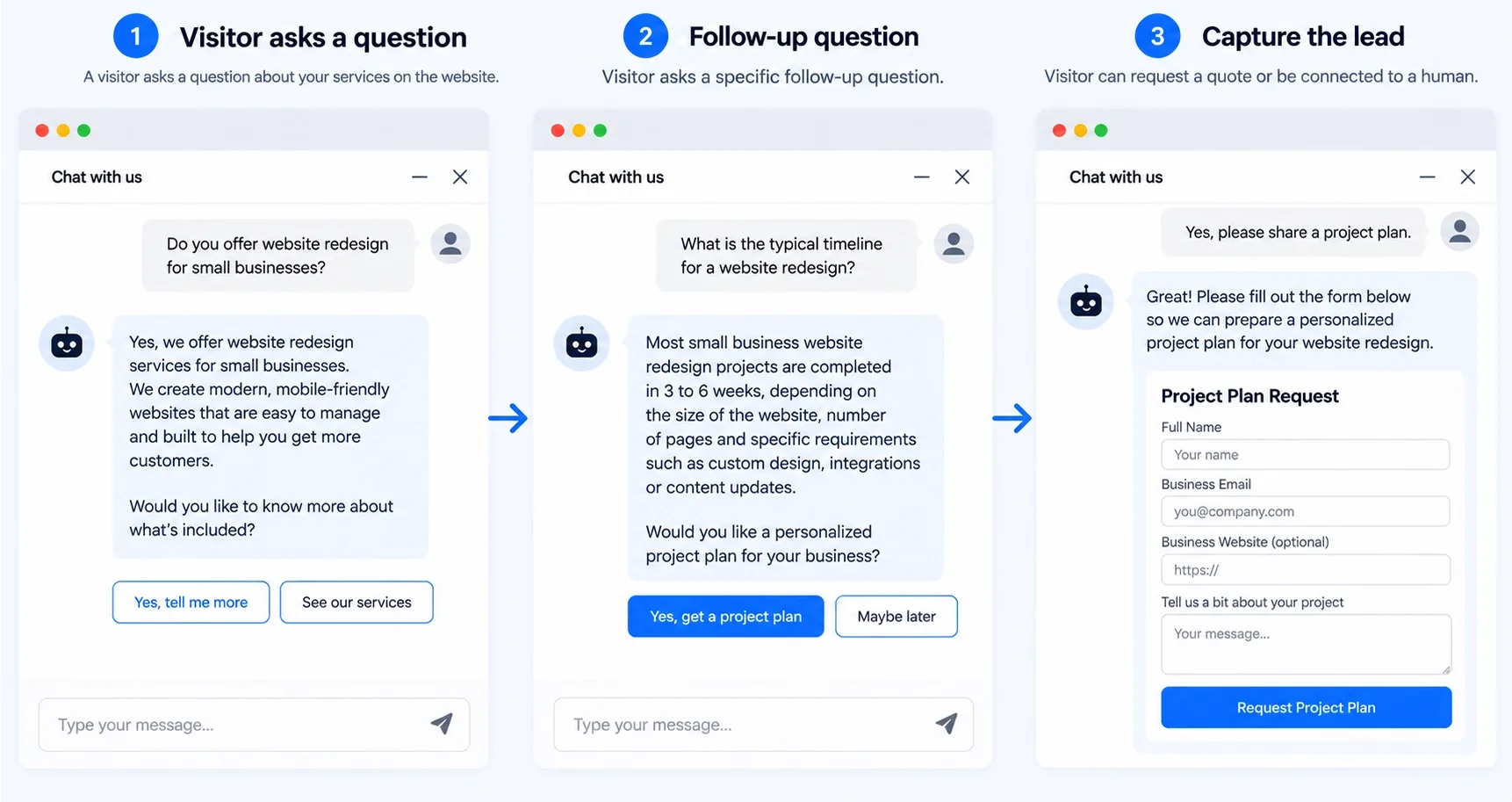
5. Conversational Lead Generation Forms
A ten-field contact form asks a stranger to do paperwork. A conversational flow asks one question at a time, adapts to the answer, and can stop early when the lead is clearly a fit or clearly not.
The AI part is narrow and useful. It reads a free-text answer such as "my basement floods when it rains" and maps it to a service category, urgency and location, then writes clean fields to your CRM.
- Keep the first step to one question: commitment grows after the first answer.
- Save partial answers: a visitor who leaves after two steps is still a lead with a partial record.
- Always offer a plain form or phone link: some people will not chat, and that is fine.
The speed of the first reply matters as much as the form. Kashaf covers that side in why automated follow-up matters more in 2026, and we wire the capture and follow-up together through GoHighLevel automation.
Track completion and lead quality separately. A flow that raises submissions but fills your CRM with unqualified contacts has not helped anyone.
Keep the model out of the sensitive part. It classifies and summarizes, while validation, consent and storage run as ordinary code.
6. AI-Powered Dynamic Pricing APIs
Dynamic pricing works for businesses with perishable capacity or fast-moving stock: appointment slots, rentals, seasonal items. It works poorly for a store with twelve products and little traffic.
I would never let a model set prices freely. The safe design has a human set a floor, a ceiling and a list of triggers, and the system moves within those limits.
- Inputs: stock level, days until an event, local demand patterns and a competitor price you are legally allowed to monitor.
- Outputs: a suggested price inside your limits, written to your store through its API, with every change logged.
- Display rule: the price in the cart must match the price on the page and in your structured data.
Customers notice when a price changes between visits, and a trust problem costs more than the margin you gained. For a small business, I usually recommend timed promotions and stock-based rules before anything adaptive.
If you cannot explain a price change to a customer in one sentence, do not automate it.
7. Automated Multi-Lingual Localization
Machine translation is good enough in 2026 to produce a usable first draft in most major languages. It is not good enough to publish unreviewed for legal, medical or pricing text.
My workflow is to translate on the server, store the result as real pages, and have a native speaker review the pages that carry revenue. A translator that rewrites the page in the browser leaves search engines with only the original language.
- Separate URLs per language: a path or subdomain for each, with hreflang links between them.
- Translate more than words: units, currency, date formats, phone formats and address fields.
- Keep a glossary: brand names, product names and service terms must never be translated.
Google's spam policies also target scaled content that adds no value, which I come back to in the section on gimmicks. Translate the pages that matter first and expand as you confirm demand.
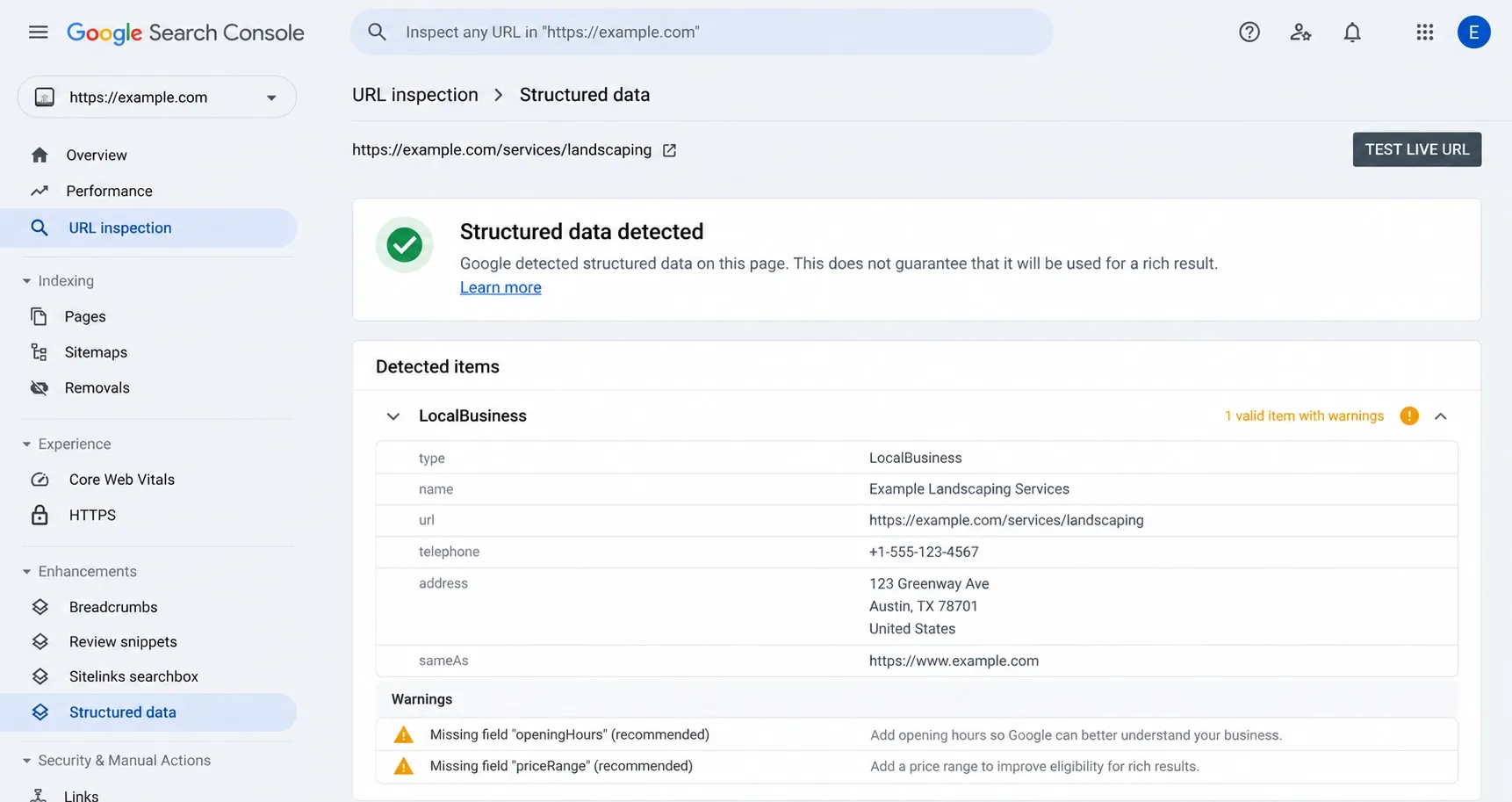
8. Automated Schema and JSON-LD Generation
Structured data is where AI helps with the grunt work. A model can read a service page or a post and propose LocalBusiness, FAQPage, Service or Product properties.
I do not let it publish anything directly. A proposal goes through a template with validation, because a model can invent a rating, an address or a price that is not on the page.
- Source of truth: pull prices, hours and ratings from your database, not from generated text.
- Match the page: every marked-up fact must be visible to the visitor.
- Validate on every deploy: run key templates through Google's Rich Results Test.
Be precise about the benefit, too. Google's AI guide says structured data is not required for generative AI search and that no special markup exists for it, but it still supports rich results eligibility.
Kashaf walks through the on-page side in the GEO-ready web design checklist.
9. Real-Time AI Accessibility Adjustments
Accessibility is a legal exposure for small businesses, not just a courtesy. UsableNet's 2026 midyear litigation analysis, published in July, projects about 6,176 digital accessibility lawsuits for 2026, nearly 20% more than 2025.
Ecommerce accounts for 79% of them, and through June 2026, 68% of the companies sued had revenue under $50 million. The size of your business is not a shield.
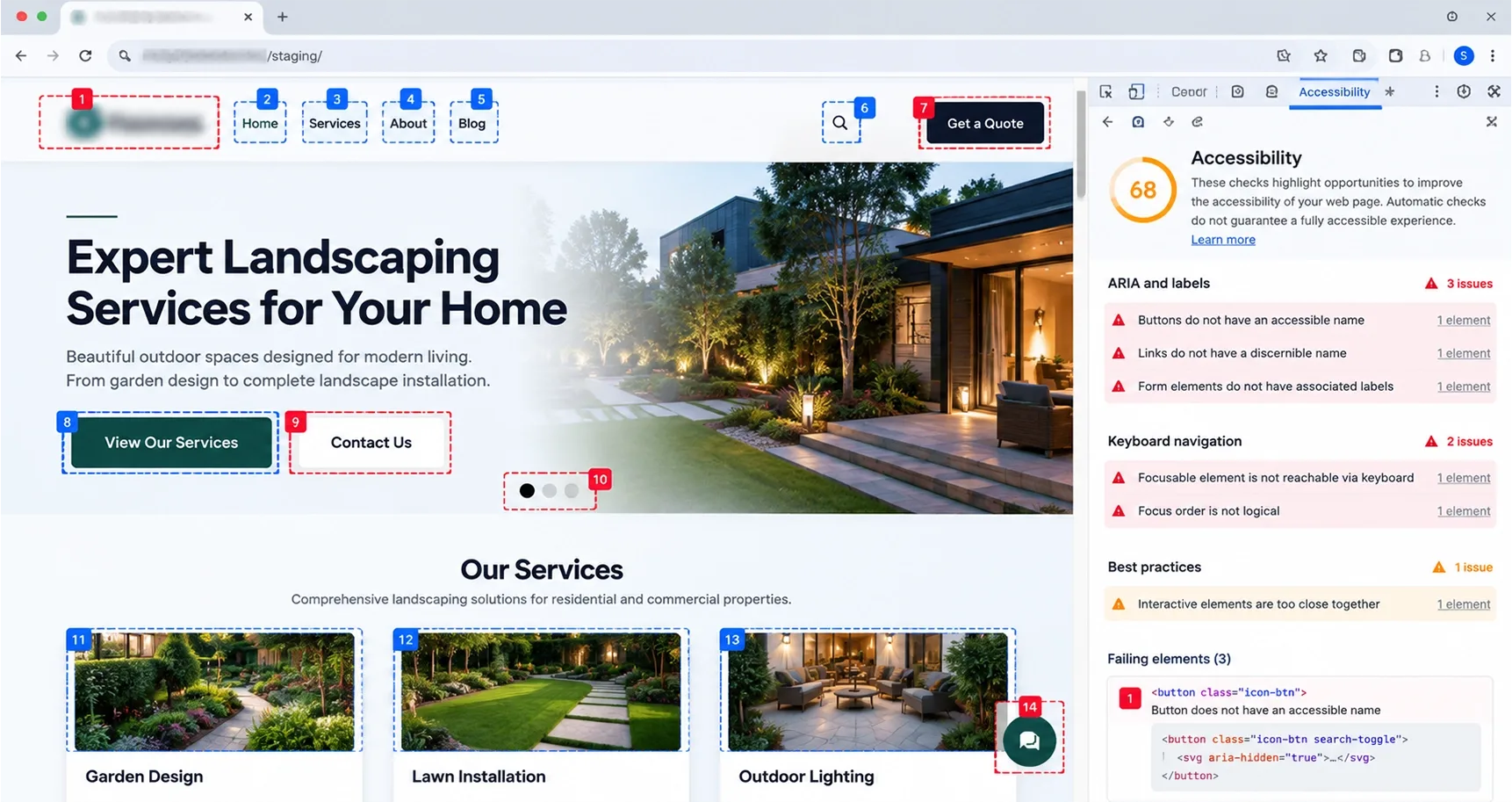
The point I make to every owner is that a widget does not fix inaccessible code. Compliance starts in the markup: semantic HTML, labelled form fields, visible focus states, sufficient contrast and keyboard access.
- Fix first: contrast, alt text, form labels, heading order and keyboard traps.
- AI helps with: drafting alt text for review, scanning pages for common failures and flagging regressions in your release process.
- Light preferences layer: respect prefers-reduced-motion and prefers-contrast with CSS, which adds almost no weight.
I have seen accessibility overlays add large scripts to every page and still leave the underlying problems in place. Test with a keyboard and a screen reader, and fix what they expose.
10. Generative Image Placeholders (BlurHash and Similar)
A placeholder is a tiny representation of an image that shows while the real file loads. BlurHash and ThumbHash encode a blurred version in a short string of characters, so the placeholder costs almost nothing to send.
It is a perceived-speed tool, so use it carefully. It makes a gallery feel instant, but it does nothing to improve the Largest Contentful Paint element if that image is slow.
- Never lazy-load the hero image: it is usually the LCP element and should load with high priority.
- Use placeholders for below-the-fold images: galleries, cards and long pages.
- Set width and height: reserved space prevents layout shift.
On a small business site with a dozen service photos, the gain is modest, and I would not prioritize this over fixing oversized files.
Generate the placeholder at build time or upload time, never in the visitor's browser. I pair it with modern formats such as WebP or AVIF and correctly sized files.
Kashaf covered the ranking side of speed in a past guide on how important page speed is for SEO in 2026.
11. Predictive Churn and Exit-Intent Overlays
The idea is to notice when a visitor is about to leave and make a relevant offer. On desktop that means fast cursor movement toward the browser chrome, and on mobile it means a sharp scroll up or a back-button gesture.
The danger is that most implementations ignore what the visitor is doing. A pop-up that covers the checkout form is worse than no pop-up.
- Trigger on intent, not time: a visitor who read your pricing page twice is different from one who bounced from a blog post.
- Offer something useful: a quote reminder, a saved cart or an answer, not a generic discount.
- Cap the frequency: show it once per session at most, and never on pages with forms.
I keep this one rule-based. A trained model needs thousands of sessions to beat a simple rule, and most small sites do not have that volume.
The best exit offers I have built answer the question that was stopping the visit: a delivery estimate on a product page, or a callback option on a service page. They work because they are relevant, not because they interrupt.
Check mobile carefully, since intrusive overlays on phones can hurt both usability and search performance.
12. Backend Predictive Analytics for the Owner
This is the quietest feature and often the most valuable. A script reads your analytics export, orders and ad spend each morning, and sends the owner a short plain-English note.
Example: "Orders from mobile fell on Tuesday after the checkout script update, while desktop was flat." That one sentence replaces twenty minutes in a dashboard.
- Inputs: GA4 exports, order data, form submissions, stock levels and uptime logs.
- Checks: anomalies against the same weekday, stock running out before the next delivery and pages that stopped converting.
- Rules: the model summarizes numbers your code has already calculated, it never calculates them itself.
Stock alerts work the same way. Compare sales velocity to current inventory and message the owner when a best seller will run out before the next delivery.
That last rule matters. Language models are unreliable at arithmetic, so the code computes and the model only narrates.
If you also want help with the search side of reporting, Kashaf compares options in the best AI SEO tools for small business.
Turn Every Lead Into a Fast Follow-Up, Automatically
Vareweb builds GoHighLevel systems that respond to new leads in under 60 seconds, text back missed calls, book appointments, and report on what's working, so no enquiry sits unanswered while you run your business.
The AI Gimmicks That Will Actually Hurt Your Website
Let me be blunt about when I tell a business owner to remove AI from their site.
- Wrapper chatbots with no grounding. A plugin that sends your visitor's question to a model with no access to your policies will eventually invent a return window or a price. After the Air Canada ruling, that is a liability, not a feature.
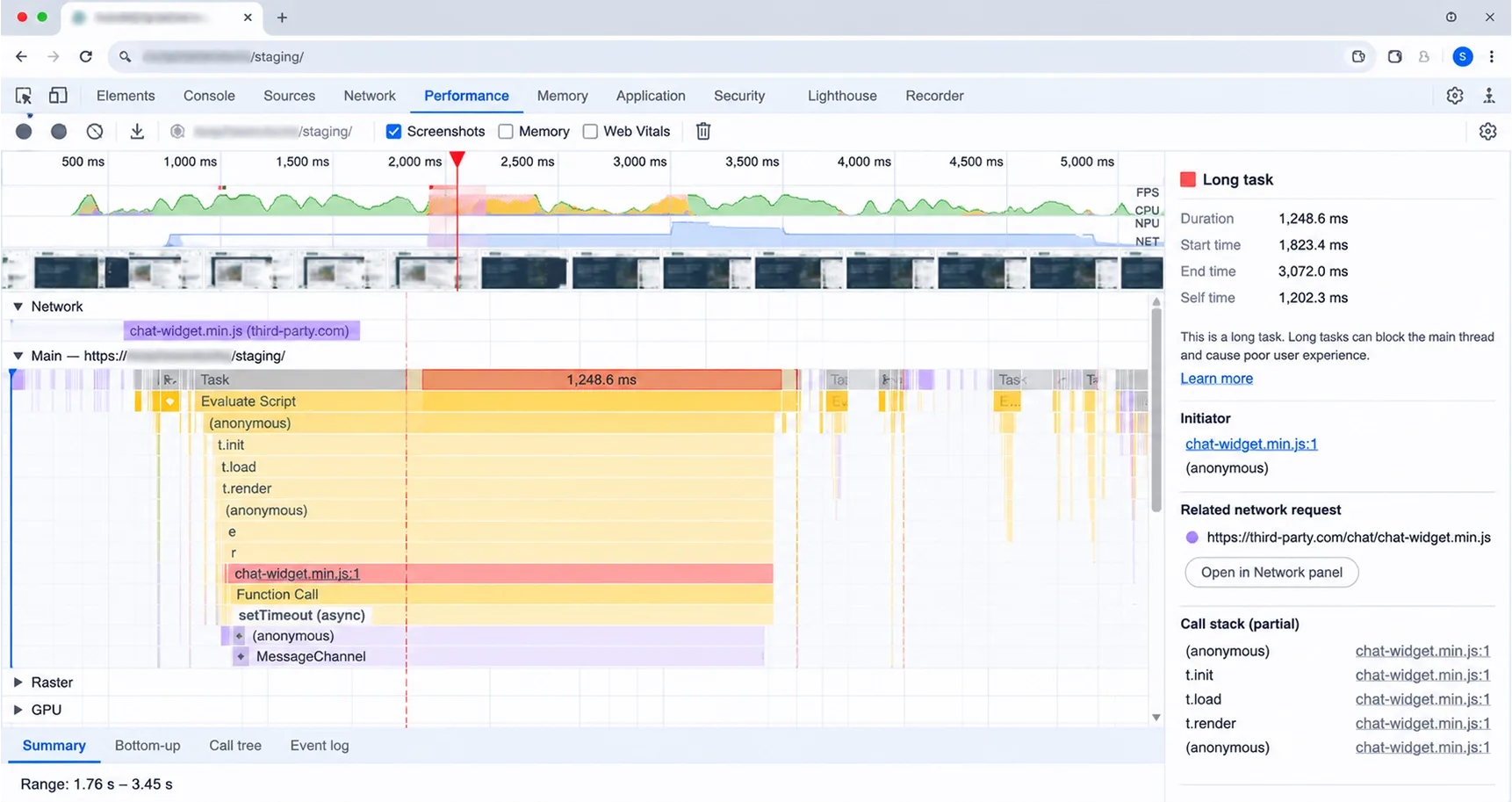
- Heavy third-party widgets. Every script that loads in the main thread competes with your visitor's first tap. Google rates an Interaction to Next Paint of 200 milliseconds or less as good, measured at the 75th percentile of real visits.
- Unedited AI blog posts at scale. Google's guidance on generative AI content says using AI to create many pages without adding value may violate its spam policy on scaled content abuse, and that outputs should be fact-checked before publishing.
- Overlays that claim to make you compliant. They add weight and leave the real barriers in the code.
The test I use is simple. Open Chrome DevTools, record a page load and a few interactions, and look at what the widget does to long tasks.
If it blocks input for more than a few hundred milliseconds on a mid-range phone, I remove it. A small speed loss compounds across every visitor, while the benefit of the feature is often unproven.
Kashaf's piece on 11 UI and UX tips for flawless Core Web Vitals is a good checklist for what to look at next.
Frequently Asked Questions
Will adding AI to my website slow down my page load time?
It can, depending on how it is built. Features that run on your server through an API add almost nothing to the browser, while a third-party widget that loads a large script can hurt your Interaction to Next Paint and Largest Contentful Paint. Test every addition on a mid-range phone and remove anything that makes the page slower or less responsive.
How much does it cost to integrate custom AI APIs in 2026?
There are two cost layers: the build and the usage. The build depends on how many systems the feature connects to, such as a booking tool, inventory feed or CRM. Usage is typically billed per request or per volume of text processed, so I will not quote a flat figure. Ask any developer for a build estimate and a monthly usage cap before you start.
Can an AI chatbot actually replace a human customer service rep?
It can handle repetitive questions such as hours, pricing, order status and booking, but it should not replace people for complaints, exceptions or anything sensitive. The best setup answers what it can from your documents and hands the rest to a person with the conversation attached. Keep a visible way to reach a human at all times.
What is the difference between a standard chatbot and a RAG AI agent?
A standard chatbot replies from a script or from the general knowledge of a language model. A RAG agent first retrieves relevant passages from your own documents or live data, then answers using only that material. It can also take actions, such as checking stock or booking an appointment, through your systems.
How do I stop an AI agent from making up fake prices or policies?
Ground it in your documents, instruct it to answer only from retrieved text, and make it say it does not know when nothing relevant is found. Pull prices from your live database instead of letting the model generate them. Then test it with real customer questions before launch and review its logs regularly.
Will AI tools help my small business website rank higher on Google?
Not by themselves. Google has said that its generative AI features rely on the same foundations as Search: crawlable, indexed pages with original, helpful content and a good page experience. AI can help you build faster, validate structured data and spot problems, but it does not replace content that shows real experience.
Do I need to be a developer to maintain these AI features?
Not for day-to-day use, but you need someone responsible for them. Content updates, such as adding a new service or changing a price, can usually be handled by a non-technical person if the system re-indexes your documents automatically. API keys, monitoring and upgrades should sit with a developer or an agency.
What is an llms.txt file and why does my local business need one?
It is a plain-text file at the root of your site that summarizes your business and key pages for language models. Google says Google Search does not use it, and independent analysis has not shown that it affects AI citations, so it is optional. If you add one, treat it as low-cost housekeeping and keep the information in your normal pages accurate and easy to crawl.
Not Sure Which AI Features Are Worth It for Your Business?
Tell us how your customers find and contact you. Vareweb will recommend the few AI features that fit, and tell you honestly which ones to skip. Book a free call to get started.

Written by
Minhaj
Minhaj Ahmed is an experienced web and software development professional specializing in web applications, mobile apps, SaaS platforms, and AI-powered solutions. As Head of Development at Vareweb, he brings a strong software engineering background to building scalable digital products and automation systems. He writes about web development, mobile apps, AI, software engineering, and emerging technologies.