Quick Answer: Improving ecommerce customer experience in 2026 goes far beyond polite support emails or attractive packaging. It requires an end-to-end operational and technical approach that removes friction throughout the buying journey. Priorities include fast page performance, intelligent product search, accurate real-time inventory, a low-friction checkout, and seamless post-purchase tracking. The goal is to create a consistent experience from the first product search to delivery and unboxing, then measure customer behavior and conversion data to identify where the journey can be improved further.
In my technical audits, the biggest CX failure I see isn't a bad return policy. It's a site that takes four seconds to load a product variant selector, on a phone, on a customer who was ready to buy thirty seconds ago and isn't anymore. Customer experience has quietly stopped being a support-team mandate and become an engineering one.
Here's a number worth sitting with before anything else: BootLeads' August 2026 Chrome UX Report benchmark of more than 1.5 million ecommerce stores found that only 62.0% of stores with complete data pass all three Core Web Vitals, and the spread by platform is wide: 81.7% of Shopify stores pass, against 38.9% of WooCommerce stores. BootLeads is careful to note that this describes the stores, not the platforms themselves, but the practical reading is hard to miss - roughly four in ten stores overall, and closer to six in ten on WooCommerce, are failing at least one metric on real customer visits, and every one of those stores is quietly training its own customers to expect friction. This is exactly the gap we close when we provide eCommerce web development services focused around the actual user journey rather than a template that merely looks finished in a screenshot.
Your Slowest Script Is Your Worst Customer Service Rep
A shopper who taps "Add to Cart" and gets nothing doesn't file a complaint - they leave. Vareweb builds ecommerce sites around the actual user journey, so the infrastructure underneath never becomes the reason someone stops trusting you.
Why CX Is Now a Technical Metric
Good CX is invisible. It's the absence of frustration, not the presence of delight - a shopper shouldn't have to think about how to filter products, wonder if an item is actually in stock, or hunt for a tracking number buried three emails deep. Every one of those moments is a technical decision wearing a customer-service costume.
Core Web Vitals, real-time data orchestration, and structured product data used to be back-office concerns nobody outside engineering cared about. In 2026 they're front-line CX, because a shopper doesn't distinguish between "slow site" and "bad company" - they experience both as the same disappointment, at the same moment, and they don't come back to find out which one it actually was. This is precisely why UI/UX Design and technical architecture can't be scoped as separate workstreams anymore - the interface a customer touches and the infrastructure underneath it are the same product to the person experiencing it.
Quick Overview: The Five Layers of eCommerce CX
| CX Layer | The Problem | The Fix |
|---|---|---|
| Technical Foundation | Slow pages, inventory synchronization failures, and poorly structured product data | Sub-1.5s page speed, real-time stock synchronization, and clean JSON-LD |
| Discovery & Search | Basic keyword search fails to understand what shoppers actually mean | Semantic search and content-rich product pages |
| Checkout & Conversion | Unnecessary friction at the point where purchase intent is highest | Guest checkout, Shop Pay, and proactive hesitation-reduction tactics |
| Post-Purchase & Trust | Order anxiety after purchase and unclear data or privacy practices | Proactive order tracking, AR sizing support, and transparent privacy controls |
| Personalization & Service | Generic experiences and slow customer support responses | Zero-party preference data and true self-service customer dashboards |

The Blueprint: How to Improve eCommerce Customer Experience
Twelve fixes, each one a technical or operational lever - not a customer-service platitude.
1. Eradicate "Time to Interactive" Delays
A page that looks fully loaded but can't be clicked is worse than a page that's visibly still loading - the visual promise is broken and the shopper doesn't know why their tap on "Add to Cart" did nothing. This is almost always JavaScript blocking the main thread: a review widget, a personalization script, or a chat tool all competing to execute before the browser can respond to a real interaction.
Audit every third-party script for what it's actually doing on each page type, not just whether it loads fast in isolation. Defer anything that isn't needed for the first interaction, and test on a real mid-tier Android device, not a flagship phone on office wifi. This is exactly the audit Shopify development work should include as standard practice, not something bolted on after a client already notices the lag - I go deeper on the specific technical levers that move this number in 11 Best UI/UX Design Tips for Good Core Web Vitals.
The variant selector specifically deserves its own scrutiny, because it's usually the single most-clicked interactive element on a product page and the one most likely to be blocked by a slow script. If a shopper taps a color swatch and nothing visibly changes for even a second, a meaningful share will tap it again, assume the site is broken, and leave rather than wait to find out.
2. Upgrade Site Search to Semantic, Conversational Search
Shoppers stopped typing "blue shirt" a while ago. They type "lightweight breathable shirt for a summer wedding," and a keyword-matching search engine returns nothing useful, because it's matching literal tokens instead of understanding intent.
Vector-based, semantic search engines match meaning rather than exact strings, which closes the "0 results found" dead end that quietly kills more sessions than a slow page does - a shopper who hits zero results rarely tries a second search. They just leave. Pair this upgrade with genuinely useful product data, since semantic search can only surface what your catalog actually describes well.
Audit your own internal search logs before assuming this is fine - most stores have never actually looked at what percentage of searches return zero results, and it's frequently a shockingly large number hiding in plain sight. A high-intent shopper typing a specific query and getting nothing back is the single most expensive silent failure in most ecommerce search implementations. The same underlying discipline - understanding what a shopper actually means, not just what they typed - is what makes category pages worth optimizing deliberately rather than leaving them as a bare product grid nobody bothered to write for.
Zero Results Kills More Sessions Than a Slow Page Does
A high-intent shopper who types a specific query and gets nothing back rarely searches twice. Vareweb builds search, product data, and category architecture that understands what shoppers actually mean - not just the literal words they typed.
3. Prepare for Agentic Commerce
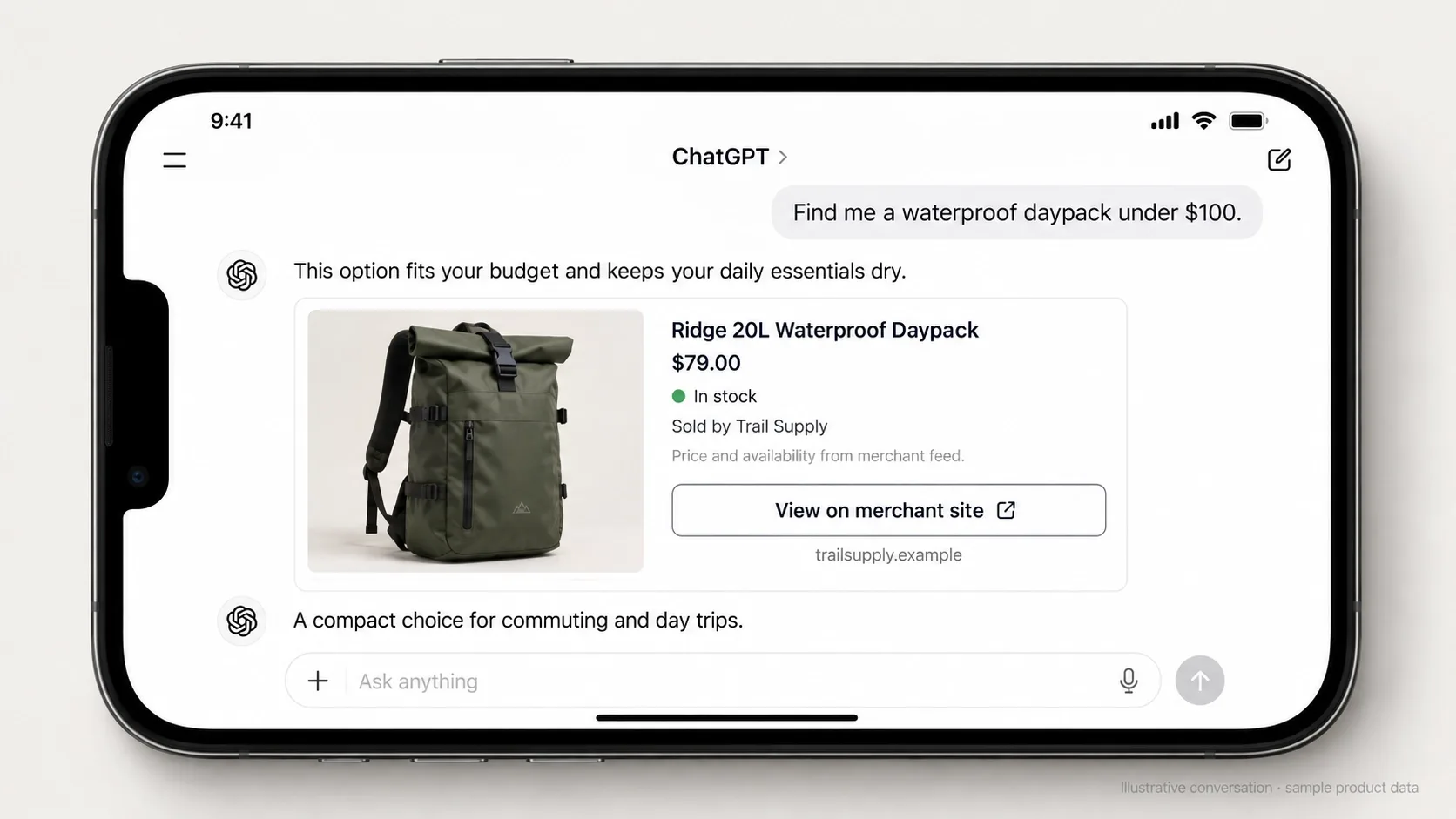
is now shopping alongside humans, not just answering questions for them. OpenAI's March 2026 update to ChatGPT shopping made this concrete: merchants share product feeds through the Agentic Commerce Protocol so their catalogs are fully represented in ChatGPT, retailers including Target, Sephora, Nordstrom, Lowe's, Best Buy, The Home Depot, and Wayfair have already integrated, and OpenAI moved away from its first in-chat checkout so merchants can send buyers to their own checkout instead. The takeaway is blunt: your product data has to be clean enough to be trusted without a human double-checking your page.
Clean JSON-LD, accurate availability, and a clear, machine-readable return policy are what let an AI agent trust your store enough to recommend it at all. I've covered the template-level implementation in How Schema Markup and Web Design Work Together, and the broader citation mechanics in How to Get Your Website Cited by AI Search Engines - an agent that can't verify your data simply routes the purchase to a competitor who made verification easy.
Treat this the same way you'd treat a new sales channel, because that's functionally what it is. A human never sees the moment an AI agent rejects your store for a competitor's - there's no bounce to analyze, no session recording to watch. The only defense is making sure your underlying data was trustworthy before the agent ever went looking.
4. Unify Omnichannel Inventory
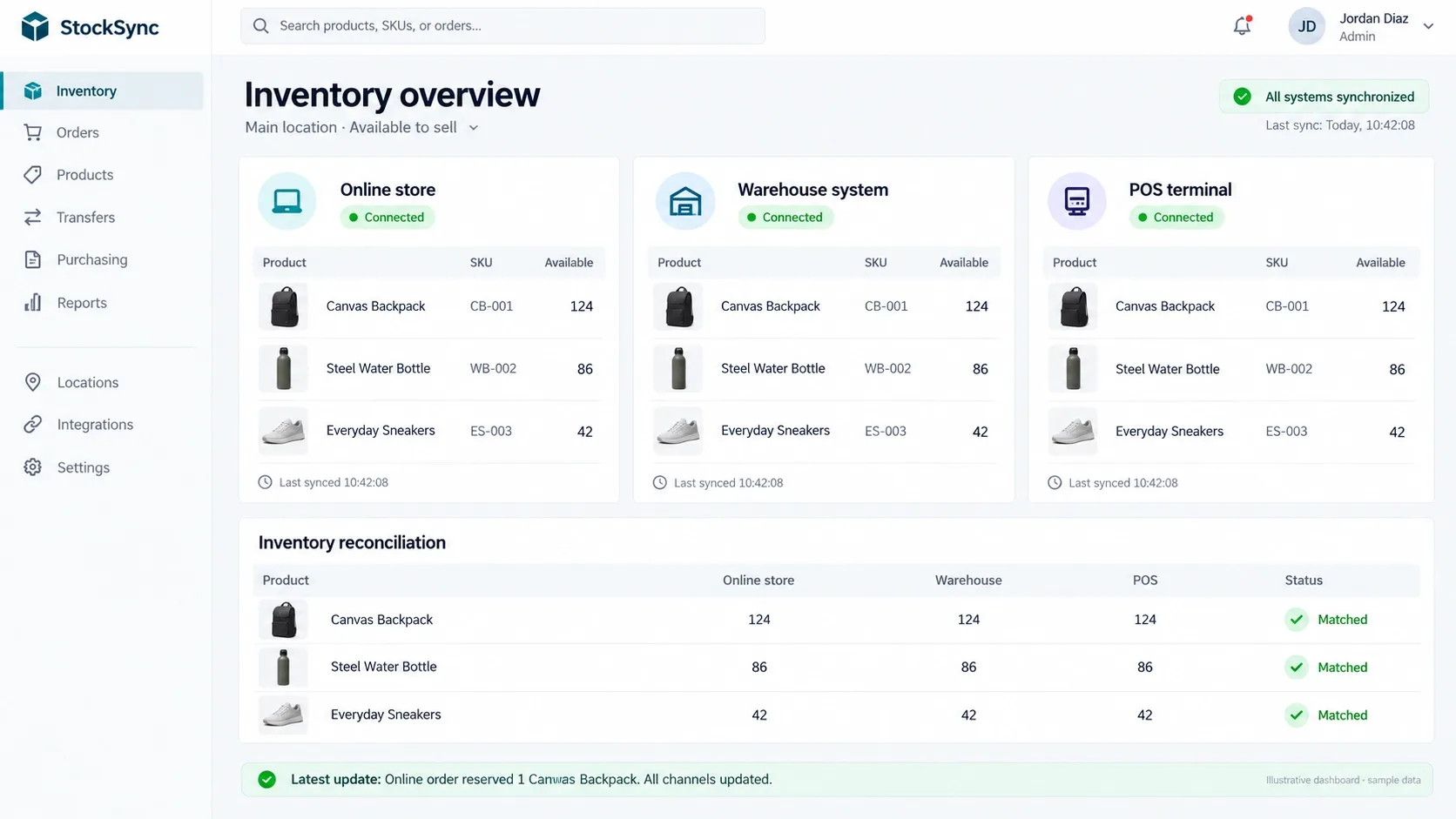
There is nothing worse than buying an item online and getting an "out of stock, refunded" email the next day - it's a broken promise the customer experienced as a lie, even though it was really a sync failure between two systems that don't talk to each other in real time.
Real-time inventory syncing through proper API integration between your storefront, your ERP, and any physical or marketplace channels is the actual fix, not a bigger safety-stock buffer papering over the sync gap. This is exactly the kind of open, composable integration WooCommerce development handles well when it's built on clean APIs instead of another plugin stacked on top - infrastructure work, not a plugin toggle, and it's the difference between an apology email and a purchase that simply completes correctly the first time.
Map every channel that can move your inventory - your storefront, a physical POS, a marketplace listing, a wholesale order sheet - and confirm each one writes to the same source of truth rather than a periodically-synced copy of it. A fifteen-minute sync delay sounds trivial until a popular item sells out across three channels simultaneously during a launch.
5. Optimize the Post-Purchase Void
Anxiety spikes the moment the card gets charged, not before. A generic "your order has shipped" link to a carrier's tracking page leaves the customer to do the work of understanding where their package actually is.
Build a real post-purchase tracking experience on your own domain - branded, proactive, and updated before the customer has to go looking for status. Automated shipping updates via SMS or email at genuine milestones do more for perceived CX than almost any other single post-purchase investment, because they answer the anxious question before it gets asked. I go deeper on why this kind of proactive touchpoint matters more now in Why Automated Follow-Up Matters More in 2026.
This is also the single highest-leverage moment to prevent a support ticket before it's written. A customer who can see exactly where their order sits, on a branded page, rarely emails asking "where is my order" - and every WISMO ticket you prevent this way is support capacity freed up for the questions that actually need a human.
6. Deploy Zero-Party Personalization
Most personalization still means quietly stalking a customer with retargeting ads built on third-party tracking they never explicitly agreed to. That approach is both increasingly blocked by browsers and increasingly resented by the people it targets.
Zero-party data works differently - you ask, and the customer tells you directly. An on-site quiz ("find your fit," "find your skin type") gathers preference data with explicit consent and lets you tailor recommendations immediately, inside the same session, without needing a single tracking pixel to do it.
The trust dividend compounds too. A customer who answered three quiz questions and then saw genuinely relevant recommendations learns that giving you information gets rewarded with a better experience - which makes them more willing to share preference data again next time, rather than more guarded about it. Silent tracking teaches the opposite lesson.
Ask Your Customers Directly. Then Build Around What They Tell You.
Quizzes, preference centers, and branded order tracking all depend on infrastructure most templates don't ship with. Vareweb builds those custom flows - zero-party data capture, proactive post-purchase updates, self-service portals - directly into your store.
7. Decouple and Streamline the Checkout
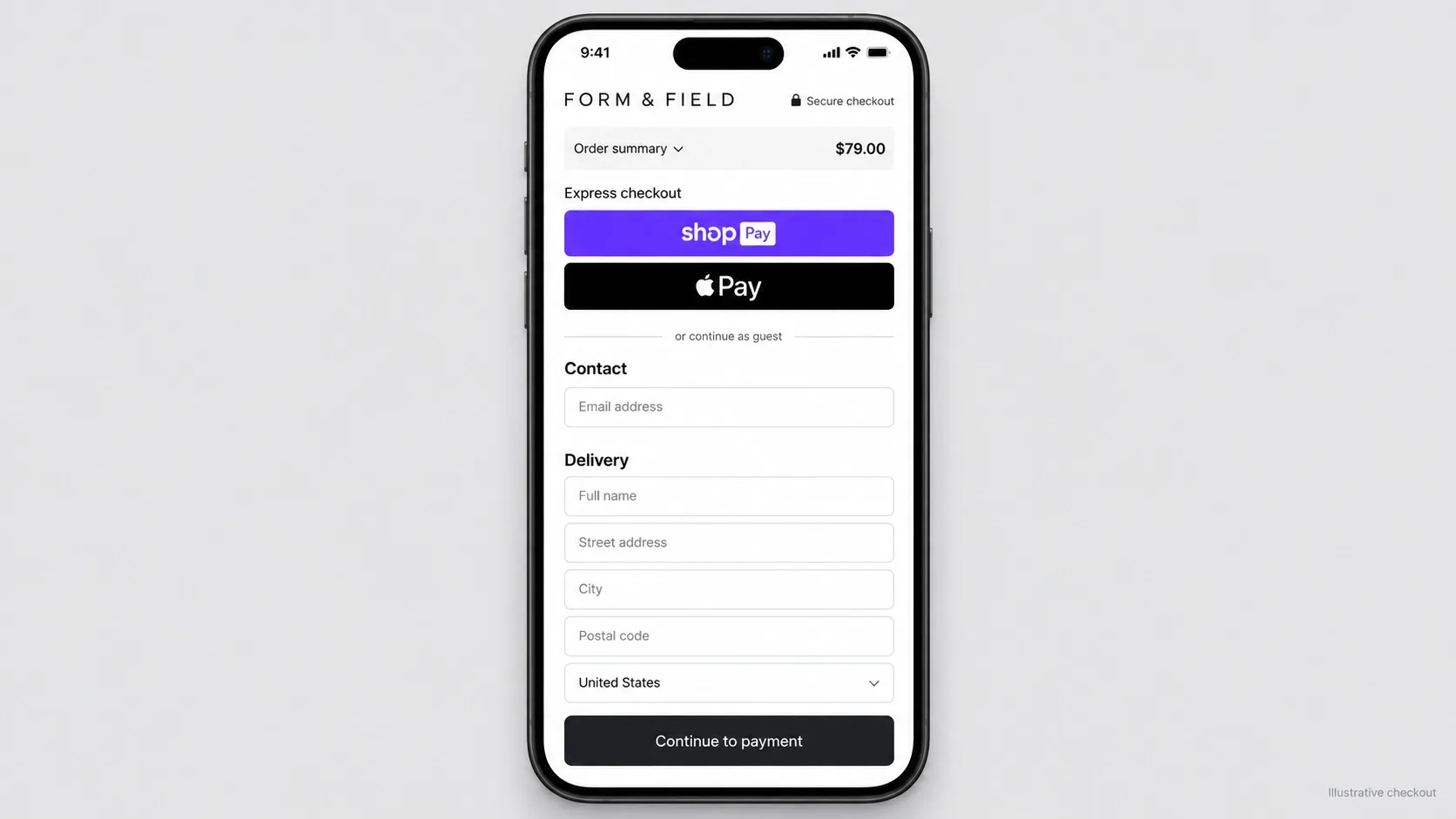
The anatomy of a frictionless checkout hasn't changed, but the cost of ignoring it has: guest checkout as the default, Shop Pay or Apple Pay above the fold, auto-fetched addresses from a zip or postal code instead of a fully manual form. Saved-wallet checkout is no longer a side feature: the transcript of Shopify's Q2 2026 earnings call shows Shop Pay GMV up 53% year over year, with the CFO tying wider payment-method choice to fewer shoppers dropping out to guest checkout. On mobile, where typing a full address on a phone is one of the biggest sources of friction, that saved-wallet path matters most.
I cover the complete pattern of what actually reduces drop-off in How to Reduce Cart Abandonment in 2026 - checkout CX and checkout conversion are the same problem wearing two different job titles.
Count your own checkout fields honestly before assuming this doesn't apply to you. Most stores can capture everything genuinely required for fulfillment in well under ten fields, and every optional field beyond that - a second phone number, a company name nobody asked for - is friction dressed up as data collection.
8. Build True Self-Service Portals
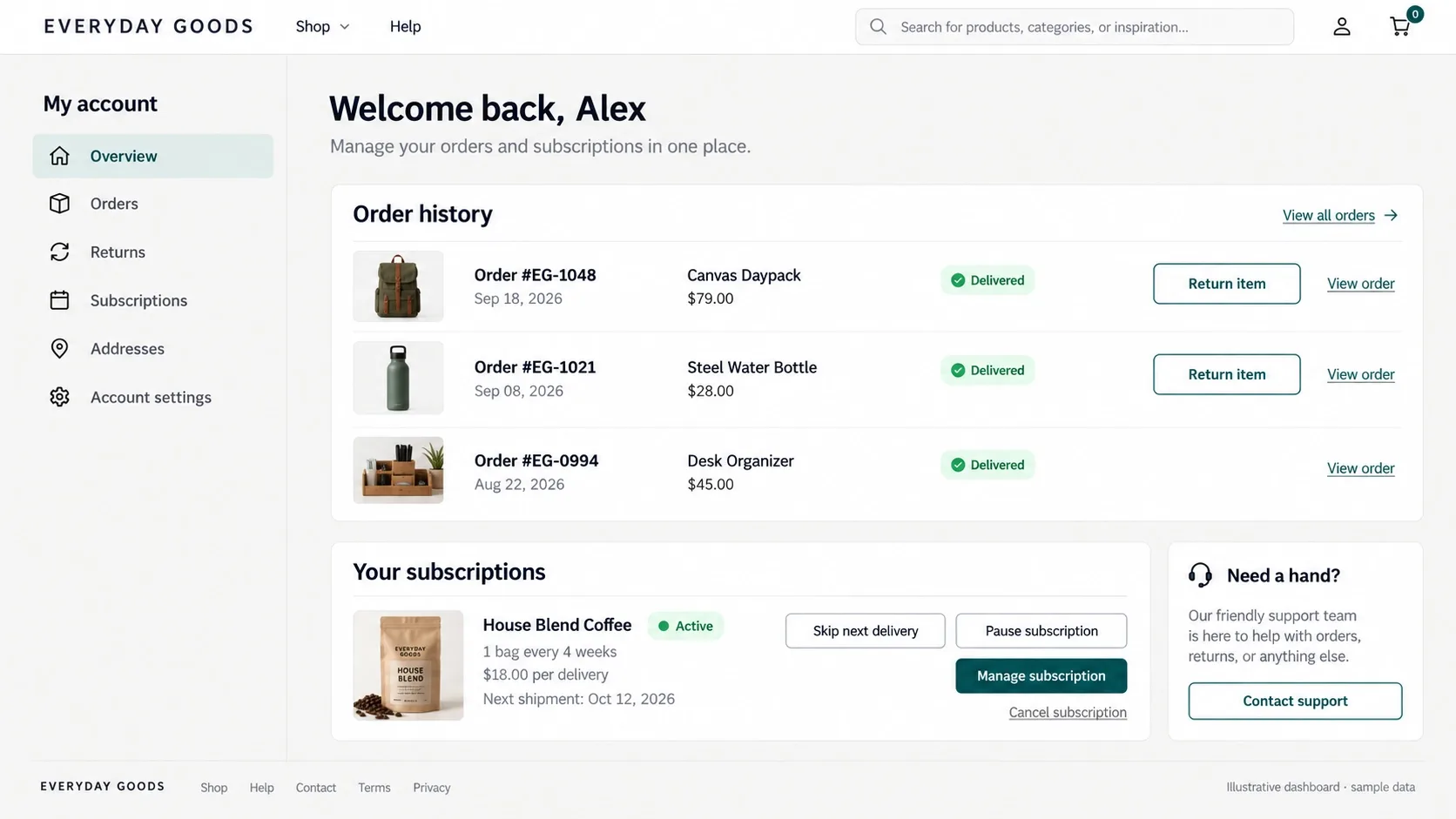
Customers hate emailing support to cancel a subscription, start a return, or download an invoice - not because the request is complicated, but because it forces a wait for a human to do something that should have been a two-click action they could complete themselves at 11pm.
A robust self-service dashboard - order history, one-click returns, subscription management, invoice downloads - is premium CX precisely because it respects the customer's time instead of routing every small task through a support queue. This matters even more for B2B and high-LTV accounts, where a procurement team expects the same self-service standard they get from their other software vendors. The same form-design discipline that makes any interaction easy to complete applies directly here - see How to Design Forms That Get Completed.
Audit your support ticket categories for the highest-volume, lowest-complexity requests - order status, address changes, simple returns - and build self-service coverage for those first. That's usually where the fastest CX improvement and the fastest support-cost reduction both live in the exact same fix.
9. Use AR and 3D Sizing to Kill Return Anxiety
Returns are a CX problem wearing a logistics costume. Narvar's own data, released in February 2026, showed holiday order volume up about 6% year over year while return volume rose about 11% - a pattern Narvar calls provisional purchasing, where shoppers buy with the intent to send back anything that doesn't clear an exact bar. That's the behavior uncertainty produces: when a shopper can't touch, try on, or verify scale before buying, buying-to-return becomes the rational move.
Virtual try-on, 360-degree product views, and AI sizing assistants that use a shopper's past purchase data all attack the same root cause: uncertainty at the moment of purchase. Closing that uncertainty gap before checkout is dramatically cheaper than absorbing the reverse-logistics cost of a return after the fact, and it removes the specific anxiety - "will this actually fit" - that AR and better sizing data are built to answer directly.
The CX framing matters as much as the cost-saving one here. A customer who returns something because it didn't match expectations doesn't just cost you shipping both ways - they walk away with a slightly worse impression of your brand's honesty, even when nothing was technically misrepresented. Preventing the return prevents that impression from forming in the first place.

10. Establish Transparent Data Sovereignty
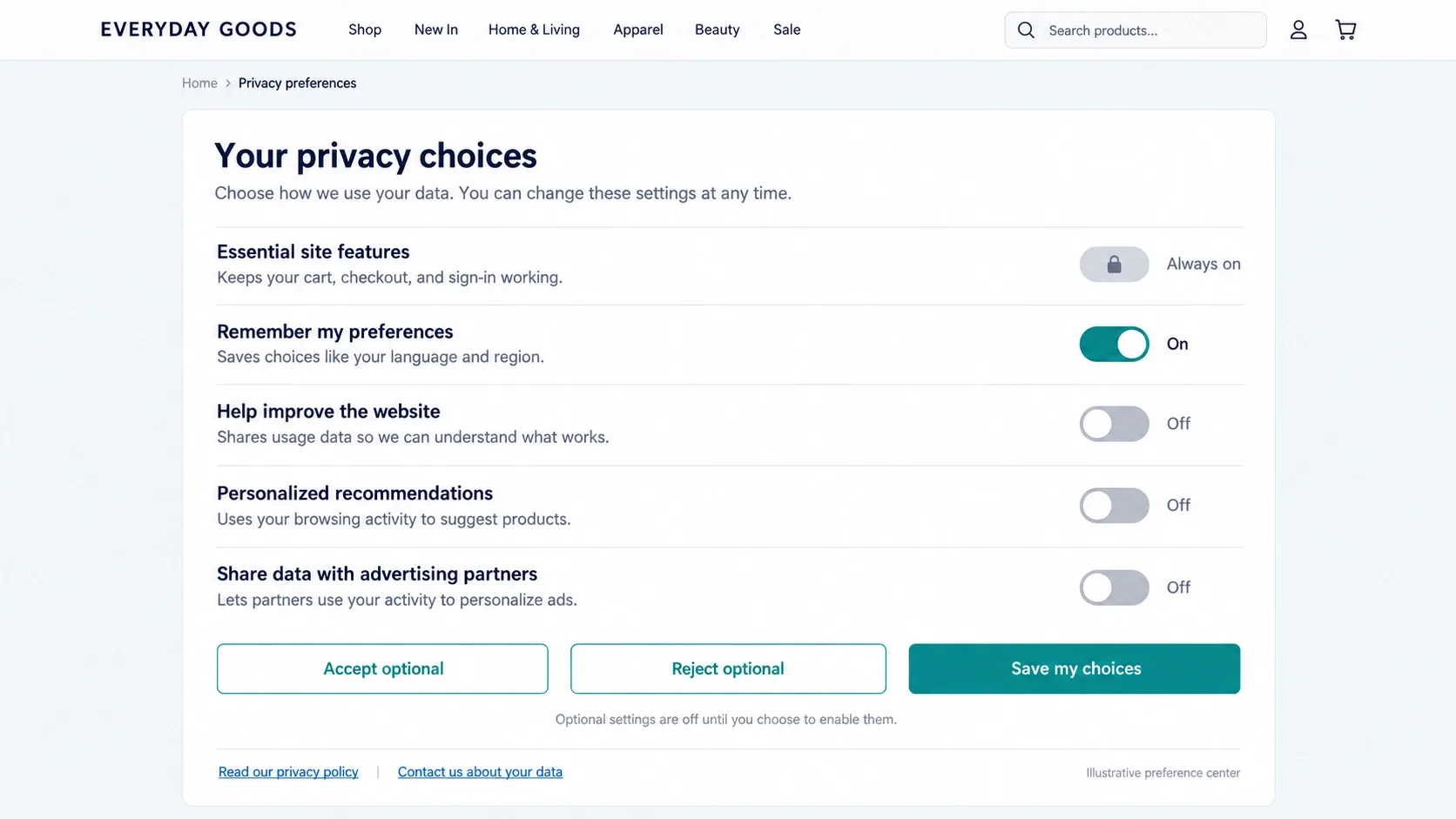
Privacy became a CX feature the moment customers started noticing how much of their data was being collected without a clear reason why. A vague, buried privacy policy doesn't just create legal risk - it quietly erodes the trust that makes someone comfortable buying from you a second time.
Clear data policies, easy opt-outs, and honest explanations of what you collect and why build loyalty precisely because they're rare enough to notice. What Trust Badges Mean and Why They Are Important covers the visible half of this trust equation - transparent data handling is the invisible half, and both matter to a customer deciding whether to trust you with a second purchase.
Put the preference center somewhere a customer would actually find it without hunting - account settings, not a footer link buried under legal boilerplate - and write the options in plain language rather than compliance-department phrasing nobody outside a law firm actually parses on a first read.
11. Map the "98 Percent" Strategy
Most CX investment optimizes for the roughly 2% of visitors ready to buy immediately, and ignores the much larger group still deciding. That's backwards - the hesitant majority is where the real revenue opportunity sits, if you give them a genuine reason to stay engaged instead of bouncing to compare elsewhere.
Live expert chat for genuine pre-purchase questions, transparent comparison guides that don't dodge your product's real weaknesses, and robust FAQ schema that answers objections before they're typed into a support form all nurture that hesitant majority toward a decision. Visible social proof at exactly this stage of hesitation does real work too - I cover why in 12 Reasons Why Social Proof Is Important for Your Brand.
Segment your own analytics by this lens before assuming you already know where the drop-off happens: how many sessions view a product three or more times without buying, and what happens differently for the ones who eventually convert versus the ones who never return. That gap usually reveals exactly which piece of hesitation-nurturing content is actually missing.
Ready to Stop Losing the Hesitant 98%?
Vareweb builds ecommerce stores where speed, search, checkout, and post-purchase trust are engineered together - so the experience holds up from the first tap to the unboxing. One team, accountable for the whole result.
12. Shift from Static Catalogs to Content-Driven Commerce
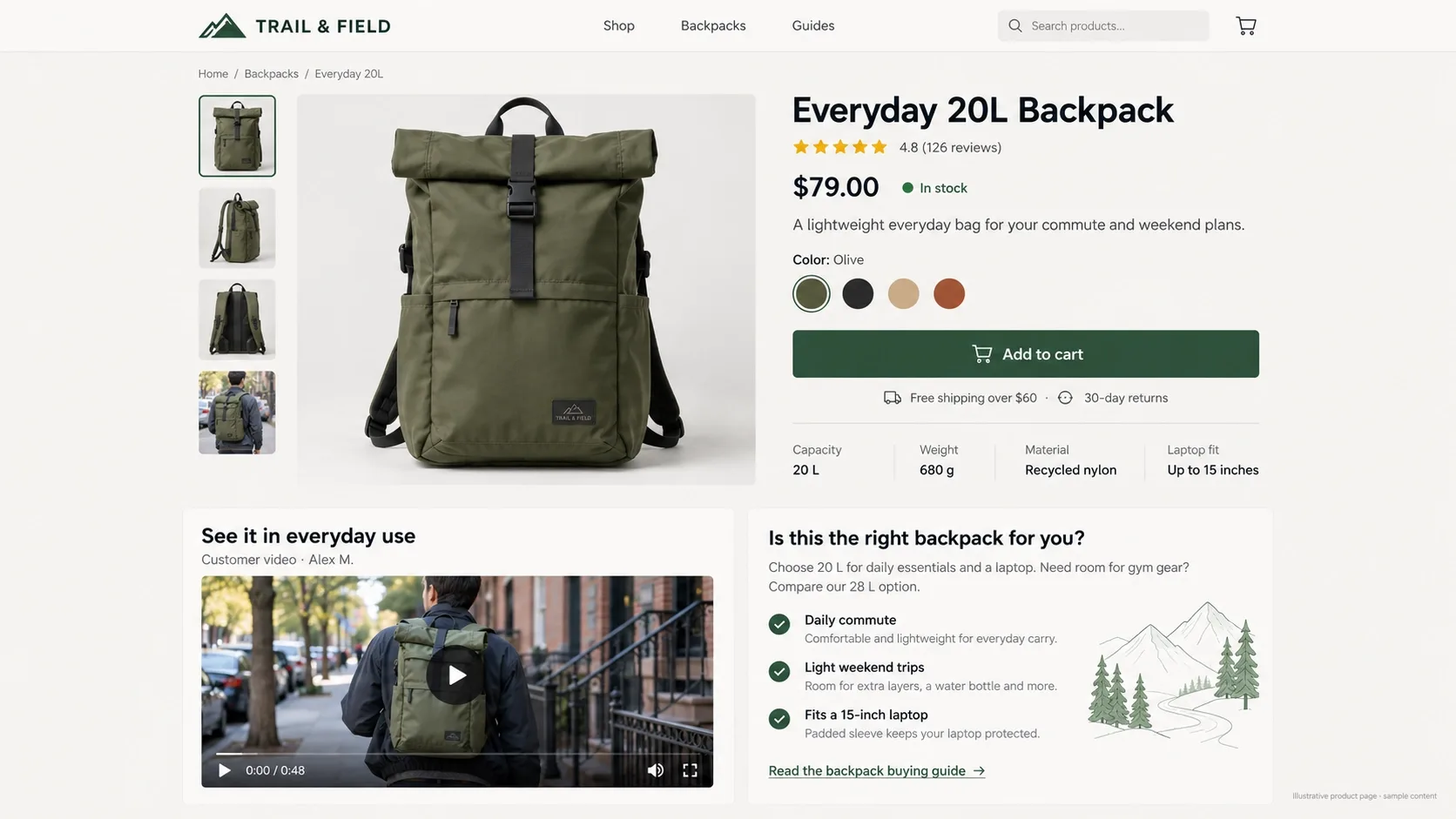
Treat product pages like landing pages, not static spec sheets. A page with a price, three bullet points, and a stock photo asks a shopper to do all the imaginative work of deciding whether this product fits their life - most won't bother.
Blend genuine editorial content, real user-generated video, and deep educational guides directly next to the Add to Cart button, not on a separate blog three clicks away. This is exactly the kind of content architecture Ecommerce SEO work should be building toward - product pages that answer questions instead of just listing specifications, which helps a hesitant human decide and gives an AI shopping agent something substantive to cite.
This approach compounds in a way a static spec sheet never can. A genuinely useful buying guide embedded on a product page keeps earning organic search traffic and answering pre-purchase questions long after it's published, while a bare bullet-point list stays exactly as thin as the day it launched - one of these assets appreciates, and the other one doesn't.
FAQs
What is the fastest way to improve eCommerce customer experience?
Fix checkout friction and page speed first. Neither trust signals nor rich content matter if a visitor abandons before the page finishes loading or can't complete a purchase once they've decided to buy.
How does page speed impact the customer journey?
Directly and compounding - a slow product page costs conversions at that exact moment, and the same slowness erodes trust for every subsequent visit, since customers rarely give a second chance to a site that already frustrated them once.
What is "Agentic Commerce" and how does it affect CX?
AI agents now browse, compare, and purchase on a customer's behalf, working from structured product feeds rather than reading your page the way a human would. Clean, accurate JSON-LD and availability data are what determine whether an agent trusts your store enough to recommend it at all.
Is live chat still necessary in 2026?
Yes, specifically for the hesitant majority who aren't ready to buy on their first visit - not as a replacement for self-service, but as a genuine escalation path when a real question needs a real answer before someone will commit to buying.
How can I personalize the shopping experience without being invasive?
Ask directly instead of tracking silently - zero-party data collected through an on-site quiz or preference center delivers better personalization with explicit consent and none of the creepiness of third-party retargeting.
Why do customers abandon carts at the shipping stage?
Almost always a cost surprise - a shipping fee that wasn't visible earlier in the funnel. Showing estimated shipping on the product or cart page, well before checkout, removes this specific and very common drop-off point.
Should I force users to create an account to buy?
No - default to guest checkout, and offer account creation after the purchase completes, when there's no remaining friction cost to charge the customer for signing up.
How do I know if my returns process needs AR or better sizing tools?
Check your return reason codes by category before investing - if "didn't fit as expected" or "not as pictured" dominate your returns, virtual try-on and better sizing data address the root cause directly rather than just processing the returns faster after the fact.

Written by
Kashaf
Kashaf is a veteran SEO specialist with deep expertise in AI SEO, generative engine optimization, ORM, web strategy, and marketing automation. With a Master's in Computer Science, he blends search strategy with technical insight into websites, automation workflows, and AI-driven platforms, helping brands dominate traditional search while adapting to the future of AI-powered discovery.