
Quick Answer: There isn't one ecommerce platform that's objectively "best" in 2026. The right choice depends on your current business size, available technical resources, how important SEO and content marketing are to your growth strategy, and where you expect your business to be over the next two years. Choosing a platform that matches those factors - not brand popularity or what competitors use - helps you avoid paying for features you'll never use or migrating to a new platform just as your business begins to scale.
I've sat across the table from three different kinds of founders this year, and all three asked me some version of the same question: "Just tell me which platform is the best one." I never answer it the way they want, because it doesn't have one answer. What I tell them instead is that the right platform is the one that fits where the business actually is right now - not the one with the loudest marketing budget or the prettiest theme demo.
Store expectations have climbed. Shoppers abandon slow pages faster than they did a few years back, competitors are better resourced, and - this is the part most platform comparisons skip entirely - search itself has changed shape. Google's AI Overviews and tools like ChatGPT and Perplexity now sit between a shopper and your product page, deciding what gets surfaced and cited before a human ever clicks through. Global ecommerce sales are on pace to reach $6.88 trillion by the end of 2026, with online transactions now accounting for more than a fifth of all retail spending worldwide - which means the platform question stopped being a side detail a while ago. It's infrastructure for a genuinely enormous, still-growing channel.
None of this happens in isolation, either. Whatever platform you land on becomes the foundation your ecommerce web development services team, your SEO team, and your day-to-day ops all have to build on top of for years. A platform decision made casually in week one of a launch has a habit of resurfacing 18 months later as a far more expensive migration decision - and by then there's real customer data, real rankings, and real revenue riding on getting the move right.
Most of what follows is a decision framework built from actual audits and actual migrations, not a spec sheet. I'll be direct about where each major platform earns its reputation and where it genuinely doesn't.
The field isn't shrinking either. The global ecommerce platform market is on track to grow from roughly $9.08 billion in 2025 to $16.51 billion by 2030, which is a polite way of saying more vendors, more pitches, and more noise for you to filter through before you commit to one.
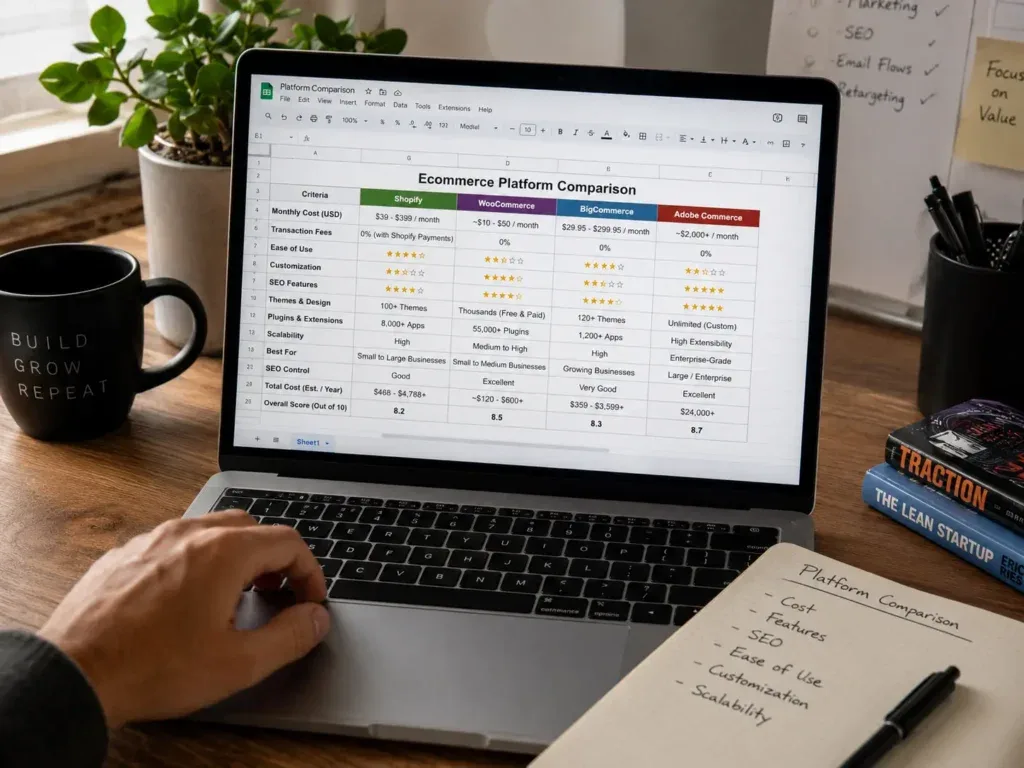
Shopify vs WooCommerce vs BigCommerce vs Adobe Commerce, At a Glance
Before the step-by-step framework, here's the honest, no-affiliate-bias snapshot I'd sketch on a whiteboard for a client. Treat it as a starting orientation, not a scorecard - the steps below are what actually decide your fit.
| Platform | Best Fit and Key Considerations |
|---|---|
| Shopify | Best for fast-growing brands and non-technical founders. Easy to launch with managed hosting, although paid apps can increase the monthly cost. Starts at approximately $39 per month. |
| WooCommerce | Best for WordPress stores that depend heavily on SEO and content. Offers strong customization, but hosting, security and maintenance are your responsibility. The core plugin is free. |
| BigCommerce | Best for B2B, wholesale and multi-storefront businesses. Includes strong built-in ecommerce features, but has a steeper learning curve. Plans generally start around $29 per month. |
| Adobe Commerce | Best for enterprise businesses with complex catalogs and custom workflows. It offers extensive flexibility but requires a large budget and dedicated development resources. Pricing is custom. |
*Starting costs are illustrative entry-tier figures as of 2026 and exclude apps, themes, hosting, and developer time. Please visit the official website for updated costs.
Hosted vs Open-Source - The Real Trade-Off Nobody Explains Well
Every platform conversation eventually collapses into one real distinction: hosted, software-as-a-service (SaaS) platforms versus open-source, self-hosted ones. Shopify, BigCommerce, Wix, and Squarespace sit in the first bucket. WooCommerce, PrestaShop, and Adobe Commerce (formerly Magento) sit in the second.
Hosted platforms handle your servers, your security patching, your uptime, and a good chunk of your scaling automatically. You're renting infrastructure and accepting the constraints that come bundled with it. Open-source platforms flip that arrangement: you get code-level control over almost everything - URL structure, checkout logic, content architecture - but hosting, performance, and security become your responsibility instead of the platform's.
I'd frame it as less technical responsibility versus more technical control, not "better vs worse." Neither side of that trade is free. You're either paying in platform constraints or paying in ongoing maintenance hours. What usually goes wrong when choosing a platform is founders picking on sticker price alone, without pricing in which side of that trade-off their team is actually equipped to manage.
It's worth knowing that WordPress alone still powers roughly 43% of all websites going into 2026 - WooCommerce rides entirely on that ecosystem, which is exactly why its long-term stability, plugin depth, and hosting options are tied to WordPress's, for better and for worse.
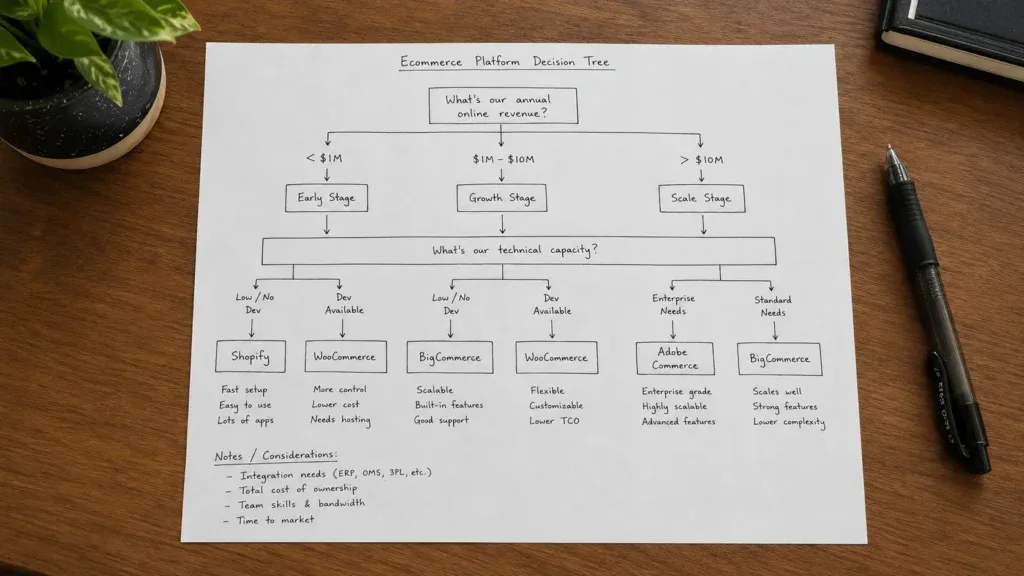
Step 1: Start With Your Business Stage and Actual Revenue
Revenue stage changes platform fit more than any single feature does. I use rough bands with founders, not hard rules - real businesses rarely sit neatly inside them.
- Under roughly $50K/year: simplicity and low overhead beat feature depth every time. A lean hosted setup with a handful of apps will out-earn a fully custom build you can't maintain.
- Roughly $50K–$200K/year: this is where integrations, better reporting, and sometimes early B2B needs start to matter. Platform limits start showing up as real friction rather than theoretical ones.
- $200K+/year: enterprise-tier features - Shopify Plus, BigCommerce Enterprise, Adobe Commerce - may genuinely earn their higher cost here, though plenty of stores at this level still run happily on standard plans.
One pattern I see constantly at the early stage: founders spend weeks comparing fifteen platforms feature-by-feature and end up paralyzed rather than closer to a decision. I've written before about how too many options on a website can quietly cost you sales - the same overload problem applies to picking the platform itself. Past a certain point, more comparison isn't more clarity.
Step 2: Be Honest About Your Technical Capacity
This is the step people fudge the most, usually because they want to believe their team can "figure it out later."
Non-technical teams struggle with open-source hosting and maintenance in fairly predictable ways - nobody's watching plugin updates, nobody's monitoring server response times, and small problems compound quietly until checkout breaks during a traffic spike. Dev-led teams have the opposite problem: they get frustrated fighting a SaaS platform's guardrails and paying for an app stack to replicate what custom code could do in a fraction of the time.
If you don't have a developer or a technical partner on retainer, lean toward hosted. If you have real developer capacity and a content-heavy growth strategy, WooCommerce or a similar open-source stack starts looking a lot more attractive than the sticker price suggests.
Step 3: Clarify How Important Content and SEO Really Are
Content-driven brands publishing consistently - blogs, buying guides, comparison pages - tend to do better long-term on WordPress + WooCommerce, because SEO flexibility, URL control, and schema implementation are all more direct there. Brands leaning heavily on paid ads and simple landing pages often do fine on Shopify or BigCommerce, where content tools are secondary but the storefront itself is fast out of the box.
Platform choice shapes blog quality, URL structure, schema implementation, and content workflows more than most founders expect walking in. I've inherited plenty of Shopify stores with genuinely strong products and a blog that hasn't published in eighteen months, simply because the platform made content feel like a bolt-on rather than a core workflow.
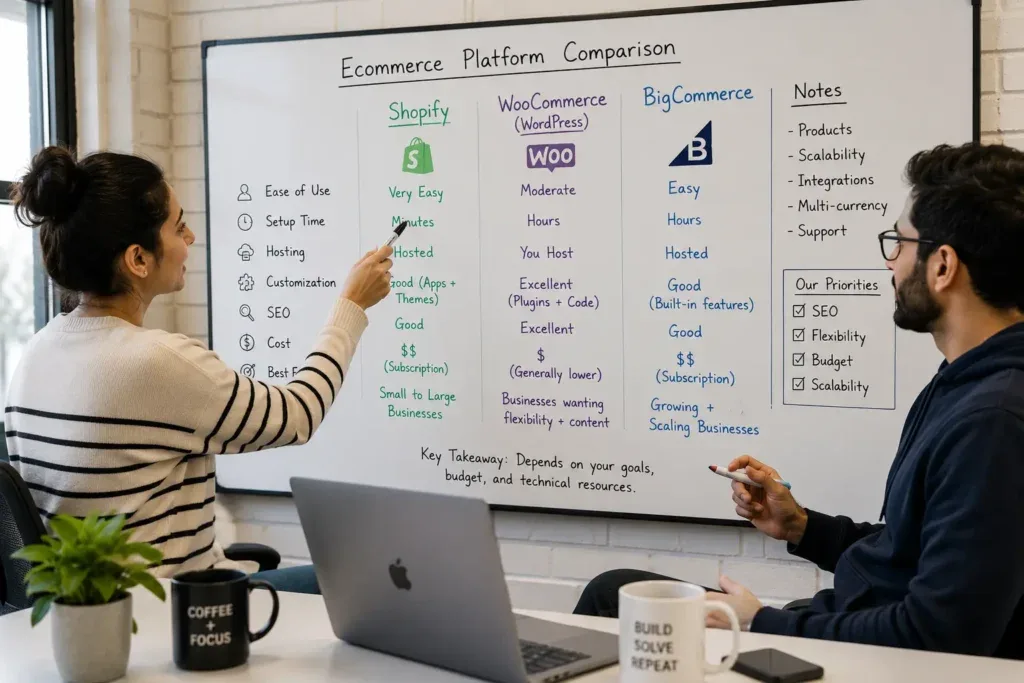
Quick Platform Positioning - Shopify, WooCommerce, and BigCommerce
I'm not ranking these 1 to 10. I'm matching them to use cases, because in my audits the platform is rarely the actual point of failure - the build discipline on top of it usually is.
Shopify: strongest for non-technical founders who need to move fast
Shopify's real strength is speed to first sale, a genuinely massive app ecosystem, and native depth on paid media integrations - Meta, Google, TikTok pixels and Conversions API all connect with minimal friction. The tradeoff is less flexibility for highly custom store logic and monthly platform fees stacking on top of app costs. If your team is small, non-technical, and needs a store live in weeks rather than months, look for Shopify development services.
WooCommerce (on WordPress): strongest for content-driven, SEO-flexible brands
WooCommerce wins on content depth, URL and schema flexibility, and zero platform transaction fees - real advantages for a brand where blogging and organic search do a lot of the acquisition work. The tradeoff is that hosting, plugin conflicts, and security patching all become your team's job rather than the platform's. From experience, the WooCommerce stores that perform best have a developer or or they are taking some WooCommerce website development services who are treating hosting and plugin discipline as part of the build, not an afterthought.
BigCommerce: strongest for B2B, wholesale, and multi-storefront operations
BigCommerce has historically differentiated itself on built-in B2B features - customer-specific pricing, quote workflows, purchase orders - and running multiple storefronts from a single backend without needing Shopify Plus-level pricing to do it. Worth knowing before you lean on either pitch as gospel: BigCommerce introduced an Open Payment Provider Fee on June 1, 2026, which narrows its old "zero transaction fees" advantage for merchants using non-approved payment gateways, and Shopify opened its own B2B functionality to every paid plan that same April, closing part of the B2B gap between the two platforms. Neither change eliminates BigCommerce's multi-storefront and wholesale strengths - it just means the comparison is closer than the marketing pages from either side let on.
Adobe Commerce: strongest for complex enterprise catalogs
Adobe Commerce (formerly Magento) earns its place when a business has genuinely enterprise-grade requirements from day one - large catalogs, custom account structures, deep ERP integrations, bespoke workflows a template platform can't express. That depth comes at real cost: implementation budgets, dedicated development resourcing, and ongoing platform ops that a leaner brand simply doesn't need yet. I rarely recommend it to anyone who hasn't already outgrown Shopify Plus or BigCommerce Enterprise in practice, not just in ambition.
Other platforms - Wix, Squarespace, PrestaShop, Shopware - come up in specific situations: Wix and Squarespace for very early-stage or portfolio-adjacent stores, PrestaShop and Shopware more often outside the US. I won't turn this into a twenty-platform roundup; they're worth a mention, not a deep dive, unless your specific situation calls for one.
Step 4: Identify B2B, Wholesale, and Multi-Storefront Needs
If you need customer-specific pricing, quotes, purchase orders, and company accounts, platforms like BigCommerce or Adobe Commerce tend to fit more naturally than a B2C-first platform stretched to cover B2B logic. If you run multiple brands or serve multiple regions, multi-storefront capability - or dedicated expansion stores - becomes a real architectural question, not a nice-to-have.
Forcing B2B logic into a platform that wasn't built for it almost always ends the same way: a heavy stack of apps and plugins trying to replicate native functionality, each one adding its own maintenance burden and its own point of failure at checkout.
Step 5: Map Your Channels and Integrations
If Meta, Google, or TikTok ad spend drives most of your traffic, Shopify's native ad-pixel and Conversions API integrations tend to save real setup time. If email, content, and organic search are core to acquisition, WooCommerce's plugin ecosystem integrates deeply with marketing tools and gives you more granular control over how that data flows. If marketplaces or B2B ordering matter, check how each platform supports them natively versus how much you'll be bolting on through third-party apps - the gap between "supported" and "supported well" is wider than most comparison charts admit.
Common Mistakes I See Founders Make When Choosing a Platform
These repeat across industries and revenue sizes. If you recognize your business in more than one of these, it's worth slowing down before you sign a plan.
- Overbuying too early - landing on Adobe Commerce or Shopify Plus before the revenue or catalog complexity justifies the overhead, then paying enterprise-tier fees for features nobody on the team uses
- Underbuying and hitting a wall mid-launch - picking the cheapest plan, then discovering it can't handle wholesale pricing, multi-currency, or a traffic spike during the exact week it matters most
- Choosing based on a competitor's stack rather than your own constraints. What works for a brand with a five-person dev team rarely transfers cleanly to a two-person operation
- Ignoring the exit path. Before committing, check whether you can export product, customer, and order data cleanly, and whether your custom logic is documented well enough that a future migration doesn't start from zero
- Treating platform marketing pages as neutral comparisons. Every platform's own "vs." page is written to win, not to inform - that's exactly why independent audits and hands-on testing still matter
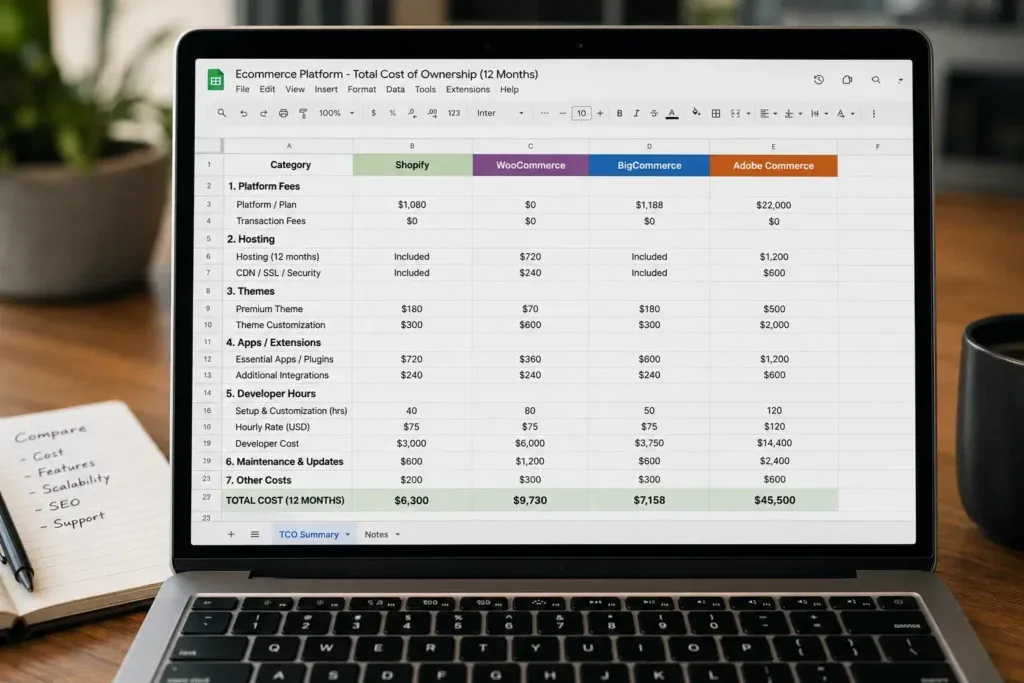
Step 6: Compare Total Cost of Ownership, Not Just Plan Price
The monthly plan fee is the least interesting number in this whole decision. Total cost of ownership - everything a platform actually costs once you add apps, hosting, developer hours, and transaction fees - tells the real story.
- Platform fees, monthly or annual
- App or plugin costs, which compound faster than founders expect once a store is a year or two old
- Hosting, for anything open-source - and hosting quality directly determines whether "cheap" WooCommerce stays cheap
- Developer hours, both for the initial build and ongoing maintenance
- Transaction fees, which vary by platform, plan tier, and payment gateway choice
"Cheaper" open-source can quietly become expensive through maintenance hours nobody budgeted for. "Expensive" SaaS can end up saving money overall by removing technical overhead your team doesn't have to hire for. This is also exactly where replatforming math gets serious: a mid-market ecommerce replatform in 2026 typically runs $150,000 to $300,000 all-in and takes 5 to 10 months, with the platform license itself usually representing only 20-40% of that total - the rest is implementation, integrations, data migration, and QA. That's the real cost of getting the platform decision wrong the first time.
Total cost of ownership should also price in the cost of friction, not just line items. Average ecommerce conversion rates hover around 3% globally, and a slower or clumsier checkout on a "cheaper" platform can quietly erase whatever you saved on the plan fee. The budget advantage disappears fast if the platform underneath it is costing you sales.
Step 7: Evaluate SEO and Performance Defaults
WooCommerce gives deep control over URLs, content, and schema - but performance depends entirely on hosting quality and plugin discipline. Shopify and BigCommerce are usually strong on speed and infrastructure out of the box, but come with more rigid URL patterns and often need apps or custom code to unlock certain SEO features.
Performance is not a cosmetic concern on any platform. A widely cited 2026 ecommerce benchmark puts average page load time at 5.3 seconds, with bounce rates climbing toward 41% once stores cross that threshold. Whichever platform you choose, treat that number as a floor to beat, not an average to accept.
This ties directly into Core Web Vitals, crawlability, and how cleanly your category and product pages get parsed by both Google and AI systems. I've covered the category-page side of this in detail in How to Optimize Ecommerce Category Pages for SEO in 2026 - worth a read regardless of which platform you land on, since the underlying architecture principles (shallow URLs, controlled faceted navigation, real schema) apply to Shopify and WooCommerce equally. If SEO carries a meaningful share of your acquisition strategy, it's worth having dedicated SEO services for eCommerce.
Step 8: Think in 24-Month Terms, Not Just Launch Week
Picking a platform for "right now" without considering where you want to be in 24 months is how migrations happen. And migrations are rarely quiet events - 27% of ecommerce companies are actively looking to switch platforms at any given time, most of them not because the original choice was foolish, but because the business outgrew it faster than anyone planned for.
AI search adds another layer to this. Structuring product and category data so answer engines can parse and cite it - what's sometimes called AEO or GEO - rewards the same fundamentals that already matter for classic SEO: clean schema, genuine content, and stable architecture. I've gone deeper on how to get your website cited by AI search engines elsewhere - the short version is that a platform which handles structured data cleanly today is doing you a favor two years from now, regardless of which platform that turns out to be.
Scenario-Based Recommendations
- Non-technical founder, small team, need to launch fast: Shopify, or a similarly hosted builder, is usually the safest starting point
- Content-heavy, SEO-driven brand with developer capacity: WooCommerce on WordPress is often the strongest long-term choice, provided hosting and plugin discipline are treated as first-class parts of the build
- Growing B2B or wholesale brand with multi-storefront or complex price-list needs: BigCommerce or Adobe Commerce deserve serious, side-by-side evaluation - check current pricing and fee structures directly, since both platforms have shifted terms meaningfully within 2026 alone
Each of these is grounded in stage, capacity, and goals - not popularity, and not which platform happens to be trending on social media this quarter.
Final Perspective
Platform choice doesn't decide your success on its own. I want to be blunt about that, because plenty of platform comparisons imply otherwise. What it actually decides is what will be harder or easier for you, every week, for the next few years - which is exactly why it's worth thinking past the marketing page and into your actual daily reality before you commit.
Choosing an ecommerce platform in 2026 isn't about finding the one true winner. It's about aligning your stack with your next 24 months of reality, not just your first week of setup.
Practical Checklist
☐ What is our current monthly revenue and realistic 24-month target?
☐ Do we have in-house technical capacity - developers, sysadmins, or a reliable agency partner?
☐ How important are blogging and SEO to our acquisition strategy?
☐ Do we have B2B, wholesale, or multi-storefront needs?
☐ Which channels - paid, email, marketplaces - matter most to how we sell?
☐ What is our true budget, including apps, plugins, and developer hours - not just the plan price?
☐ Do we want full control over code and URLs, or less technical responsibility?
☐ How many products, variants, and markets do we plan to support?
☐ Are we prepared to manage hosting, security, and performance ourselves?
☐ Can this platform grow with us, or will it force a migration sooner than we'd like?
Frequently Asked Questions
Which ecommerce platform is best for beginners?
For most non-technical founders, a hosted platform like Shopify is the lowest-friction starting point - it removes hosting and security from your plate entirely.
Which platform is best for SEO and content?
WooCommerce on WordPress generally gives the most direct control over URLs, schema, and content architecture, provided hosting and plugin management are handled properly.
Which platform is best for B2B or wholesale?
BigCommerce and Adobe Commerce both offer strong native B2B features, though it's worth checking current pricing and fee structures directly, since both have changed terms during 2026.
Should I choose Shopify or WooCommerce for my first store?
It depends on technical capacity more than anything else: Shopify if you don't have developer support on hand, WooCommerce if you do and content is central to your growth plan.
How much does platform choice really affect SEO?
Significantly at the technical level - URL structure, schema flexibility, and crawl control all vary by platform - but content quality and site architecture still matter more than the platform logo in the footer.
Can I switch platforms later without losing SEO?
Yes, with careful redirect mapping and a full content and schema migration plan - but it takes real planning, and rushed migrations are the most common cause of lost rankings.
How should I think about transaction fees and app costs?
Add them to the plan price before comparing platforms - total cost of ownership, not sticker price, is what actually determines which platform is cheaper for your specific business.
Does AI search care which platform I use?
Not directly - AI search systems care about clean structured data, genuine content, and clear site architecture, all of which are achievable on any major platform if they're built in deliberately.
Fix the platform decision with the same rigor you'd bring to a hiring decision - because in practice, that's closer to what it actually is.

Written by
Kashaf
Kashaf is a veteran SEO specialist with deep expertise in AI SEO, generative engine optimization, ORM, web strategy, and marketing automation. With a Master's in Computer Science, he blends search strategy with technical insight into websites, automation workflows, and AI-driven platforms, helping brands dominate traditional search while adapting to the future of AI-powered discovery.