
Quick Answer: Sidebars are neither inherently good nor bad for web design; their value depends on the purpose of the page. They work especially well for content-heavy blogs, documentation sites, ecommerce filtering, and SaaS dashboards, where users benefit from quick access to related navigation or controls. They are usually less effective on minimalist marketing sites, conversion-focused landing pages, and mobile-first experiences. Without a clear purpose, a sidebar can add clutter, distraction, and mobile friction. When used intentionally, however, it remains one of the most dependable navigation and content-discovery patterns in web design.
In my audits, the problem isn't the sidebar itself - it's what teams put into it. I've seen sidebars rescue chaotic navigation on a documentation site with four hundred pages, and I've seen them completely destroy focus on a single-purpose landing page that had exactly one job. Same layout element. Opposite outcomes. The difference was never the sidebar - it was whether anyone had decided what it was actually for.
Most "ditch the sidebar" articles are really talking about blogs and landing pages, where the case against them is genuinely strong. What they don't mention is that navigation sidebars have grown in exactly the opposite direction across SaaS products and admin dashboards, where persistent left navigation is close to the industry default now. Context decides the answer here, not a trend. On complex web apps, I still rely on sidebars for primary navigation. On simple marketing sites, I usually remove them - and the device split behind that decision is closer than people assume: mobile and desktop traffic sat at 50.13% versus 49.87% worldwide as of August 2026, which means a sidebar that quietly disappears for half your visitors isn't a minor edge case.
Quick Overview: Does Your Site Need a Sidebar?
Before the detailed trade-offs, the fast version by site type - the reasoning behind each row is covered in the sections that follow.
| Site Type | Sidebar Fit | Why |
|---|---|---|
| Blog / Content Site | Usually skip it | Reading focus and mobile behavior both favor a single-column layout |
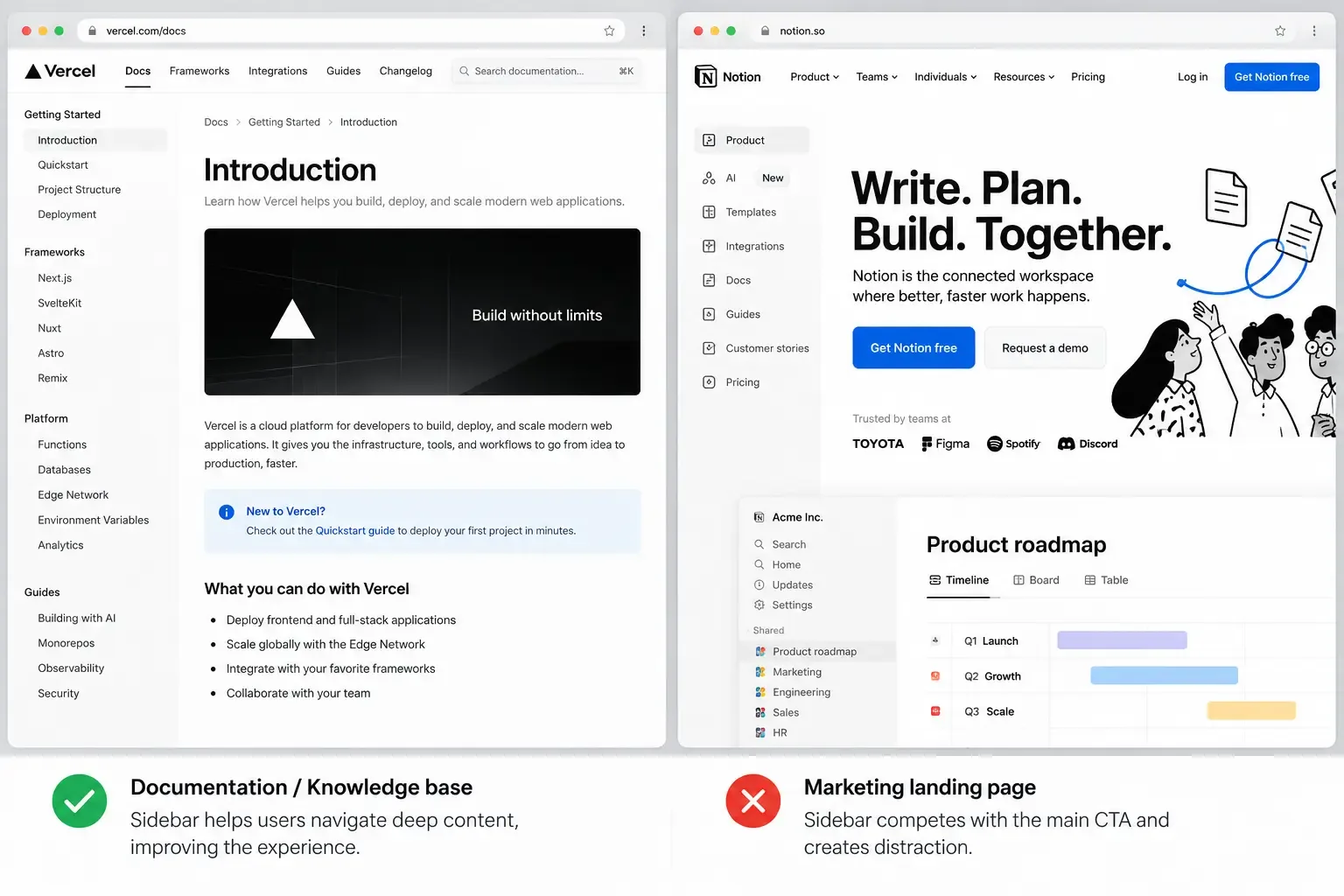
| Documentation / Knowledge Base | Strong fit | Persistent structure prevents users from feeling lost in deep content |
| Ecommerce Category Pages | Strong fit (filters) | Filtering genuinely helps users narrow choices and complete shopping tasks |
| SaaS / Admin Dashboard | Strong fit | Primary navigation benefits from an always-visible, scannable structure |
| Marketing Landing Page | Usually skip it | Single-goal pages can lose conversions when competing navigation elements distract visitors |
| Portfolio / Agency Site | Usually skip it | Visual storytelling and whitespace typically contribute more than an additional navigation column |
Sidebar or Not? That's a Design Decision, Not a Template Setting
Whether your site needs a content sidebar, a navigation sidebar, or neither depends on what the page actually has to do. Vareweb makes that call as part of every custom build - not as a theme default nobody questioned.
What Is a Sidebar Today?
A sidebar is a vertical column to the left or right of the main content, usually taking up less than a third of the page width, that holds secondary content or navigation. That's the whole definition - the disagreement in most "sidebars are dead" arguments isn't actually about the layout element, it's about which of two very different things people mean by it. Deciding which one a project needs is a Custom Web Design question, not a template setting - it depends on what the page actually has to do.
Content sidebars are what most people picture: blog widgets, related posts, email opt-ins, category lists, search boxes, sometimes ads. They're secondary by design, sitting next to content that stands on its own without them. Navigation sidebars are a different animal entirely - the persistent left-hand menu in a SaaS product, an admin panel, or a complex web app, where the sidebar isn't secondary at all. It's often the primary way users move through the product. Conflating these two is where most "sidebars are outdated" takes go wrong - the argument against content sidebars on blogs has very little to say about navigation sidebars in software, because they're solving different problems.
Advantages of Sidebars in Web Design
These advantages only show up when the sidebar has a clear, singular role. A sidebar without a job description becomes a junk drawer - and a junk drawer doesn't get credit for any of the following.
1. Better organization and discoverability for secondary content
A sidebar creates dedicated space for related posts, categories, search, and quick facts without interrupting the main text flow. On blogs, media sites, and help centers specifically, this genuinely helps users find a next step without hunting for it.
2. Stronger navigation in complex apps and documentation
Left navigation keeps primary destinations visible and scannable, which supports learnability and repeated movement across sections - exactly what a SaaS product or a large documentation site needs. It can expose hierarchy and child pages far more clearly than a crowded top nav ever manages once a site has more than six or seven top-level sections.
3. Highlighting key content and calls-to-action
Sidebars can spotlight an email signup, a featured product, or a key resource with consistent presence across every page. Used carefully - meaning one clear CTA, not four competing ones - this genuinely lifts sign-ups. I go deeper on where a CTA actually earns its placement, sidebar or otherwise, in 10 Places to Put Your CTA for Higher Signup Rates.
4. Space for monetization and ads
On content sites specifically, sidebars have historically provided a well-defined ad or sponsorship slot without putting ads directly inside the reading flow. This is a narrower advantage than it used to be, but it still holds for publishers who need a predictable, non-intrusive placement.
5. Scalable structure for growing sites
A sidebar can absorb new navigation or content modules - filters, taxonomies, tools - as a site grows, without a full template redesign every time something gets added. That flexibility is genuinely valuable on a site you expect to keep expanding for years, not just launch and leave.
A Sidebar Without a Job Description Is a Junk Drawer
The difference between a sidebar that helps and one that hurts your conversion rate comes down to execution, not the layout pattern itself. Vareweb's UI/UX work gives every element on the page - sidebar included - one clear purpose.
Disadvantages of Sidebars in Web Design
1. Distraction and reduced focus on primary content
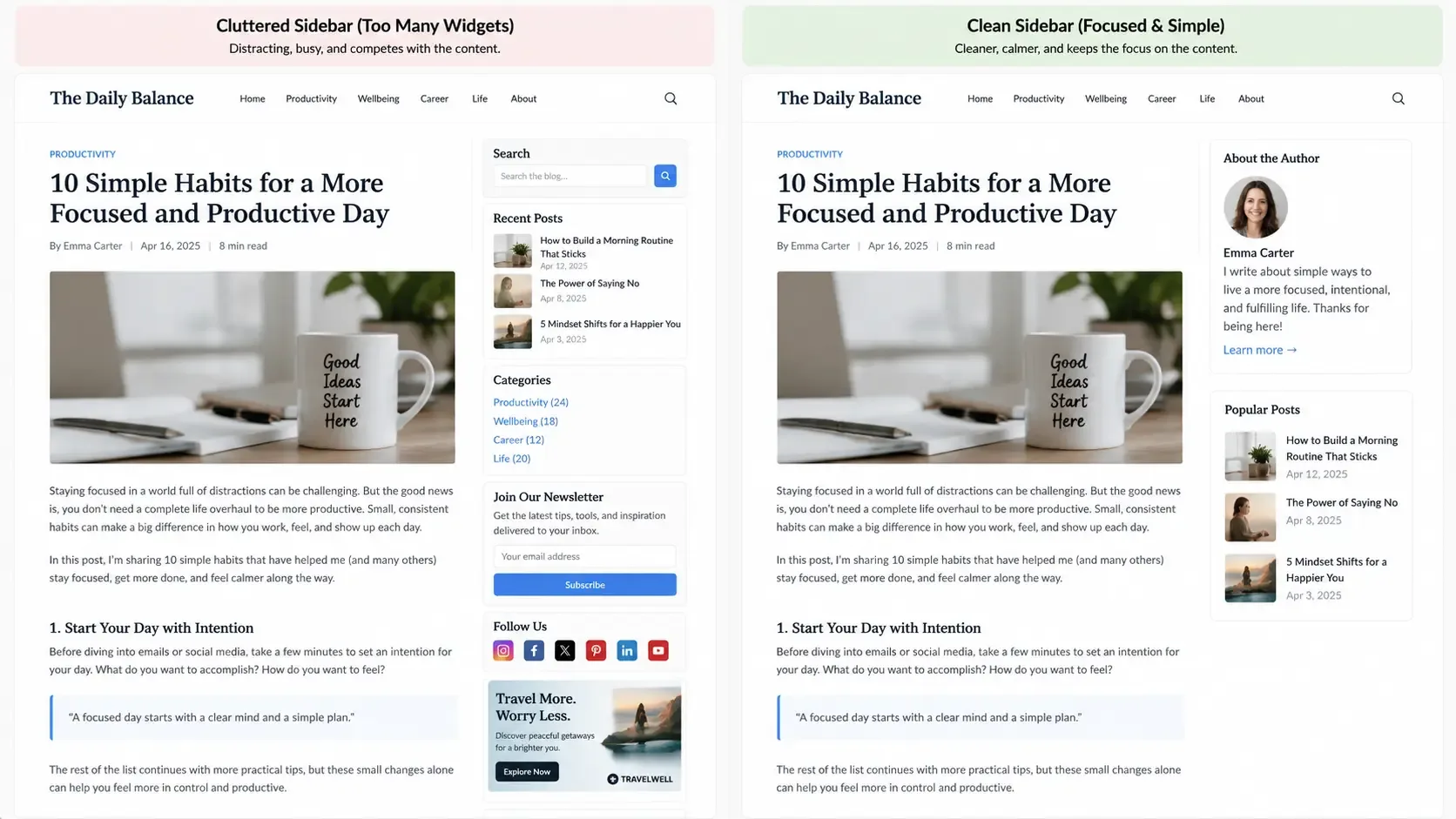
A sidebar stuffed with links, ads, video, and widgets pulls attention away from the main content - especially on reading-heavy pages and landing pages, where focus is the entire point. Multi-column layouts fragment attention; removing a sidebar often makes content feel calmer and noticeably easier to actually finish reading.
2. Visual clutter and outdated aesthetics
Sidebars tend to become a catch-all for everything that doesn't fit elsewhere on the page, and that accumulation is exactly what makes a site look dated next to a modern, full-width, story-driven layout. Stale sidebar content - an expired offer, a past event, a widget nobody's touched in two years - actively signals neglect to anyone who notices it.
3. Poor mobile and responsive behavior
On small screens, sidebars usually collapse below the main content or into an off-canvas drawer - and a meaningful share of users never open that drawer at all. On tablets and small laptops, a sidebar eats horizontal space that would otherwise go to the content itself, narrowing the reading column and making text measurably harder to read. I cover the layout decisions that hold up across breakpoints in Mobile-Friendly Design Best Practices for Improving Conversions and Better UX.
4. Performance and load-time issues
A heavy sidebar packed with ads, embedded social feeds, and third-party scripts slows the page down and drags on Core Web Vitals right alongside it. Removing an unnecessary sidebar is one of the more reliable ways to lighten a content site - I've written more on what actually moves these numbers in 10 Best UI/UX Design Tips for Good Core Web Vitals.
5. Redundant or sloppy information architecture
Plenty of sites use a sidebar to patch weak navigation - duplicating header links, adding three different "find this" paths, stuffing everything in one place because nobody wants to fix the underlying structure. That redundancy confuses users and, worse, hides the actual IA problem instead of forcing a real fix. It's the same instinct behind why too many options on a page quietly cost you sales - a sidebar can multiply choices exactly where a visitor needed fewer of them
When Sidebars Make Sense
A sidebar is usually the right call when:
- The site has enough content categories or tools that users genuinely need to move among them often - blogs, news, documentation, ecommerce filters, SaaS dashboards.
- Secondary content actually helps users finish a task - filters, account tools, related articles - rather than existing purely as marketing noise.
- Navigation has real depth and hierarchy that benefits from always-visible grouping and active states, the way left nav does in a SaaS product.
- The context is desktop-first or work-environment-centric - dashboards, admin panels - where persistent navigation genuinely improves efficiency.
- The page is long or complex - documentation, encyclopedic reference content, knowledge bases - where sidebar navigation keeps users oriented instead of lost.
When Sidebars Usually Hurt
A sidebar tends to be a net negative when:
- It's a single-focus landing page where the goal is one action - signup, purchase, booking - and any competing element dilutes that focus.
- The site is minimalist and relies on whitespace, strong typography, and linear storytelling; a sidebar breaks that rhythm and looks bolted on. I go deeper on why that restraint matters in Why White Space Is a Crucial Component in Web Design.
- The audience is mobile-heavy, where most visitors never see the sidebar at all, or screen space is too precious for a multi-column layout to begin with.
- The content is genuinely lean - there isn't enough relevant secondary material, so the sidebar fills with repetitive or irrelevant widgets just to look occupied.
- The site is already slow, and every extra script the sidebar adds costs more than whatever it contains is worth.
In every one of these contexts, removing the sidebar tends to improve clarity, performance, and conversion together, not just one of the three.
Left vs. Right Sidebars
Placement isn't a coin flip. Nielsen Norman Group's eye-tracking research consistently finds that horizontal attention leans left - a left sidebar gets seen earlier and can genuinely compete with main content for visual priority, which is exactly why it works well for primary navigation in an app when used deliberately, and exactly why it can dominate the page and misdirect attention when it's full of non-essential elements instead.
A right sidebar reads as more clearly secondary, which is why it's the historical default for blogs and content sites - it supports the main story without competing for the same first glance. The risk runs the other way: content placed on the right is easier to miss entirely, and on mobile, right sidebars are usually the first thing pushed below the fold. Hierarchy and content importance should decide left versus right - not habit, and not whichever felt easiest to implement in the theme you started with.
Sidebar Design and UX Best Practices
If you're using one, these are the details that separate a sidebar that earns its place from one that's quietly working against the page - the kind of detail work that sits at the core of UI/UX Design rather than a checklist applied after the fact:
- Give it one clear purpose - navigation, filters, related content, or CTAs - not all of them competing in the same column.
- Don't duplicate the header nav. Use the sidebar to extend or deepen navigation, never to repeat it verbatim.
- Limit modules to two or three genuinely useful blocks - a category list, related content, one email opt-in - not ten widgets fighting for attention.
- Use real visual hierarchy - boxes, headings, spacing - so the sidebar is scannable, not one undifferentiated wall of links.
- Consider collapsible sections or tabs for a heavy sidebar on desktop, so users can expand only what they actually need.
- For navigation sidebars specifically, follow established patterns: clear active states, grouped sections, logical labels, and consistent behavior across every page.
- Test accessibility directly - keyboard navigation, visible focus states, contrast ratios, and screen reader behavior - not just automated tool pass rates.
Mobile and Responsive Considerations
On mobile, content generally needs the full width, which means the sidebar either collapses below it or moves into an off-canvas drawer. Both patterns need a clear, obvious toggle and a close control that behaves consistently across breakpoints - an off-canvas drawer with an ambiguous open state is worse than no sidebar at all.
The harder decision is what actually has to stay visible. Critical filters or CTAs hidden inside a drawer most users never open aren't serving their purpose anymore - they need to migrate into the main content flow or a bottom nav bar on mobile instead of quietly disappearing. With traffic split almost exactly down the middle between mobile and desktop globally, treating mobile sidebar behavior as an afterthought is no longer a defensible default; it's roughly half your audience, not an edge case. This is exactly the layer Responsive Web Design is supposed to solve deliberately, breakpoint by breakpoint, rather than leaving a sidebar to collapse however the framework defaults to.
Half Your Traffic Might Never See That Sidebar
With mobile and desktop traffic split almost exactly down the middle, a sidebar that collapses into a drawer nobody opens is a real cost, not an edge case. Vareweb designs responsive behavior deliberately, breakpoint by breakpoint.
Sidebars vs. Alternatives
A sidebar is one navigation and content pattern among several - it's worth knowing what the alternatives are actually better at:
- Header navigation handles primary site-wide destinations well and works cleanly on every screen size without a collapse behavior to design around.
- Mega menus suit sites with wide, shallow catalogs better than a sidebar's narrow, deep structure - I compare the two directly in Mega Menu vs Hamburger Menu: What to Use.
- Footer navigation is the right home for tertiary links - legal, sitemap, secondary resources - that don't deserve premium screen space anywhere else; a well-built footer does a lot of this job on its own.
- In-content blocks - related posts woven into the article itself, inline CTAs - often outperform a sidebar equivalent because they appear exactly where attention already is, not beside it.
- Sticky bottom bars on mobile frequently do the job a sidebar CTA was trying to do, without the collapse-and-hide problem; the same persistent-visibility logic behind sticky navigation applies directly here.
None of these are universally better than a sidebar. Each one is better at a specific job - the question is which job your page actually needs done.
Data-Driven Decisions About Sidebars
Don't assume a sidebar is helping. Check.
- Heatmaps and scroll maps show whether users actually engage with sidebar elements or scroll straight past them without a glance.
- Click-through data on sidebar modules - categories, filters, CTAs - compared against the same content placed in-header or in-content tells you where it genuinely performs.
- A/B testing full-width layouts against sidebar layouts on the pages that matter - blog posts, category pages - is the only way to see real impact on engagement or conversion rather than assumed impact.
- Device-segmented behavior matters specifically because a sidebar can help desktop users meaningfully while adding nothing - or actively hurting - the mobile half of the same traffic.
This is exactly the discipline behind web analytics done properly, and it pairs directly with structured usability testing methods rather than a redesign based on a hunch. A sidebar that nobody's checked in eighteen months isn't a decision anymore - it's an assumption that happened to survive.
Not Sure If Your Sidebar Is Helping or Hurting?
Vareweb audits real user behavior - heatmaps, click-through data, device-segmented engagement - before recommending whether a sidebar earns its place on your site. One team, accountable for the whole result.
Practical Checklist
☐ What specific purpose will the sidebar serve - navigation, discovery, filters, CTAs, or ads?
☐ Is there enough relevant secondary content to genuinely justify a sidebar?
☐ Does the sidebar duplicate header or footer navigation unnecessarily?
☐ Will a sidebar help or hurt the primary goal of this specific page?
☐ How will the sidebar behave on tablet and mobile specifically?
☐ Are we prepared to keep sidebar content current - no stale offers or expired events?
☐ Can we implement the sidebar without harming performance or Core Web Vitals?
☐ Have we planned accessible keyboard navigation and clear visual hierarchy for it?
☐ Do we have a plan to measure sidebar engagement and remove it if it underperforms?
FAQs
Are website sidebars obsolete in 2026?
No, but content sidebars on blogs and landing pages have genuinely declined in favor of full-width, single-column layouts. Navigation sidebars in SaaS and dashboard products have moved in the opposite direction and are close to a default pattern now.
Should my blog have a sidebar?
Only if it holds genuinely useful secondary content - real category navigation, a search box, relevant related posts - not a stack of widgets. If you're unsure what would go in it, that uncertainty is usually the answer.
When is a left sidebar better than a right sidebar?
Left works better for primary navigation you want seen early and used often. Right suits genuinely secondary content that shouldn't compete with the main story for first attention.
Do sidebars hurt mobile UX?
They can, if critical content gets buried in a drawer nobody opens. They don't have to - the fix is deciding what must stay visible on mobile and moving only that into the main flow, not deleting the sidebar reflexively.
How do sidebars affect conversion rates?
It depends entirely on what competes with your primary CTA. A focused sidebar CTA can lift conversion; a sidebar with five competing offers usually suppresses the one that actually mattered.
Are sidebars good for SEO?
Indirectly, through internal linking and content discovery - and just as easily harmful if a heavy sidebar drags down page speed and Core Web Vitals. Net effect depends entirely on execution, not the pattern itself.
Can I use a sidebar for primary navigation in a SaaS app?
Yes - this is one of the strongest, best-supported use cases for a sidebar in modern web design, provided the hierarchy underneath it is actually well organized.
What should I never put in a sidebar?
Anything essential to completing the page's primary task. If a user can't finish what they came to do without opening the sidebar, that content belongs in the main flow, not beside it.
How often should I update sidebar content?
Whenever anything in it goes stale - an expired offer, an outdated event, a broken widget. A sidebar with visibly old content signals neglect faster than almost any other part of a page.
How do I test whether my sidebar is actually helping?
Heatmaps for engagement, click-through data on individual modules, and an A/B test comparing the sidebar layout against a full-width version on the same page. If nobody's looked at any of these, that's the first thing to fix, before redesigning anything.

Written by
Minhaj
Minhaj Ahmed is an experienced web and software development professional specializing in web applications, mobile apps, SaaS platforms, and AI-powered solutions. As Head of Development at Vareweb, he brings a strong software engineering background to building scalable digital products and automation systems. He writes about web development, mobile apps, AI, software engineering, and emerging technologies.