
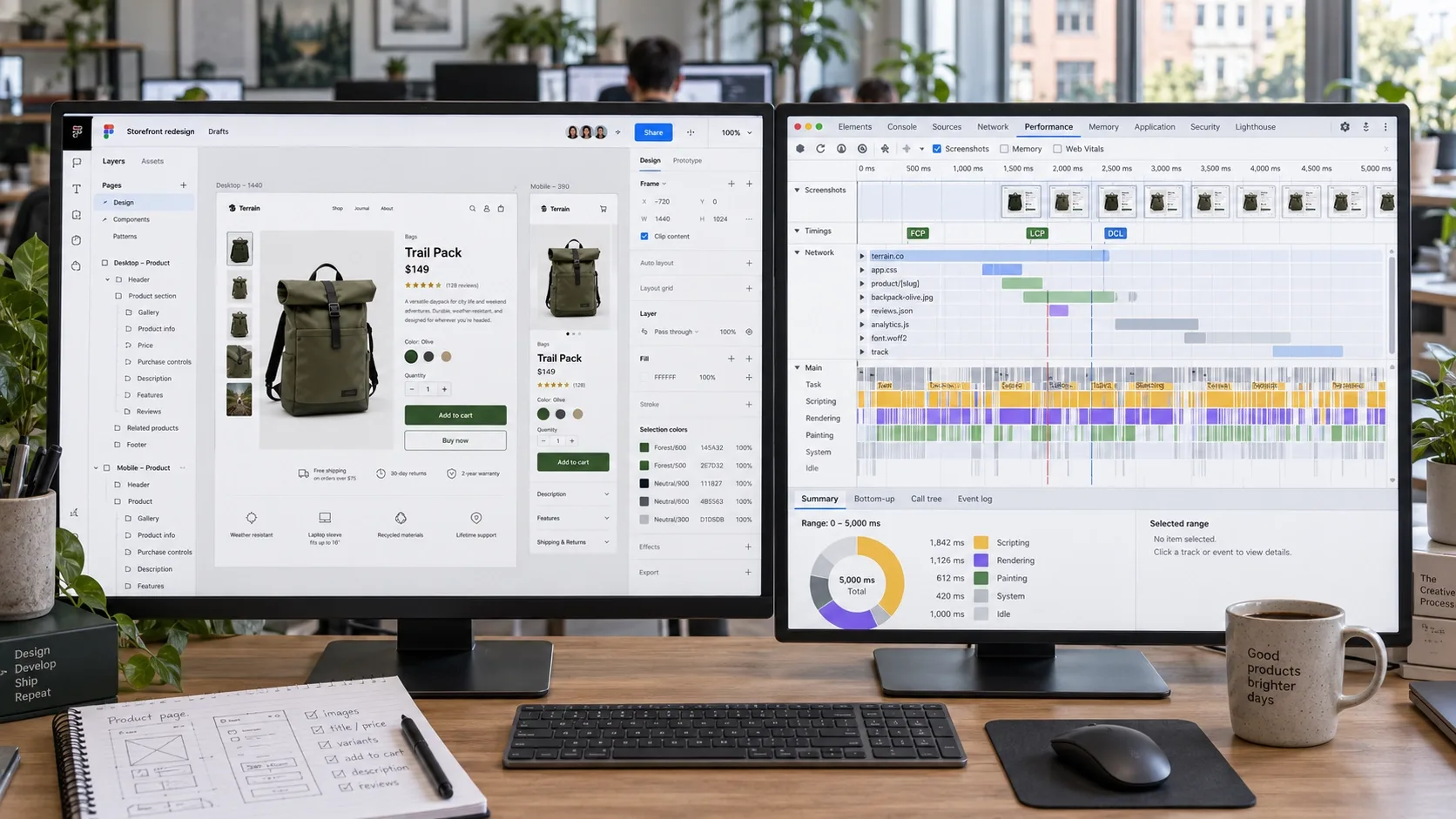
Quick Answer: A visually impressive Figma design means little if the finished website produces a bloated DOM, unexpected layout shifts, slow interactions, or an overloaded main thread. Designing UI/UX for strong Core Web Vitals in 2026 means considering browser performance from the earliest design decisions: reserve space for images and dynamic elements, keep page structure efficient, favor lightweight CSS-driven motion over unnecessary JavaScript, and prioritize fast, stable, responsive experiences. The goal is to design interfaces that feel fast to real users and remain performant after development, rather than prototypes that look impressive but perform poorly once implemented.
In my technical audits, the biggest fight I see isn't between brands and Google. It's between the design team's Figma file and the developer's performance budget - and the design team usually wins the argument and loses the Core Web Vitals assessment. Nobody intended that outcome. Nobody designed for it either.
Here's a number worth sitting with before anything else: HTTP Archive's own Web Almanac, drawing on the May 2026 CrUX release put the global pass rate at roughly 56% of all tracked web origins passing all three Core Web Vitals - meaning close to half the open web still fails at least one metric, on every kind of site, not a niche corner of it. Platform choice swings that number hard, and it has nothing to do with what a site sells: HTTP Archive's own Core Web Vitals Technology Report, in its most recent published snapshot, found Duda passing at roughly 85% of origins, Wix at 75%, Squarespace at 70%, and WordPress - the CMS behind close to half the open web, blogs and SaaS marketing sites included - at just 46%. Same three metrics, same browser, a genuine 38-point spread driven almost entirely by defaults: theme weight, image handling, render-blocking scripts. That gap shows up identically on a law firm's WordPress blog, a SaaS product's marketing site, or a design agency's own portfolio - the browser doesn't check what industry a page belongs to before deciding whether to paint it. We see this constantly across the front-ends we build, including through our eCommerce web development services - the rendering discipline underneath a fast, stable page is identical whether that page is selling a product or explaining one.
Your Figma File and Your Performance Budget Are Fighting - Who's Winning?
Close to half the open web still fails at least one Core Web Vital, and the gap between platforms comes down almost entirely to defaults nobody questioned. Vareweb treats rendering performance as a design decision from the first wireframe, not a cleanup phase handed to developers after the fact.
The UX vs. CWV War: Why Designers and Developers Must Align
Most designers don't realize that a simple dynamic banner sliding in at the top of the screen can instantly fail a site's CLS score. Most developers don't realize how much of that failure was actually decided weeks earlier, in Figma, before a single line of code existed. Both teams are right about their own discipline and both are incomplete without the other.
Good UI/UX in 2026 isn't just user empathy, color theory, and wireframes - it's defined by how efficiently the browser can paint what you designed. If a design requires a multi-megabyte JavaScript payload just to render the above-the-fold content, it's a bad design, regardless of how it looks in the prototype. Here's the operational reality: the browser doesn't care about your mood board. It cares about the main thread, the compositor thread, and whether it has to guess at layout before content arrives. This is exactly where UI/UX Design has to stop being scoped as a visual deliverable handed off to development and start being scoped as a rendering decision made jointly - which is also why we treat Custom Web Design and performance engineering as one build process rather than a design phase followed by a cleanup phase.
The Big Three, Defined for Designers
LCP (Largest Contentful Paint) measures when the main content - usually a hero image or headline - actually becomes visible. Target: under 2.5 seconds. CLS (Cumulative Layout Shift) measures visual stability - does a button jump away right as someone tries to tap it? Target: under 0.1. INP (Interaction to Next Paint), which officially replaced the older FID metric in March 2024, measures how quickly the page responds to a click, tap, or keypress across the entire session, not just the first one. Target: under 200 milliseconds.
Quick Overview: How Each Design Decision Protects a Vital
| # | Tip | Vital Protected | Core Fix |
|---|---|---|---|
| 1 | Kill the JS Hero Slider | LCP | Use a static, preloaded hero image instead of a JavaScript-powered carousel |
| 2 | Set Explicit Aspect Ratios | CLS | Reserve the correct layout space before images and media finish loading |
| 3 | Use CSS Compositor Animations | INP | Prefer transform and opacity over unnecessary JavaScript-driven motion |
| 4 | Rethink Mega Menus on Mobile | INP | Use a lightweight accordion or drawer navigation instead of complex interactive menus |
| 5 | Use Facades for Third-Party Widgets | LCP + CLS | Delay heavy third-party scripts until the user actually interacts with the feature |
| 6 | Skip Web Fonts on Functional Screens | LCP + CLS | Consider system fonts for performance-sensitive checkout, dashboard, and form interfaces |
| 7 | Use Skeleton Screens for Async Data | CLS | Reserve predictable space so the layout remains stable while real data loads |
| 8 | Use “Load More” Instead of Endless Scroll | INP | Control DOM growth instead of allowing the page to expand indefinitely |
| 9 | Overlay Sticky Headers & Banners | CLS | Use fixed positioning where appropriate instead of inserting elements that unexpectedly push page content down |
| 10 | Give Instant Feedback on Every Tap | INP | Use immediate visual states so users know their interaction has been registered while processing continues |
| 11 | Design Below the Fold for Lazy Loading | LCP | Keep above-the-fold content lightweight and defer non-critical assets further down the page |
The 11 Best UI/UX Design Tips for Core Web Vitals
1. Kill the JS Hero Slider
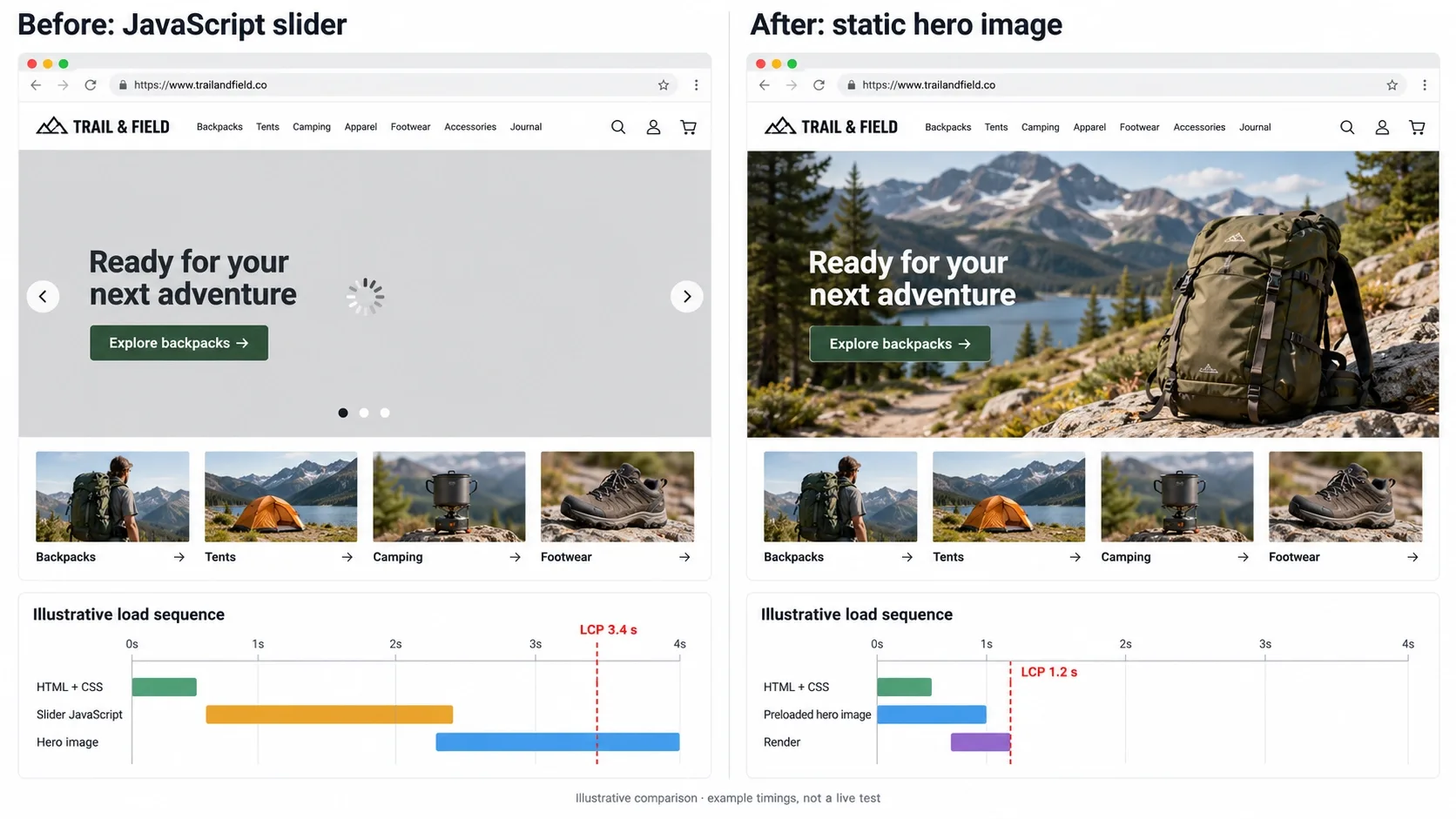
Sliders are conversion killers on their own merits - nobody waits for slide three. Technically, they're worse: a JavaScript-driven carousel requires meaningful script execution before the Largest Contentful Paint can even fire, because the browser has to run the slider logic before it knows what to paint first.
Design a static, high-impact hero section instead, with a preloaded WebP or AVIF background image declared as the LCP candidate. One strong image with a clear message consistently outperforms a slider on both conversion and LCP - it's rare that fixing a UX problem and a performance problem turns out to be the exact same decision, but this is one of those cases. I go deeper on the broader speed levers that compound with this fix in How Important Is Page Speed for SEO in 2026?.
Most theme marketplaces and page-builder plugins ship a slider in the default homepage template, across every category of site - a SaaS landing page, a portfolio, a blog, not just retail. That default exists because it demos well in a sales call, not because it performs well in the field. Removing it is almost always a deliberate override against the template's own defaults, which is exactly why it gets skipped so often.
2. Design with Explicit Aspect Ratios
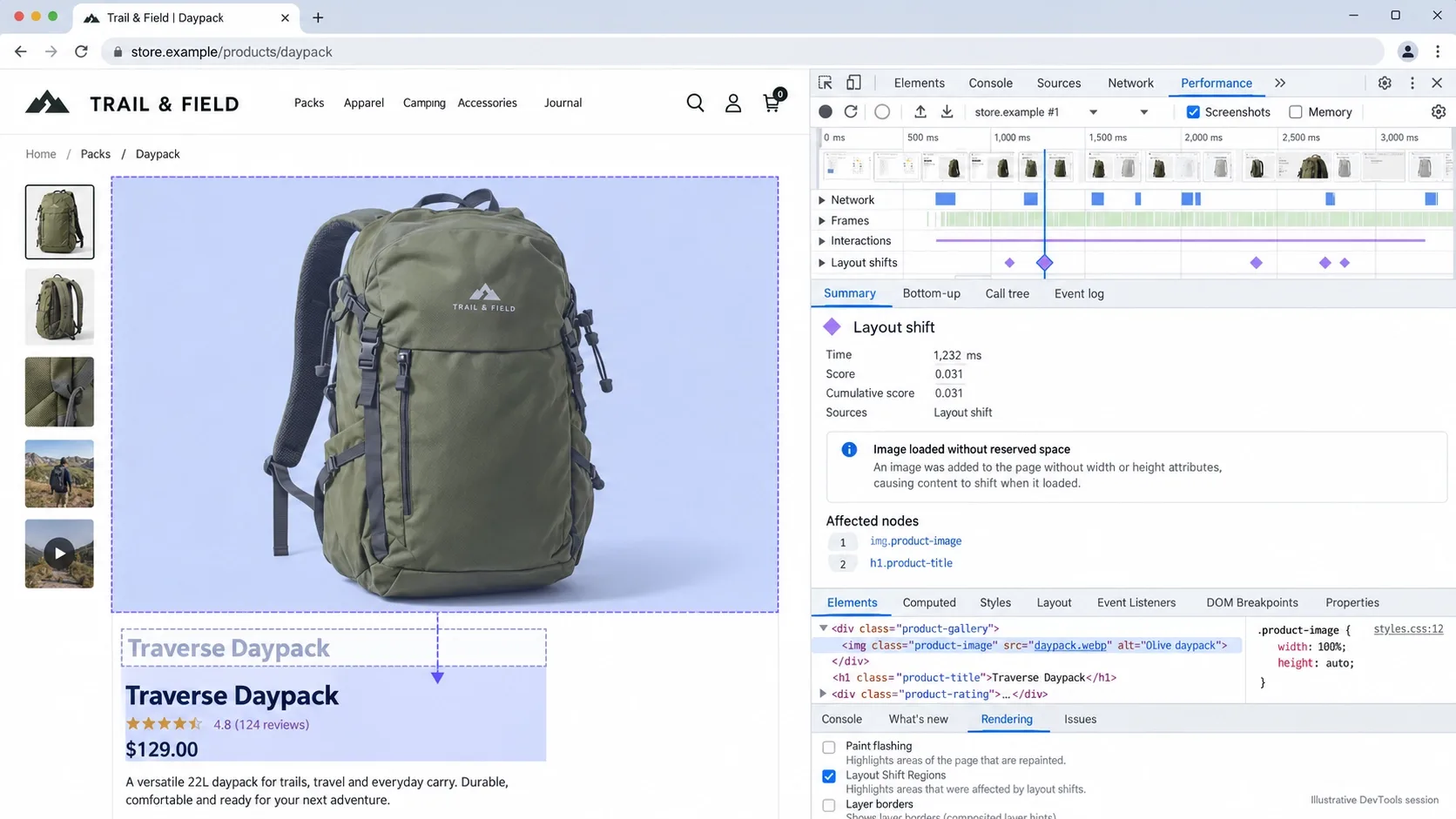
Images and ad blocks without defined dimensions cause the DOM to jump as they load - the browser doesn't know how much space to reserve, so it reserves none, then shoves everything down once the real dimensions arrive. That jump is exactly what CLS measures, and it's one of the most common - and most avoidable - failures I find in audits.
Specify exact width, height, and an aspect-ratio value for every image and embedded block at the design stage, not as a developer afterthought. The browser then reserves the box before the image downloads, and the layout never has a reason to shift. This is a five-minute fix in a design system and a permanent one once it's baked into the component library.
3. Replace JS Animations with CSS Compositor Animations
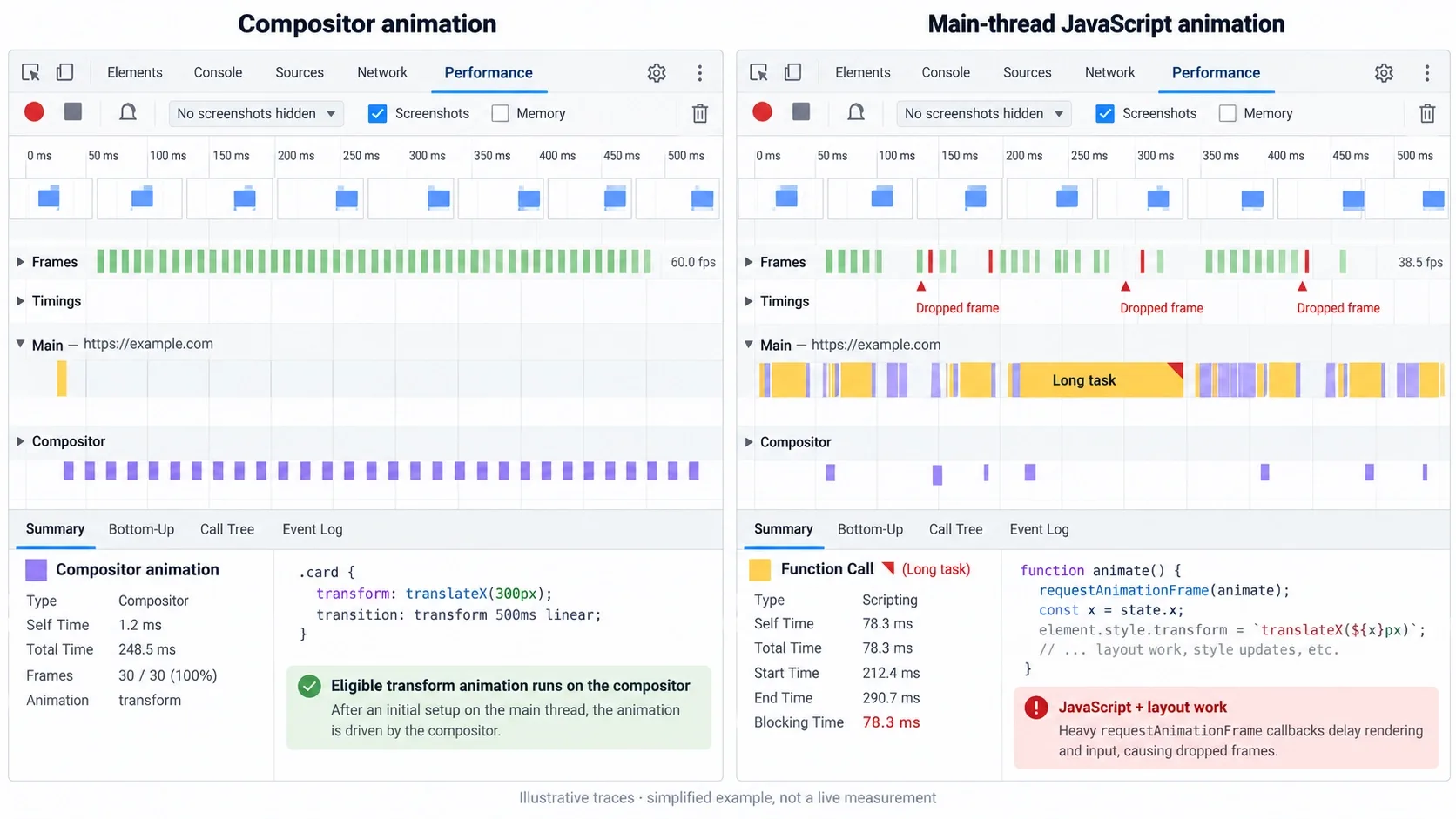
JavaScript-driven animations run on the main thread - the same thread handling clicks, taps, and every other user interaction. Animate with JavaScript and you're competing with the user for the browser's attention, and INP is exactly the metric that punishes losing that competition.
Design motion that relies strictly on CSS transform and opacity, both of which the browser can hand off to the compositor thread and run essentially for free, without touching the main thread at all. A hover state, a fade-in, a subtle scale on tap - all of it can run on the compositor if it's specified correctly from the start. This is a design-system decision as much as a development one; if your component library defaults to JS-driven motion, every new feature inherits the problem automatically.
Test this the honest way: throttle your CPU to 4x slowdown in Chrome DevTools and interact with the page the way a mid-range Android device would experience it. A CSS-driven animation stays buttery under that throttle. A JavaScript-driven one starts visibly stuttering almost immediately, and that gap is precisely what INP is measuring in the field.
4. Rethink the Mega Menu for Mobile
A massive dropdown menu with hundreds of DOM nodes and hover-intent JavaScript freezes exactly the devices least equipped to handle it - a mid-range Android phone, on a real network, with a real user impatiently tapping twice because the first tap didn't visibly register.
Prioritize CSS-only accordion menus or a genuine drawer navigation pattern on mobile, keeping the main thread free for the interaction that actually matters - getting to the content or page someone actually came for, whether that's a product, a pricing page, or an article. I cover the broader mobile-first principles this fix sits inside of in Mobile-Friendly Design Best Practices for Improving Conversions and Better UX, and a navigation pattern that quietly works against a third of your traffic - roughly the mobile half of all web traffic globally as of August 2026 - deserves more design attention than it usually gets.
Count the DOM nodes your current mega menu actually generates before assuming this doesn't apply to you - open DevTools, inspect the nav element, and look at how many list items, images, and hover listeners load on every single page regardless of whether anyone ever opens that menu. Most teams are genuinely surprised by the number. A lean, keyboard-navigable menu also happens to be the same fix genuinely accessible navigation needs - a screen reader and a mid-range Android phone are both, in their own way, punished by the same DOM bloat.
Most Teams Have Never Counted Their Own Mega Menu's DOM Nodes
Open DevTools on your own site and you'll likely find hundreds of list items and hover listeners loading on every page, whether anyone opens that menu or not. Vareweb designs and builds lean, accessible navigation that doesn't punish the mobile majority of your traffic.
5. Use Facades for Third-Party Widgets
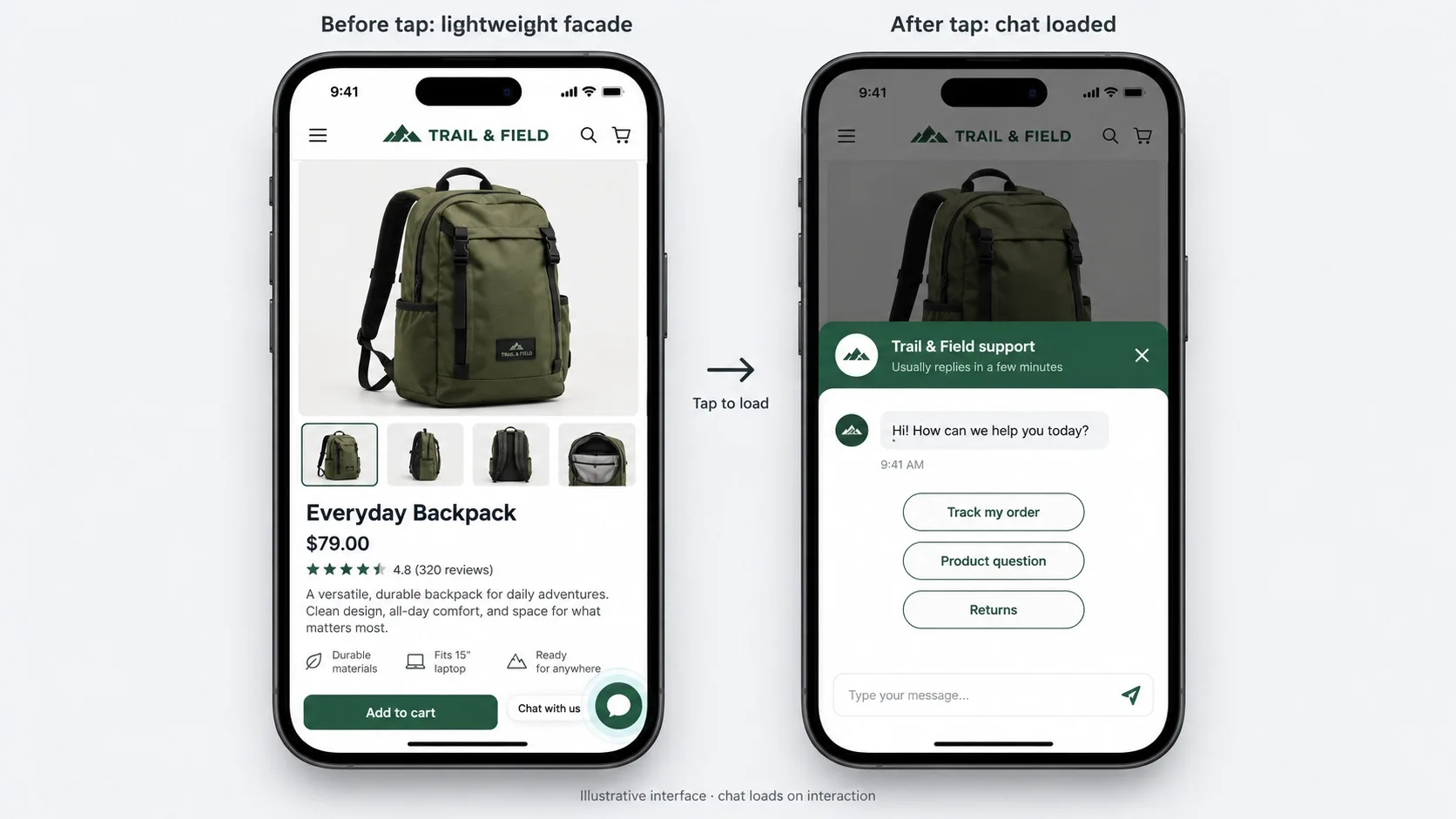
Chatbots, review widgets, social feeds, and analytics scripts are heavy by nature, and there's no getting around that - they're built by someone else, optimized for their goals, not your CWV score. This applies everywhere, not just to retail sites: a SaaS dashboard stacking a chat widget, a product tour tool, and a feedback survey has the exact same problem as a store stacking a reviews app and a loyalty widget. One major platform's app marketplace alone now lists over 30,000 published apps from more than 18,000 vendors, and the average site using that ecosystem isn't running one or two of them - it's running a stack, each one adding its own script to every page whether that page needs it or not.
Design a static facade instead - a lightweight placeholder that looks exactly like the real widget - and only load the actual heavy script when a user clicks or hovers over it. The visual promise gets kept instantly. The performance cost only gets paid by users who actually want the feature. This pattern works identically whether the widget in question is a support chat bubble on a SaaS product or a reviews carousel on a product page - the underlying rendering problem, and the fix, don't change based on industry.
6. Stop Using Web Fonts for Checkouts and Dashboards
Custom web fonts cause either a Flash of Invisible Text or a Flash of Unstyled Text while the font file downloads - a genuinely fine trade-off on a marketing page where brand voice matters, and a genuinely bad one on a checkout, where every extra render-blocking millisecond sits directly between a customer and a completed purchase.
For highly functional areas - checkout, account dashboards, order tracking - design around system fonts instead: San Francisco on Apple devices, Segoe UI on Windows, Roboto on Android. Zero download, zero latency, zero flash. Save the custom typeface for the pages where it's actually earning its cost in brand perception.
This is a harder sell to a brand team than any other fix on this list, because it sounds like giving up on design polish at the exact moment a customer is deciding whether to trust you with a card number. Reframe it honestly: nobody has ever abandoned a purchase because the checkout font matched their operating system. People abandon purchases because a page felt slow or broken.
Nobody Abandons a Purchase Because the Checkout Font Matched Their OS
They abandon because the page felt slow or broken. Vareweb makes these unglamorous, high-leverage calls as standard practice on every build - system fonts where they help, custom type where it actually earns its cost.
7. Design Skeleton Screens for Asynchronous Data
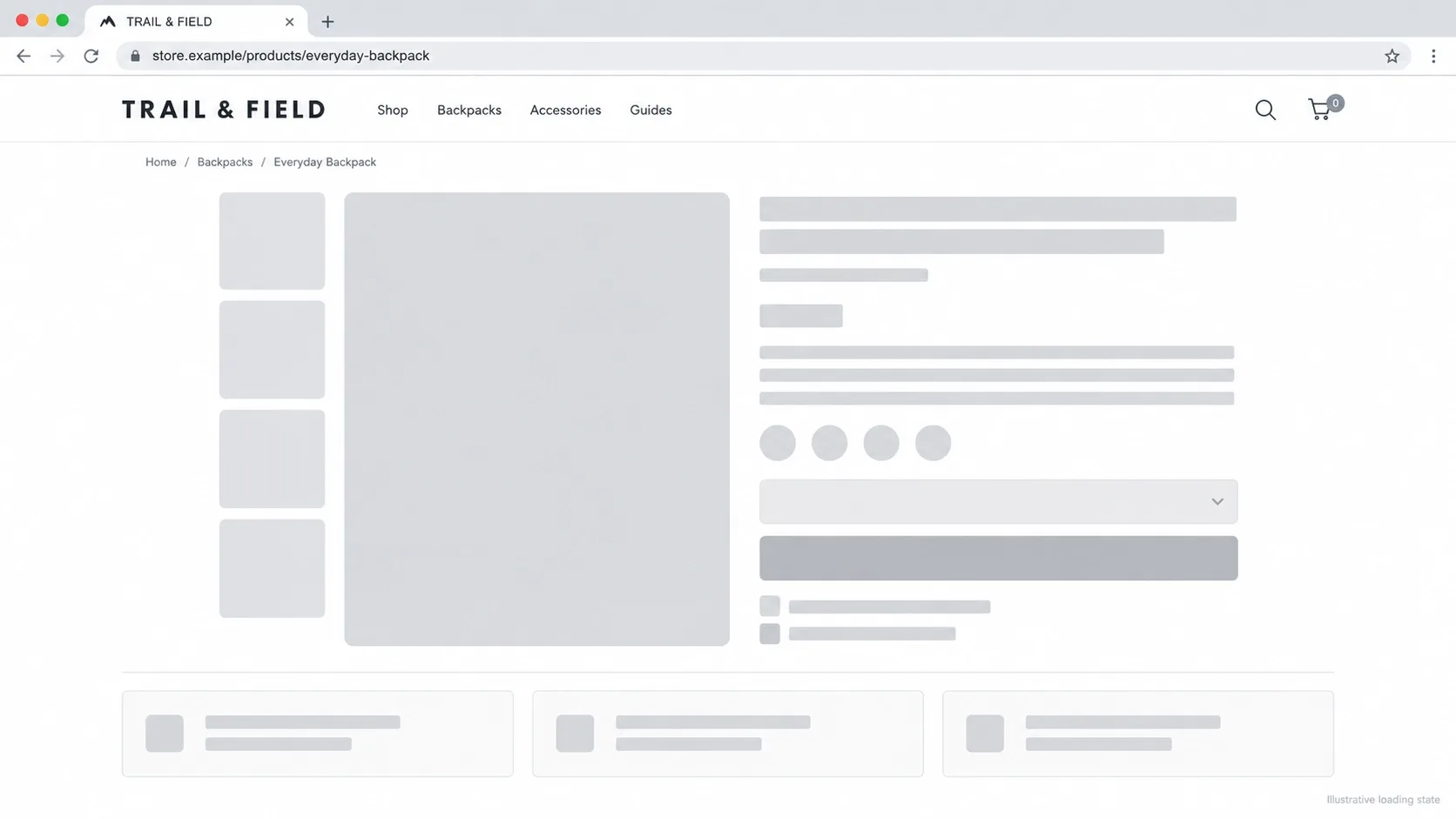
When a page fetches dynamic data - live pricing, a dashboard metric, a social feed, personalized recommendations - leaving a blank space that snaps open once the data arrives is a guaranteed layout shift. It's one of the most common CLS failures across every kind of dynamic interface, from a SaaS analytics dashboard to a product page, anywhere content is fetched asynchronously after the initial paint.
Design a structured skeleton loader that holds the exact visual layout steady from the first paint, so the real content simply fades into space that was already reserved for it rather than pushing everything else around when it arrives. This is as much a perceived-performance win as a CLS one - a skeleton screen feels faster than a blank space, even at an identical load time.
8. Limit DOM Depth - Load More, Not Infinite Scroll
Infinite scroll bloats the DOM continuously as a user scrolls, and every additional node the browser has to track makes every subsequent interaction slightly slower - eventually the page lags on every tap, which is a direct, cumulative INP cost that gets worse the longer someone browses, exactly when you'd want the experience to stay fast.
Use a deliberate "Load More" button or genuine pagination instead, keeping DOM size under control rather than letting it grow unbounded for the entire session. This is the same restraint principle behind why too many options on a page quietly cost you sales - unlimited scroll feels generous and behaves like a performance liability that compounds the longer someone stays engaged.
If infinite scroll is a genuine product requirement - a social feed, a large image gallery - at minimum implement virtualization, unmounting DOM nodes that have scrolled far out of view rather than letting the browser hold every single one in memory indefinitely. The visual experience stays identical. The DOM footprint doesn't grow forever.
Infinite Scroll Feels Generous and Behaves Like a Liability
Every node the browser has to track makes every subsequent tap slightly slower - a cost that compounds the longer someone actually stays engaged with your site. Vareweb designs pagination and DOM growth deliberately, not as an afterthought.
9. Sticky Headers and Cookie Banners Must Overlay, Not Push
If a promotional banner or cookie notice injects itself above the existing content and pushes the whole page down after a two-second delay, that's a textbook CLS failure - and it's one of the most preventable ones, because the fix is a single CSS property away from the exact same visual outcome.
Design these elements to sit at position: fixed and overlay the content instead of pushing it, or reserve their exact height in the layout from the very first paint so there's nothing to shift when they appear. I cover why persistent, well-implemented headers remain worth the design investment - done this way - in Why Sticky Navigation Is Still Your Website's Best Friend.

10. Optimize Touch Targets with Instant Visual Feedback
INP measures the time between a user's action and the next frame the browser paints in response. If your server takes 300 milliseconds to submit a form, add an item to a cart, or save a preference, the UI has to acknowledge that tap immediately anyway - an instant CSS active or hover state, a micro-animation on the button itself - masking the real server latency behind something that feels responsive even while the actual request is still in flight.
I cover the broader version of this principle, specifically for form-heavy interactions, in How to Design Forms That Get Completed - a button that visibly responds the instant it's tapped buys real, perceived speed even when the underlying request hasn't finished, and a button that stays visually inert for 300 milliseconds reads as broken regardless of what's actually happening on the server, whether that button submits a signup form or completes a purchase.
11. Design Below the Fold for Aggressive Lazy Loading
The UI should be designed so above-the-fold content stays genuinely lightweight and complete on its own, while visually encouraging the natural next action: scrolling. That separation is what lets developers lazy-load everything below the fold aggressively, without the user ever noticing the deferral.
Getting this right means the heaviest media on the page - a product gallery three sections down, an embedded video in the footer - never competes with the LCP candidate for bandwidth or render priority. The design decision and the loading strategy have to be made together, because a developer can't lazy-load content the design never clearly separated from what genuinely needs to render first.
Ready for a Site That's Fast Because It Was Designed That Way?
Vareweb builds interfaces and the rendering strategy underneath them together - one process, not a design phase followed by a performance cleanup. One team, accountable for the whole result.
Walk your own homepage section by section and ask, honestly, whether each element above the fold is earning its place there. A trust-badge row, a secondary announcement bar, and a hero all fighting for the same initial viewport usually means at least one of them should move down the page - not because it's unimportant, but because it's competing with something more important for the exact same limited rendering budget. This is the same restraint deliberate white space is built on - an above-the-fold section that breathes loads lighter than one crammed with everything the brand wanted to say at once.

FAQs
Why did Google replace FID with INP, and how does it affect UI design?
FID only measured the delay before the first interaction started processing. INP measures responsiveness across every interaction in the entire session, which means a UI that feels sluggish on the fifth click - not just the first - now shows up directly in your score.
Can I still use custom web fonts if I want good Core Web Vitals?
Yes, with the right technique - preload the font file, use font-display: swap or optional, and reserve system fonts specifically for latency-sensitive areas like checkout. The problem was never custom fonts themselves; it was loading them without a fallback strategy.
How do pop-ups and modals affect Cumulative Layout Shift?
A modal that overlays the page correctly has zero CLS impact, since it doesn't push existing content. A modal or banner that inserts itself into the document flow and shifts everything below it is a direct, measurable CLS failure - the fix is almost always a single position property.
Are background videos in the hero section a bad idea for LCP?
Generally yes, unless the poster frame itself is a lightweight, preloaded image serving as the actual LCP candidate. An autoplaying video file competing for bandwidth with the rest of the critical rendering path is one of the more common LCP failures I find in audits.
How can a designer test Figma layouts for Core Web Vitals before development?
You can't test CWV directly in Figma, but you can audit the plan - count how many elements would require JavaScript to render, flag every image without a clear aspect ratio, and identify anything that loads asynchronously without a reserved space. Catching these in review is far cheaper than catching them in a post-launch Lighthouse report.
Does DOM size really impact user experience?
Yes, directly - a larger DOM means more nodes for the browser to track, style, and update on every interaction, which shows up as slower INP scores even on interactions that have nothing to do with the bloated section specifically.
How do third-party tracking scripts ruin a good UI design?
They execute on the main thread regardless of how clean the design underneath them is, competing directly with real user interactions for processing time. A beautifully designed page can still fail Core Web Vitals entirely because of scripts the design team never saw and the development team inherited by default.

Written by
Kashaf
Kashaf is a veteran SEO specialist with deep expertise in AI SEO, generative engine optimization, ORM, web strategy, and marketing automation. With a Master's in Computer Science, he blends search strategy with technical insight into websites, automation workflows, and AI-driven platforms, helping brands dominate traditional search while adapting to the future of AI-powered discovery.