The Blind Spot in GoHighLevel's Email Verification, and How We Closed It
How a quiet rise in spam complaints led us to add a second layer of verification to every GoHighLevel workflow we run, and what it actually cost to do it properly.
A few months ago we noticed something we had not seen before. Emails that used to land fine were starting to bounce, and our spam complaint rate was creeping toward the point where GoHighLevel starts warning you that your sending reputation is at risk, somewhere around two percent. Nothing about our list had changed, and we were already running GoHighLevel's built in email verification on every contact before we sent to them.
That is when we found the gap. Some addresses that had been marked as valid were still going straight to spam, or bouncing outright. So we went looking for why, and then for a way to actually cover it.
Why the built in checker keeps letting bad emails through
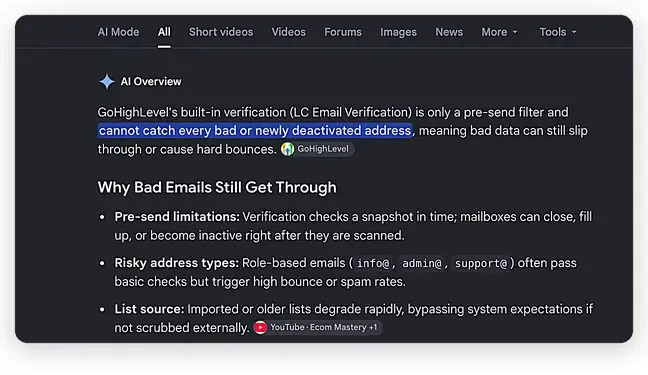
GoHighLevel's native verification checks an address once, at the exact moment you run it, then moves on. That single moment in time is the gap. A mailbox that is active today can be abandoned, full, or deactivated by the time you actually send to it weeks later, and a check that only ran once has no way of catching that.
Role based addresses cause a quieter version of the same issue. Addresses like info@, admin@, or support@ usually pass a basic validity check, since the domain and mailbox both genuinely exist, but they carry a much higher chance of being marked as spam or simply ignored, which drags sender reputation down over time even though nothing looks technically wrong.
And any list that has been imported, purchased, or left sitting for a while degrades in ways a single check never catches, since nothing goes back to rescan it later.
Bringing In A Second Layer: Proofy
We started testing third party verification tools to sit on top of GoHighLevel's built in check rather than replace it. Proofy is the one that held up. We ran it manually first against a batch of contacts we already knew were a mix of good and bad, and it correctly flagged the ones we expected it to, including a few our own checker had waved through.
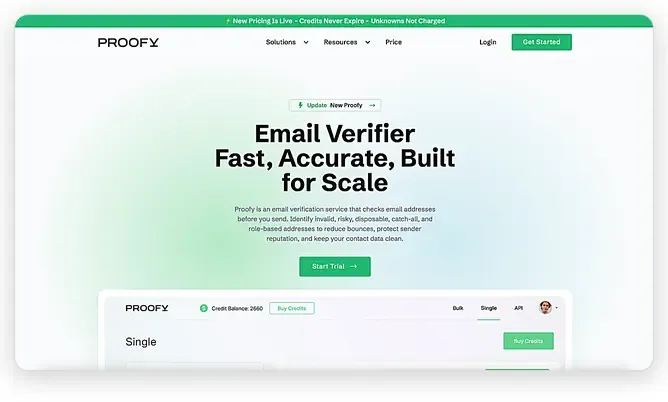
Proofy checks whether an address is deliverable, risky, disposable, a catch all domain, or role based, which is a wider net than a simple valid or invalid flag. Once we confirmed the accuracy, the next question was whether we could automate it, and Proofy has a straightforward API for exactly that. You can wire it into almost anything through a webhook, or route it through something like n8n, Zapier, or Make if you would rather not touch the API directly yourself. We run on GoHighLevel, so ours lives as a native workflow.
Pricing turned out to be simple enough that it barely needed evaluation. It is pay as you go or subscription, one credit covers one verified address, duplicates are never charged, and unknown results do not cost a credit either. Credits do not expire, so you are not paying to keep a balance alive. A five dollar trial covers five thousand checks, more than enough to validate it before committing to anything larger.
How We Built It Into GoHighLevel
Here is the actual workflow, named Daily, Verify With Proofy and Send Email. It runs every time a contact's email is added or changed, whether that is a brand new lead coming in or our lead generation team correcting an address on an existing contact.
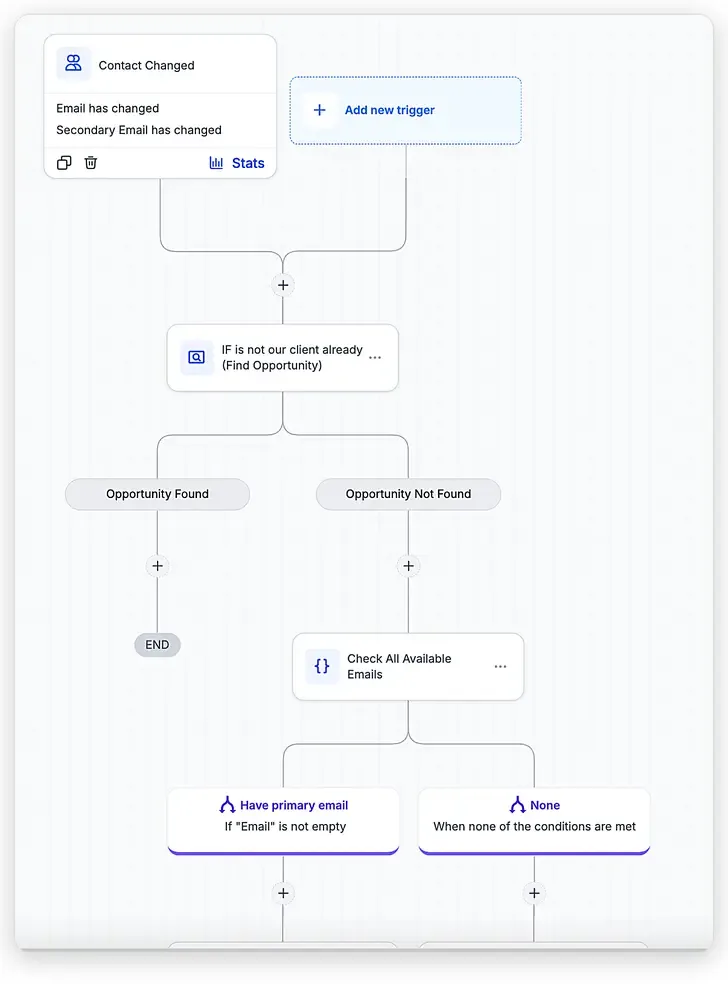
The workflow triggers on any email change, new leads and later corrections alike, then filters out anyone who is already an active client.
- Any email change starts the check. New contact, changed primary email, changed secondary email. All three trigger the same workflow, so a correction made months later gets verified with the same rigor as day one.
- Existing clients skip straight through. If we find an open opportunity for the contact, we already know their email is good from working with them directly. The workflow ends there and leaves them alone. Everyone else moves into verification.
- The primary email goes to Proofy. If a primary email exists, it gets sent to Proofy through a Custom Webhook action, which returns a full read: deliverable or not, risky, whether the mail server can be reached at all, catch all, and disabled.
- A good result gets tagged and sent. The contact is tagged as having a valid email, waits briefly, and the email goes out. Two days later they are added to a longer nurture sequence.
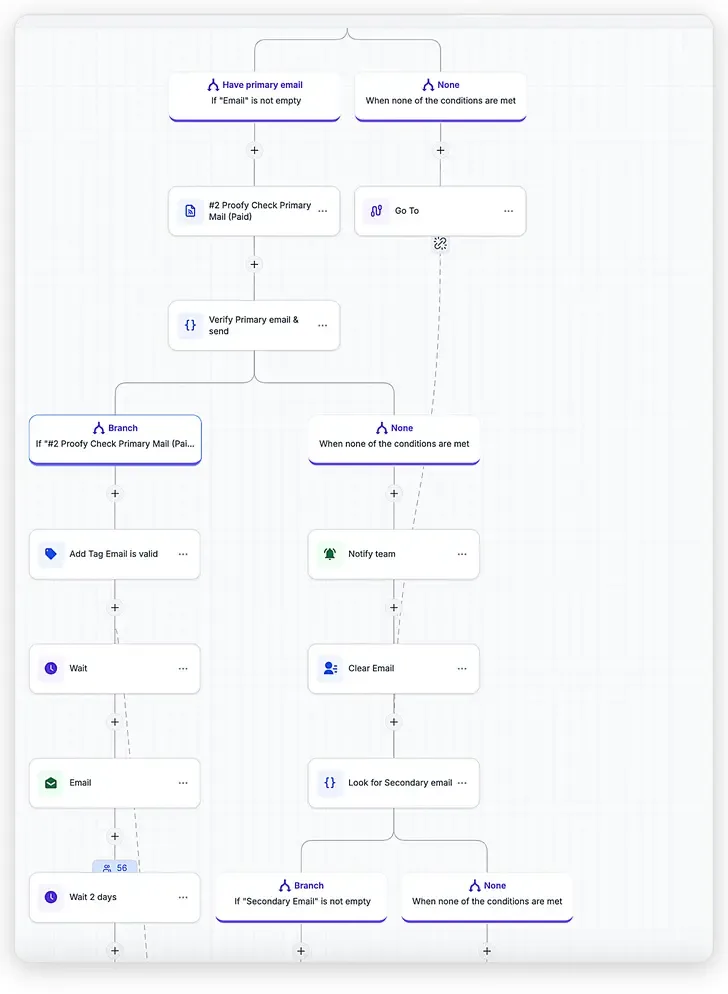
A good result gets tagged and sent. A bad one gets cleared out, and the workflow goes looking for a secondary email instead.
- A bad result sends it looking for the secondary email. Nothing gets sent to a flagged address. We notify the team, clear that email, and check whether the contact has a secondary email on file. Most contacts in our CRM have two addresses, so this is usually where a good one turns up.
GoHighLevel quirk: the Send Email action only reads from the primary email field. If the secondary address is the good one, it has to be promoted into the primary field before it can actually be used, then it gets verified through Proofy the same way the first one did.
- Still no usable address, and the workflow stops. If neither email checks out, we notify the team, remove the email from both fields, and end the workflow. We would rather have no email on file than keep sending into a mailbox we already know is bad.
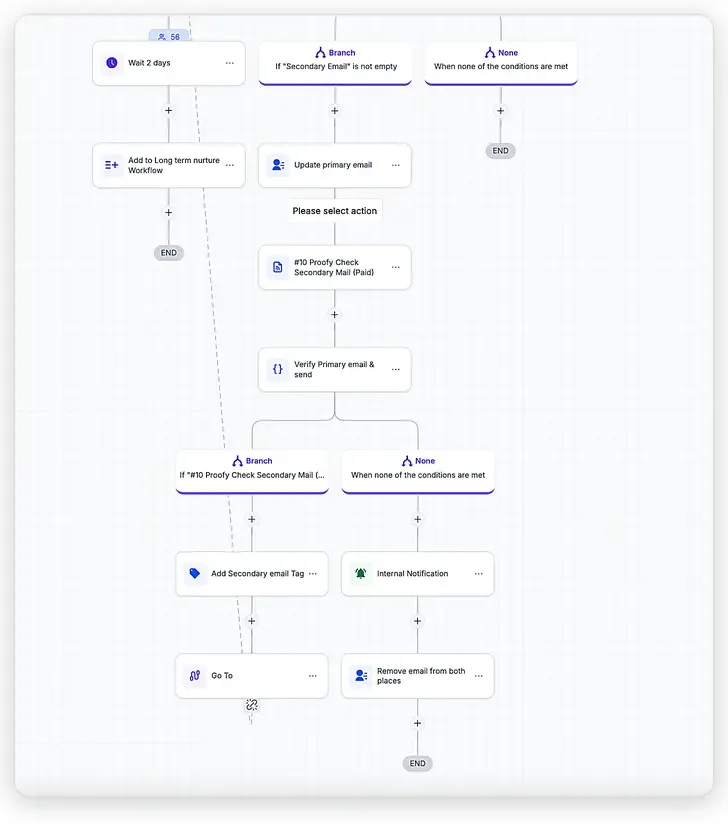
If the promoted secondary address checks out, it gets tagged and sent the same way. If it also fails, both fields get cleared and the team is notified.
Most contacts arrive with two email addresses on file, and running both through this process almost always turns up one good one between them.
What This Actually Costs
Proofy itself is inexpensive compared to the other verification tools we looked at. The real cost surprise came from GoHighLevel, not Proofy. A standard webhook in GoHighLevel cannot branch on the response it gets back or check conditions against it, which is exactly what this workflow needs to do. That requires the Custom Webhook action instead, a premium feature billed at roughly one cent per execution.
That adds up faster than it sounds once it is running against every contact created in your CRM. Here is an actual invoice from a recent period.
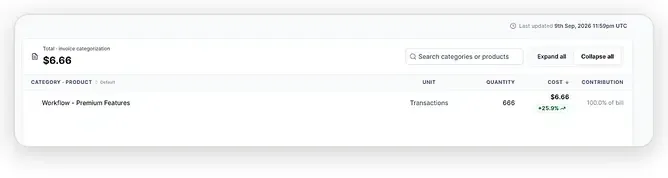
$6.66 for 666 executions, just over one cent each.
If you are running this at meaningful volume, the fix is to stop verifying one contact at a time and use Proofy's bulk endpoint instead, checking a batch of addresses in a single call. That drops the per contact cost significantly.
Even without that optimization, the math still favors doing this. A cent per contact is nothing next to what a rising spam complaint rate costs you: every email landing in spam, not just the bad ones, and a sender reputation that takes real time to rebuild once it is damaged.
Why This Matters Beyond Proofy
The bigger lesson here was not really about Proofy specifically. It was that email verification only works if it happens continuously, not once. A single check at signup tells you an address was good on that day. What actually protects sender reputation is catching the ones that go bad later, before sending to them again, not after.
If you are running into the same thing inside GoHighLevel and want a hand setting up a workflow like this one, that is exactly the kind of system we build for clients at Vareweb. Reach out and we can walk through it.

Written by
Minhaj
Minhaj Ahmed is an experienced web and software development professional specializing in web applications, mobile apps, SaaS platforms, and AI-powered solutions. As Head of Development at Vareweb, he brings a strong software engineering background to building scalable digital products and automation systems. He writes about web development, mobile apps, AI, software engineering, and emerging technologies.